Open Source Alternatives
  • Alternatives
  • Categories
    Categories by size894 projects
    • Developer Tools463
    • AI & Machine Learning404
    • Web Development196
    • Business & Productivity194
    • Security & Monitoring129
    • Communication & Collaboration128
    • IT Management124
    • Cloud & Hosting108
    • Product & Project Management106
    • Data & Analytics104
    Browse all 21 categoriesDesign & Creative, LLMOps & AI Tooling and 9 more
  • Blog
  • Advertise
SearchNotion, Slack, password manager.../
Submit
Open Source Alternatives
  • Alternatives
    • Developer Tools463
    • AI & Machine Learning404
    • Web Development196
    • Business & Productivity194
    • Security & Monitoring129
    • Communication & Collaboration128
    • Browse all 21 categories
  • Blog
  • Advertise
Submit your project

New open source projects by email

The projects we add and every new guide. Free, unsubscribe any time.

Open Source Alternatives LogoOpen Source Alternatives

Handpicked Open Source Alternatives to Paid Softwares

Product

  • Categories
  • Tag
  • Advertise

Resources

  • Blog
  • Collection
  • Submit

Company

  • Privacy Policy
  • Terms of Service
  • Refund Policy
  • Sitemap

Alternatives

  • Claude Code
  • Jira
  • Notion
  • Slack
  • Linear
  • Wispr Flow
  • All alternatives
© 2026 Open Source Alternatives. All rights reserved.
Open SourceAlternatives
Home/Categories/AI & Machine Learning/Cherry Studio
icon of Cherry Studio

Cherry Studio

Open source alternative to TypingMind, Msty Studio, BoltAI and ChatWise

  • 52.9K stars
  • AGPL-3.0
  • Active this week
  • Last commit today

Last verified Oct 22, 2026

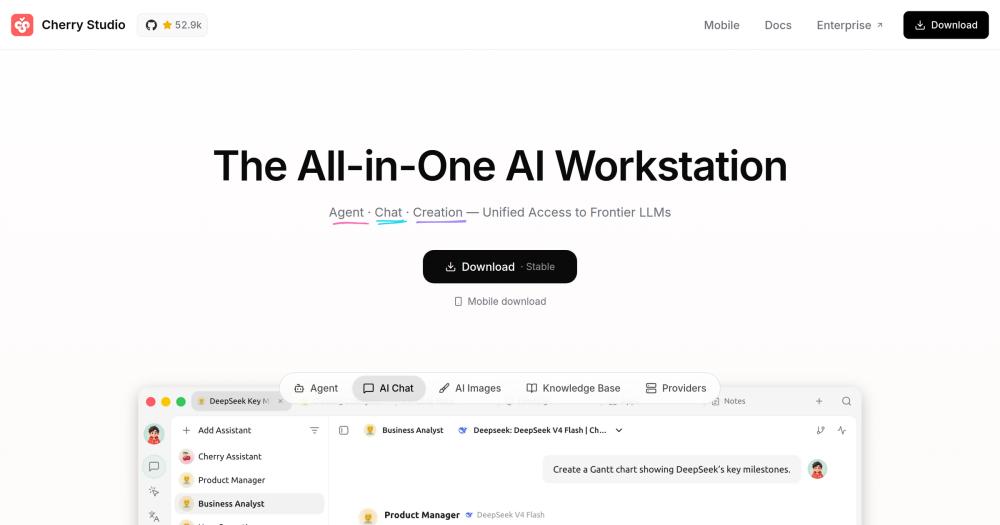
Connect to any AI model provider from a local-first desktop app with agents, knowledge bases, and conversation history stored on your device.

Visit websiteGitHub52.9K stars
Image for Cherry Studio
TL;DR

Cherry Studio is an AGPL-3.0 desktop AI workstation for Windows, macOS, and Linux that connects to any cloud or local model provider and stores all data on your device. It is a free open source alternative to paid tools like TypingMind, BoltAI, ChatWise, and Msty Studio, with conversations and knowledge bases staying on your machine by default. Best for developers and researchers who work across multiple AI providers and want a private, extensible workspace with autonomous agent support.

Read the full breakdownHide the full breakdownWho it is for, how it works, trade-offs and the FAQ
who it's for

Who Cherry Studio is for#

Developers working across multiple AI providers daily

Cherry Studio connects every major cloud provider and local model runtime in a single app. Developers who switch between Claude for code review and GPT-4o for documentation can maintain separate conversation threads, compare outputs side by side, and build provider-specific prompt templates without logging into multiple dashboards.

Skip if:

If you work exclusively with one provider and have no local model needs, the provider's own web interface is simpler and avoids the desktop install overhead.

Researchers building private local knowledge bases

Knowledge bases let researchers ingest PDF papers, Word documents, and web pages into a searchable local index. Conversations and agents can pull from this index without sending source files to any external service. The OCR option covers scanned documents and images.

Skip if:

If your primary need is a shared team knowledge base with collaborative editing across multiple users, Cherry Studio's knowledge bases are personal-only by default on the community edition.

Power users running local AI models offline

Ollama and LM Studio integrations let Cherry Studio serve as the chat and agent frontend for models running entirely on your machine. Users who have downloaded Llama, Mistral, or other local models get the full agent and knowledge base stack at zero API cost.

Skip if:

If your only goal is basic local model chat, a lightweight dedicated interface may be simpler. Cherry Studio's value scales with how many of its additional features you actually use.

Teams replacing paid multi-model chat tools

Cherry Studio covers the same ground as paid tools like TypingMind, BoltAI, ChatWise, and Msty Studio. It provides a unified interface for multiple AI models with conversation history, assistant templates, and organization features. The enterprise edition adds centralized model management and per-team access controls.

Skip if:

If your team requires browser-accessible shared workspaces with no desktop install, managed cloud infrastructure, or commercial support with SLA guarantees, the paid alternatives remain a practical choice.

the problem

The problem it solves#

AI assistants from different providers require separate browser tabs, separate conversation histories, and separate billing accounts. A developer using Claude for code review, ChatGPT for drafts, and Gemini for research manages three interfaces and three sets of exported history, none of which integrate with each other.

The knowledge base problem compounds this. Files and documents you want to ground your conversations in live in a different place from the AI chat window, requiring manual copy-paste or expensive third-party RAG setups. Paid multi-model chat tools address the interface fragmentation but introduce per-product pricing, and switching providers later means migrating conversation history, prompt libraries, and configured integrations.

how Cherry Studio solves it

How it solves it#

Multi-Provider Model Access

Connect cloud providers including OpenAI, Anthropic, Gemini, and DeepSeek, or add any OpenAI-compatible API endpoint. Local models work through Ollama and LM Studio integrations, so you can run fully offline sessions using models already downloaded to your machine.

Agent Workspace with MCP Server Support

Create agents with their own system instructions, model assignments, tool permissions, and dedicated workspaces. Agents can browse the web, run shell commands, process files, and call Model Context Protocol servers. Scheduled tasks and messaging channel integrations let agents run unattended.

Local Knowledge Bases with OCR

Build searchable knowledge bases from local files, folders, and web pages. Cherry Studio processes PDF, Office documents, images, and text with optional OCR support. Knowledge bases connect directly to conversations and agent workflows, keeping your private documents out of any cloud index.

Side-by-Side Multi-Model Chat

Open a single conversation and compare responses from two or more models side by side. Useful for evaluating a prompt across providers, picking the best output for a specific task, or benchmarking a new model against a trusted one without switching apps.

API Gateway for External Applications

The built-in API Gateway exposes your configured models to other applications using a standard interface. Third-party tools that support OpenAI-compatible APIs can route requests through Cherry Studio, keeping your key configuration and rate limits in one place.

On-Device Storage with WebDAV Backup

Conversation history and knowledge bases are stored locally on your device by default. WebDAV backup support lets you sync to a self-hosted storage provider without routing data through any commercial cloud service.

strengths · trade-offs

Strengths and trade-offs#

Strengths

  • 52,000+ Stars with Active Ongoing DevelopmentCherry Studio crossed 52,000 GitHub stars since launching in May 2024, with repository pushes as recent as October 2026. Regular releases and an active contributor community reduce the risk of the project going unmaintained as the AI model ecosystem evolves.
  • No Purchase Price for Core Desktop UseThe desktop app is free to download and run. Your AI spend goes entirely to the model providers you connect, not to a software purchase or subscription. The community edition carries no licence cost for personal or team use.
  • Model Context Protocol IntegrationCherry Studio supports MCP servers out of the box, allowing connections to any tool that exposes an MCP endpoint, from code indexers to database inspectors to web search providers. This integration becomes more valuable as the MCP ecosystem expands across developer tooling.
  • On-Device Data by DefaultAll conversation history and knowledge base data sit on your local disk by default. No Cherry Studio account is required for basic use, and your prompts do not pass through Cherry Studio's own servers. For work involving confidential documents or unreleased code, this is a meaningful architectural difference from browser-based AI interfaces.

Trade-offs

  • -Desktop Application Only, No Browser InterfaceCherry Studio is a downloaded desktop application with no browser-based interface. Teams that need a shared workspace accessible from any device without installing software will need the enterprise edition or a different product. The mobile app for iOS and Android is a separate, simpler application.
  • -Large Open Issue BacklogWith over 2,000 open GitHub issues as of October 2026, the bug backlog is substantial relative to the feature set. Some edge cases in provider integrations, knowledge base processing, and agent workflows remain unresolved. Users with niche provider configurations or complex document types may encounter rough edges before they are addressed upstream.
  • -AGPL-3.0 Restricts Hosted-Service RedistributionCherry Studio uses the AGPL-3.0 license, which permits personal use, internal team use, and modification with no restrictions. Anyone offering Cherry Studio as a managed hosted service to paying external customers must publish their source modifications under AGPL-3.0. A commercial license is available from [email protected] for organizations that need an exemption.
versus alternatives

Cherry Studio vs alternatives#

Cherry Studio vs TypingMind

Both tools provide a single interface for multiple AI model providers with your own API keys, conversation management, and custom system prompts. The primary structural difference is deployment model: TypingMind is browser-based with personal one-time licences ($39 to $99) and a TypingMind Teams monthly subscription; Cherry Studio is a local desktop app for Windows, macOS, and Linux under AGPL-3.0 with no purchase price.

FeatureCherry StudioTypingMind
LicenseAGPL-3.0 (open source)Proprietary
PriceFreeOne-time $39-$99 personal; Teams subscription
App typeDesktop appBrowser-based
PlatformsWindows, macOS, LinuxBrowser (any OS)
Local LLM supportYes, via Ollama and LM StudioYes, via LM Studio and custom models
MCP toolsYesYes

Cherry Studio is the better pick when you want a native desktop app with local data storage, or an inspectable open source codebase. TypingMind's browser-based approach means no download required and access from any device with a login, which suits users who prefer web access over a desktop install.

Cherry Studio vs BoltAI

BoltAI is a native Mac app with a one-time perpetual licence from $79 including one year of updates (Windows is announced as coming soon). Cherry Studio supports Windows, macOS, and Linux today, carries no purchase price, and is open source under AGPL-3.0.

FeatureCherry StudioBoltAI
LicenseAGPL-3.0 (open source)Proprietary
PriceFreeFrom $79 one-time (1 year updates)
PlatformsWindows, macOS, LinuxmacOS (Windows coming soon)
Local LLMsYes (Ollama, LM Studio)Yes (Ollama, LM Studio)
AI agentsYesYes
MCP toolsYesYes

BoltAI is a strong fit for Mac users who want a polished paid app with native macOS integration and commercial support. Cherry Studio is the better fit when you need cross-platform desktop support today, prefer an inspectable open source codebase, or want additional features from the README such as knowledge bases, API Gateway, Mini Apps, and scheduled tasks.

Cherry Studio vs ChatWise

ChatWise is a desktop AI chat client for any LLM with your own API keys. The core app is free for personal use; Pro is a one-time licence around $29. Data is stored locally; it includes web search, artifacts, and MCP tools.

Both tools follow a local-first, bring-your-own-key model on the desktop. Cherry Studio adds agents, knowledge bases, an API Gateway, Mini Apps, and scheduled tasks beyond ChatWise's core chat feature set. ChatWise is a lighter-weight option for straightforward multi-model chat with a simpler surface and a free tier.

tech stack · detected from GitHub

What it's built on#

Languages
JavaScriptTypeScript
Frameworks
React
Infrastructure
AWS
frequently asked

FAQ#

Is Cherry Studio free to use?

Yes. The desktop application is free to download for Windows, macOS, and Linux under the AGPL-3.0 licence. You pay only for the AI model providers you connect; Cherry Studio itself carries no subscription fee or purchase price. An enterprise edition with additional team features is available with separate pricing from the Cherry Studio team.

Does Cherry Studio store my conversations or prompts in the cloud?

No by default. All conversation history and knowledge bases are stored locally on your device. WebDAV backup lets you sync to your own storage server. Cherry Studio does not route your prompts through its own servers in the community edition.

Can Cherry Studio run AI models locally without an internet connection?

Yes. Cherry Studio integrates with Ollama and LM Studio, so any model you have already downloaded runs through the same interface as cloud providers. Local models work fully offline with no API costs.

What does the AGPL-3.0 license mean for using Cherry Studio commercially?

AGPL-3.0 permits personal use, internal business use, and modification with no restrictions. If you offer Cherry Studio as a managed hosted service to paying external customers, you must release your source modifications under AGPL-3.0. A commercial license exemption is available from [email protected] for organizations that need one.

How does Cherry Studio compare to paid tools like TypingMind and BoltAI?

TypingMind is a browser-based chat frontend with one-time personal licences and a Teams subscription; BoltAI is a Mac-native app with a one-time perpetual licence from $79. Cherry Studio is open source under AGPL-3.0, stores all data locally by default, and is free to download. The key practical differences: Cherry Studio runs as a native desktop app on Windows, macOS, and Linux, while TypingMind requires no desktop install and BoltAI is currently Mac-only.

also worth a look

Similar open-source tools#

omlx

Alternative toLM Studio

Fast LLM inference for Apple Silicon with persistent SSD KV caching

  • 22,964 GitHub stars
  • Apache-2.0Licence Apache-2.0

Open WebUI

Alternative toTypingMind

Chat interface for Ollama and any OpenAI API, with RAG support

  • 156,238 GitHub stars

rakazo

Featured

Alternative toGrok Bot

AI teammates you own: your keys, your model, your machine.

  • 4,904 GitHub stars
  • Apache-2.0Licence Apache-2.0

AutoCua

Alternative toOpenAI Operator

Computer-use agent: desktop, browser, terminal, and iOS automation.

  • 191 GitHub stars
  • MITLicence MIT

Voice Assistant

Alternative toSuperwhisper

Voice interface for Claude Code with local Whisper and spoken answers

  • 2 GitHub stars
  • MITLicence MIT

OCRmyPDF

Alternative toABBYY FineReader PDF

Make scanned PDFs searchable and copy-pasteable in one command.

  • 35,105 GitHub stars
  • MPL-2.0Licence MPL-2.0
by category

Open source tools in these categories#

405

AI & Machine Learning

freeCodeCamp, OpenClaw, REA (Reverse Engineer Anything)
464

Developer Tools

REA (Reverse Engineer Anything), superpowers, Skills for Real Engineers
195

Business & Productivity

OpenClaw, Excalidraw, RustDesk

Featured

Omnara

Alternative toCClaude Managed Agents

Open-source agent deployment API. Self-host or use Omnara Cloud.

  • 2,957 GitHub stars
  • Apache-2.0Licence Apache-2.0
  • #AI Agents

Inbox Zero

Alternative toSuperhuman

AI email assistant that drafts replies and clears your inbox

  • 12,712 GitHub stars
  • AGPL-3.0Licence AGPL-3.0
  • #Email

rakazo

Alternative toGrok Bot

AI teammates you own: your keys, your model, your machine.

  • 4,904 GitHub stars
  • Apache-2.0Licence Apache-2.0
  • #AI Agents
Feature your project

New open source projects by email

The projects we add and every new guide. Free, unsubscribe any time.

Find open source alternatives to paid software

/
  • Claude Code to OpenCode
  • Jira to Windshift
  • Notion to AppFlowy
  • Slack to Mattermost
  • Linear to GitLab
  • Wispr Flow to Handy
  • CapCut to Concat
  • Grok Bot to rakazo
  • Superhuman to Inbox Zero
  • Airtable to AITable
  • Muse to OpenClaw
  • GitHub Copilot to Cline
  • Datadog to Netdata
  • Microsoft Teams to Rocket.Chat
  • Confluence to Docmost
  • Pinecone to Qdrant
  • Zapier to n8n
  • Devin AI to OpenHands
  • Firebase to Supabase
  • 1Password to KeePassXC
  • Contentful to Strapi
  • Adobe Premiere Pro to Shotcut
  • ChatGPT to AnythingLLM
  • LangSmith to Langfuse
  • Claude Code to OpenCode
  • Jira to Windshift
  • Notion to AppFlowy
  • Slack to Mattermost
  • Linear to GitLab
  • Wispr Flow to Handy
  • CapCut to Concat
  • Grok Bot to rakazo
  • Superhuman to Inbox Zero
  • Airtable to AITable
  • Muse to OpenClaw
  • GitHub Copilot to Cline
  • Datadog to Netdata
  • Microsoft Teams to Rocket.Chat
  • Confluence to Docmost
  • Pinecone to Qdrant
  • Zapier to n8n
  • Devin AI to OpenHands
  • Firebase to Supabase
  • 1Password to KeePassXC
  • Contentful to Strapi
  • Adobe Premiere Pro to Shotcut
  • ChatGPT to AnythingLLM
  • LangSmith to Langfuse