

Who omlx is for#
Developers running Claude Code or Cursor locally on Apple Silicon
oMLX serves as the local backend for Claude Code, Cursor, and OpenClaw, providing both OpenAI-compatible and Anthropic-compatible endpoints. The SSD KV cache means repeated context prefixes are restored from disk rather than recomputed, keeping tool response times under 5 seconds on long agentic sessions.
Skip if:
If you are on a Linux or Windows machine, or do not have an Apple Silicon Mac, oMLX does not run on your hardware. Use Ollama, vLLM, or another inference server instead.
AI engineers running multi-model inference on a Mac with large RAM
oMLX serves LLMs, VLMs, embedding models, and rerankers from the same server, with LRU eviction and manual pinning. Continuous batching handles multiple concurrent agent threads. The admin dashboard exposes per-request metrics, per-model settings, and one-click benchmarks.
Skip if:
If your primary workload is batch inference at scale on GPU clusters, oMLX is optimized for Apple Silicon unified memory and is not intended for datacenter GPU inference.
Developers exploring vision-language and OCR models locally
VLM support (since v0.2.0) covers multi-image chat, base64/URL/file image inputs, and tool calling with vision context. OCR models including DeepSeek-OCR, DOTS-OCR, and GLM-OCR are auto-detected with optimized prompts. The same paged SSD caching stack applies to VLM inference.
Skip if:
If you need production-scale VLM serving with GPU acceleration outside Apple Silicon, oMLX is not the right deployment target.
The problem it solves#
Running local LLMs for coding agents is painful when the cache works against you. Every time a coding agent switches context mid-session, conventional LLM servers like LM Studio and Ollama discard and recompute the entire KV cache from scratch. On long contexts, that prefill recomputation takes 30 to 90 seconds per turn, making agentic tools feel unusable locally.
The problem compounds with agents that loop back to earlier context. Each revisit to a previously processed prefix triggers a full recompute, burning time and blocking the next request. Teams running Claude Code or Cursor locally must either accept slow response times or pay cloud API rates for every token.
How it solves it#
Paged SSD KV caching
Persists KV cache blocks to SSD in safetensors format using a two-tier architecture: hot blocks stay in RAM, cold blocks offload to disk. When an agent revisits a previously seen prefix, oMLX restores it from disk instead of recomputing, cutting time-to-first-token from 30-90 seconds to under 5 seconds. Cache blocks survive server restarts.
Continuous batching with mlx-lm
Handles concurrent requests through mlx-lm's BatchGenerator without queuing each behind the last. At 8x concurrency, generation throughput reaches 4.14x the single-request speed on Qwen3-Coder-Next-8bit, measured at 243.3 tok/s versus 58.7 tok/s for a single request.
Native Swift/SwiftUI macOS menu bar app
Starts, stops, and monitors the inference server from the macOS menu bar without opening a terminal. Written in Swift/SwiftUI, not Electron. Signed and notarized for macOS, with built-in auto-update, persistent serving stats, and auto-restart on crash.
OpenAI and Anthropic drop-in API
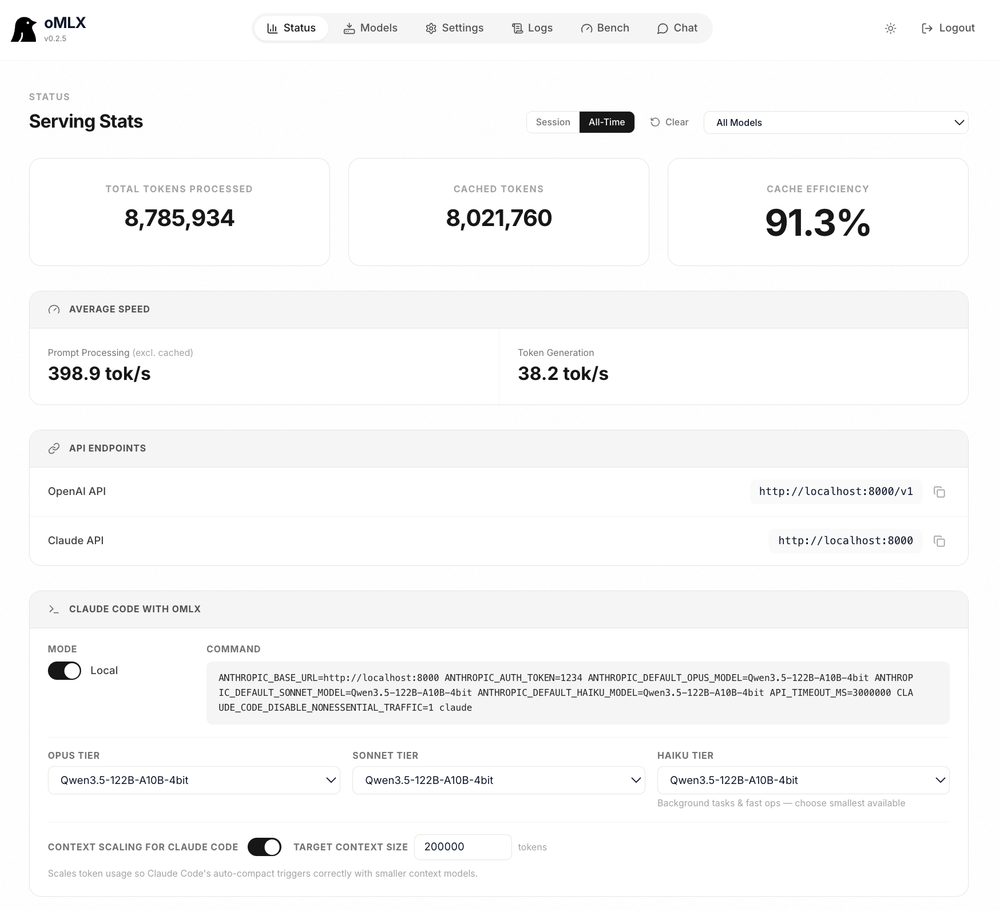
Exposes both /v1/chat/completions (OpenAI) and /v1/messages (Anthropic) endpoints, so Claude Code, Cursor, OpenClaw, and any OpenAI-compatible client connect without code changes. The admin dashboard generates the exact config command for each tool.
Multi-model serving with LRU eviction
Loads LLMs, vision-language models, embedding models, and rerankers simultaneously. When memory runs low, least-recently-used models evict automatically. Frequently used models can be pinned to stay loaded, and per-model TTL sets an idle timeout for auto-unload.
Tool calling and MCP integration
Supports all major tool calling formats: JSON, Qwen XML, Gemma, GLM, MiniMax, Mistral, and others. MCP tool integration is available via pip install mcp, with tool result trimming for oversized outputs. Settings are configurable per model from the admin panel.
Strengths and trade-offs#
Strengths
- SSD cache persistence that survives server restartsOther local inference servers keep KV cache in RAM and invalidate it on context change or restart. oMLX restores cached blocks from disk after restart, so previously computed prefixes stay available across sessions. The project documents TTFT dropping from 30-90 seconds to under 5 seconds for agentic coding tools on long contexts.
- Apache-2.0 license with no usage restrictionsApache-2.0 allows commercial use, modification, and distribution without requiring open-sourcing of derivative works. Unlike paid inference tools, there are no per-seat costs, usage caps, or vendor lock-in. The full source is on GitHub at github.com/jundot/omlx.
- Reads existing Hugging Face and LM Studio model cachesoMLX reads the standard Hugging Face cache at ~/.cache/huggingface/hub, shared by Transformers, MLX, vLLM, and llama.cpp. It also reads the LM Studio model folder automatically. No re-download is required when switching from another inference server.
- Native macOS app, not ElectronThe menu bar application is written in Swift/SwiftUI. It is signed and notarized by Apple and ships with in-app auto-update. A lightweight CLI shim installs alongside the app, so Apple Shortcuts and terminal scripts can control the server without extra dependencies.
Trade-offs
- -macOS and Apple Silicon onlyoMLX requires Apple Silicon (M1 or later) and macOS 15 (Sequoia) or later. Linux, Windows, and Intel Macs are not supported. Teams running mixed-OS infrastructure cannot use it as a shared inference server.
- -16GB RAM minimum, 64GB recommended for real useThe minimum supported RAM is 16GB, but the documentation recommends 64GB or more for comfortable use with larger models. Running 122B-parameter models like Qwen3.5-122B-A10B-4bit requires the M3 Ultra with 512GB RAM for the benchmark numbers shown on the site.
- -Native custom kernels require full Xcode to buildSource builds without native custom kernels silently fall back to slower generic paths. For GLM-5.2, the fused DSA prefill is roughly 30x faster with the kernels (845 vs ~29 tok/s on M3 Ultra). Building them requires full Xcode; Command Line Tools alone are insufficient. The official DMG ships the kernels precompiled.
omlx vs alternatives#
oMLX vs Msty Studio
oMLX and Msty Studio both serve local LLMs on macOS, but their designs differ significantly. oMLX is Apache-2.0 open source and functions as a local inference server with a drop-in API; Msty Studio is a paid commercial desktop application.
| Feature | oMLX | Msty Studio |
|---|---|---|
| License | Apache-2.0 | Proprietary |
| Pricing | Free (self-hosted) | Paid |
| Source code | Open on GitHub | Closed |
| Primary design | Inference server with API | Desktop chat app |
| SSD KV caching | Yes, paged, two-tier | Not documented |
| Continuous batching | Yes, up to 4.14x at 8x concurrency | Not documented |
oMLX is the better choice when your goal is running coding agents (Claude Code, Cursor, OpenClaw) against a local model. The server-first design with OpenAI and Anthropic-compatible endpoints means any agent framework connects without code changes. The paged SSD KV caching directly solves the 30-90 second recompute that makes agentic tools slow on local models. At Apache-2.0, there are no per-seat costs or usage caps.
Msty Studio is worth considering when you want a paid product with a polished desktop interface and do not need programmatic API access or agentic toolchain integration. Teams evaluating it for pure chat use cases without agent workflows may find the paid product's support and UX preferable.
Quick start#
Install oMLX via Homebrew on an Apple Silicon Mac with macOS 15 and Python 3.11 or later, then start the server.
```bash
brew tap jundot/omlx https://github.com/jundot/omlx
brew install jundot/omlx/omlx
omlx start
```What it's built on#
- Languages
- C++JavaScriptObjective-C++PythonSwift
- Frameworks
- FastAPI
FAQ#
How is oMLX different from Ollama or LM Studio for coding agents?
Ollama and LM Studio keep KV cache in memory and recompute it on every context shift. oMLX persists cache blocks to SSD, so when a coding agent revisits a previous context prefix, it restores from disk instead of recomputing from scratch. Time-to-first-token drops from 30-90 seconds to under 5 seconds on long agentic sessions. The server also exposes both OpenAI and Anthropic-compatible API endpoints, which Ollama does not natively support for the Anthropic format.
What hardware do I need to run oMLX?
Apple Silicon (M1 or later) with macOS 15 (Sequoia) or later. The minimum RAM is 16GB, but 64GB or more is recommended for comfortable use with larger models. The sweet spot for daily coding work is an M-series Pro or Max with 64GB. The M3 Ultra 512GB is used for the benchmark results published on the site.
Does oMLX work with Claude Code, Cursor, and OpenClaw?
Yes. oMLX provides both OpenAI-compatible (/v1/chat/completions) and Anthropic-compatible (/v1/messages) endpoints, so all three connect as drop-in backends. The admin dashboard includes a config generator: select your model, copy the command, and paste it into your terminal. No manual config file editing is needed.
Do I need to re-download my models to use oMLX?
No. oMLX reads the standard Hugging Face cache at ~/.cache/huggingface/hub, shared by Transformers, MLX, vLLM, and llama.cpp. It also reads your LM Studio model folder automatically. For new models, the admin dashboard has a built-in HuggingFace downloader.
What is the oMLX license and can I use it commercially?
Apache-2.0. You can use it commercially, modify it, and distribute it without restriction. There are no usage caps, per-seat costs, or vendor lock-in. The source is on GitHub at github.com/jundot/omlx.
Similar open-source tools#

Hermes Agent
Self-hosted AI agent with persistent memory, multi-channel chat, and model choice across OpenAI, OpenRouter, and custom endpoints.

Pi
The minimal, self-extensible coding agent for the terminal
leanctx
Drop-in LLM token compression. Code stays verbatim; prose compresses.
token-optimizer-mcp
Token savings and persistent knowledge graphs for AI coding agents
llama-swap
Hot-swap AI models on your local inference server

magnitude
Local models for your agent, tuned for your hardware