Open Source Alternatives
  • Alternatives
  • Categories
    Categories by size956 projects
    • Developer Tools496
    • AI & Machine Learning426
    • Business & Productivity211
    • Web Development200
    • Security & Monitoring143
    • IT Management131
    • Communication & Collaboration129
    • Cloud & Hosting113
    • LLMOps & AI Tooling110
    • Data & Analytics108
    Browse all 21 categoriesDesign & Creative, Product & Project Management and 9 more
  • Blog
  • Advertise
SearchNotion, Slack, password manager.../
Submit
Open Source Alternatives
  • Alternatives
    • Developer Tools496
    • AI & Machine Learning426
    • Business & Productivity211
    • Web Development200
    • Security & Monitoring143
    • IT Management131
    • Browse all 21 categories
  • Blog
  • Advertise
Submit your project

New open source projects by email

The projects we add and every new guide. Free, unsubscribe any time.

Open Source Alternatives LogoOpen Source Alternatives

Handpicked Open Source Alternatives to Paid Softwares

Product

  • Categories
  • Tag
  • Advertise

Resources

  • Blog
  • Collection
  • Submit

Company

  • Privacy Policy
  • Terms of Service
  • Refund Policy
  • Sitemap

Alternatives

  • Claude Code
  • Jira
  • Notion
  • Slack
  • Linear
  • Wispr Flow
  • All alternatives
© 2026 Open Source Alternatives. All rights reserved.
Open SourceAlternatives
Home/Categories/Web & App Development/Crest
icon of Crest

Crest

Open source alternative to Arc, Vivaldi and Opera One

  • 983 stars
  • MPL-2.0
  • Active this week
  • Last commit 3 days ago

Last verified Oct 29, 2026

Browse the web with isolated Spaces on Mac, iPhone, and iPad. MPL-2.0 licensed, running Chromium and WebKit engines with iCloud sync.

Visit websiteGitHub983 stars
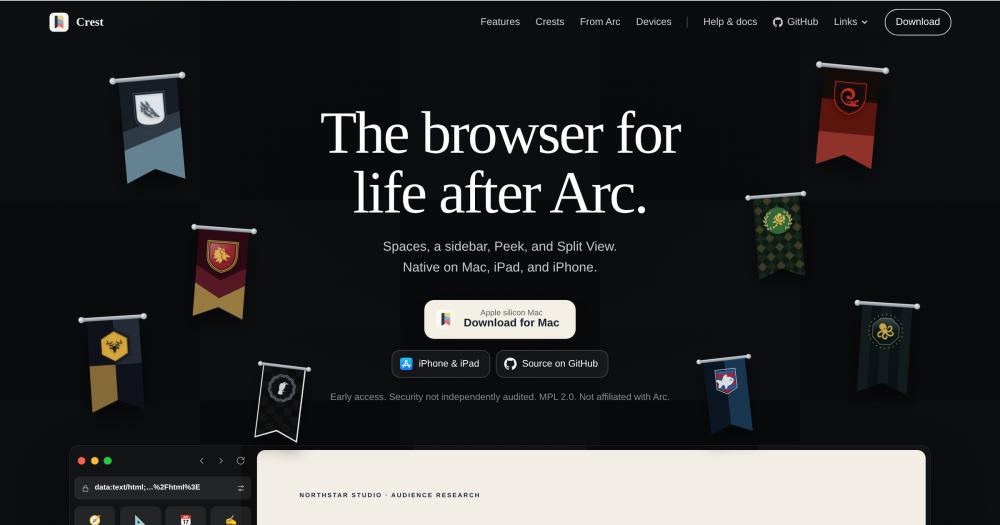
image of Crest
TL;DR

Crest is an open source browser for Mac, iPhone, and iPad that organizes browsing through named Spaces. Each Space carries its own cookies, history, credentials, and sync identity, so work and personal browsing stay genuinely isolated. It is the closest open source equivalent to Arc's Space-based model, MPL-2.0 licensed and under active development, running on ungoogled-Chromium and WebKit on Mac and WebKit on iOS. Best for developers and technical users on Apple devices who want per-context isolation with iCloud sync.

Read the full breakdownHide the full breakdownWho it is for, how it works, trade-offs, the quick start and the FAQ
who it's for

Who Crest is for#

Former Arc users rebuilding their browser workflow

Crest maps Arc's features directly: Spaces remain Spaces, Favorites become Pinned sites, Pinned Tabs become Saved tabs, Air Traffic Control becomes Link Routing, and Space Themes become Crest Studio. The Mac import tool carries over Arc Spaces, tabs, folders, colors, icons, and passwords, letting you review each destination Space before anything moves.

Skip if:

If you primarily used Arc on Windows or Linux, or need cross-platform browser continuity, Crest does not cover those platforms.

Developers managing multiple client or project accounts

Separate Spaces for each client, project, or environment keep sessions, extensions, and credentials isolated at the browser level. Quick Window on Mac opens external links in the right signed-in Space without switching manually, and Link Routing sends URLs to their designated Space automatically.

Skip if:

If your workflow depends heavily on Chrome extension ecosystems, verify compatibility at crestbrowser.com/guides/extension-compatibility before committing, as Crest extension support varies.

Privacy-conscious Apple device users

Private Spaces use temporary storage, stay out of history and sync, and can require Face ID or Touch ID to unlock. Content blocking with uBlock Origin Lite or the built-in list covers iPhone, iPad, and WebKit pages. Chromium pages on Mac require a blocking extension installed per-Space.

Skip if:

If you need a browser with a completed independent security audit for high-sensitivity work, Crest's current early-access status may not meet that bar.

the problem

The problem it solves#

Most browsers put every login, tab, and session into one shared container. Switching between work and personal accounts means manual sign-out and sign-in, separate browser profiles with no shared organization, or incognito windows that drop their state when closed. Power users managing three or more contexts, like work, a side project, and a personal account, end up with browser profiles that drift out of sync, bookmarks duplicated across contexts, and passwords tied to the wrong session.

The specific pain with existing paid browsers is context bleed: a personal notification badge on a work site, a work meeting link opening in a personal login, or extension settings that apply globally rather than per-context. Arc built a model around Spaces that addressed most of this, but Arc stops working on 22 December 2026 and new accounts can no longer be created. Users who built their workflow around Arc's Spaces have no direct commercial replacement with the same model and an active development path.

how Crest solves it

How it solves it#

Isolated Spaces per context

Each Space carries its own cookies, website data, history, archive, tabs, credentials, settings, and sync identity. Switching Spaces changes the full browsing context, not just the color of the window. Work and personal sessions cannot bleed into each other, and Private Spaces use temporary storage that never touches normal history or sync.

Dual-engine browsing on Mac

Mac opens pages in an ungoogled-Chromium build with Google integrations removed, supporting Chrome Web Store extensions. Any site can open in WebKit instead, which adds Reader, whole-page on-device translation, FairPlay video, and built-in content blocking. The default engine and per-site rules are configurable in Settings, and Crest switches to WebKit automatically for protected video.

Crest Studio for Space appearance

Each Space's sidebar gets a custom crest built in a live-preview editor: choose shape, artwork, colors, band, emblem, border, and finish from heraldic artwork, emoji, monograms, or SF Symbols. Appearance settings let you dock the sidebar on either edge, go borderless, adjust tab shape and scale, pick pin layouts, and set color schemes per Space or globally.

iCloud sync across Apple devices

Spaces, tabs, folders, Split View groups, appearance, history, and archive sync across Mac, iPhone, and iPad through iCloud. Passwords stay in the system Keychain and are not sent to CloudKit; iCloud Keychain handles them separately. Sync is optional and requires only an Apple ID, not a separate Crest account.

Split View and Peek

Keep two to four live pages open side by side in a Split View group, with resizable columns on Mac and iPad. Peek lets you preview a link above the current page before deciding to keep it as a tab. On Mac, you can drag a link directly into a live Peek window.

Per-Space extensions and passwords

Chrome Web Store extensions are installed per-Space on Mac, so a work Space can have work-specific extensions without affecting personal browsing. Crest Passwords stores credentials in the system Keychain matched per-origin and per-Space, preventing a work Space from auto-filling personal credentials.

strengths · trade-offs

Strengths and trade-offs#

Strengths

  • Active development with a public roadmapCrest reached version 0.8 in October 2026, adding coding agent support, a new command palette, and Settings. The public roadmap lives on GitHub. For users moving off Arc after its browser focus shifted, this is a project in active development with a clear contribution path under MPL-2.0.
  • Chromium and WebKit in one Mac browserRunning both an ungoogled-Chromium build and WebKit in one browser is uncommon in the open source space. Chromium handles Chrome Web Store extensions and most modern sites; WebKit covers Reader, on-device translation, FairPlay video, and built-in tracker blocking without requiring an extension.
  • MPL-2.0 license with source accessThe Mozilla Public License 2.0 lets you use, modify, and distribute Crest. You can inspect the full source on GitHub and submit contributions. Modifications to MPL-2.0 files must be shared under the same license if distributed, but personal and commercial use of the unmodified app are unrestricted.
  • No account required for core useCrest does not require creating an account to browse. Spaces, tabs, passwords, and history are local to your device. iCloud sync is optional and uses your existing Apple ID. This keeps your browsing data off third-party servers by default.

Trade-offs

  • -Apple platforms onlyCrest runs on Apple silicon Mac (macOS 26.1+), iPhone (iOS 26.1+), and iPad (iPadOS 26.1+) only. There is no Windows, Linux, or Intel Mac version. Teams or individuals who need a consistent browser across platforms cannot use Crest as their sole browser.
  • -Security not independently auditedThe product website states: "Early access. Security not independently audited." Crest handles passwords in the system Keychain, session credentials per-Space, and Private Spaces with biometric lock. Users with high-security requirements should account for the absence of a formal third-party security review before relying on it for sensitive work.
  • -Early access with 223 open issuesAt version 0.8 with 223 open issues on GitHub as of October 2026, Crest is under active development. Users should expect rough edges and features still in progress. The roadmap describes items that are not yet shipped, and some behaviors reported in issues may not be fixed quickly.
versus alternatives

Crest vs alternatives#

Crest vs Arc

Crest was designed for people coming from Arc. The product website's tagline is "The browser for life after Arc," and the feature table on the site maps every Arc feature to its Crest equivalent. Both browsers organize browsing through named Spaces with isolated contexts, a sidebar, Peek, link routing, and iCloud sync. The primary differences are development status and licensing.

Arc is a proprietary browser that stops working on 22 December 2026; new accounts can no longer be created. Its Space-based browser model shaped the workflow Crest was designed to carry forward. Crest is an MPL-2.0 open source project under active development, at version 0.8 as of October 2026, built by an independent developer with a public roadmap on GitHub.

FeatureCrestArc
LicenseMPL-2.0 open sourceProprietary
SpacesYesYes
SidebarYesYes
PeekYesYes
Split ViewYesYes
Link RoutingYesYes (Air Traffic Control)
PlatformsMac, iPhone, iPadMac, iPhone, iPad
Browser engines (Mac)Chromium + WebKitChromium
iCloud syncYesYes (Arc Sync)
Extensions per SpaceYes, Chrome Web StoreYes
Command paletteYesYes (Command Bar)
Source accessGitHub, MPL-2.0Closed source

Crest is the stronger choice when source access matters, when you want to contribute to or fork the browser, or when you want an actively developed open source project behind your daily browsing workflow. The Arc-to-Crest migration path is documented and the feature parity for core Space-based workflows is close.

If your Arc setup still holds, stay on it through the shutdown and export your data before mid-December 2026. After that, Crest is the closest Space-for-Space move on Apple devices: the sidebar, Spaces, Peek, and iCloud sync map directly. The trade is an early-access browser at version 0.8 with 223 open issues as of October 2026 and no independent security audit completed yet.

install · quick start

Quick start#

bash
Install Crest on an Apple silicon Mac running macOS 26.1 or later via Homebrew.
```bash
brew install --cask crest-browser
```
tech stack · detected from GitHub

What it's built on#

Languages
C#C++Objective-C++PythonSwift
Frameworks
React
frequently asked

FAQ#

Is Crest available for Windows or Linux?

No. Crest runs on Apple silicon Mac (macOS 26.1+), iPhone (iOS 26.1+), and iPad (iPadOS 26.1+) only. There is no Windows, Linux, or Intel Mac version currently available or on the public roadmap.

What license is Crest under?

Crest is MPL-2.0 licensed. The Mozilla Public License 2.0 lets you use, modify, and distribute the browser. Modifications to MPL-2.0 files must be shared under the same license if you distribute them, but using the unmodified app personally or commercially is unrestricted. Source is on GitHub.

Does Crest require an account to use?

No. Core browsing, Spaces, passwords, and local data do not require an account. iCloud sync uses your Apple ID and is optional. Passwords are stored in your device's system Keychain, not in a Crest-controlled service.

How does Crest compare to Arc?

Crest was built specifically for Arc users. It maps Arc's core features directly: Spaces, sidebar, Peek, Link Routing, iCloud sync, and per-Space appearance. Arc is a proprietary browser from a commercial company that shifted focus away from its Space-based browser; Crest is an MPL-2.0 open source project under active development with a public roadmap.

Can I import my Arc browsing data into Crest?

Yes, on Mac. The browser import tool lets you review each destination Space before anything moves. Arc imports carry Spaces, tabs, folders, colors, icons, and passwords. The import runs from within Crest after installation.

Looking for more

Other ways to replace Arc, Vivaldi and Opera One#

Zen Browser

#1 in the Arc guide

Sidebar Workspaces, split view for up to 4 tabs and Boosts, the closest match to how Arc worked

45,408 GitHub stars

Floorp

#2 in the Arc guide

Workspaces that switch a Firefox container per project, with no account required

8,466 GitHub stars

Brave

#3 in the Arc guide

Chrome Web Store extensions and an Android app, with encrypted sync across devices

3,723 GitHub stars

Firefox

#4 in the Arc guide

Vertical tabs, tab groups and split view built into the browser itself, on 5 platforms

13,641 GitHub stars
All 10 Arc alternatives6 open source Arc alternatives, ranked
by category

Open source tools in these categories#

36

Web & App Development

Flutter, Rust, Nvm
497

Developer Tools

REA (Reverse Engineer Anything), Skills for Real Engineers, superpowers

Sponsors

Inbox Zero

Alternative toSuperhuman

AI email assistant that drafts replies and clears your inbox

  • 12,826 GitHub stars
  • AGPL-3.0Licence AGPL-3.0
  • #Email

Omnara

Alternative toCClaude Managed Agents

Open-source agent deployment API. Self-host or use Omnara Cloud.

  • 3,296 GitHub stars
  • Apache-2.0Licence Apache-2.0
  • #AI Agents

rakazo

Alternative toGrok Bot

AI teammates you own: your keys, your model, your machine.

  • 5,914 GitHub stars
  • Apache-2.0Licence Apache-2.0
  • #AI Agents
Advertise your product

New open source projects by email

The projects we add and every new guide. Free, unsubscribe any time.

Find open source alternatives to paid software

/
  • Claude Code to OpenCode
  • Jira to Windshift
  • Notion to AppFlowy
  • Slack to Mattermost
  • Linear to GitLab
  • Wispr Flow to Handy
  • Arc to Zen Browser
  • CapCut to Concat
  • Grok Bot to rakazo
  • Superhuman to Inbox Zero
  • Airtable to AITable
  • Muse to OpenClaw
  • Railway to Coolify
  • GitHub Copilot to Cline
  • Datadog to Netdata
  • Microsoft Teams to Rocket.Chat
  • Confluence to Docmost
  • Pinecone to Qdrant
  • Zapier to n8n
  • Devin AI to OpenHands
  • Firebase to Supabase
  • 1Password to KeePassXC
  • Contentful to Strapi
  • Adobe Premiere Pro to Shotcut
  • Claude Code to OpenCode
  • Jira to Windshift
  • Notion to AppFlowy
  • Slack to Mattermost
  • Linear to GitLab
  • Wispr Flow to Handy
  • Arc to Zen Browser
  • CapCut to Concat
  • Grok Bot to rakazo
  • Superhuman to Inbox Zero
  • Airtable to AITable
  • Muse to OpenClaw
  • Railway to Coolify
  • GitHub Copilot to Cline
  • Datadog to Netdata
  • Microsoft Teams to Rocket.Chat
  • Confluence to Docmost
  • Pinecone to Qdrant
  • Zapier to n8n
  • Devin AI to OpenHands
  • Firebase to Supabase
  • 1Password to KeePassXC
  • Contentful to Strapi
  • Adobe Premiere Pro to Shotcut