
Open Source Alternatives
  • Alternatives
  • Categories
    Categories by size1,030 projects
    • Developer Tools527
    • AI & Machine Learning455
    • Business & Productivity237
    • Web Development203
    • Security & Monitoring153
    • Communication & Collaboration138
    • IT Management137
    • Cloud & Hosting122
    • LLMOps & AI Tooling119
    • Data & Analytics112
    Browse all 21 categoriesDesign & Creative, Product & Project Management and 9 more
  • Blog
  • Advertise
SearchNotion, Slack, password manager.../
Submit
Open Source Alternatives
  • Alternatives
    • Developer Tools527
    • AI & Machine Learning455
    • Business & Productivity237
    • Web Development203
    • Security & Monitoring153
    • Communication & Collaboration138
    • Browse all 21 categories
  • Blog
  • Advertise
Submit your project

New open source projects by email

The projects we add and every new guide. Free, unsubscribe any time.

Open Source Alternatives LogoOpen Source Alternatives

Handpicked Open Source Alternatives to Paid Softwares

Product

  • Categories
  • Tag
  • Advertise

Resources

  • Blog
  • Collection
  • Submit

Company

  • Privacy Policy
  • Terms of Service
  • Refund Policy
  • Sitemap

Alternatives

  • Claude Code
  • Jira
  • Notion
  • Slack
  • Linear
  • Wispr Flow
  • All alternatives
© 2026 Open Source Alternatives. All rights reserved.
Open SourceAlternatives
Home/Categories/Developer Tools/DevToys
icon of DevToys

DevToys

Open source alternative to DevUtils, Exabox and Developer Tools Pro

  • 32.2K stars
  • MIT
  • Active recently
  • Last commit 36 days ago

Last verified Nov 4, 2026

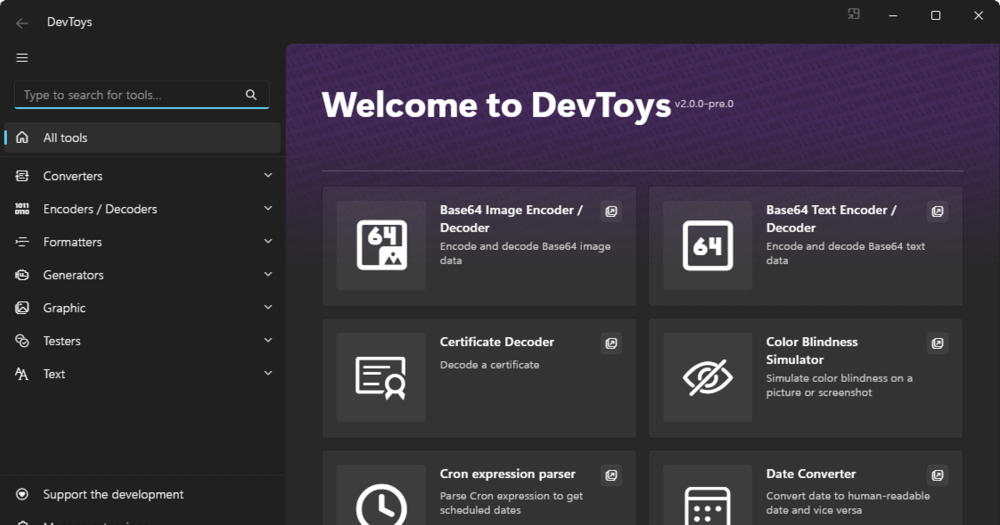
Convert and test developer data offline with DevToys, a cross-platform toolbox with 30+ privacy-focused tools.

Visit websiteGitHub32.2K stars
image of DevToys
TL;DR

DevToys is a cross-platform developer toolbox that handles formatting, encoding, conversion, and testing tasks offline, without sending data to third-party websites. It replaces paid tools like DevUtils and Exabox with an MIT-licensed desktop app covering 30+ tools on Windows, macOS, and Linux, from JSON formatting and Base64 encoding to regex testing and password generation. Best for developers who run frequent small data tasks and want to keep sensitive inputs like tokens and credentials off the internet.

Read the full breakdownHide the full breakdownWho it is for, how it works, trade-offs, the quick start and the FAQ
who it's for

Who DevToys is for#

Backend developers doing frequent JSON and JWT work

DevToys covers JSON formatting, YAML conversion, JWT encoding and decoding, and Base64 operations in one place. Smart Detection picks up clipboard content automatically, so pasting a JWT from an HTTP response triggers the decoder without manual navigation.

Skip if:

You rarely format or decode data in your workflow and prefer a browser extension for a single specific task.

Developers working with sensitive tokens and credentials

Teams operating under data handling policies that restrict sending credentials to third-party sites can format, decode, and generate data locally. This covers API keys, certificates, JWT tokens, and private configuration values.

Skip if:

You work exclusively with non-sensitive, public data where online tools carry no compliance or privacy risk.

Windows developers using CI pipelines

DevToys CLI exposes most tools as terminal commands, letting pipelines perform data transformation locally without calling external APIs. The Windows-native WinUI integration makes it a natural fit for Windows-focused development workflows.

Skip if:

Your CI environment runs on a platform where DevToys CLI has not been tested or is not easily installable.

Developers building or evaluating regex patterns

The built-in RegEx tester accepts an expression and a test string, highlights matches, and updates in real time. Because it runs locally, there is no latency and no submission to an external service, which matters when test strings contain production data.

Skip if:

Your IDE already includes an integrated regex tester that covers your workflow without switching context.

the problem

The problem it solves#

Developers constantly juggle small data tasks throughout the day: decoding a JWT token, formatting a messy JSON blob, generating a secure password, testing a regex. Each task has traditionally meant opening a new browser tab and trusting a random website with potentially sensitive data. Those sites may log inputs, inject ads, or simply return wrong results.

The risk multiplies when working with credentials and tokens. Pasting an API key or a JWT into an online decoder means that data crosses the wire to an unknown server. Many teams operate under data handling policies that restrict this, but writing a quick script or installing a one-off tool for each task takes longer than the task itself.

how DevToys solves it

How it solves it#

Smart Detection for clipboard content

DevToys monitors your clipboard and automatically identifies the best-fit tool for the copied content. When only one tool matches, it pastes the content automatically. When multiple tools could apply, a lightbulb indicator shows the options. This removes the lookup step for common formats like JSON, JWT, and Base64.

30+ offline tools across seven categories

Tools span Converters (JSON/YAML, Number Base, Date), Encoders/Decoders (Base64, JWT, URL, HTML, Certificate, GZip), Formatters (JSON, SQL, XML), Generators (Hash, UUID, Password, Lorem Ipsum), Graphics (Color Blindness Simulator, PNG Compressor), Testers (RegEx, JSONPath, XML/XSD), and Text Utilities (Text Comparer, Markdown Preview). All run locally.

Command-line interface for CI and scripting

DevToys CLI is a separate installable that exposes most tools as terminal commands. This lets teams use the same local tooling in automated pipelines, shell scripts, or CI environments, without relying on third-party API calls for data transformation.

Extensible with community and custom tools

Third-party tools install directly from NuGet.org, covering additional use cases like JSON-to-C#, PNG Compressor, RSA Generator, and Semver Calculator. The SDK and documentation at devtoys.app/doc let teams build and distribute their own tools into the same UI.

Cross-platform with native OS integration

DevToys runs on Windows 10/11 (WinUI and Fluent Design), macOS, and Linux using a shared C# and Blazor codebase. On Windows it integrates with Task Bar jump lists, Compact Overlay mode (picture-in-picture), system search, and multiple instance support.

strengths · trade-offs

Strengths and trade-offs#

Strengths

  • MIT license with no purchase requiredDevToys is fully MIT licensed, free to download and run, with no trial period, no license key, and no recurring fee. Unlike paid alternatives like DevUtils and Exabox, there is no cost to get started or to keep using it.
  • All data stays on your machineEvery tool runs entirely offline. No data is sent to external servers, which matters when working with tokens, API keys, credentials, or private certificates. The app was built specifically to address the risk of pasting sensitive developer data into random websites.
  • Active project with 32,000+ GitHub starsDevToys has 32,183 GitHub stars and was last updated in September 2026. It runs on Windows, macOS, and Linux using a shared C# and Blazor codebase, so feature parity across platforms is maintained across the same build.
  • CLI included for automation and CI pipelinesMost tools are available from the terminal via DevToys CLI, a separate installable that works independently of the GUI. This lets teams use the same local tooling in scripts and pipelines without third-party API dependencies.

Trade-offs

  • -329 open issues as of November 2026The issue tracker shows 329 open issues. For a tool covering 30+ workflows across three operating systems, that volume reflects active use and cross-platform complexity, but it also means some edge cases in specific tools may not be patched quickly.
  • -No web or mobile accessDevToys is desktop-only. There is no web interface, browser extension, or mobile app. If you need to run a quick format or decode operation on a phone or a machine where you cannot install software, you will still need an alternative.
  • -CLI installs separately from the desktop appDevToys CLI installs and updates independently of the GUI app. Users who want both the visual interface and the terminal tooling need to set up and maintain two separate installations.
versus alternatives

DevToys vs alternatives#

DevToys vs DevUtils, Exabox, and Developer Tools Pro

DevUtils, Exabox, and Developer Tools Pro are paid developer toolkits that share the same category as DevToys: offline data utilities for formatting, encoding, converting, and testing. The main distinction is licensing and cost.

FeatureDevToysDevUtils / Exabox / Dev Tools Pro
LicenseMITProprietary
PriceFreePaid
PlatformWindows, macOS, LinuxVaries by product
CLIYesVaries
ExtensibleYes (SDK + NuGet)Varies

DevToys is the practical choice when you want no license fee, cross-platform coverage across Windows, macOS, and Linux, a CLI for scripted use, and community extensibility via NuGet. The paid alternatives may fit developers who prefer dedicated support, a UI tuned to a narrower scope, or specific workflows one of those products covers that DevToys has not yet added.

install · quick start

Quick start#

bash
Download the DevToys installer for Windows, macOS, or Linux from GitHub Releases: https://github.com/DevToys-app/DevToys/releases/latest
tech stack · detected from GitHub

What it's built on#

Languages
C#JavaScriptTypeScript
frequently asked

FAQ#

Is DevToys free to use?

Yes. DevToys is MIT licensed and free to download and use with no subscription, no license key, and no paid tier. The source code is on GitHub at github.com/DevToys-app/DevToys.

Does DevToys work on macOS and Linux, or just Windows?

DevToys runs on Windows 10/11, macOS, and Linux. All three platforms receive the same set of tools. The Windows version uses WinUI with Fluent Design; the macOS and Linux builds share the same C# and Blazor codebase.

What is the difference between DevToys and DevToys CLI?

DevToys is the desktop GUI application. DevToys CLI is a separate command-line tool that exposes most of the same tools as terminal commands, useful for scripts and CI pipelines. Both are MIT licensed and extensible with the same SDK.

How does Smart Detection work?

DevToys monitors your clipboard. When you copy content, it checks which tools can process it and displays a lightbulb indicator. If only one tool matches, it pastes the content automatically. This behavior can be turned off in app settings.

Can I add custom tools to DevToys?

Yes. DevToys has an extensibility SDK with documentation at devtoys.app/doc. Third-party tools are available on NuGet.org and install directly into the app. Teams can also build and distribute private tools using the same SDK.

also worth a look

Similar open-source tools#

CleanYourTV

Featured

Alternative toATV Launcher Pro

Debloat any Android or Google TV over Wi-Fi and get an Apple TV-style home.

  • 48,047 GitHub stars
  • MIT LicenseLicence MIT License

REA (Reverse Engineer Anything)

Featured

Alternative toRevEng.AI

AI-powered reverse engineering for binaries, apps, and assemblies.

  • 418,752 GitHub stars
  • MITLicence MIT

rakazo

Featured

Alternative toGrok Bot

AI teammates you own: your keys, your model, your machine.

  • 6,568 GitHub stars
  • Apache-2.0Licence Apache-2.0

Agent Reach

Featured

Alternative toFirecrawl

Give any AI agent internet access, free and local

  • 107,577 GitHub stars
  • MITLicence MIT

Hermes Agent

Featured

Alternative toGrok Bot

Self-hosted AI agent: persistent memory, multi-channel chat, model choice.

  • 259,499 GitHub stars
  • MITLicence MIT

Nasiko

Alternative toPortkey

Self-hosted runtime for agent cost control, routing, and access policy

  • 11,681 GitHub stars
  • Apache-2.0Licence Apache-2.0
by category

Open source tools in these categories#

528

Developer Tools

REA (Reverse Engineer Anything), superpowers, Skills for Real Engineers

Sponsors

Inbox Zero

Alternative toSuperhuman

AI email assistant that drafts replies and clears your inbox

  • 12,889 GitHub stars
  • AGPL-3.0Licence AGPL-3.0
  • #Email

rakazo

Alternative toGrok Bot

AI teammates you own: your keys, your model, your machine.

  • 6,568 GitHub stars
  • Apache-2.0Licence Apache-2.0
  • #AI Agents

SnitchFeed

Live monitoring on LinkedIn, X, Reddit & more. Agentic social listening for startups.

Marketing & Growth

Advertise your product

New open source projects by email

The projects we add and every new guide. Free, unsubscribe any time.

Find open source alternatives to paid software

/
  • Claude Code to OpenCode
  • Jira to Windshift
  • Notion to AppFlowy
  • Slack to Mattermost
  • Linear to GitLab
  • Wispr Flow to Handy
  • Arc to Zen Browser
  • CapCut to Concat
  • Grok Bot to rakazo
  • Superhuman to Inbox Zero
  • Airtable to AITable
  • Muse to OpenClaw
  • Railway to Coolify
  • GitHub Copilot to Cline
  • Datadog to Netdata
  • Microsoft Teams to Rocket.Chat
  • Confluence to Docmost
  • Pinecone to Qdrant
  • Zapier to n8n
  • Devin AI to OpenHands
  • Firebase to Supabase
  • 1Password to KeePassXC
  • Contentful to Strapi
  • Adobe Premiere Pro to Shotcut
  • Claude Code to OpenCode
  • Jira to Windshift
  • Notion to AppFlowy
  • Slack to Mattermost
  • Linear to GitLab
  • Wispr Flow to Handy
  • Arc to Zen Browser
  • CapCut to Concat
  • Grok Bot to rakazo
  • Superhuman to Inbox Zero
  • Airtable to AITable
  • Muse to OpenClaw
  • Railway to Coolify
  • GitHub Copilot to Cline
  • Datadog to Netdata
  • Microsoft Teams to Rocket.Chat
  • Confluence to Docmost
  • Pinecone to Qdrant
  • Zapier to n8n
  • Devin AI to OpenHands
  • Firebase to Supabase
  • 1Password to KeePassXC
  • Contentful to Strapi
  • Adobe Premiere Pro to Shotcut