Open Source Alternatives
  • Alternatives
  • Categories
    Categories by size921 projects
    • Developer Tools478
    • AI & Machine Learning414
    • Web Development199
    • Business & Productivity198
    • Security & Monitoring134
    • Communication & Collaboration129
    • IT Management128
    • Cloud & Hosting110
    • Data & Analytics107
    • Design & Creative106
    Browse all 21 categoriesProduct & Project Management, LLMOps & AI Tooling and 9 more
  • Blog
  • Advertise
SearchNotion, Slack, password manager.../
Submit
Open Source Alternatives
  • Alternatives
    • Developer Tools478
    • AI & Machine Learning414
    • Web Development199
    • Business & Productivity198
    • Security & Monitoring134
    • Communication & Collaboration129
    • Browse all 21 categories
  • Blog
  • Advertise
Submit your project

New open source projects by email

The projects we add and every new guide. Free, unsubscribe any time.

Open Source Alternatives LogoOpen Source Alternatives

Handpicked Open Source Alternatives to Paid Softwares

Product

  • Categories
  • Tag
  • Advertise

Resources

  • Blog
  • Collection
  • Submit

Company

  • Privacy Policy
  • Terms of Service
  • Refund Policy
  • Sitemap

Alternatives

  • Claude Code
  • Jira
  • Notion
  • Slack
  • Linear
  • Wispr Flow
  • All alternatives
© 2026 Open Source Alternatives. All rights reserved.
Open SourceAlternatives
Home/Categories/Design & Creative/Hallmark
icon of Hallmark

Hallmark

  • 32.2K stars
  • MIT
  • Active this week
  • Last commit 2 days ago

Last verified Oct 25, 2026

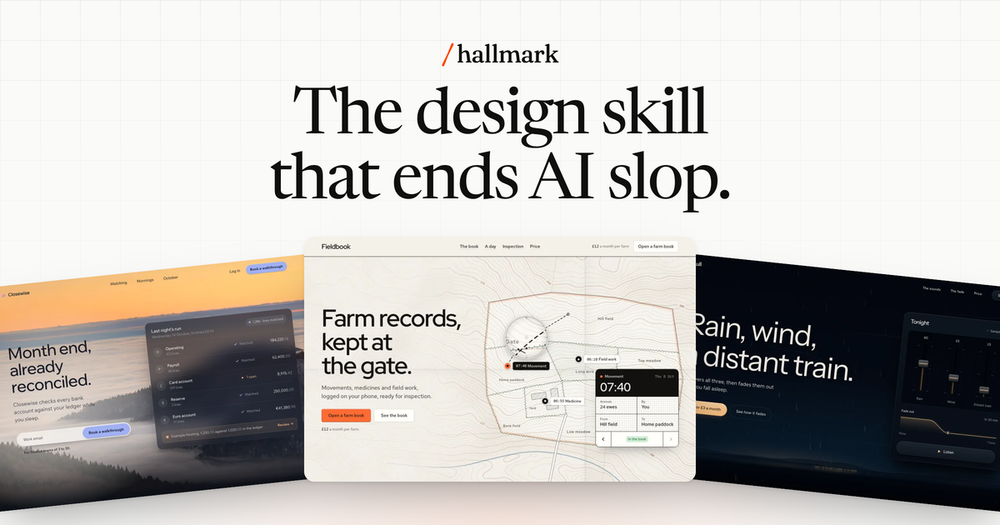
Build pages that don't look AI-generated. Hallmark gives coding agents 48 design themes, real photographs, and a linter that checks each build in the browser.

Visit websiteGitHub32.2K stars
image of Hallmark
TL;DR

Hallmark is a design skill for Claude Code, Codex, Cursor, and OpenCode that prevents the visual patterns that make AI-built pages look machine-generated. It deals three themes from a catalog of forty-eight, collects real photographs and actual data before designing, and lints the result in a real browser. MIT licensed, it installs in one npx command and works inside the editors developers already use. Best for developers who want coding agents to produce pages that look considered rather than generated.

Read the full breakdownHide the full breakdownWho it is for, how it works, trade-offs, the quick start and the FAQ
who it's for

Who Hallmark is for#

Developers building landing pages with coding agents

Hallmark gives Claude Code, Codex, Cursor, or OpenCode a set of design rules it cannot override below the floor tier. A one-line prompt produces a page that fits the subject, selects real photographs, and passes browser lint before the build ends. Developers who regularly generate marketing or product pages with AI get non-generic output without writing CSS.

Skip if:

Your team has a design system and component library the agent must adhere to. Hallmark's output is self-contained HTML and CSS; it does not generate React components or Tailwind classes unless those are specified in the project's `design.md`.

Developers running post-build QA on AI-generated pages

`sloplint` can be installed and run standalone on any HTML file or directory: `node skills/hallmark/scripts/sloplint.mjs <file-or-dir> --render`. Teams that use other AI page generators and want a lint pass before shipping can adopt the linter without using the full Hallmark skill.

Skip if:

Your pages are React or Vue components and never render to standalone HTML. The linter needs a rendered HTML file and cannot analyse component source directly.

Teams refreshing an existing site with an agent

`/hallmark redesign ./src/app` reads the page's content, links, and forms, then rebuilds the visual system around them. The `sloplint --kept` check fails the redesign if any handler or heading went missing, so the restyle is a one-command operation with a built-in regression guard.

Skip if:

The site uses a CMS with its own design tokens and build pipeline. Hallmark's redesign targets standalone HTML and CSS; CMS-managed templates are outside its scope.

Designers encoding visual rules for a coding agent

Hallmark reads `design.md` and the project's token file before building. A designer can write type, spacing, and color rules in those files and trust the agent will read them before picking a theme. This works for the common case of 'here are our tokens; use them' without a full design system handoff.

Skip if:

The handoff needs component-level constraints (specific button sizes, responsive breakpoints, animation curves). Hallmark's rules operate at material and layout level; component-level precision needs a design system the agent can query directly.

the problem

The problem it solves#

Coding agents build pages from their defaults. Without a design constraint, they reach for the same patterns: a tracked-capitals label above every heading, a gradient where a real photograph would fit, an email sign-up form at the bottom of every page regardless of the goal. The layout is structurally correct but visually identical to every other page the agent has built.

The problem compounds when the agent invents material. It fills placeholder frames with generic stock images, writes made-up statistics, and sizes the hero for a 1440px desktop while the actual first load is mobile. A page that looks generated loses trust with visitors before a line of content is read.

how Hallmark solves it

How it solves it#

Forty-eight design themes

Each theme is a material: a paper, a type set, a color palette, and rules for using photographs. Hallmark selects three themes that fit the prompt and offers them to the agent; `draw` then lays out the page structure within the chosen theme. Two prompts in the same theme produce different layouts, so the theme constrains materials, not page structure.

Browser-based sloplint

`sloplint` renders the finished page at eight viewport widths and checks for the visual tells that read as machine-made: tracked capitals on labels, text over photographs with insufficient contrast, filled buttons side by side, a gradient where a photograph belongs. A fresh-context subagent then reviews the result. Run it standalone on any HTML file with `node skills/hallmark/scripts/sloplint.mjs <file> --render`.

755 openly licensed photographs

Photos come from Wikimedia Commons (CC0, public domain, CC BY, and CC BY-SA). Hallmark selects them by subject and credits each one on the page. The photo library uses no stock sites; Unsplash, Pexels, and Pixabay bar AI tools from picking their images, so Hallmark's library is purpose-built for agent use.

Redesign and audit commands

`/hallmark redesign <path>` rebuilds a page around the same content, links, and forms while replacing the visual system and layout. `/hallmark audit <path>` reports lint findings without touching the page. Both use `sloplint --kept` to fail the redesign if any link, field, handler, or heading went missing in the process.

Custom mode with no preset themes

Say 'custom' and Hallmark drops the themes entirely. No plan, no components, no palette recipe, only the floor rules, the gates, and a short direction to find the one idea the client has and build the page from it. Custom mode follows the same lint and review steps as a themed build.

Install across all coding agents at once

One command (`npx skills add nutlope/hallmark -g`) installs the skill for Claude Code, Codex CLI, Cursor, and OpenCode simultaneously. Pass `--agent claude-code` (or `codex`, `cursor`, `opencode`, `github-copilot`) to target one agent. Claude Code also supports a plugin install path via `/plugin marketplace add nutlope/hallmark`.

strengths · trade-offs

Strengths and trade-offs#

Strengths

  • No API key and no external image servicePhotographs come from Hallmark's own library of 755 openly licensed images on Wikimedia Commons. There is no image API key to configure, no paid account to maintain, and no license terms that bar AI tools from using the photos.
  • MIT license with no usage restrictionsFully MIT licensed. Fork it, ship it, modify it for internal use or client work with no restrictions on commercial use. Unlike proprietary AI design tools that require accounts and ongoing subscriptions, Hallmark runs as a local skill you own.
  • Lint runs in a real browser at eight widths`sloplint --render` uses puppeteer-core and Chrome to render the page and catch issues a static DOM check would miss. Checking eight viewport widths catches mobile regressions that only appear at small sizes. Without puppeteer-core and Chrome, the static checks still run.
  • Layout varies on every buildA theme specifies materials (paper, type, color, photograph rules), not page structure. Every build chooses its own hero, section order, and navigation shape within the theme. Two prompts for different products in the same theme produce visually distinct pages.

Trade-offs

  • -Browser checks require puppeteer-core and ChromeRender-time lint and screenshot features require `npm i -g puppeteer-core` and Chrome on the machine. Without them, browser checks are skipped and only static analysis runs. Headless Chrome adds memory overhead; machines under 1 GB RAM may see instability during the render step.
  • -Output is self-contained HTML and CSS, not framework componentsHallmark produces standalone HTML and CSS files, not React or Vue components. Teams with existing component libraries may need to adapt or re-implement the generated output. The skill can read a project's `design.md` and tokens, but it does not generate shadcn/ui or Tailwind component code.
  • -Short maintenance history with 49 open issuesThe repository was created in April 2026 and has 49 open issues. It has 32,173 stars and recent pushes, but the short history means some edge cases are still being resolved. Users may encounter rough edges in less common prompts or agent configurations.
versus alternatives

Hallmark vs alternatives#

Hallmark vs v0.dev

v0.dev and Hallmark both use AI to generate web pages from a text prompt. The key difference is in the design constraint layer and where the output lands.

v0.dev is a managed commercial service from Vercel. You describe a component or page and it generates React code using shadcn/ui. The output is clean and deployable, but it draws from the same component library for every build, and every page starts from the same visual primitives.

FeatureHallmarkv0.dev
LicenseMITProprietary
Self-hostingYes (skill, no server)No
Design constraint48 themes, floor gatesshadcn/ui defaults
Output formatSelf-contained HTML/CSSReact components
Photographs755 openly licensedNone included
PriceFreeFree tier, then paid

Hallmark is the better fit when you want pages that look distinct from each other and from AI defaults. Because each build chooses its own structure within the theme and uses subject-specific photographs, two builds for different products look different. v0.dev produces more predictable component-level output, which suits teams building inside an existing React design system who need components that match their token set.

Hallmark vs Framer AI

Framer AI generates full web pages from a prompt and exports them to Framer's hosted hosting environment. It is a commercial product with a visual editor layered on top. Framer AI excels when the goal is a hosted, editable marketing site with the designer still in the loop after generation.

FeatureHallmarkFramer AI
LicenseMITProprietary
Self-hostingYesNo
Runs in coding agentYesNo
OutputHTML/CSSFramer project
Post-generation editVia agentVisual editor
PriceFreePaid plans

Hallmark fits the case where output goes directly into an engineering workflow: the agent builds the page, the linter runs, and the result ships without a visual editor step. Framer AI is worth considering when the designer needs to iterate on the visual layer post-generation in a point-and-click environment, and the team is comfortable with the hosting and pricing model.

install · quick start

Quick start#

bash
Install globally with Node 18 or later; browser render checks also need puppeteer-core and Chrome.
```bash
npx skills add nutlope/hallmark -g
npm install -g puppeteer-core
```
tech stack · detected from GitHub

What it's built on#

Languages
JavaScriptPython
frequently asked

FAQ#

Does Hallmark need an API key for photographs?

No. Photos come from Hallmark's own library of 755 openly licensed images sourced from Wikimedia Commons. An image API key is optional if you want to supplement the library with your own source. No paid account is required to use the built-in photo library.

Which coding agents does Hallmark work with?

Hallmark installs as a skill for Claude Code, Codex CLI, Cursor, OpenCode, and GitHub Copilot. One command installs it globally for all agents; pass --agent <name> to target one. It also installs as a Claude Code plugin via /plugin marketplace add nutlope/hallmark.

Can Hallmark redesign a site I already have?

Yes. /hallmark redesign <path> reads all existing content, links, and form handlers, then rebuilds the page visually around them. It uses sloplint --kept to verify no link, field, handler, or heading was lost in the process. Say 'keep the layout' for a restyle only, or 'polish' to fix visual tells without changing the layout.

Does Hallmark work without Chrome installed?

Yes, with reduced coverage. Static sloplint checks run on any machine. Browser-based rendering and screenshot capture require npm i -g puppeteer-core and Chrome; without them, the render-time checks are skipped. The Floor gates (contrast, focus, invented facts, broken mobile layout) run regardless of whether Chrome is present.

What is Hallmark's license?

MIT. The core skill and all scripts are MIT licensed. The photograph library (photos.json) lists photos hosted on Wikimedia Commons; each image keeps its own original license (CC0, public domain, CC BY, or CC BY-SA) and is credited on every page that uses it.

also worth a look

Similar open-source tools#

God's Eye View

Featured

Alternative toFFlightradar24

Real-time global intelligence on a 3D globe

  • 59,346 GitHub stars
  • CustomLicence MIT with third-party data restrictions

Unity Mcp

Alternative toUnity

MCP bridge for Unity: 50 tools, any AI client, MIT licensed.

  • 15,381 GitHub stars
  • MITLicence MIT

Openfilm

Alternative toRemotion

AI video agent for coding agents, with a local editor and no account.

  • 2,601 GitHub stars
  • MITLicence MIT

SOMA

Alternative toZoo.dev

Parametric 3D modeling via CLI agent: describe, generate, iterate.

  • 286 GitHub stars
  • GPL-3.0Licence GPL-3.0

OpenCreator

Alternative toHeyGen

Local AI workspace for video, image, voice, and translation

  • 13,875 GitHub stars
  • Apache-2.0Licence Apache-2.0

CodeBoarding

Alternative toCodeDashboard

Review code changes as architecture maps, not line diffs

  • 2,614 GitHub stars
  • MITLicence MIT
by category

Open source tools in these categories#

106

Design & Creative

ComfyUI, Excalidraw, Godot Engine
478

Developer Tools

REA (Reverse Engineer Anything), superpowers, Skills for Real Engineers
199

Web Development

freeCodeCamp, superpowers, Skills for Real Engineers
414

AI & Machine Learning

OpenClaw, freeCodeCamp, REA (Reverse Engineer Anything)

Featured

Omnara

Alternative toCClaude Managed Agents

Open-source agent deployment API. Self-host or use Omnara Cloud.

  • 3,235 GitHub stars
  • Apache-2.0Licence Apache-2.0
  • #AI Agents

rakazo

Alternative toGrok Bot

AI teammates you own: your keys, your model, your machine.

  • 5,406 GitHub stars
  • Apache-2.0Licence Apache-2.0
  • #AI Agents

Inbox Zero

Alternative toSuperhuman

AI email assistant that drafts replies and clears your inbox

  • 12,787 GitHub stars
  • AGPL-3.0Licence AGPL-3.0
  • #Email
Feature your project

New open source projects by email

The projects we add and every new guide. Free, unsubscribe any time.

Find open source alternatives to paid software

/
  • Claude Code to OpenCode
  • Jira to Windshift
  • Notion to AppFlowy
  • Slack to Mattermost
  • Linear to GitLab
  • Wispr Flow to Handy
  • CapCut to Concat
  • Grok Bot to rakazo
  • Superhuman to Inbox Zero
  • Airtable to AITable
  • Muse to OpenClaw
  • GitHub Copilot to Cline
  • Datadog to Netdata
  • Microsoft Teams to Rocket.Chat
  • Confluence to Docmost
  • Pinecone to Qdrant
  • Zapier to n8n
  • Devin AI to OpenHands
  • Firebase to Supabase
  • 1Password to KeePassXC
  • Contentful to Strapi
  • Adobe Premiere Pro to Shotcut
  • ChatGPT to AnythingLLM
  • LangSmith to Langfuse
  • Claude Code to OpenCode
  • Jira to Windshift
  • Notion to AppFlowy
  • Slack to Mattermost
  • Linear to GitLab
  • Wispr Flow to Handy
  • CapCut to Concat
  • Grok Bot to rakazo
  • Superhuman to Inbox Zero
  • Airtable to AITable
  • Muse to OpenClaw
  • GitHub Copilot to Cline
  • Datadog to Netdata
  • Microsoft Teams to Rocket.Chat
  • Confluence to Docmost
  • Pinecone to Qdrant
  • Zapier to n8n
  • Devin AI to OpenHands
  • Firebase to Supabase
  • 1Password to KeePassXC
  • Contentful to Strapi
  • Adobe Premiere Pro to Shotcut
  • ChatGPT to AnythingLLM
  • LangSmith to Langfuse