Open Source Alternatives
  • Alternatives
  • Categories
    Categories by size913 projects
    • Developer Tools472
    • AI & Machine Learning411
    • Web Development198
    • Business & Productivity197
    • Security & Monitoring133
    • Communication & Collaboration129
    • IT Management127
    • Cloud & Hosting109
    • Data & Analytics106
    • Product & Project Management106
    Browse all 21 categoriesDesign & Creative, LLMOps & AI Tooling and 9 more
  • Blog
  • Advertise
SearchNotion, Slack, password manager.../
Submit
Open Source Alternatives
  • Alternatives
    • Developer Tools472
    • AI & Machine Learning411
    • Web Development198
    • Business & Productivity197
    • Security & Monitoring133
    • Communication & Collaboration129
    • Browse all 21 categories
  • Blog
  • Advertise
Submit your project

New open source projects by email

The projects we add and every new guide. Free, unsubscribe any time.

Open Source Alternatives LogoOpen Source Alternatives

Handpicked Open Source Alternatives to Paid Softwares

Product

  • Categories
  • Tag
  • Advertise

Resources

  • Blog
  • Collection
  • Submit

Company

  • Privacy Policy
  • Terms of Service
  • Refund Policy
  • Sitemap

Alternatives

  • Claude Code
  • Jira
  • Notion
  • Slack
  • Linear
  • Wispr Flow
  • All alternatives
© 2026 Open Source Alternatives. All rights reserved.
Open SourceAlternatives
Home/Categories/Business & Productivity/Koel
icon of Koel

Koel

Open source alternative to Spotify, Apple Music and YouTube Music

  • 17.3K stars
  • MIT
  • Active this week
  • Last commit today

Last verified Oct 24, 2026

Host your personal music collection as a streaming server with smart playlists, lossless audio, native mobile apps, and Subsonic API support.

Visit websiteGitHub17.3K starsDeploy on Hostinger
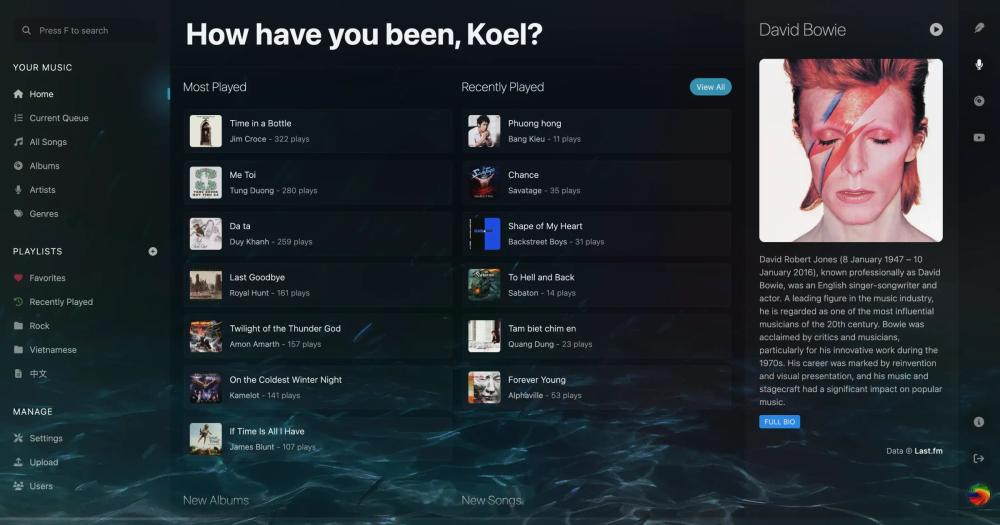
Koel web player home screen with most played and recently played songs
TL;DR

Koel is a self-hosted music streaming server that turns your personal music library into a web-based listening experience. It is a free, MIT-licensed alternative to paid services like Spotify, Apple Music, and YouTube Music for listeners who already own a music collection and want cross-device access without a monthly subscription. Built on Laravel and Vue, it runs on any PHP server, supports lossless audio, smart playlists, and the Subsonic API, and ships with native iOS and Android apps via Koel Player. Best for music collectors with large local libraries.

Read the full breakdownHide the full breakdownWho it is for, how it works, trade-offs and the FAQ
who it's for

Who Koel is for#

Music collectors streaming a large personal library across devices

Koel scans your local music files and makes them available from any browser or Subsonic client, so you can reach your full archive from a phone, work computer, or tablet without copying files manually. Smart playlists and metadata enrichment via Last.fm and MusicBrainz make large libraries more browsable.

Skip if:

You primarily listen to music you do not own locally. Koel does not connect to streaming catalogs; it serves files you already have on disk. If your library is small or consists mostly of albums available on Spotify, a self-hosted server adds overhead for little gain.

Audiophiles wanting lossless streaming to any device

Koel supports transparent lossless audio pass-through, which means your FLAC files reach the browser or Koel Player app without quality loss. Combined with a built-in equalizer, this gives audio-focused users quality control that subscription services with compressed audio do not offer.

Skip if:

Your listening is primarily on mobile with a limited data plan. Lossless FLAC files are significantly larger than compressed formats, so streaming them over a mobile connection uses more data than a compressed stream would.

Households sharing a private music server

Koel supports multiple user accounts on a single installation, each with their own playlists and favorites. The Community version works well for households where everyone streams from the same shared music library and wants individual listening history without paying a streaming service.

Skip if:

Each person in the household needs a completely separate music collection rather than shared access. Per-user individual libraries are a Koel Plus feature, so households needing strict collection separation require a Koel Plus purchase.

Self-hosters replacing a paid music subscription

For listeners who primarily stream music they already own or could purchase, Koel replaces a recurring subscription with a self-hosted server. Integrations with Last.fm, Spotify (for metadata), and YouTube pull in album art and related content automatically so the library feels complete.

Skip if:

You rely on streaming primarily for music discovery or regularly listen to new releases before purchasing. Koel serves only files you own locally and has no access to licensed catalog content.

the problem

The problem it solves#

Music streaming subscriptions charge a monthly fee to access a catalog you do not own. When a label pulls an album or a service discontinues, your playlists and listening history stay on their servers but your music is gone. For listeners who have spent years building a local collection of FLAC files, vinyl rips, or digital purchases that streaming services do not carry, there is no clean way to access that library from a phone, another computer, or a browser without setting up your own server.

Managing a large local music library across devices also means dealing with inconsistent metadata, missing album art, and no smart playlist support. Commercial desktop players solve the local playback problem but do not give you streaming access when you are away from the machine where the files live.

how Koel solves it

How it solves it#

Subsonic and OpenSubsonic API

Koel speaks the Subsonic and OpenSubsonic API protocol, so you can point any compatible mobile or desktop client directly at your library. You are not limited to the web interface; any Subsonic-compatible client works with Koel without additional setup or plugins.

Smart Playlists and Playlist Folders

Create dynamic playlists that update automatically based on rules you define, or organize playlists into folders for a tidier library. Both features are included in the Community version with no cost and no limits on the number of playlists.

Metadata Enrichment via Third-Party Services

Koel integrates with Last.fm, MusicBrainz, Wikipedia, Spotify, and YouTube to automatically pull in album art, artist biographies, and music videos. Your library fills in the details without requiring manual tagging for most mainstream releases.

Transparent Lossless Audio Pass-Through

Koel passes lossless audio files to the browser without transcoding, preserving quality for FLAC and other lossless formats. A built-in equalizer and visualizer let you tune playback in the browser without a separate desktop application.

Koel Player for iOS and Android

The official Koel Player app is available for both iOS and Android and connects directly to your Koel server with no additional configuration. It delivers a native app experience for your library beyond what the mobile browser version provides.

AI Assistant with Natural-Language Commands

Koel includes an AI assistant that responds to natural-language commands for search and playback control, part of the core installation alongside scrobbling, podcasts, and radio support as documented in the project README.

strengths · trade-offs

Strengths and trade-offs#

Strengths

  • MIT License with No Subscription FeesThe Community version is MIT licensed, which means you can self-host it commercially, fork it, and modify it without licensing restrictions. There is no freemium cap on songs, users, or playback hours in the self-hosted version, unlike cloud-based streaming services that charge per month.
  • Actively Maintained with a Low Issue CountKoel has over 17,000 GitHub stars and a commit history spanning more than a decade, with a last push in October 2026. With only 14 open issues at the time of writing, the project keeps its backlog clean and has shown long-term commitment to maintenance.
  • Client Freedom via Subsonic APISubsonic API support means you are not locked into the Koel web interface. Any Subsonic-compatible client on iOS, Android, or desktop can connect directly to your server, giving you the client experience you prefer without changing the backend.
  • One-Time Purchase for Premium FeaturesKoel Plus costs a one-time fee with no recurring subscription. Cloud storage drivers, SSO, white labeling, and per-user individual libraries are yours permanently after purchase, which beats per-seat pricing for organizations hosting their own instance.

Trade-offs

  • -PHP and Laravel Stack Adds Setup ComplexityKoel runs on PHP with Laravel, which means your server needs a PHP runtime, Composer, and a relational database. This is more involved than tools with single-container deployment paths. Users unfamiliar with the PHP ecosystem may find initial setup and upgrades more demanding.
  • -Cloud Storage and Individual Libraries Require Koel PlusStoring your music on Amazon S3, Nextcloud, ownCloud, or Dropbox requires purchasing Koel Plus. The Community version assumes you serve files from local storage on the server. Per-user individual libraries, where each household member has a separate collection rather than shared access, are also a Koel Plus feature.
versus alternatives

Koel vs alternatives#

Koel vs Spotify

Spotify and Koel address fundamentally different use cases. Spotify licenses access to a large catalog of tracks through a monthly subscription; Koel streams music files you already own from a server you run. The comparison matters most for listeners whose library includes purchases, vinyl rips, or recordings that streaming services do not carry.

FeatureKoelSpotify
Self-hostingYes, requiredNo
CatalogYour own filesLicensed streaming catalog
PricingFree (Community) / One-time (Plus)Monthly subscription
Mobile appsYes (Koel Player, iOS/Android)Yes
Subsonic APIYesNo
Lossless audioYes (pass-through)Paid tier
Music discoveryNo built-inAlgorithmic recommendations

Koel wins for music collectors who own their library and want to self-host without a monthly fee. Spotify remains the better choice when catalog breadth, algorithmic discovery, or no-server simplicity matters more than ownership and cost.

Koel vs Apple Music

Apple Music provides licensed access to a large streaming catalog and integrates with iCloud for syncing purchased tracks across Apple devices. Koel does not integrate with the Apple ecosystem but works on any browser and with any Subsonic-compatible client, making it platform-agnostic.

FeatureKoelApple Music
Self-hostingYesNo
PricingFree (Community)Monthly subscription
Platform supportAny browser, Subsonic clientsApple ecosystem, Windows
Library sourceYour local filesStreaming catalog + iCloud sync
LosslessYes (pass-through)Yes

Apple Music remains the better choice if you rely on iCloud Library sync, Siri integration, or the full streaming catalog. Koel is better when data ownership and avoiding ongoing subscription costs matter more.

Koel vs YouTube Music

YouTube Music combines a streaming catalog with the ability to upload personal tracks to Google's servers. Koel serves your files from infrastructure you control rather than uploading them to a third-party cloud, which matters for privacy.

Koel is the better fit for anyone who does not want to upload personal music to Google. YouTube Music's advantage is its integration with YouTube's catalog, including live recordings and music videos not available on other services. Both support mobile apps; Koel's Subsonic API gives more client flexibility.

tech stack · detected from GitHub

What it's built on#

Languages
PHPTypeScript
Frameworks
LaravelVue
frequently asked

FAQ#

Is Koel free to use?

The Community version is MIT licensed and free to self-host permanently. There are no caps on songs, users, or playback hours in the free tier. Koel Plus is an optional paid upgrade that adds cloud storage drivers (Amazon S3, Nextcloud, ownCloud, Dropbox), per-user individual libraries, SSO, and white labeling for a one-time purchase with no recurring fees.

Can I use Koel on my phone?

Yes. The official Koel Player app is available for both iOS and Android and connects directly to your Koel server. Koel also speaks the Subsonic and OpenSubsonic API, so any Subsonic-compatible mobile client works as well. Both options are available without purchasing Koel Plus.

What is the difference between Koel and Koel Plus?

Koel (the Community version) is MIT licensed and free forever. It includes music streaming, smart playlists, multi-user support, podcast and radio playback, equalizer, Subsonic API, and mobile app support. Koel Plus adds cloud storage drivers for Amazon S3, Nextcloud, ownCloud, and Dropbox; per-user individual libraries; music collaboration; custom themes; SSO; proxy auth; media browser; and white labeling. Koel Plus is a one-time purchase with no subscription.

How does Koel compare to Spotify for personal music?

Koel and Spotify serve different needs. Spotify licenses access to a large catalog on its own infrastructure; Koel streams music you already own from a server you control. Koel has no monthly fee in the Community version but requires your own files and a PHP server. If your collection includes purchases or vinyl rips that Spotify does not carry, Koel is the better fit. If you primarily want catalog discovery and new releases, Spotify remains the more practical choice.

Does Koel support podcast and radio playback?

Yes. Koel includes both podcast and radio support in the Community version without any additional purchase or plugin. Podcast management and radio streaming are part of the default installation alongside music library features.

also worth a look

Similar open-source tools#

CleanYourTV

Featured

Alternative toATV Launcher Pro

Debloat any Android or Google TV over Wi-Fi and get an Apple TV-style home.

  • 24,233 GitHub stars
  • MIT LicenseLicence MIT License

OpenClaw

Featured

Alternative toMuse

Self-hosted AI assistant for WhatsApp, Telegram, and more

  • 392,852 GitHub stars
  • MITLicence MIT

Inbox Zero

Featured

Alternative toSuperhuman

AI email assistant that drafts replies and clears your inbox

  • 12,787 GitHub stars
  • AGPL-3.0Licence AGPL-3.0

rakazo

Featured

Alternative toGrok Bot

AI teammates you own: your keys, your model, your machine.

  • 5,406 GitHub stars
  • Apache-2.0Licence Apache-2.0

paperclip

Featured

Alternative toGrok Bot

Self-hosted AI agent management with org charts and budgets

  • 106,516 GitHub stars
  • MITLicence MIT

VoiceWink

Alternative toWispr Flow

Hotkey voice-to-text for Windows 11, offline AI, one-time purchase.

  • 3 GitHub stars
  • GPL-3.0Licence GPL-3.0
by category

Open source tools in these categories#

197

Business & Productivity

OpenClaw, Excalidraw, RustDesk
Hostinger

Run Koel on your own server

Self-host Koel on a Hostinger VPS.

Deploy on Hostinger

Featured

rakazo

Alternative toGrok Bot

AI teammates you own: your keys, your model, your machine.

  • 5,406 GitHub stars
  • Apache-2.0Licence Apache-2.0
  • #AI Agents

Omnara

Alternative toCClaude Managed Agents

Open-source agent deployment API. Self-host or use Omnara Cloud.

  • 2,957 GitHub stars
  • Apache-2.0Licence Apache-2.0
  • #AI Agents

Inbox Zero

Alternative toSuperhuman

AI email assistant that drafts replies and clears your inbox

  • 12,787 GitHub stars
  • AGPL-3.0Licence AGPL-3.0
  • #Email
Feature your project

New open source projects by email

The projects we add and every new guide. Free, unsubscribe any time.

Find open source alternatives to paid software

/
  • Claude Code to OpenCode
  • Jira to Windshift
  • Notion to AppFlowy
  • Slack to Mattermost
  • Linear to GitLab
  • Wispr Flow to Handy
  • CapCut to Concat
  • Grok Bot to rakazo
  • Superhuman to Inbox Zero
  • Airtable to AITable
  • Muse to OpenClaw
  • GitHub Copilot to Cline
  • Datadog to Netdata
  • Microsoft Teams to Rocket.Chat
  • Confluence to Docmost
  • Pinecone to Qdrant
  • Zapier to n8n
  • Devin AI to OpenHands
  • Firebase to Supabase
  • 1Password to KeePassXC
  • Contentful to Strapi
  • Adobe Premiere Pro to Shotcut
  • ChatGPT to AnythingLLM
  • LangSmith to Langfuse
  • Claude Code to OpenCode
  • Jira to Windshift
  • Notion to AppFlowy
  • Slack to Mattermost
  • Linear to GitLab
  • Wispr Flow to Handy
  • CapCut to Concat
  • Grok Bot to rakazo
  • Superhuman to Inbox Zero
  • Airtable to AITable
  • Muse to OpenClaw
  • GitHub Copilot to Cline
  • Datadog to Netdata
  • Microsoft Teams to Rocket.Chat
  • Confluence to Docmost
  • Pinecone to Qdrant
  • Zapier to n8n
  • Devin AI to OpenHands
  • Firebase to Supabase
  • 1Password to KeePassXC
  • Contentful to Strapi
  • Adobe Premiere Pro to Shotcut
  • ChatGPT to AnythingLLM
  • LangSmith to Langfuse