

Who Inbox Zero is for#
Executives and founders receiving 100+ emails daily
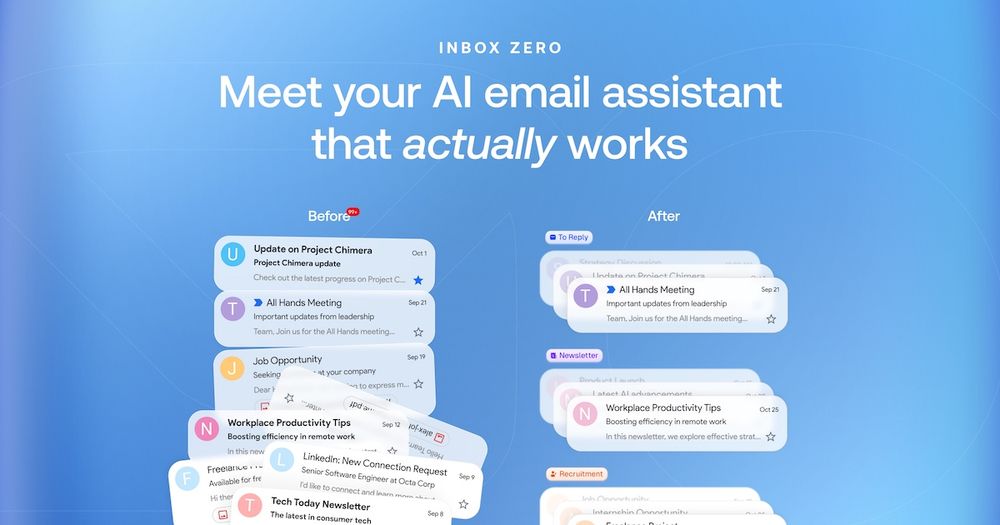
Inbox Zero's pre-drafted replies and automatic labeling give high-volume inbox owners an organized inbox to work through rather than a raw pile to sort. The meeting brief feature pulls context from email and calendar so you arrive at meetings informed without manual research beforehand.
Skip if:
You receive fewer than 30 emails per day. At low volume the overhead of configuring AI rules outweighs the time saved; a simple Gmail filter setup is more appropriate.
Privacy-focused professionals leaving managed email AI tools
Self-hosting Inbox Zero keeps your email content on your own server, processed by your own AI pipeline rather than a third-party service. This is the primary reason to choose the self-hosted path over managed alternatives like Superhuman or Fyxer AI, which have no self-hosting option.
Skip if:
You use Proton Mail, Fastmail, or any non-Google, non-Microsoft email provider. Inbox Zero requires a Gmail or Outlook connection and cannot ingest email via IMAP.
Small teams managing high daily email volume
The Professional plan ($50/user/month on the managed tier) includes team-wide analytics showing email volume by sender across the whole team. Self-hosted deployments can serve multiple users from a single setup, making this a cost-effective path for teams with the technical capacity to self-host.
Skip if:
Your team needs a shared inbox tool with assignment, collision detection, and internal notes. Inbox Zero is per-user rather than a help-desk-style shared inbox product.
Developers who want to customize email automation logic
Built on TypeScript and Next.js with a public repository, Inbox Zero is forkable and modifiable. Developers can add rule types, integrations, or classification logic that the stock product does not support. The contributor guide and Discord community provide context for onboarding to the codebase.
Skip if:
You need a stable, no-maintenance production setup. Forking the project means owning your own upgrade path and manually merging upstream changes.
The problem it solves#
Managing a busy inbox manually fails at scale. Newsletters, cold emails, and action-needed threads arrive in one undifferentiated pile, and the work of sorting them takes attention away from whatever actually matters. Most people end each day with more unread messages than they started with.
The harder pain point is that AI-powered email tools are almost exclusively managed services: your email content is processed on their servers, your writing style is analyzed by their models, and your productivity depends on their pricing tiers. When prices rise or the product changes direction, there is no exit path. Teams handling sensitive communications or operating in regulated industries have had no self-hosted option in this category.
How it solves it#
AI-drafted replies in your voice
Before you open your inbox, Inbox Zero scans incoming emails that need a response and generates a pre-written draft based on your email history, tone, and calendar availability. You review and send; the AI handles the composing. Drafts are connected to your calendar so they reflect your actual schedule and availability.
Plain-English AI rules for inbox automation
Write instructions in plain English to define how the AI should handle specific email types. For example: archive any newsletter from a domain you have not opened in 30 days, or label emails from clients as urgent. The AI enforces these rules automatically on each incoming message, with no filter syntax to learn.
Bulk unsubscribe with Gmail-native filters
See which newsletters and promotional emails you never open, sorted by volume. One click unsubscribes and archives them. Unlike third-party unsubscribe apps, Inbox Zero creates actual Gmail filters, so the rules live in your account rather than in an external layer that disappears if you cancel the service.
Cold email auto-blocking
Inbox Zero detects cold sales emails and removes them from your primary inbox automatically. The blocking runs on incoming mail without requiring manual filter setup, reducing interruption from unsolicited outreach without requiring you to identify and block each sender individually.
Slack and Telegram inbox management
Read and respond to emails from inside Slack or Telegram without switching to your email client. Useful for inbox triage on mobile or for professionals who want to handle email replies from within their existing communication tools rather than context-switching to a separate app.
Email analytics and sender insights
Tracks which senders email you most and what categories of email consume the most inbox space. The analytics dashboard shows trends over time so you can identify the top sources of inbox noise and take targeted action, such as blocking a domain or creating a new AI rule to auto-archive a category.
Strengths and trade-offs#
Strengths
- Works alongside Gmail and Outlook without replacing themInbox Zero layers on top of your existing email client rather than replacing it. You continue using Gmail or Outlook as normal; Inbox Zero adds AI organization, pre-drafted replies, and automation without requiring you to change how you read or send email. There is no migration risk and no new email interface to learn.
- One-command self-hosting via the official CLIThe official CLI (npx @inbox-zero/cli setup) handles the entire setup process in a single wizard command, requiring only Docker and Node.js v24+. This gets a production-capable AI email assistant running on your own server, with email data never leaving your infrastructure.
- 12,000+ GitHub stars and active daily developmentThe repository has over 12,000 GitHub stars and 1,500 forks. Docker images build automatically on every push to main and are tagged with the commit SHA. The most recent commit was made on 2026-08-24, indicating active maintainer attention. A public contributing guide and Discord community support onboarding for contributors.
- SOC 2 Type 2 certified on the managed tierThe hosted version at getinboxzero.com carries SOC 2 Type 2 certification. For teams evaluating the managed product for business use, this provides a formal security attestation. Self-hosters inherit the application's security architecture and manage their own compliance posture.
Trade-offs
- -Fair-code license: not standard OSI-approved open sourceThe repository uses AGPL-3.0 with additional commercial restrictions added by Inbox Zero Inc. You cannot resell the software, offer it as a paid service, or include it in a commercial product without written permission. Individuals and teams self-hosting for their own internal email use are not affected. This is a fair-code arrangement comparable to n8n's Sustainable Use License, not OSI-approved open source.
- -Self-hosting requires Docker and Node.js v24+The CLI-based setup launches a Postgres database and application containers, requiring Docker and Node.js v24+. This is a moderate deployment compared to a single-container install, and ongoing maintenance requires keeping those dependencies updated. Not appropriate for users who want a zero-maintenance self-hosted setup or who are running on minimal server hardware.
- -Only Gmail and Outlook are supportedInbox Zero currently supports Gmail, Google Workspace, and Microsoft Outlook only. Teams on Fastmail, Proton Mail, Zoho, or any IMAP-only provider cannot connect their account. This is a significant limitation for privacy-conscious users who have already moved their email off Google and Microsoft infrastructure.
Inbox Zero vs alternatives#
Inbox Zero vs Superhuman
Superhuman is a premium email client at $30/user/month, known for keyboard-driven navigation, AI summaries, and a split-inbox view. Inbox Zero shares the AI-drafting angle but differs in design: it is not an email client, and it is self-hostable.
| Feature | Inbox Zero | Superhuman |
|---|---|---|
| License | AGPL-3.0 + commercial restrictions | Proprietary |
| Self-hosting | Yes | No |
| Email client | No (works alongside Gmail/Outlook) | Yes (replaces Gmail UI) |
| AI reply drafting | Yes | Yes |
| Bulk unsubscribe | Yes | No |
| Price (managed) | $20/user/month | $30/user/month |
Inbox Zero is the better choice for teams that need self-hosting, bulk inbox cleanup, or data control. Superhuman is still the stronger pick for users who want a redesigned email interface with keyboard shortcuts as the primary speed driver and have no need for self-hosting or bulk unsubscribe tooling.
Inbox Zero vs Fyxer AI
The Inbox Zero README explicitly positions the project as an open source alternative to Fyxer AI, calling itself "more customizable and secure." Both tools pre-draft replies and organize incoming email. Fyxer AI is managed-only with no self-hosting option; Inbox Zero offers both a managed tier and full self-hosting. The customization advantage refers to Inbox Zero's plain-English AI rules, which let you define your own automation logic rather than relying on preset classification categories.
Inbox Zero vs SaneBox
SaneBox focuses on inbox filtering and snooze, using its algorithms to sort email into folders like SaneLater. Its key advantage over Inbox Zero is IMAP support: SaneBox works with any email provider, including Proton Mail and Fastmail. Inbox Zero only supports Gmail and Outlook, but adds AI reply drafting and email analytics that SaneBox does not offer. SaneBox is the better choice for users on IMAP-only providers or who want lightweight filtering without an AI drafting layer.
Quick start#
Self-hosting uses the official CLI with Docker and Node.js v24+ as prerequisites.
```bash
npx @inbox-zero/cli setup
npx @inbox-zero/cli start
```What it's built on#
- Languages
- JavaScriptTypeScript
- Frameworks
- Next.jsReactshadcn/ui
- Databases
- PostgreSQL
- Tooling
- esbuildTurborepo
FAQ#
Does Inbox Zero replace my email client like Gmail or Outlook?
No. Inbox Zero works alongside your existing email client rather than replacing it. You continue using Gmail or Outlook as normal; Inbox Zero adds AI organization, pre-drafted replies, and automation on top. There is no new email interface to learn and no migration of your existing email data.
Can I self-host Inbox Zero for free?
Individuals and teams can self-host Inbox Zero at no charge for their own internal email use. The license is AGPL-3.0 with additional terms that prohibit commercial resale or offering the software as a paid service without written permission from Inbox Zero Inc. Personal use and team internal use are not restricted under these additional terms.
Which email providers does Inbox Zero support?
Inbox Zero supports Gmail, Google Workspace, and Microsoft Outlook. IMAP-based providers such as Fastmail, Proton Mail, and Zoho are not currently supported. Check the GitHub repository or docs.getinboxzero.com for updates on provider support.
How do I self-host Inbox Zero?
Self-hosting uses the official CLI. Run npx @inbox-zero/cli setup once for initial configuration, then npx @inbox-zero/cli start to launch the Docker containers. Prerequisites are Docker and Node.js v24+. Full instructions including OAuth setup and production configuration are at docs.getinboxzero.com/hosting/quick-start.
How is Inbox Zero different from SaneBox or Clean Email?
Inbox Zero adds AI reply drafting in your voice, which neither SaneBox nor Clean Email offer. SaneBox's key advantage is IMAP support: it works with any email provider including Proton Mail and Fastmail, while Inbox Zero only supports Gmail and Outlook. Inbox Zero is also self-hostable; SaneBox and Clean Email are managed-only. SaneBox or Clean Email are better choices for users on non-Google, non-Microsoft providers or who want lightweight filtering without an AI drafting layer.
Similar open-source tools#

agentic-inbox
Self-hosted email client with AI agent on Cloudflare Workers

Cypht
Open source self-hosted webmail aggregator

NeoMutt
Open source keyboard-first terminal email client

Thunderbird
Free, extensible open source desktop email client

Mailspring
Fast open source desktop email client

Macro
The open source workspace, one app for all your work.