Open Source Alternatives
  • Alternatives
  • Categories
    Categories by size957 projects
    • Developer Tools497
    • AI & Machine Learning426
    • Business & Productivity212
    • Web Development200
    • Security & Monitoring143
    • IT Management131
    • Communication & Collaboration129
    • Cloud & Hosting113
    • LLMOps & AI Tooling110
    • Data & Analytics108
    Browse all 21 categoriesDesign & Creative, Product & Project Management and 9 more
  • Blog
  • Advertise
SearchNotion, Slack, password manager.../
Submit
Open Source Alternatives
  • Alternatives
    • Developer Tools497
    • AI & Machine Learning426
    • Business & Productivity212
    • Web Development200
    • Security & Monitoring143
    • IT Management131
    • Browse all 21 categories
  • Blog
  • Advertise
Submit your project

New open source projects by email

The projects we add and every new guide. Free, unsubscribe any time.

Open Source Alternatives LogoOpen Source Alternatives

Handpicked Open Source Alternatives to Paid Softwares

Product

  • Categories
  • Tag
  • Advertise

Resources

  • Blog
  • Collection
  • Submit

Company

  • Privacy Policy
  • Terms of Service
  • Refund Policy
  • Sitemap

Alternatives

  • Claude Code
  • Jira
  • Notion
  • Slack
  • Linear
  • Wispr Flow
  • All alternatives
© 2026 Open Source Alternatives. All rights reserved.
Open SourceAlternatives
Home/Categories/Developer Tools/Zephium
icon of Zephium

Zephium

Open source alternative to Arc, Dia and Vivaldi

  • 866 stars
  • MPL-2.0
  • Active this week
  • Last commit today

Last verified Oct 29, 2026

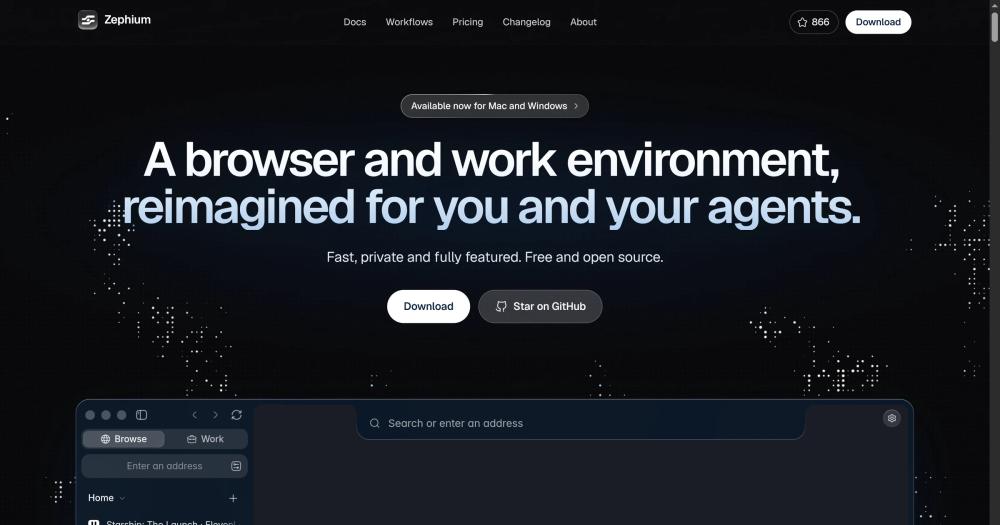
Browse the web in a Rust-native browser that is not a fork of Chromium, with a Work canvas where AI agents research, compare, and plan in plain sight.

Visit websiteGitHub866 stars
image of Zephium
TL;DR

Zephium is a browser built in Rust that renders pages through the web engine your operating system already ships: WKWebView on macOS and WebView2 on Windows. It replaces commercial browsers like Arc and Dia with no subscription required; the browser is free, open source under MPL-2.0, with zero telemetry and all data stored on-device. Work, the built-in agent canvas, lets you describe an outcome and watch helpers browse real pages, compare options, and build plans that stay on the canvas. Bring your own API keys for OpenAI, Anthropic, Gemini, or others, or run a local model through Ollama. Best for developers and knowledge workers who want agent-assisted research built into the browser they already use.

Read the full breakdownHide the full breakdownWho it is for, how it works, trade-offs, the quick start and the FAQ
who it's for

Who Zephium is for#

Developers researching or comparing technical tools

Work can open three monitoring tools on their own sites simultaneously, run a local helper to check endpoints, then leave a comparison table, config file, and task list on the canvas. The README uses this exact scenario as a worked example: evaluating Uptime Kuma, Gatus, and OpenStatus.

Skip if:

If your research is a single lookup or your workflow already involves terminal-based comparisons, the Work canvas adds overhead with no benefit. Work is designed for multi-step, multi-source tasks.

Knowledge workers doing multi-step research and planning

Work takes a longer task in plain words and runs helpers in parallel, each browsing real pages you can watch. It produces a plan you can break into linked tasks in one click. Results persist on the canvas across sessions rather than disappearing in a chat scroll.

Skip if:

If the task is a single question, Ask Zephium or any sidebar assistant handles it; Work's parallel-agent canvas is overhead for simple lookups.

Privacy-conscious users leaving commercial browsers

Zero first-party telemetry, on-device storage for all browsing data, no required account, and a native tracker blocker make Zephium a practical choice for users who want to limit data exposure. The import flow reads Chrome, Safari, Arc, Brave, Firefox, Zen, and Edge.

Skip if:

Zephium does not yet have a mobile app, so cross-device sync between desktop and phone is not available. If you need a unified history across devices including iOS and Android, another browser is a better fit today.

Developers who want to build from source or contribute

The source is on GitHub under MPL-2.0. The build follows Tauri conventions: install Rust via rustup, Node.js, and pnpm, then run pnpm dev. Development builds use a separate profile and do not overwrite the installed app, so contributing is low-risk on a daily-driver machine.

Skip if:

If you need a fully stable, enterprise-supported browser on Linux with long-term vendor backing, Zephium's single-maintainer status and missing Linux builds make it a poor choice today.

the problem

The problem it solves#

AI assistants and agent tools have a visibility problem: they run in sidebars, separate apps, or opaque chat windows, and you cannot see what sources they consulted, what they skipped, or how they reached a conclusion. When you ask an agent to compare options or plan a trip, the reasoning disappears after the answer arrives.

The browser is also where most work already happens, yet the major AI tools ask you to leave it to open another app, paste in context, and start a chat. That context transfer erodes the point. A plan built in isolation loses the tabs, history, and notes that shaped the question in the first place.

how Zephium solves it

How it solves it#

Work canvas with parallel agents

Work lets you describe an outcome in plain words; agents open real pages you can watch, send helpers to run parallel tasks (one checks flights while another finds accommodation), and leave the results as tables, charts, comparisons, and plans on a canvas that persists between sessions. One click converts any step of a plan into a task.

Rust core on system web engines

Zephium is built in Rust and renders pages through WKWebView on macOS (the same engine Safari uses) and WebView2 on Windows. There is no bundled copy of Chromium to download or keep in memory, which puts the installed app at around 40 MB and keeps startup time and battery use close to a native app.

Native ad and tracker blocker

A network-level blocker built on Brave's adblock-rust with EasyList and EasyPrivacy blocks ads and trackers before a page can load them. It counts what it blocked on every page and can hide any remaining page element with a click. No extension is required; the blocker ships on by default.

Chrome extension support from the Web Store

Extensions install directly from the Chrome Web Store. Twenty popular ones are verified to work in Zephium, including 1Password, Bitwarden, Grammarly, Dark Reader, Vimium, SponsorBlock, and Notion Web Clipper. The import flow from Chrome, Arc, Safari, Firefox, and others carries your existing setup with it.

Ask Zephium sidebar assistant

The sidebar assistant (Command E on macOS, Ctrl E on Windows) reads the current page and answers questions, picks out what is worth your attention, and opens links in new tabs. It can restyle or act on a page in place. When a task outgrows a chat, Continue in Work carries it to the canvas with the page.

Built-in tasks, notes, and time tracking

Tasks live beside the browser and link to the page they came from; write them in plain language and they land on the right day. Notes are Markdown files stored on your device, editable from any app. Time tracks per-site usage on-device only and can start a focus round that keeps distracting sites shut until the break ends.

strengths · trade-offs

Strengths and trade-offs#

Strengths

  • No bundled browser engineZephium uses WKWebView and WebView2 rather than bundling Chromium, so the installed app is around 40 MB and the rendering engine is kept up to date by Apple and Microsoft respectively. You are not running a second browser engine inside the browser, which keeps memory lower and battery lasting longer compared to Electron or Chromium-based alternatives.
  • MPL-2.0 open source licenseThe browser is open source under the Mozilla Public License 2.0, which permits reading the code, building from it, and filing issues or pull requests. MPL-2.0 allows commercial use and modification; the only obligation is that changes to MPL-licensed files are shared under the same license.
  • Zero first-party telemetryZephium sends no browsing telemetry. History, tabs, tasks, notes, and activity are stored on-device. Until you sign in for Zephium AI, the browser makes no contact with Zephium's servers at all. On Windows, Microsoft WebView2 diagnostic data follows your Windows settings, but Zephium's own telemetry is zero regardless.
  • Bring your own AI model with no lock-inWork and Ask Zephium accept your own API keys for OpenAI, Anthropic, Gemini, xAI, Mistral, DeepSeek, Groq, Cerebras, and OpenRouter, stored in the system keychain. A local model through Ollama or LM Studio also works with no outbound API calls. You can switch between providers without changing a configuration file.
  • MCP server and command-line tool integrationWork connects to MCP servers including Linear, Notion, Sentry, Stripe, and Figma, and to command-line tools such as gh. Agents can read and edit files in folders you grant, run commands, and hand larger coding tasks to Claude Code or Codex. Every action that posts or modifies something waits for your approval before it runs.

Trade-offs

  • -macOS and Windows only at launchZephium runs on macOS Apple Silicon (Sonoma 14 or later) and Windows x64. Intel Mac and Linux are listed as the next planned targets in the README, with mobile following. Teams whose users span Linux, iOS, or Android cannot standardize on Zephium today.
  • -Windows installer not yet code-signedThe Windows installer is not yet code-signed. Microsoft SmartScreen displays a Windows protected your PC prompt on first run; the fix is to choose More info, then Run anyway. Code signing is listed as planned in the README; until it ships, every new Windows installation requires dismissing the warning.
  • -Single-maintainer projectThe CONTRIBUTING notes that Zephium is maintained by one person with a clear product direction, and asks contributors to discuss larger changes first. With 60 open issues on GitHub, the pace of bug fixes and new features depends on a single maintainer's capacity, which matters for teams evaluating it for sustained daily use.
  • -Work canvas requires AI credentialsThe Work canvas and Ask Zephium assistant require either a Zephium AI account (which starts with 250 free credits) or your own API key for a supported provider. The browser browses the web normally without any account; agents are not available in a purely offline, no-key setup.
versus alternatives

Zephium vs alternatives#

Zephium vs Arc and Dia

Arc is a proprietary Chromium-based browser from The Browser Company that stops working on December 22, 2026; new accounts can no longer be created as of October 22, 2026. Its successor Dia adds an AI chat layer to the same Chromium base and is now the active product from The Browser Company. Both are closed-source with no self-hosting option.

FeatureZephiumArcDia
StatusActiveStops working 2026-12-22Active
LicenseMPL-2.0ProprietaryProprietary
Browser engineWKWebView / WebView2ChromiumChromium
Source codeOpen (GitHub)ClosedClosed
AI agentsWork canvas (live pages)NoneDia AI chat
First-party telemetryZeroProprietaryProprietary
PlatformsmacOS Apple Silicon, WindowsmacOS, iOS (Arc Search for iOS continues after shutdown)macOS, Windows

Zephium is the better choice when source access, telemetry control, or agent transparency are the deciding factors. The Work canvas lets you watch every page an agent opens in real time, which differs from Dia's chat-based assistant where sources are not directly visible. Dia is the stronger option for users who want a browser backed by a larger commercial team. Arc should not be adopted as a new browser today; see the opensourcealternatives.to/alternative-to/arc guide for open source alternatives that cover mobile and cross-device sync.

Zephium vs Vivaldi

Vivaldi is a Chromium-based browser aimed at power users who want deep UI customization: tab stacking, split views, tiling, a built-in mail client, and fine-grained keyboard shortcut control. It is free to use but not open source.

FeatureZephiumVivaldi
LicenseMPL-2.0Proprietary (freeware)
Browser engineWKWebView / WebView2Chromium
Tab managementVertical tabs, spaces, split viewTab stacking, tiling, panels
AI work canvasYes (Work)No
Source codeOpen (GitHub)Closed

Vivaldi is the stronger option for power users whose priority is extensive tab management at scale, a built-in mail client, or highly configurable keyboard shortcuts without any AI component. Zephium is the better fit when agent-assisted work, privacy-first defaults, or the ability to read and build from the source code are the requirements. Vivaldi offers no build-from-source path; Zephium's entire codebase is on GitHub under MPL-2.0.

install · quick start

Quick start#

bash
Download the installer for your platform from the GitHub releases page.

- macOS Apple Silicon (Sonoma 14 or later): https://github.com/zephium-browser/Zephium/releases/latest/download/Zephium-macOS-arm64.dmg
- Windows x64 (Windows 10 or 11): https://github.com/zephium-browser/Zephium/releases/latest/download/Zephium-Windows-x64-setup.exe

On Windows, SmartScreen may show "Windows protected your PC" on first run; choose More info, then Run anyway. To build from the repository source instead, clone and follow the setup steps in CONTRIBUTING.md.

```bash
git clone https://github.com/zephium-browser/Zephium.git
```
tech stack · detected from GitHub

What it's built on#

Languages
JavaScriptRustTypeScript
Frameworks
Svelte
frequently asked

FAQ#

Is Zephium based on Chromium?

No. Zephium is written in Rust and renders pages through the web engine your system already ships: WKWebView on macOS, which is the engine Safari uses, and WebView2 on Windows. There is no bundled copy of Chromium, which is why the installer is about 40 MB and the browser starts quickly.

Do I need an AI subscription to use Zephium?

No. The browser works fully without an account or AI subscription. The Work canvas and Ask Zephium need either a Zephium AI account (which starts with 250 free credits) or your own API key for OpenAI, Anthropic, Gemini, xAI, Mistral, DeepSeek, or another supported provider. A local model through Ollama or LM Studio also works with no outbound calls.

Is Zephium free and open source?

The browser is free and licensed under the Mozilla Public License 2.0, which allows reading, building, and modifying the source code. Zephium AI, the hosted agent service, starts you with 250 free credits to try everything; Pro adds 2,000 credits a month ($20) and Max adds 10,000 a month ($100). With your own API keys or a local model, the browser itself costs nothing. Pricing is at zephium.app/pricing.

Which platforms does Zephium support?

At launch, Zephium runs on macOS Apple Silicon (requires Sonoma 14 or later) and Windows 10/11 x64. Intel Mac and Linux are listed as the next planned targets in the README, with iOS and Android following after that. Windows builds do not yet include code signing, so SmartScreen shows a warning on first run that requires clicking More info then Run anyway.

Can I import my bookmarks and extensions from another browser?

Yes. The welcome flow imports bookmarks, history, and passwords from Chrome, Safari, Arc, Zen, Firefox, Brave, and Edge. Extensions also install from the Chrome Web Store, and twenty popular ones including 1Password, Bitwarden, Grammarly, Dark Reader, and Notion Web Clipper are verified to work in Zephium.

Looking for more

Other ways to replace Arc, Dia and Vivaldi#

Zen Browser

#1 in the Arc guide

Sidebar Workspaces, split view for up to 4 tabs and Boosts, the closest match to how Arc worked

45,408 GitHub stars

Floorp

#2 in the Arc guide

Workspaces that switch a Firefox container per project, with no account required

8,466 GitHub stars

Brave

#3 in the Arc guide

Chrome Web Store extensions and an Android app, with encrypted sync across devices

3,723 GitHub stars

Firefox

#4 in the Arc guide

Vertical tabs, tab groups and split view built into the browser itself, on 5 platforms

13,641 GitHub stars
All 10 Arc alternatives6 open source Arc alternatives, ranked
by category

Open source tools in these categories#

497

Developer Tools

REA (Reverse Engineer Anything), Skills for Real Engineers, superpowers
426

AI & Machine Learning

freeCodeCamp, OpenClaw, REA (Reverse Engineer Anything)
212

Business & Productivity

OpenClaw, Excalidraw, RustDesk

Sponsors

Inbox Zero

Alternative toSuperhuman

AI email assistant that drafts replies and clears your inbox

  • 12,826 GitHub stars
  • AGPL-3.0Licence AGPL-3.0
  • #Email

Omnara

Alternative toCClaude Managed Agents

Open-source agent deployment API. Self-host or use Omnara Cloud.

  • 3,296 GitHub stars
  • Apache-2.0Licence Apache-2.0
  • #AI Agents

rakazo

Alternative toGrok Bot

AI teammates you own: your keys, your model, your machine.

  • 5,914 GitHub stars
  • Apache-2.0Licence Apache-2.0
  • #AI Agents
Advertise your product

New open source projects by email

The projects we add and every new guide. Free, unsubscribe any time.

Find open source alternatives to paid software

/
  • Claude Code to OpenCode
  • Jira to Windshift
  • Notion to AppFlowy
  • Slack to Mattermost
  • Linear to GitLab
  • Wispr Flow to Handy
  • Arc to Zen Browser
  • CapCut to Concat
  • Grok Bot to rakazo
  • Superhuman to Inbox Zero
  • Airtable to AITable
  • Muse to OpenClaw
  • Railway to Coolify
  • GitHub Copilot to Cline
  • Datadog to Netdata
  • Microsoft Teams to Rocket.Chat
  • Confluence to Docmost
  • Pinecone to Qdrant
  • Zapier to n8n
  • Devin AI to OpenHands
  • Firebase to Supabase
  • 1Password to KeePassXC
  • Contentful to Strapi
  • Adobe Premiere Pro to Shotcut
  • Claude Code to OpenCode
  • Jira to Windshift
  • Notion to AppFlowy
  • Slack to Mattermost
  • Linear to GitLab
  • Wispr Flow to Handy
  • Arc to Zen Browser
  • CapCut to Concat
  • Grok Bot to rakazo
  • Superhuman to Inbox Zero
  • Airtable to AITable
  • Muse to OpenClaw
  • Railway to Coolify
  • GitHub Copilot to Cline
  • Datadog to Netdata
  • Microsoft Teams to Rocket.Chat
  • Confluence to Docmost
  • Pinecone to Qdrant
  • Zapier to n8n
  • Devin AI to OpenHands
  • Firebase to Supabase
  • 1Password to KeePassXC
  • Contentful to Strapi
  • Adobe Premiere Pro to Shotcut