Open Source Alternatives
  • Alternatives
  • Categories
    Categories by size1,010 projects
    • Developer Tools517
    • AI & Machine Learning446
    • Business & Productivity232
    • Web Development203
    • Security & Monitoring150
    • Communication & Collaboration138
    • IT Management135
    • Cloud & Hosting119
    • LLMOps & AI Tooling116
    • Data & Analytics110
    Browse all 21 categoriesProduct & Project Management, Design & Creative and 9 more
  • Blog
  • Advertise
SearchNotion, Slack, password manager.../
Submit
Open Source Alternatives
  • Alternatives
    • Developer Tools517
    • AI & Machine Learning446
    • Business & Productivity232
    • Web Development203
    • Security & Monitoring150
    • Communication & Collaboration138
    • Browse all 21 categories
  • Blog
  • Advertise
Submit your project

New open source projects by email

The projects we add and every new guide. Free, unsubscribe any time.

Open Source Alternatives LogoOpen Source Alternatives

Handpicked Open Source Alternatives to Paid Softwares

Product

  • Categories
  • Tag
  • Advertise

Resources

  • Blog
  • Collection
  • Submit

Company

  • Privacy Policy
  • Terms of Service
  • Refund Policy
  • Sitemap

Alternatives

  • Claude Code
  • Jira
  • Notion
  • Slack
  • Linear
  • Wispr Flow
  • All alternatives
© 2026 Open Source Alternatives. All rights reserved.
Open SourceAlternatives
Home/Categories/AI & Machine Learning/Agent Desktop
icon of Agent Desktop

Agent Desktop

  • 3.9K stars
  • Apache-2.0
  • Active this week
  • Last commit today

Last verified Oct 31, 2026

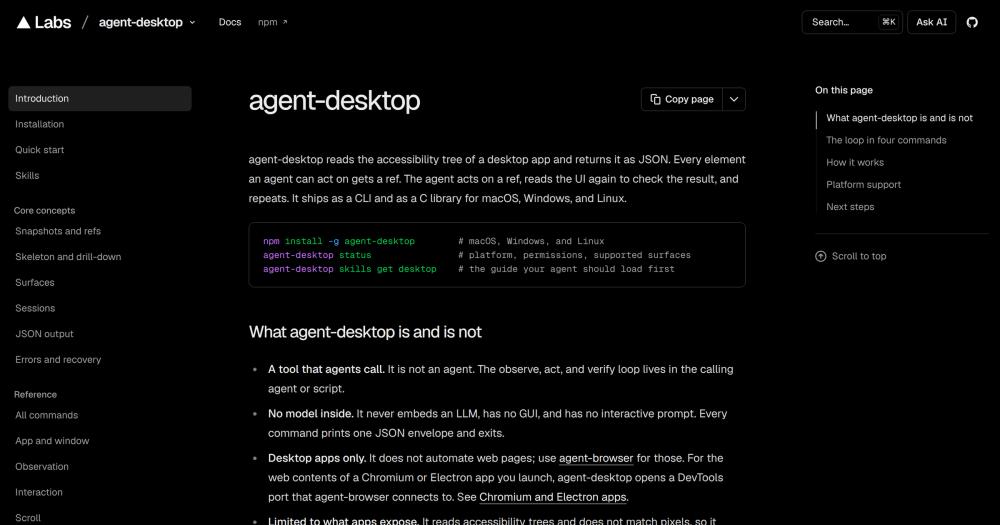
Automate desktop apps for AI agents on macOS, Windows, and Linux through the OS accessibility tree, with stable refs and Apache-2.0 license.

Visit websiteGitHub3.9K stars
image of Agent Desktop
TL;DR

Agent Desktop is a CLI and C library that gives AI agents reliable computer use on macOS, Windows, and Linux by reading desktop app UI through the OS accessibility tree. It replaces pixel-based computer-use approaches (screenshot and coordinate matching) with stable accessibility refs, so actions stay safe to retry and do not break on UI redraws. Apache-2.0 licensed, it ships as an npm package with native Rust binaries for all three platforms. Best for AI developers building agent workflows that need to operate native desktop apps.

Read the full breakdownHide the full breakdownWho it is for, how it works, trade-offs, the quick start and the FAQ
who it's for

Who Agent Desktop is for#

AI developers building agent workflows over native desktop apps

Agent Desktop gives a calling agent the observe-act-verify loop over any app that exposes an accessibility tree: accounting tools, internal desktop software, legacy systems with no API. The agent maps the app, acts on refs, and checks the result structurally instead of visually.

Skip if:

Your workflow targets web apps only. Agent Desktop does not automate web pages; use agent-browser for those. A workflow that only needs a browser has no use for the desktop tool.

Agent framework authors adding desktop computer use

The C FFI (`libagent_desktop_ffi`) lets a framework call Agent Desktop in-process without spawning the CLI for every command. The skills system gives the framework a way to inject version-matched docs into the agent's context before it starts acting on the desktop.

Skip if:

You only need CLI access and do not want in-process calls. The CLI path is simpler for scripted agents that do not need to minimize per-command overhead.

Developers building reliable retry logic for desktop actions

The ref-based model returns explicit error codes (`STALE_REF`, `AMBIGUOUS_TARGET`) with a `disposition.retry` flag so retry logic is deterministic. The `wait` command lets the agent pause until a specific element reaches a predicate value, removing the need for fixed sleep timers between actions.

Skip if:

Your testing needs are in the QA regression space: Ranorex, TestComplete, and UFT One are better fits. Agent Desktop is infrastructure for AI agents, not a test framework; it has no test runner, assertion library, or reporting.

the problem

The problem it solves#

AI agents that need to control desktop apps face a fundamental challenge: they have no reliable way to see what is on screen and act on it structurally. Pixel-based approaches (taking a screenshot, identifying a button by its position, clicking the coordinates) are fragile. A UI element shifts position after an OS update, a window redraws during animation, or a high-DPI display returns different coordinates, and the agent is guessing. Retrying a failed click risks acting on the wrong element, because there is no structural signal to confirm whether the UI actually changed.

The underlying gap is that most computer-use infrastructure treats the desktop as an image rather than a structured object tree. Every major OS already exposes that structure through accessibility APIs, but consuming it correctly requires platform-specific bindings and a stable referencing scheme that survives UI changes. Most teams either accept the fragility of pixel matching or avoid desktop automation entirely.

how Agent Desktop solves it

How it solves it#

OS accessibility tree observation

Reads the real UI structure every major OS exposes rather than matching pixels. On macOS it uses the AX API, on Windows UI Automation, and on Linux AT-SPI. Every interactive element gets a ref, and the tree returns as JSON. An agent maps the full app, drills into the region it needs, and works from a stable structural view instead of coordinates.

Stable ref-based actions

Every element an agent can act on gets a ref that carries the ID of the snapshot that produced it. Acting on a stale ref returns `STALE_REF` instead of silently targeting the wrong element. Refs stay valid while the UI is unchanged; take a new snapshot after a change and use the new refs. This makes retry logic safe and deterministic.

60-command CLI with JSON output

Every command prints one JSON envelope with an `ok` field and either `data` or `error`. The 56 operational commands cover observation (snapshot, find, get, screenshot), ref-based actions (click, type, set-value, scroll), app and window management, clipboard, notifications, and sessions. Error codes carry a `disposition.retry` flag so agent loops know when a retry is safe.

C library for in-process calls

Each release ships `libagent_desktop_ffi` for macOS, Linux, and Windows. A program can call the tool in-process through the C FFI instead of spawning the CLI for each command, reducing per-call overhead. Bindings are available through ctypes in Python and any language that can call a C shared library.

Cross-platform: macOS, Windows, and Linux

Ships native Rust binaries for x64 and ARM64 on all three platforms, with the same 60 command names on every OS. macOS requires Accessibility permission (guided via `agent-desktop permissions --guide`). Windows requires no grant for apps at the terminal's integrity level. Linux requires Ubuntu 24.04 or later with a running AT-SPI bus.

strengths · trade-offs

Strengths and trade-offs#

Strengths

  • Apache-2.0 license with no usage restrictionsApache-2.0 means you can run it in any commercial product, modify it, and distribute it without restriction. Unlike commercial computer-use APIs that bill per action or require a paid subscription, the CLI and library cost nothing beyond the machine you run them on.
  • Accessibility trees beat pixels for reliabilityRefs stay stable while the UI does not change, and a changed UI returns a clear error code rather than silently targeting a moved element. The repo description states that refs stay stable and actions stay safe to retry, which is the structural property pixel matching cannot provide.
  • No embedded model or cloud dependencyAgent Desktop has no embedded LLM and no cloud connection. The observe-act-verify loop stays in the calling agent. This works with any model or framework, and no data leaves the machine unless the calling agent sends it somewhere. The optional JEV helper that sends screen descriptions to a model provider is a separate component.
  • Version-matched skill docs shipped inside the binaryThe binary ships its own documentation that agents read before using it: `agent-desktop skills get desktop` returns the loop, ref, and verification rules; `agent-desktop skills get platform` returns the OS-specific capability table. Docs are versioned with the binary, so an agent always reads the correct documentation for the version it is running.

Trade-offs

  • -Cannot see apps that publish no accessibility treeAgent Desktop reads accessibility trees and does not match pixels, so it cannot observe a UI that publishes no accessibility tree. Custom-painted canvases, some game engines, and fully hardware-rendered UIs expose nothing through the AX API, UI Automation, or AT-SPI. The README states this limitation explicitly. For those UIs, a pixel-based approach is the only option.
  • -Linux requires a graphical session with AT-SPIOn Linux, Agent Desktop requires Ubuntu 24.04 or later with glibc 2.35, a running graphical session, and an active AT-SPI bus. Headless Linux servers without AT-SPI cannot use the tool. Some Linux apps use non-standard toolkits that expose limited or no AT-SPI nodes, reducing what the agent can observe and act on.
  • -macOS headless calls restrict foreground activation and inputOn macOS, headless calls prohibit foreground activation and synthesized input. The CLI runs a private command host that retains native accessibility objects, but `TMPDIR` must be owned by the current user with mode `0700`. The `--headed` global flag enables physical input when the automated path is insufficient, but that removes the headless guarantee.
versus alternatives

Agent Desktop vs alternatives#

Agent Desktop vs Commercial Screen Automation

Agent Desktop and commercial computer-use APIs both let AI agents control desktop software, but they work through different mechanisms. Commercial services from providers like OpenAI and Anthropic send screenshots to a vision model that returns coordinate-based actions; Agent Desktop reads the OS accessibility tree and acts on structural refs.

FeatureAgent DesktopCommercial Computer-Use APIs
LicenseApache-2.0Proprietary / paid access
Self-hostingYes, CLI + C libraryNo; API calls to cloud endpoint
Observation methodOS accessibility treeScreenshot + vision model
Ref stabilityYes; stale ref returns error codeNo structural refs
LLM requiredNo (bring your own)Yes (provider's model)
PlatformsmacOS, Windows, LinuxVaries by provider

Agent Desktop is the better choice when the agent needs verifiable, retry-safe actions over a UI with an accessibility tree, when data must stay on the local machine, or when the calling agent already has a model and the team wants to control the full loop. The Apache-2.0 license means there are no usage costs and no per-action billing.

Commercial computer-use APIs from paid services are still a better fit when the target UI has no accessibility tree: a fully custom-painted canvas, a game engine viewport, or an app that publishes nothing through AX API, UI Automation, or AT-SPI. In those cases the screenshot-based approach is the only option Agent Desktop cannot cover. Paid cloud services also bundle the vision model, which reduces setup for teams that do not want to wire a model to an action loop themselves.

install · quick start

Quick start#

bash
Install the CLI with npm on macOS, Windows, or Linux.

```bash
npm install -g agent-desktop
agent-desktop version
```
tech stack · detected from GitHub

What it's built on#

Languages
CC#JavaScriptObjective-CPythonRust
Frameworks
Next.jsReact
frequently asked

FAQ#

Does agent-desktop support Windows and Linux, or only macOS?

All three platforms are supported. macOS requires Accessibility permission (guided via agent-desktop permissions --guide), Windows requires no grant for apps at the terminal's integrity level, and Linux requires Ubuntu 24.04 or later with a running AT-SPI bus. The same 60 command names are available on every platform; platform-specific behavior is documented by running agent-desktop skills get platform.

How is agent-desktop different from a pixel-based computer-use API?

Agent Desktop reads the OS accessibility tree (AX API on macOS, UI Automation on Windows, AT-SPI on Linux) rather than taking screenshots and matching coordinates. Elements get stable refs that carry error codes when the UI changes, making retry logic deterministic. Pixel-based approaches cannot provide that structural guarantee; the tradeoff is that Agent Desktop cannot observe UIs that expose no accessibility tree.

Does agent-desktop include an AI model or require a cloud account?

No. Agent Desktop has no embedded model, no cloud connection, and no interactive prompt. It is a tool that agents call; the observe-act-verify loop lives in the calling agent or script. This means it works with any model provider and does not send data outside the machine unless the calling agent does so separately.

How do I install agent-desktop?

Install the CLI with npm install -g agent-desktop on macOS, Windows, or Linux. Bun, Yarn, and pnpm can install the same package. The package includes native Rust binaries for x64 and ARM64. For direct execution without a JavaScript launcher, download the native archive from GitHub Releases at https://github.com/vercel-labs/agent-desktop/releases.

What license does agent-desktop use?

Apache-2.0. You can run it commercially, modify it, and distribute it without restriction, as long as you include the license notice. There is no commercial license required and no usage-based billing.

also worth a look

Similar open-source tools#

Hermes Agent

Featured

Alternative toGrok Bot

Self-hosted AI agent: persistent memory, multi-channel chat, model choice.

  • 258,472 GitHub stars
  • MITLicence MIT

Mlx Serve

Alternative toLM Studio

Local LLM server for Apple Silicon, faster than LM Studio

  • 2,206 GitHub stars
  • MITLicence MIT

TensorFold

InAI & Machine Learning

Local LLM inference for Apple Silicon and NVIDIA GPUs, no Python.

  • 1,567 GitHub stars
  • Apache-2.0Licence Apache-2.0

Skillshare

InDeveloper Tools

AI coding setup manager for skills, agents, MCP, and hooks

  • 2,872 GitHub stars
  • MITLicence MIT

Aletheia Mem

InDeveloper Tools

Persistent local memory and rules for Claude Code, Codex and Cursor

  • 9 GitHub stars
  • Apache-2.0Licence Apache-2.0

Claude Cookbooks

InAI & Machine Learning

Official Claude API notebooks and code recipes for Python developers

  • 53,978 GitHub stars
  • MITLicence MIT
by category

Open source tools in these categories#

446

AI & Machine Learning

freeCodeCamp, REA (Reverse Engineer Anything), OpenClaw
517

Developer Tools

REA (Reverse Engineer Anything), superpowers, Skills for Real Engineers
116

LLMOps & AI Tooling

Hermes Agent, OpenCode, MarkItDown

Sponsors

Inbox Zero

Alternative toSuperhuman

AI email assistant that drafts replies and clears your inbox

  • 12,855 GitHub stars
  • AGPL-3.0Licence AGPL-3.0
  • #Email

rakazo

Alternative toGrok Bot

AI teammates you own: your keys, your model, your machine.

  • 6,242 GitHub stars
  • Apache-2.0Licence Apache-2.0
  • #AI Agents

SnitchFeed

Live monitoring on LinkedIn, X, Reddit & more. Agentic social listening for startups.

Marketing & Growth

Advertise your product

New open source projects by email

The projects we add and every new guide. Free, unsubscribe any time.

Find open source alternatives to paid software

/
  • Claude Code to OpenCode
  • Jira to Windshift
  • Notion to AppFlowy
  • Slack to Mattermost
  • Linear to GitLab
  • Wispr Flow to Handy
  • Arc to Zen Browser
  • CapCut to Concat
  • Grok Bot to rakazo
  • Superhuman to Inbox Zero
  • Airtable to AITable
  • Muse to OpenClaw
  • Railway to Coolify
  • GitHub Copilot to Cline
  • Datadog to Netdata
  • Microsoft Teams to Rocket.Chat
  • Confluence to Docmost
  • Pinecone to Qdrant
  • Zapier to n8n
  • Devin AI to OpenHands
  • Firebase to Supabase
  • 1Password to KeePassXC
  • Contentful to Strapi
  • Adobe Premiere Pro to Shotcut
  • Claude Code to OpenCode
  • Jira to Windshift
  • Notion to AppFlowy
  • Slack to Mattermost
  • Linear to GitLab
  • Wispr Flow to Handy
  • Arc to Zen Browser
  • CapCut to Concat
  • Grok Bot to rakazo
  • Superhuman to Inbox Zero
  • Airtable to AITable
  • Muse to OpenClaw
  • Railway to Coolify
  • GitHub Copilot to Cline
  • Datadog to Netdata
  • Microsoft Teams to Rocket.Chat
  • Confluence to Docmost
  • Pinecone to Qdrant
  • Zapier to n8n
  • Devin AI to OpenHands
  • Firebase to Supabase
  • 1Password to KeePassXC
  • Contentful to Strapi
  • Adobe Premiere Pro to Shotcut