Open Source Alternatives
  • Alternatives
  • Categories
    Categories by size1,010 projects
    • Developer Tools517
    • AI & Machine Learning446
    • Business & Productivity232
    • Web Development203
    • Security & Monitoring150
    • Communication & Collaboration138
    • IT Management135
    • Cloud & Hosting119
    • LLMOps & AI Tooling116
    • Data & Analytics110
    Browse all 21 categoriesProduct & Project Management, Design & Creative and 9 more
  • Blog
  • Advertise
SearchNotion, Slack, password manager.../
Submit
Open Source Alternatives
  • Alternatives
    • Developer Tools517
    • AI & Machine Learning446
    • Business & Productivity232
    • Web Development203
    • Security & Monitoring150
    • Communication & Collaboration138
    • Browse all 21 categories
  • Blog
  • Advertise
Submit your project

New open source projects by email

The projects we add and every new guide. Free, unsubscribe any time.

Open Source Alternatives LogoOpen Source Alternatives

Handpicked Open Source Alternatives to Paid Softwares

Product

  • Categories
  • Tag
  • Advertise

Resources

  • Blog
  • Collection
  • Submit

Company

  • Privacy Policy
  • Terms of Service
  • Refund Policy
  • Sitemap

Alternatives

  • Claude Code
  • Jira
  • Notion
  • Slack
  • Linear
  • Wispr Flow
  • All alternatives
© 2026 Open Source Alternatives. All rights reserved.
Open SourceAlternatives
Home/Categories/AI & Machine Learning/Mlx Serve
icon of Mlx Serve

Mlx Serve

Open source alternative to LM Studio

  • 2.2K stars
  • MIT
  • Active this week
  • Last commit today

Last verified Nov 1, 2026

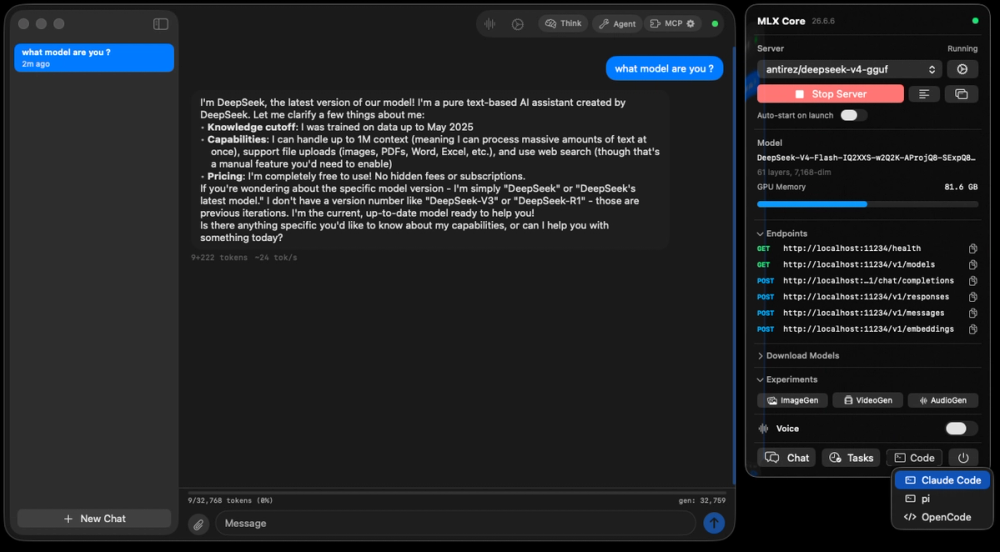
Run open language models on Apple Silicon with a native Zig inference server; OpenAI, Anthropic, and Ollama APIs included, no Python required.

Visit websiteGitHub2.2K starsDeploy on Hostinger
image of Mlx Serve
TL;DR

Mlx Serve is a native Zig inference server for Apple Silicon that runs any MLX or GGUF model locally without Python or cloud API costs. It replaces proprietary local inference tools like LM Studio with an MIT-licensed open source server that speaks the OpenAI, Anthropic, and Ollama APIs on a single port. On M4 Max with identical model weights, it decodes tokens 81% faster than LM Studio on average. Best for developers who need local LLM serving with full API compatibility for coding agents, RAG pipelines, or private document chat.

Read the full breakdownHide the full breakdownWho it is for, how it works, trade-offs, the quick start and the FAQ
who it's for

Who Mlx Serve is for#

Developers running coding agents on a local model

MLX Serve integrates with Claude Code, Codex, OpenCode, and Cursor via `mlx-serve launch claude` and standard OpenAI/Anthropic API configuration. The server uses the model's real context window rather than a capped default, so agent loops that echo file contents into edits benefit directly from the speculative decoding speedup.

Skip if:

Your coding agent setup is already stable on another inference server and performance is not a bottleneck. Switching inference servers requires reconfiguring every tool that points at it.

Teams building private RAG pipelines on macOS

Document RAG is built into the app: drag a folder of PDFs, text files, or notes into the chat and ask questions about the contents. Nothing leaves the machine. The embeddings endpoint is available on the API for teams who want to build their own retrieval layer against the local model.

Skip if:

Your RAG pipeline runs on cloud infrastructure where Apple Silicon is not the deployment target. MLX Serve's primary advantage is on-device inference for macOS-based workflows.

macOS users replacing LM Studio who need Ollama compatibility

Existing Ollama-compatible tools connect to MLX Serve unchanged. The model library carries over if you use 4-bit MLX weights, since the same Hugging Face model identifiers work. The switch gains Anthropic API support, faster decode speed, and media generation without breaking existing tooling.

Skip if:

You rely on LM Studio's model browser as your primary interface for discovering and downloading models. MLX Serve's app has model selection but the discovery UX is more minimal than LM Studio's dedicated browser.

Researchers running very large models on high-memory Apple Silicon

On 96 GB and larger Macs, DeepSeek V4 Flash (284B parameters) and Qwen3.8-Flash-Next (125B with about 6B active per token) are available as one-click downloads. Two 64+ GB Macs connected over Thunderbolt 5 can share a single model for configurations that exceed a single machine's memory.

Skip if:

Your research requires CUDA-specific libraries, Python-based training workflows, or models that only ship in PyTorch checkpoint format without an MLX or GGUF conversion available.

the problem

The problem it solves#

Running large language models locally on macOS means navigating a slow, fragile inference stack. Most local inference tools are built on Python runtimes: model loading takes longer than necessary, dependencies conflict, and the Python layer clips the GPU throughput that Apple Silicon can actually deliver. For developers building agent loops, coding assistants, or RAG pipelines, token generation speed is the bottleneck, and the performance gap between what the hardware can do and what these tools deliver is significant.

The API compatibility problem adds another layer of friction. A developer who wants to route Claude Code or Cursor to a local model typically has to manage separate tool versions for the OpenAI and Anthropic protocols, or run a translation proxy on top of their inference server. That is one more process to monitor, one more failure point, and one more reason the local inference setup breaks at the worst moment.

how Mlx Serve solves it

How it solves it#

No Python inference stack

MLX Serve is written in Zig and calls Apple's MLX framework and llama.cpp directly via C bindings. There is no Python runtime in the call path, which cuts model load time and removes the dependency management overhead that affects Ollama and LM Studio on macOS.

OpenAI, Anthropic, and Ollama APIs on one port

The server listens on port 11234 and handles OpenAI chat completions, Anthropic Messages, and Ollama list/generate/chat requests on the same endpoint. Tools built for any of these three protocols connect without reconfiguration. Streaming, tool calling, JSON schema outputs, embeddings, and WebSocket support are included on every surface.

Three speculative decoding modes

Prompt Lookup Decoding works on any model architecture with no extra downloads. The Gemma 4 Drafter uses a cross-attention drafter that reuses the target model's K/V cache for up to 65% faster code completion. Native Qwen MTP uses the model's own multi-token prediction head for up to 2x on code and agent edits. Adaptive gates disable drafting when drafts stop landing so there is no quality cost.

Models larger than available RAM via SSD streaming

Models like GLM-5.3-Flash, MiMo-V2.6-Flash, and DeepSeek-V4.1-Flash run on 128 GB Macs by reading expert layers from the SSD on demand. Two Macs connected over Thunderbolt 5 can split a single model between them, and any Mac on the local network can serve models to other devices.

Media generation: images, video, music, and 3D

The macOS app includes image generation with FLUX.2, Qwen-Image, and Krea; video generation with LTX-Video and MiniMax-H3; music generation with ACE-Step and YuE2; and 3D model export from a single photograph with Hunyuan3D. All models run on-device with no cloud calls or watermarks.

Agent mode with MCP and a sandboxed shell

Agent mode gives the model file system access confined to a folder you choose, or an isolated Linux VM. MCP tool calling works on every model, including DeepSeek V4 Flash. Schedules let you hand the agent a recurring task in plain English; a Telegram integration lets you message your local model from anywhere through a private bot.

strengths · trade-offs

Strengths and trade-offs#

Strengths

  • 81% geomean faster than LM Studio on identical model weightsOn M4 Max hardware with identical 4-bit MLX weights, MLX Serve decodes 81% faster geomean than LM Studio in benchmarks published on the project site. The advantage holds across Gemma 4, Qwen 3.8, and Llama 3 families. Speculative decoding extends the lead further: code completion on Qwen3.6-27B reaches 78 tok/s versus 28 tok/s without the MTP drafter.
  • MIT license, free for commercial useThe full codebase is MIT licensed, including the server and the macOS app. There is no open-core split, no paywalled feature tier, and no per-seat pricing. Third-party bundled components use Apache-2.0, BSD 3-Clause, and MIT as noted in the NOTICE file. You can run it in a commercial product, modify it, and ship it to customers without restriction.
  • Single binary with no external dependenciesThe server ships as one self-contained binary with no Python, no Node.js, and no separate runtime to install. On first launch the app downloads whichever model fits your hardware and is ready to answer in seconds. There are no setup scripts and no gigabyte runtime downloads before the first response.
  • Drop-in replacement for Ollama-compatible toolsMLX Serve speaks the Ollama protocol natively, so tools built for Ollama connect unchanged: same models, same endpoints, same configuration. Raycast, Obsidian, Enchanted, and Open WebUI work without reconfiguration. The command `mlx-serve run gemma4` downloads, serves, and opens a chat session in one step, matching Ollama's workflow exactly.

Trade-offs

  • -macOS 26.2 or later requiredThe app and server require macOS 26.2 or later on Apple Silicon. Macs running earlier macOS versions cannot run the app until they upgrade. Linux builds for NVIDIA GPUs are available but are not shipped as prebuilt installers, and Windows support requires building from source using a provided script.
  • -New project with 47 open issuesThe repository was created in February 2026 and had 47 open issues at the time of this writing. As a relatively new project, some edge cases in model compatibility and API surface coverage are still being worked through. Teams with production-critical inference requirements should test thoroughly against their specific model and workload before committing.
  • -Media generation requires GPU memory headroomVideo generation (LTX-Video, MiniMax-H3) and 3D reconstruction (Hunyuan3D) are separate model downloads. Running media generation concurrently with a large language model on a 16 GB Mac is likely to exhaust available unified memory. Users who primarily want media features should account for this when choosing which language model to keep loaded.
versus alternatives

Mlx Serve vs alternatives#

MLX Serve vs LM Studio

LM Studio is a proprietary desktop application for local LLM inference on macOS, Windows, and Linux. Both tools download and run open models locally with a chat interface and a developer API. The primary decision criteria are performance, API breadth, and licensing.

FeatureMLX ServeLM Studio
LicenseMITProprietary
Self-hostingSingle binary, server deployableDesktop app only
Ollama protocolYes, nativePartial
Anthropic APIYesNo
Speculative decodingYes (PLD, Drafter, MTP)No
Media generationYes (images, video, music, 3D)No
Agent modeYes (sandboxed shell, MCP)No
No Python requiredYesNo
Linux/WindowsBuilds availableNative installers

MLX Serve is the better choice for performance-sensitive workloads. On M4 Max hardware with identical 4-bit MLX weights and default settings, MLX Serve decodes 81% faster geomean than LM Studio. Developers who need Anthropic API support alongside OpenAI compatibility will also find MLX Serve is the only option that provides both on a single port: LM Studio's API surface is OpenAI-only, so tools that call the Anthropic Messages API need a separate adapter. The MIT license removes licensing friction for teams shipping commercial products that embed a local inference server.

LM Studio is worth considering when a polished GUI-first experience for model browsing and discovery is the priority. Its model browser, per-conversation settings, and community documentation are mature and well-established. Teams where the primary user is non-technical and model management matters more than API throughput may find LM Studio easier to adopt. LM Studio also ships native installers for Windows and Linux without build steps, making it more accessible for mixed-OS teams not focused on macOS performance.

install · quick start

Quick start#

bash
Install the macOS app via Homebrew or download the signed DMG installer from GitHub Releases.

```bash
brew tap ddalcu/mlx-serve https://github.com/ddalcu/mlx-serve
brew trust ddalcu/mlx-serve
brew install --cask mlx-serve
```
tech stack · detected from GitHub

What it's built on#

Languages
CC++JavaScriptPythonSwiftTypeScriptZig
Frameworks
Svelte
frequently asked

FAQ#

Is MLX Serve actually faster than LM Studio?

Yes. On M4 Max hardware with identical 4-bit MLX weights and default settings, MLX Serve decodes 81% faster geomean than LM Studio, according to benchmarks published on the project site at mlxserve.com. The advantage comes from a native Zig backend that calls Apple's MLX framework directly without a Python intermediary, plus speculative decoding modes that LM Studio does not offer.

Does MLX Serve work with Claude Code and Cursor?

Yes. Running mlx-serve launch claude starts Claude Code configured to use your local model with its real context window. Cursor, Zed, Continue, and OpenCode connect via the OpenAI-compatible endpoint on port 11234. Tools that use the Anthropic Messages API also connect natively, since MLX Serve exposes both OpenAI and Anthropic surfaces on the same port.

What Mac do I need to run it?

Any Apple Silicon Mac (M1 through M5) running macOS 26.2 or later. The app suggests a model for your specific hardware on first launch: 16 GB Macs start with Gemma 4 E4B, 32 GB Macs with Qwen 3.8 27B, and 96 GB Macs can run Qwen3.8-Flash-Next (125B). Models bigger than your available unified memory stream expert layers from the SSD on 128 GB and 256 GB configurations.

Does it run on non-Apple hardware?

Partially. Linux builds for NVIDIA GPUs ship with every release: x64 for RTX 20 through 50 series cards and arm64 for DGX Spark, GH200, and Jetson Thor. Windows support requires building from source with a provided script. The macOS app and media generation features are Apple Silicon only; the server binary itself targets supported GPU platforms.

Is it really MIT licensed with no paywalled features?

Yes. The full codebase is MIT licensed with no open-core split. Third-party bundled components keep their own licenses (Apache-2.0, BSD 3-Clause, and MIT), listed in the NOTICE file. The README states "Nothing is paywalled: it's MIT now and stays MIT." You can run it commercially, fork it, and modify it without restriction.

also worth a look

Similar open-source tools#

LocalAI

Alternative toOpenAI API

Self-hosted AI runtime: any model, any modality, any hardware.

  • 50,066 GitHub stars
  • MITLicence MIT

llama-swap

Alternative toLM Studio

Hot-swap AI models on your local inference server

  • 6,145 GitHub stars
  • MITLicence MIT

magnitude

Alternative toLM Studio

Local models for your agent, tuned for your hardware

  • 7,538 GitHub stars
  • Apache-2.0Licence Apache-2.0

omlx

Alternative toLM Studio

Fast LLM inference for Apple Silicon with persistent SSD KV caching

  • 23,165 GitHub stars
  • Apache-2.0Licence Apache-2.0

Ollama

Alternative toLM Studio

Run large language models locally on Mac, Linux, or Windows

  • 185,272 GitHub stars
  • MITLicence MIT

Hermes Agent

Featured

Alternative toGrok Bot

Self-hosted AI agent: persistent memory, multi-channel chat, model choice.

  • 258,472 GitHub stars
  • MITLicence MIT
by category

Open source tools in these categories#

446

AI & Machine Learning

freeCodeCamp, REA (Reverse Engineer Anything), OpenClaw
116

LLMOps & AI Tooling

Hermes Agent, OpenCode, MarkItDown
517

Developer Tools

REA (Reverse Engineer Anything), superpowers, Skills for Real Engineers
Hostinger

Self-host Mlx Serve on a Hostinger VPS

Keep it running 24/7, even when your laptop is off. A Hostinger VPS gives it a server of its own.

  1. 01

    Choose a plan

    Starts from $6.49/mo

  2. 02

    Apply

    Extra 10% off yearly plans

  3. 03

    Install Mlx Serve

    On a server that stays on

  4. 04

    Start building

    Focus on the app, not the server

Deploy on Hostinger

Sponsors

Inbox Zero

Alternative toSuperhuman

AI email assistant that drafts replies and clears your inbox

  • 12,855 GitHub stars
  • AGPL-3.0Licence AGPL-3.0
  • #Email

rakazo

Alternative toGrok Bot

AI teammates you own: your keys, your model, your machine.

  • 6,242 GitHub stars
  • Apache-2.0Licence Apache-2.0
  • #AI Agents

SnitchFeed

Live monitoring on LinkedIn, X, Reddit & more. Agentic social listening for startups.

Marketing & Growth

Advertise your product

New open source projects by email

The projects we add and every new guide. Free, unsubscribe any time.

Find open source alternatives to paid software

/
  • Claude Code to OpenCode
  • Jira to Windshift
  • Notion to AppFlowy
  • Slack to Mattermost
  • Linear to GitLab
  • Wispr Flow to Handy
  • Arc to Zen Browser
  • CapCut to Concat
  • Grok Bot to rakazo
  • Superhuman to Inbox Zero
  • Airtable to AITable
  • Muse to OpenClaw
  • Railway to Coolify
  • GitHub Copilot to Cline
  • Datadog to Netdata
  • Microsoft Teams to Rocket.Chat
  • Confluence to Docmost
  • Pinecone to Qdrant
  • Zapier to n8n
  • Devin AI to OpenHands
  • Firebase to Supabase
  • 1Password to KeePassXC
  • Contentful to Strapi
  • Adobe Premiere Pro to Shotcut
  • Claude Code to OpenCode
  • Jira to Windshift
  • Notion to AppFlowy
  • Slack to Mattermost
  • Linear to GitLab
  • Wispr Flow to Handy
  • Arc to Zen Browser
  • CapCut to Concat
  • Grok Bot to rakazo
  • Superhuman to Inbox Zero
  • Airtable to AITable
  • Muse to OpenClaw
  • Railway to Coolify
  • GitHub Copilot to Cline
  • Datadog to Netdata
  • Microsoft Teams to Rocket.Chat
  • Confluence to Docmost
  • Pinecone to Qdrant
  • Zapier to n8n
  • Devin AI to OpenHands
  • Firebase to Supabase
  • 1Password to KeePassXC
  • Contentful to Strapi
  • Adobe Premiere Pro to Shotcut