Open Source Alternatives
  • Alternatives
  • Categories
    Categories by size1,198 projects
    • Developer Tools618
    • AI & Machine Learning521
    • Business & Productivity291
    • Web Development215
    • Security & Monitoring180
    • Communication & Collaboration160
    • IT Management151
    • LLMOps & AI Tooling132
    • Cloud & Hosting129
    • Product & Project Management126
    Browse all 21 categoriesDesign & Creative, DevOps & CI/CD and 9 more
  • Blog
  • Advertise
SearchNotion, Slack, password manager.../
Submit
Open Source Alternatives
  • Alternatives
    • Developer Tools618
    • AI & Machine Learning521
    • Business & Productivity291
    • Web Development215
    • Security & Monitoring180
    • Communication & Collaboration160
    • Browse all 21 categories
  • Blog
  • Advertise
Submit your project

New open source projects by email

The projects we add and every new guide. Free, unsubscribe any time.

Open Source Alternatives LogoOpen Source Alternatives

Handpicked Open Source Alternatives to Paid Softwares

Add Open Source Alternatives as a preferred source on Google

Product

  • Categories
  • Tag
  • Advertise

Resources

  • Blog
  • Collection
  • Submit

Company

  • Privacy Policy
  • Terms of Service
  • Refund Policy
  • Sitemap

Alternatives

  • Claude Code
  • Jira
  • Notion
  • Slack
  • Linear
  • Wispr Flow
  • All alternatives
© 2026 Open Source Alternatives. All rights reserved.
Open SourceAlternatives
Home/Categories/Developer Tools/asm8086
icon of Asm8086

asm8086

Open source alternative to EMU8086

  • 9 stars
  • MIT
  • Active this week
  • Last commit today

Last verified Nov 10, 2026

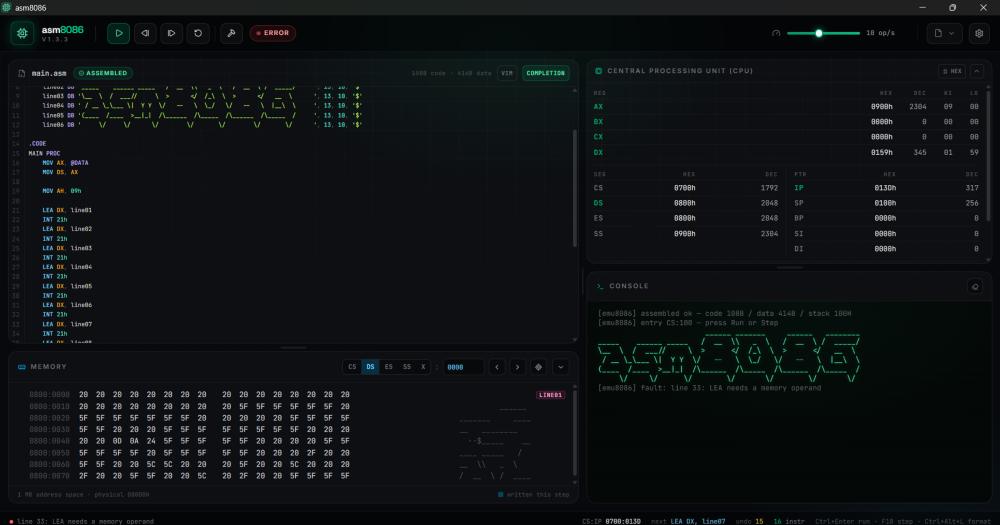
Build and test Intel 8086 assembly programs in an MIT-licensed desktop IDE with VIM keybindings, dark theme, and code auto-completion.

Visit websiteGitHub9 stars
image of Asm8086
TL;DR

asm8086 is a Tauri desktop IDE for Intel 8086 assembly development, built as an open source replacement for EMU8086. EMU8086 ships without dark theme, VIM keybindings, code auto-completion, or meaningful error messages; asm8086 includes all four. MIT licensed, it ships as a downloadable desktop app for students and CS educators learning x86 assembly on current hardware.

Read the full breakdownHide the full breakdownWho it is for, how it works, trade-offs, the quick start and the FAQ
who it's for

Who asm8086 is for#

CS students learning x86 assembly

Get the Intel 8086 instruction set with a modern editor that shows CPU state in real time. The built-in examples run immediately; the step-back debugger helps when a register value is wrong and you need to trace execution backward.

Skip if:

If your course requires the specific interface and output format of EMU8086 for graded assignments, check with your instructor before switching tools.

Educators teaching introductory computer architecture

Demo assembly execution on current hardware with a tool that projects well: dark theme, clean interface, and variable emulation speed let you slow execution to explain what each instruction does to the registers.

Skip if:

If your course materials include EMU8086-specific screenshots or assignment formats, switching tools mid-course requires updating those materials.

Developers exploring 8086 assembly as a learning project

VIM keybindings mean you can write assembly without learning a new editor. Built-in examples show patterns like stack operations and loops with working code you can run and modify immediately.

Skip if:

If you need to produce machine code for real 8086 hardware or modern x86-64 targets, asm8086 is a simulator, not a production assembler toolchain.

the problem

The problem it solves#

Learning Intel 8086 assembly requires a development environment that simulates the processor, runs the full instruction set, and shows CPU registers and memory in real time. EMU8086 is the established commercial tool for this, but it ships without dark theme support, VIM keybindings, code auto-completion, meaningful error messages, or built-in example programs. Students and developers who want a modern editor experience when learning assembly have limited options.

The absence of inline diagnostics slows iteration. Without code auto-completion and meaningful error messages, an error appears only after assembly, not as you type. Each misspelled opcode or missing operand means an extra assemble-and-debug cycle. For beginners working through assembly for the first time, the feedback loop matters more than it does in higher-level languages where tooling catches mistakes early.

how asm8086 solves it

How it solves it#

Step-forward and step-back debugger

Execution pauses at any point, advances one instruction at a time, or rewinds to an earlier state. The CPU register panel and memory view update live at each step. This lets you trace exactly how a register value changes across a sequence of instructions without resetting and re-running from the start.

Code auto-completion and autoformatting

The editor suggests instruction mnemonics and operands as you type, reducing misspelled opcode errors before assembly. Autoformatting (Ctrl+Alt+F) normalizes indentation and spacing across the file in one keypress. EMU8086 ships neither feature.

Variable emulation speed

Execution speed is adjustable at runtime. Slowing it down lets you watch the memory and register panels update without pausing on every instruction. EMU8086 has only partial speed control, according to its feature comparison with asm8086.

Built-in example programs

Ships with example assembly programs that run immediately from the IDE. Students can open an example, step through it, and watch the CPU state change without sourcing code from outside the editor. EMU8086 ships no built-in examples.

VIM keybindings

The editor supports VIM modal keybindings for navigation and editing. Developers who already work in Vim or Neovim can write 8086 assembly without adopting a new editing model. EMU8086 has no VIM support.

Run without saving to disk

Assembly programs execute directly from the editor buffer without requiring a save first. EMU8086 requires saving to a file before every run. This removes one step from the write-assemble-run cycle, which matters when iterating quickly on a code snippet.

strengths · trade-offs

Strengths and trade-offs#

Strengths

  • MIT license: no cost, no usage restrictionsMIT licensing means you can run asm8086 on any machine, fork the source, and distribute your version without restriction. No licensing fee and no usage limits, unlike commercial products that require a purchase.
  • Modern editor features EMU8086 does not shipDark theme, VIM keybindings, code auto-completion, meaningful error messages, code autoformatting, and built-in examples are all present in asm8086 and absent from EMU8086. These features change the daily experience of anyone spending hours in the editor.
  • Built on Tauri v2: native desktop app without ElectronTauri produces a native desktop binary rather than an Electron wrapper, keeping the application lightweight. TypeScript powers the editor and UI; Rust handles the system layer. The result runs on the desktop without a browser runtime overhead.

Trade-offs

  • -Early-stage development with known gapsThe README explicitly notes the project is in early stages and that some features may not work as expected. The repo was created in October 2026 and has 9 stars and 1 open issue, meaning minimal community testing. Users relying on this tool for coursework should test their specific programs against it and report any issues.
  • -No package manager or auto-update pathThe README documents no package manager distribution for asm8086. Installation requires manually downloading the binary from GitHub Releases, and updates require repeating that download. There is no auto-update mechanism documented.
versus alternatives

asm8086 vs alternatives#

Asm8086 vs EMU8086

Both tools emulate the Intel 8086 processor with step-by-step debugging and memory visualization, targeting CS students and developers learning x86 assembly. The primary difference is licensing and editor quality: EMU8086 is a proprietary commercial product; asm8086 is MIT licensed with no cost.

Featureasm8086EMU8086
LicenseMIT (free)Proprietary (commercial)
Dark themeYesNo
VIM keybindingsYesNo
Code auto-completionYesNo
Meaningful error messagesYesNo
Built-in examplesYesNo
Code autoformattingYesNo
Run without saving to diskYesNo
Variable emulation speedFullPartial
CPU and memory visualizationYesYes
Step forward / step backYesYes

Asm8086 is the better choice for students and educators who want a modern editing experience. VIM keybindings, dark theme, auto-completion, and built-in examples are all features EMU8086 lacks, and they matter to anyone spending hours in the editor. For anyone with an established EMU8086 workflow, particularly in courses with specific UI documentation or grading scripts tied to its output format, EMU8086 remains the more proven tool with a longer track record and broader community documentation online. Asm8086 is in early development, and users with strict reliability requirements should evaluate it against their specific coursework before switching.

install · quick start

Quick start#

bash
Download the installer from GitHub Releases: https://github.com/arijit4/asm8086/releases/latest
tech stack · detected from GitHub

What it's built on#

Languages
TypeScript
Frameworks
React
Tooling
Rollup
frequently asked

FAQ#

Is asm8086 a free replacement for EMU8086?

Yes. Asm8086 is MIT licensed and free to download and use. It covers the same Intel 8086 instruction set and adds features EMU8086 does not have: dark theme, VIM keybindings, code auto-completion, and built-in example programs. EMU8086 is a commercial product; asm8086 has no cost and no licensing restrictions.

What operating systems does asm8086 support?

Built with Tauri v2, asm8086 compiles to native desktop applications. The available installer formats for each platform are listed on the GitHub Releases page at https://github.com/arijit4/asm8086/releases/latest.

Is asm8086 stable enough to use for coursework?

The README notes the project is in early stages and that some features may not work as expected. With the repo created in October 2026 and active development ongoing as of November 2026, users doing graded coursework should test their specific assembly programs against it before committing to it. Report issues at the GitHub issues tracker.

Does asm8086 support the full Intel 8086 instruction set?

The README lists complex assembly code simulation as a supported feature, alongside CPU and memory visualization. For exact instruction coverage, check the GitHub repository or the open issues list for any reported gaps, since the project is in active development.

Can I use asm8086 to write code for real 8086 hardware?

Asm8086 is a simulator for learning and development; it models the 8086 processor in software for desktop use. It is not documented as a hardware-targeting assembler toolchain. For producing machine code targeting real 8086 or x86 hardware, standard tools like NASM are the typical choice.

also worth a look

Similar open-source tools#

Nuphos

Featured

Alternative toConductor

Agent workspace for teams running Claude Code or Codex

  • 386 GitHub stars
  • Apache-2.0Licence Apache-2.0

CleanYourTV

Featured

Alternative toATV Launcher Pro

Debloat any Android or Google TV over Wi-Fi and get an Apple TV-style home.

  • 55,564 GitHub stars
  • MIT LicenseLicence MIT License

REA (Reverse Engineer Anything)

Featured

Alternative toRevEng.AI

AI-powered reverse engineering for binaries, apps, and assemblies.

  • 441,247 GitHub stars
  • MITLicence MIT

rakazo

Featured

Alternative toGrok Bot

AI teammates you own: your keys, your model, your machine.

  • 7,478 GitHub stars
  • Apache-2.0Licence Apache-2.0

Agent Reach

Featured

Alternative toFirecrawl

Give any AI agent internet access, free and local

  • 109,989 GitHub stars
  • MITLicence MIT

Hermes Agent

Featured

Alternative toGrok Bot

Self-hosted AI agent: persistent memory, multi-channel chat, model choice.

  • 261,524 GitHub stars
  • MITLicence MIT
by category

Open source tools in these categories#

618

Developer Tools

REA (Reverse Engineer Anything), Skills for Real Engineers, superpowers

Sponsors

Inbox Zero

Alternative toSuperhuman

AI email assistant that drafts replies and clears your inbox

  • 12,942 GitHub stars
  • AGPL-3.0Licence AGPL-3.0
  • #Email

rakazo

Alternative toGrok Bot

AI teammates you own: your keys, your model, your machine.

  • 7,478 GitHub stars
  • Apache-2.0Licence Apache-2.0
  • #AI Agents

SnitchFeed

Live monitoring on LinkedIn, X, Reddit & more. Agentic social listening for startups.

Marketing & Growth

Advertise your product

New open source projects by email

The projects we add and every new guide. Free, unsubscribe any time.

Find open source alternatives to paid software

/
  • Claude Code to OpenCode
  • Jira to Windshift
  • Notion to AppFlowy
  • Slack to Mattermost
  • Linear to GitLab
  • Wispr Flow to Handy
  • Arc to Zen Browser
  • CapCut to Concat
  • Grok Bot to rakazo
  • Superhuman to Inbox Zero
  • Airtable to AITable
  • Muse to OpenClaw
  • Railway to Coolify
  • GitHub Copilot to Cline
  • Datadog to Netdata
  • Confluence to Wiki.js
  • Microsoft Teams to Rocket.Chat
  • 1Password to KeePassXC
  • Firebase to Supabase
  • Pinecone to Qdrant
  • Zapier to n8n
  • Devin AI to OpenHands
  • Asana to Leantime
  • Contentful to Strapi
  • Claude Code to OpenCode
  • Jira to Windshift
  • Notion to AppFlowy
  • Slack to Mattermost
  • Linear to GitLab
  • Wispr Flow to Handy
  • Arc to Zen Browser
  • CapCut to Concat
  • Grok Bot to rakazo
  • Superhuman to Inbox Zero
  • Airtable to AITable
  • Muse to OpenClaw
  • Railway to Coolify
  • GitHub Copilot to Cline
  • Datadog to Netdata
  • Confluence to Wiki.js
  • Microsoft Teams to Rocket.Chat
  • 1Password to KeePassXC
  • Firebase to Supabase
  • Pinecone to Qdrant
  • Zapier to n8n
  • Devin AI to OpenHands
  • Asana to Leantime
  • Contentful to Strapi