Open Source Alternatives
  • Alternatives
  • Categories
    Categories by size1,332 projects
    • Developer Tools683
    • AI & Machine Learning552
    • Business & Productivity327
    • Web Development219
    • Security & Monitoring202
    • Communication & Collaboration171
    • IT Management166
    • Design & Creative151
    • DevOps & CI/CD145
    • LLMOps & AI Tooling142
    Browse all 21 categoriesCloud & Hosting, Product & Project Management and 9 more
  • Blog
  • Advertise
SearchNotion, Slack, password manager.../
Submit
Open Source Alternatives
  • Alternatives
    • Developer Tools683
    • AI & Machine Learning552
    • Business & Productivity327
    • Web Development219
    • Security & Monitoring202
    • Communication & Collaboration171
    • Browse all 21 categories
  • Blog
  • Advertise
Submit your project

New open source projects by email

The projects we add and every new guide. Free, unsubscribe any time.

Open Source Alternatives LogoOpen Source Alternatives

Handpicked Open Source Alternatives to Paid Softwares

Add Open Source Alternatives as a preferred source on Google

Product

  • Categories
  • Tag
  • Advertise

Resources

  • Blog
  • Collection
  • Submit

Company

  • Privacy Policy
  • Terms of Service
  • Refund Policy
  • Sitemap

Alternatives

  • Claude Code
  • Jira
  • Notion
  • Slack
  • Linear
  • Wispr Flow
  • All alternatives
© 2026 Open Source Alternatives. All rights reserved.
Open SourceAlternatives
Home/Categories/AI & Machine Learning/Bloks
icon of Bloks

Bloks

Open source alternative to Grok Bot

  • 336 stars
  • FSL-1.1-MIT
  • Active this week
  • Last commit today

Last verified Nov 25, 2026

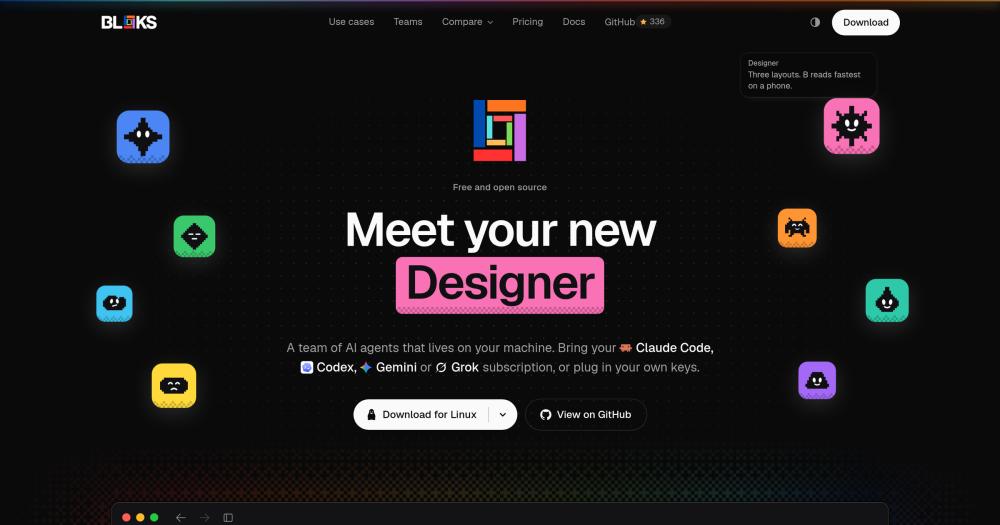
Run a team of AI agents on your own computer with the AI subscriptions and keys you already have.

Visit websiteGitHub336 starsDeploy on Hostinger
image of Bloks
TL;DR

Bloks is a desktop app that runs a team of AI agents on your own computer. It replaces cloud-based AI agent services like Grok Bot, with your agents running on the AI plans and keys you already have. The app is free and needs no account. It is best for solo workers and small teams who want to give AI agents real tasks on their own machine.

Read the full breakdownHide the full breakdownWho it is for, how it works, trade-offs, the quick start and the FAQ
who it's for

Who Bloks is for#

Solo workers with an existing AI plan

If you pay for Claude Code, Codex, or Gemini, Bloks lets you put that plan to work on longer tasks while you do something else. You can set up a Chief of Staff agent to brief you each morning. An Engineer can watch your code folder, and a Marketer can draft posts on a schedule.

Skip if:

You need agents that keep running while your computer is off and do not want to run a second always-on machine.

Small teams sharing a workspace

With a Bloks Team plan, you can invite up to ten people into a shared workspace. Each person connects their own apps and keys. Agents run on your computer, and each member can also make their own private agents. Members reach agents from their phone or any browser with Bloks Cloud.

Skip if:

Your team needs an enterprise product with service-level agreement (SLA) guarantees, audit logs, or dedicated support.

Developers who want agents living in their project files

Memory, skills, and team setups are plain markdown files in a folder. You can write a skill as a text file, switch models with a dropdown, and undo any file change turn by turn. The whole agent state lives on disk, so you can read it, edit it, and version it like any other file.

Skip if:

You need a service that runs continuously with zero maintenance. Bloks requires a machine to stay on and the app to stay open for routines to run.

the problem

The problem it solves#

Cloud AI agent services run your agents on their computers. Your files, conversations, and what your agents learn all live on a server you do not control. That makes it hard to let agents near private files.

Most tools also tie you to one AI provider. If you already pay for Claude Code or Codex, a service running its own cloud model charges you again for the same work. You end up paying twice, and you lose the choice of which model handles each task.

how Bloks solves it

How it solves it#

Agents as contacts in a messaging-style app

Each agent is a contact with a name, a face, a job, and its own memory. You message one the way you would ask a colleague. Rooms are group chats for agents. Add several, pick a lead, and they take turns rather than talking over each other. The lead reviews what came back and gives you one answer. You can @name anyone to ask them directly, or let the app pick the right person for each message.

Bring any AI plan or key

Every agent picks its own engine and model. Use the Claude Code, Codex, Gemini CLI, or Grok CLI plan you already pay for. Or paste an API key (a code from the AI provider) and pay them directly. Run local models with Ollama or add any OpenAI-compatible endpoint. Each agent can have a backup engine that takes over if the main one hits a rate limit.

Every agent keeps its own memory

Each agent keeps a MEMORY.md file on your machine that you can open and edit. The team shares a second memory file. Every file change an agent makes has a before-and-after saved. You can go back one turn at a time with one button, and it never touches edits made since.

Schedules and watchers

Give an agent a time (morning, hourly, Fridays) or point it at a folder, a web page, or a feed. When a time comes or something changes, the agent does what you asked and reports back. A morning brief covers what your agents did, what is waiting on you, and what it cost.

You set how much each agent may do

Choose how much an agent may do before it asks: from Ask first (every step needs your sign-off) to Full access (it acts freely). You can also add rules for what it must never do. Set a monthly spending limit per AI provider so agents cannot go over your budget.

strengths · trade-offs

Strengths and trade-offs#

Strengths

  • Your files and keys never leave your machineBloks runs on your computer. Your API keys go only to the provider they belong to, with no copy on the Bloks side. No account to create and no analytics sent.
  • Free base app with no account requiredThe desktop app is free and needs no sign-in. You get unlimited agents, rooms, and schedules. The paid options are Bloks Cloud ($5/month for phone access from anywhere) and Bloks AI ($20/month, a model that needs no keys). You can run a full agent team at no cost with the AI plans you already have.
  • Not locked to one AI providerEach agent can use a different engine and model. You can mix Claude Code and Codex in the same room, or run a local model alongside a cloud key. If one engine runs out or hits a rate limit, a backup engine takes over. Switching providers is a dropdown change.
  • Daily backups on your own machineBloks keeps a daily backup of your agents, their memory, and their settings in a folder on your machine. The last seven days are kept. You restore with one command. Teams export as one file you can share with someone else or keep as an archive.

Trade-offs

  • -Source-available license, not fully open sourceBloks uses the FSL-1.1-MIT license. You may run it yourself, including at a company for internal use. You may not offer it, or something that works like it, to others as a competing commercial product or service. Each release becomes MIT (fully open) two years after it ships.
  • -Agents stop when your machine sleepsRoutines, watchers, and scheduled work only run while the app is open. Work scheduled while your machine is asleep is skipped, not queued. Bloks Hosting, a paid add-on to Bloks Cloud or Bloks Team, keeps agents working while your computer is off. You can also run bloks-server on another machine of yours that stays on.
  • -Very new projectBloks was first published in August 2026 and has 336 stars on GitHub. It is under active development but is not yet a mature project with years of production use. Five open issues were visible at the time of writing.
versus alternatives

Bloks vs alternatives#

Bloks vs Grok Bot

Bloks and Grok Bot both let you run AI agents with access to a browser, a terminal, and your files, to get multi-step work done. The main difference is where the agents run. Grok Bot is a cloud service. Your agents live on xAI's computers and keep working while your device is off. Bloks runs on your own computer.

FeatureBloksGrok Bot
Where agents runYour own machinexAI's cloud
LicenseFSL-1.1-MIT (source-available)Proprietary
AI enginesClaude Code, Codex, Gemini CLI, Grok CLI, API keys, local modelsSet by xAI
Cost of the appFree, no account neededSold by xAI
Works while device is offNo (needs an always-on server)Yes
Your data locationYour machine onlyxAI's servers

Bloks is the better choice when you want agents on your own machine, with your own files and keys. No data goes to a third party. You can mix any combination of AI providers in one team, and there is no account to create.

Grok Bot is the better fit when you need agents that keep working while your computer is off. It is simpler if you do not want to manage a second always-on machine, and there is no app to install on your own computer.


install · quick start

Quick start#

bash
Download the macOS, Windows, or Linux desktop app from GitHub Releases: https://github.com/hamedgitty/bloks/releases/latest
tech stack · detected from GitHub

What it's built on#

Languages
JavaScriptTypeScript
Frameworks
ElectronReact
Tooling
esbuild
frequently asked

FAQ#

Is Bloks free to use?

Yes. The desktop app is free and needs no account. You get unlimited agents, rooms, and schedules on your own machine. The only paid parts are Bloks Cloud ($5/month) and Bloks AI ($20/month). Bloks Cloud lets your phone reach your agents from anywhere. Bloks AI is a managed model you do not need keys to use.

What AI providers does Bloks work with?

Bloks works with Claude Code, Codex, Gemini CLI, and Grok CLI through the plan you already pay for. You can also paste an API key and pay any AI provider directly: OpenRouter, Gemini, Grok, DeepSeek, Mistral, Llama, and Groq are supported. Run local models with Ollama or add any OpenAI-compatible endpoint. Each agent can use a different engine, and you can set a backup that takes over when the main one hits a limit.

What is the Bloks license, and can I use it at work?

Bloks uses the FSL-1.1-MIT license, which is source-available but not a fully open source license. You may run it yourself, including for internal use at a company. You may not offer it, or something substantially like it, as a competing commercial product or service. Each release becomes MIT two years after it ships, with no restrictions from that point.

Does Bloks work on Windows and Linux?

Yes. The desktop app runs on macOS, Windows, and Linux. The iPhone app pairs with the desktop app and shows your agents' answers, plus approvals you can answer from the Lock Screen. An Android app is listed as coming soon on the project's page.

What happens to my agents if Bloks closes down?

Your agents' memory, skills, and settings are plain files on your machine, in a folder you can read and open. Teams export as one markdown file. Daily backups are kept on your disk for seven days and restored with one command. Keys go only to the AI providers you chose, not to Bloks. If the app stopped working, your data would still be on your machine in readable form.

Looking for more

Other ways to replace Grok Bot#

Paperclip

Featuredfor Grok Bot

Self-hosted AI agent management with org charts and budgets

116,118 GitHub starsVisit

Rakazo

#1 in the Grok Bot guide

Closest architectural Grok Bot match

9,550 GitHub stars

OpenMausBot

#2 in the Grok Bot guide

Local-first agent team on your existing CLI subscriptions

27,054 GitHub stars

OpenBot

#3 in the Grok Bot guide

Per-agent isolation with a policy-gated audit trail

13,412 GitHub stars
All 15 Grok Bot alternatives8 open source Grok Bot alternatives, ranked
by category

Open source tools in these categories#

552

AI & Machine Learning

REA (Reverse Engineer Anything), freeCodeCamp, OpenClaw
327

Business & Productivity

OpenClaw, Excalidraw, RustDesk
Hostinger

Self-host Bloks on a Hostinger VPS

Keep it running 24/7, even when your laptop is off. A Hostinger VPS gives it a server of its own.

  1. 01

    Choose a plan

    Starts from $6.49/mo

  2. 02

    Apply

    Extra 10% off yearly plans

  3. 03

    Install Bloks

    On a server that stays on

  4. 04

    Start building

    Focus on the app, not the server

Deploy on Hostinger

Sponsors

SnitchFeed

Live monitoring on LinkedIn, X, Reddit & more. Agentic social listening for startups.

Marketing & Growth

Windshift

Alternative toJira

Self-hosted work management for teams leaving Jira

  • 468 GitHub stars
  • AGPL-3.0Licence AGPL-3.0

Nuphos

Alternative toConductor

Agent workspace for teams running Claude Code or Codex

  • 802 GitHub stars
  • Apache-2.0Licence Apache-2.0
  • #AI Agents
Advertise your product

New open source projects by email

The projects we add and every new guide. Free, unsubscribe any time.

Find open source alternatives to paid software

/
  • Claude Code to OpenCode
  • Jira to Windshift
  • Notion to AppFlowy
  • Slack to Mattermost
  • Linear to GitLab
  • Wispr Flow to Handy
  • Microsoft To Do to Super Productivity
  • Arc to Zen Browser
  • CapCut to Concat
  • Grok Bot to Rakazo
  • Superhuman to Inbox Zero
  • Discord to Stoat
  • Airtable to AITable
  • Datadog to SigNoz
  • Muse to OpenClaw
  • Railway to Coolify
  • GitHub Copilot to Cline
  • Confluence to Wiki.js
  • Microsoft Teams to Rocket.Chat
  • Zapier to n8n
  • 1Password to KeePassXC
  • Pinecone to Qdrant
  • Contentful to Strapi
  • Firebase to Supabase