
Open-source alternatives guide
Open Source Microsoft To Do Alternatives Before June 2027
By SurajReviewed Verified
Microsoft To Do retires on June 30, 2027, and personal accounts get no Microsoft replacement. That covers the web, Windows, Mac, iOS, and Android apps, for both work or school accounts and personal Microsoft accounts.
I think the best open source alternative to Microsoft To Do is Super Productivity because it needs no account, runs on Windows, macOS, Linux, Android, iOS and the browser at no cost under the MIT licence, and its new importer pulls your open lists straight from Microsoft. The importer works in the desktop and web apps only and leaves completed tasks, reminders, attachments and My Day behind.
On Android, Tasks.org syncs with your existing Microsoft To Do account today.
TL;DR
- Super Productivity: needs no account, runs on Windows, macOS, Linux, Android, iOS and the browser at no cost, and its new importer pulls your open lists straight from Microsoft.
- Vikunja: Kanban or Gantt views, a managed cloud host in the EU, and an OAuth import that works from a browser.
- Tasks.org: on Android, syncs with your existing Microsoft To Do account today, until Microsoft retires the sync on a date it has not announced.
Overview
What Microsoft To Do is and what it costs
Microsoft To Do is a free task manager that syncs your lists across the web, Windows, iOS, and Android. You get due dates, reminders, repeating tasks, and shared lists with other personal Microsoft accounts or with people at the same workplace or school. Flag an email in Outlook and it appears as a task, with the subject line as the task name.
Microsoft confirms that To Do retires June 30, 2027. That covers the web, Windows, Mac, iOS, and Android apps, for both work or school accounts and personal Microsoft accounts.
For work or school accounts, Microsoft Planner becomes the home for personal work tasks, with the updated My Tasks experience rolling out in December 2026. Existing To Do tasks and lists will not migrate to Planner. Microsoft says they remain accessible in Planner through June 30, 2027, and after that date you can no longer view or manage them there. For personal Microsoft accounts, Planner is not available as a replacement, and Microsoft's advice is to pick another app.
Before you decide how to move, a few lines on Microsoft's support page are worth reading directly: "The underlying To Do service, APIs, and related synchronization support will retire on separate, later timelines." "Microsoft will provide a way to export your To Do data before the apps retire." "App retirement does not itself schedule existing task data for deletion." "Classic Outlook's native Tasks experience is separate from the To Do experience hosted in Outlook and will continue working and syncing with Exchange."
Microsoft has not published the export instructions yet: it says it will update its page with instructions, supported data, requirements, and limitations when those details are finalized.
A few other limits apply if you are on a work account moving to Planner. Native Planner apps for Windows and Mac are not planned as desktop replacements. Planner's due-date notifications differ from To Do's per-task reminders. Planner labels don't synchronize with Outlook categories. File attachments are not currently supported on tasks in the new Planner-backed private plan. To Do list groups have no direct equivalent in Planner, and equivalent printing and email-list capabilities are not currently planned.
Pain points
Why people leave Microsoft To Do
The practical reasons teams compare Microsoft To Do with open-source alternatives before they migrate.
For personal account holders, Microsoft is not offering a replacement. The To Do apps retire on June 30, 2027, and that date is why most people searching for open source alternatives are here.
Microsoft To Do does not currently support start and end dates, task status, task completion percentage, multiple priority levels, task work hours, task colors, or Outlook categories available in Outlook Tasks. If you relied on any of those fields, the gap was already enough reason to look.
The retirement notice lands harder if you have no interest in moving again with a vendor you do not control. Open source is the direct answer to that. A tool you self-host, or run from an open codebase, lets you keep your lists and your copy of the code.
Check how each tool handles My Day, shared lists and repeating tasks before you switch.
3 questions separate the 7 tools on this page. Answer them before you install anything and you skip a rebuild later.
Do you need a mobile app? Microsoft To Do syncs across iOS, Android, and Windows at no cost. Not every open source replacement matches that, and some mobile stories are thinner than their desktop counterpart.
Will you run a server? Some tools store everything locally, with no server required. Others are self-hosted web apps that need Docker or a VPS. The answer turns on whether you share lists with anyone and how much setup you are willing to do.
Does a direct Microsoft To Do import matter to you? Microsoft's own export is not out yet. Some tools on this list can reach into Microsoft Graph today and pull your open tasks. The others would need Microsoft's export, which Microsoft has promised but not published. The difference matters most if you want to start migrating before the app retires.
At a glance
Quick comparison
| Name | License | Best For |
|---|---|---|
| Super Productivity | MIT | offline-first with a direct Microsoft To Do import |
| Vikunja | AGPL-3.0 | list and Kanban views with an OAuth import from Microsoft To Do |
| OpenTodo | AGPL-3.0 | a new self-hosted to do app that imports flagged emails |
| Tasks.org | GPL-3.0 | Android-first with a Microsoft To Do sync |
| Tududi | MIT | a self-hosted task manager with CalDAV sync |
| Donetick | AGPL-3.0 | shared chores and household tasks with rotation scheduling |
| Sleek | MIT | a todo.txt desktop app for Windows Mac and Linux |
My Day
A view of the tasks you picked for today
OpenTodo (Today view with a limit), Tududi (Today view)
Lists
Lists
All 7: Super Productivity, Vikunja, OpenTodo, Tasks.org, Tududi, Donetick, Sleek (a todo.txt file)
Steps
Steps
Subtasks in Super Productivity, Vikunja, OpenTodo, Tasks.org, Tududi and Donetick
Due dates and reminders
Due dates and reminders
All 7 (Sleek: due dates)
Repeating tasks
Repeating tasks
All 7
Shared lists
Shared lists
Vikunja, OpenTodo, Tasks.org (up to 5 guests), Tududi, Donetick
Outlook flagged email
Flag an email in Outlook and it appears as a task
OpenTodo, Super Productivity (import only, once)
Editorial ranking
7 Best Open Source Microsoft To Do Alternatives (Ranked)

- 23.9K stars
- MIT
- Active this week
- Last commit 1 day ago
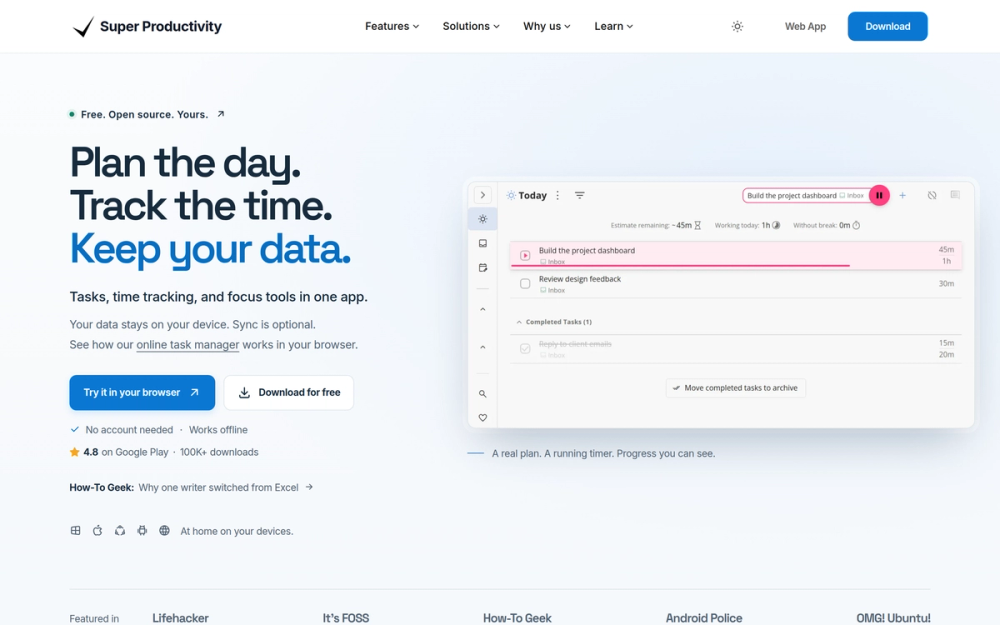
If you want your tasks off Microsoft's servers without routing them through anyone else's on the way out, Super Productivity is where I'd start. The v20.1.0 importer connects to your Microsoft account from the desktop app or the official web app and pulls your open lists to your device. It brings across list names, tasks, notes, steps, categories, due dates and the repeats Super Productivity can express. Starred tasks can come across with an important tag. Completed tasks, reminders, attachments, and My Day do not transfer. It stores everything on your device by default, runs on Windows, macOS, Linux, Android, iOS, and the browser, and costs nothing.
Read moreShow lessKey Features · Pros · Cons · License & Hosting · Best For
It writes your lists to your device as projects and tasks, over an encrypted connection.
Key Features
- Tasks organized via lists, Kanban boards, or an Eisenhower Matrix
- Pomodoro timer and focus mode for deep work sessions
- Integrations with GitHub, GitLab, and Jira for pulling issues into the daily plan
- Recurring tasks with daily, weekly, monthly, yearly, custom, and after-completion repeat patterns
- Optional cross-device sync via SuperSync (in beta, with servers in Germany), WebDAV or Dropbox
Pros
- No account required and works offline out of the box
- The Microsoft To Do importer never passes your data through Super Productivity servers
- Available on the Microsoft Store for Windows as well as Setup.exe, portable, AppImage, Snap, Flatpak, RPM, and DEB
- 100% free with no trials, no premium tiers, and no hidden costs
- No data collection and no analytics inside the app
Cons
- The Microsoft To Do importer is desktop and official web app only, not the mobile apps
- Completed tasks, reminders, attachments, and My Day do not transfer in the import
- If you forget your SuperSync password, encrypted server data cannot be recovered
License & Hosting
- License: MIT License, copyright Johannes Millan. Use it commercially or privately, modify it and distribute it, as long as the license and copyright notice stay with it.
- Where it runs: Local-first, no server required. Desktop apps for Windows, macOS, and Linux. Mobile apps for iOS and Android. Browser app available. Sync is optional.
- Setup: Download from the Microsoft Store, Flathub, Snap Store, or directly from GitHub. No Docker required. The browser app needs no install.
- Costs: Nothing. WebDAV or Dropbox sync requires your own account on those services.
Best For
I'd start here for anyone on Windows, macOS, or Linux who wants a direct import path and no server to manage. Super Productivity shipped v20.1.0 with the To Do importer. Skip Super Productivity if you need the import to run from your iPhone or Android: the importer requires the desktop or web app. If you want Kanban views with a managed cloud, look at Vikunja.

- 6.1K stars
- AGPL-3.0
- Active this week
- Last commit 4 days ago
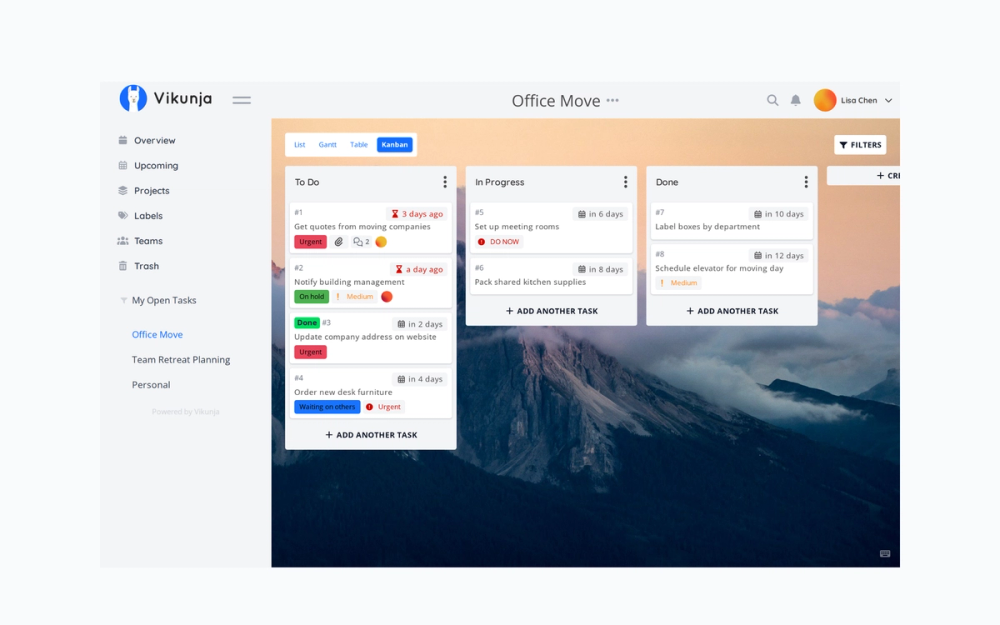
Kanban and Gantt views alongside a standard task list are what Vikunja adds over a plain to-do app. It is AGPLv3, made and hosted in the EU, and a managed cloud plan starts at 4 euros a month for anyone who wants those views without running a server.
Read moreShow lessKey Features · Pros · Cons · License & Hosting · Best For
Vikunja's install docs mention a mobile app that, in their words, "only supports the very basic features of Vikunja", and its CalDAV link for other phone apps is "in an early alpha stage and has bugs". The OAuth import from Microsoft To Do happens in your browser, so your Vikunja instance does not need to be reachable from the internet, only from the browser you use to do the migration. A self-hosted instance also needs VIKUNJA_SERVICE_PUBLICURL set so the OAuth redirect reaches it. The Microsoft To Do import uses Microsoft's To Do service, which Microsoft says retires on a separate, later timeline.
Key Features
- 4 task views: List, Kanban, Gantt Chart, and Table
- Quick Add Magic that sets due dates, labels, and assignees from natural language when creating a task
- Project sharing via share links that allow others to view or edit tasks without an account
Pros
- Completely free to self-host under AGPLv3 with no user limit
- Vikunja Cloud Personal starts at 4 euros per month (40 euros billed yearly) with a 14-day free trial
- Unlimited lists, tasks, reminders, share links, relations, and filters on the Personal plan with 10 GB attachment storage
- Made and hosted in the EU, relevant for GDPR considerations
- Install via Docker, native binaries, Debian/Ubuntu packages, RPM, Arch Linux, Alpine, FreeBSD, Kubernetes, or Ansible
Cons
- CalDAV integration is in an early alpha stage and has known bugs with some clients
- Repeating tasks do not support flexible patterns such as "every 2 weeks on Tuesday"
- Vikunja Cloud Personal requires a payment method to start the 14-day free trial
License & Hosting
- License: AGPL-3.0. Fully open. If you modify Vikunja and use it to provide a network service, the source code of your modified version must be made available.
- Where it runs: Self-hosted web app or Vikunja Cloud. A desktop app for Linux and Windows. A mobile app that its install docs say supports only the very basic features, and an early-alpha CalDAV integration.
- Setup: Docker or native binaries for self-hosting. Cloud signup available at vikunja.io.
- Costs: Self-hosting is free. Vikunja Cloud Personal is 4 euros per month or 40 euros per year. Family plan is 10 euros per month for up to 5 users (99 euros per year).
Best For
I'd pick Vikunja when you want Gantt or Kanban views, EU-hosted data, or a managed cloud without running a server. Skip it if mobile sync is your main need: the CalDAV integration is documented as early alpha. For iOS or Android apps that work today, Super Productivity or Tasks.org is the better starting point.

- 667 stars
- AGPL-3.0
- Active this week
- Last commit today
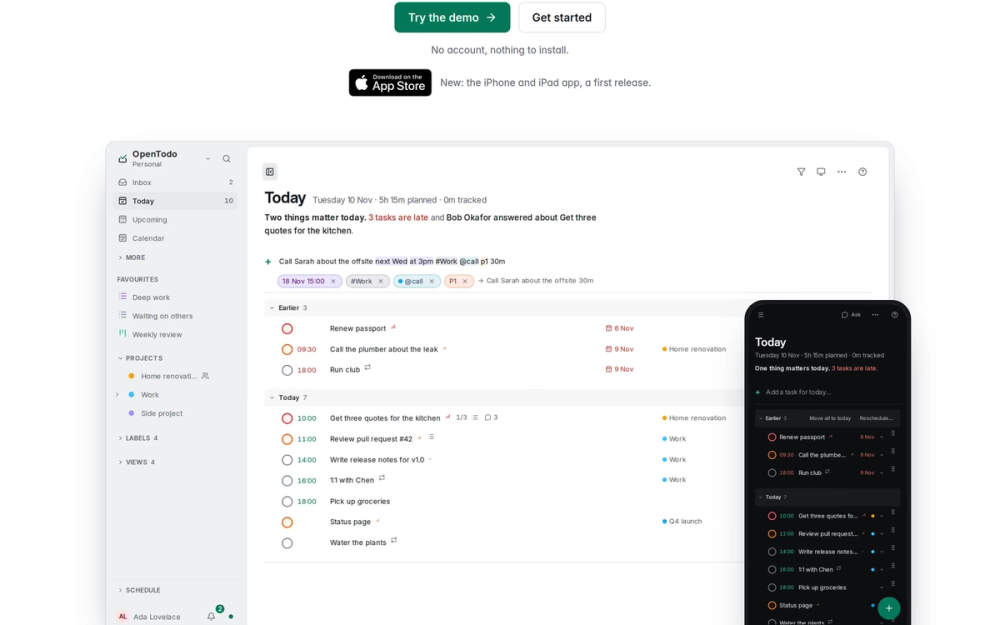
OpenTodo is a young project: its iPhone and iPad app is a first release. Its import brings flagged emails from Outlook across into a Flagged emails project.
Read moreShow lessKey Features · Pros · Cons · License & Hosting · Best For
The Microsoft To Do import uses a short PowerShell script, or Graph Explorer in a browser, to read your lists via Microsoft Graph and write a JSON file for OpenTodo to import. The import brings titles, notes, steps as subtasks, due and start dates, reminders, and simple repeats. Repeats like "the second Thursday of the month" and repeat end dates are not carried across.
Key Features
- Self-hosted with no OpenTodo cloud account, via Docker, Umbrel, Unraid, TrueNAS, a Raspberry Pi, or a VPS
- iPhone and iPad app, plus a PWA that installs on Windows, macOS, Linux, ChromeOS, iOS, and Android
- Full offline copy on every device, with field-by-field merges when connectivity returns
- Optional end-to-end encryption where task text is encrypted on devices before reaching the server
- CalDAV, Google Calendar, Outlook, GitHub and GitLab issues, MCP, Claude Code, and Obsidian integrations
- Quick-add syntax parses natural-language dates, times, projects, and priorities in 9 languages
Pros
- No paid tiers, no seat limits, no trial: every feature for everyone on your server
- PikaPods managed hosting available from $2 per month if you want someone else to run the server
- Flagged emails import into a dedicated Flagged emails project
- Recurring tasks support flexible rules including every last Friday, every 2nd Tuesday, after-completion intervals, and end dates or occurrence counts
- Multi-step Undo added in v1.6.0
Cons
- The script needs PowerShell 7, which OpenTodo's guide lists for Windows, macOS or Linux, or you can use Graph Explorer in a browser
- No OpenTodo cloud: you run your own server or pay PikaPods
- A young project, with its first iPhone and iPad release only just out
License & Hosting
- License: AGPL-3.0. Fully open. Modified versions used to provide a network service must make source available.
- Where it runs: Self-hosted web app. iPhone and iPad app. PWA on Windows, macOS, Linux, ChromeOS, iOS, and Android.
- Setup: Docker, Umbrel, Unraid, TrueNAS, Raspberry Pi, or a VPS. The Microsoft To Do import uses a short PowerShell script, or Graph Explorer in a browser, to export a JSON file once.
- Costs: Software is free. PikaPods managed hosting starts from $2 per month.
Best For
I'd pick OpenTodo if you are consolidating tasks from several apps at once, or if the Outlook flagged emails import matters to your workflow. Skip it if you would rather not touch PowerShell for the migration step and Graph Explorer in a browser is not an option. For a local-first setup with no server involved, Super Productivity is the easier starting point.

- 5.8K stars
- GPL-3.0
- Active this week
- Last commit 1 day ago
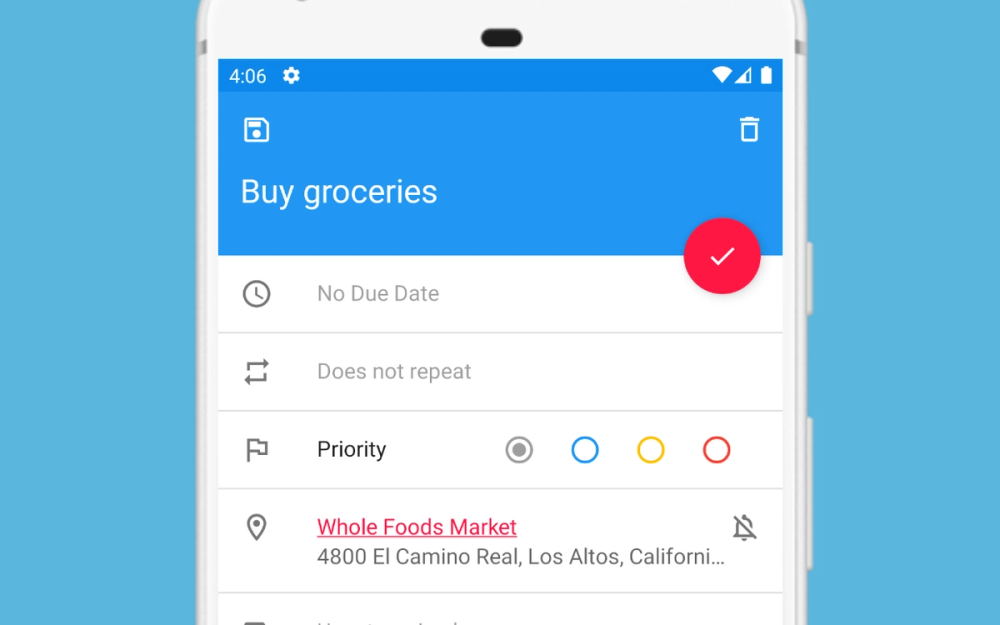
Tasks.org is a task management app for Android, with a desktop build described as alpha. If you want to move tasks across while keeping your existing To Do setup running in parallel, Tasks.org syncs with your Microsoft To Do account today.
Read moreShow lessKey Features · Pros · Cons · License & Hosting · Best For
The sync leaves behind start dates, location reminders, attachments, timers, comments, and manual sorting. Manual sort is excluded because the Microsoft Graph API does not support it. The sync depends on Microsoft's service and APIs, which retire on a separate, later timeline Microsoft has not announced.
Key Features
- CalDAV synchronization, recurring tasks, notifications, location-based reminders, and custom filters
- Filters, tags, lists, infinite-depth subtasks, and manual sorting within the app
- Compatible with Outlook, Thunderbird, Apple Reminders, and other CalDAV apps via open protocols
- Sync options include Tasks.org Cloud, Google Tasks, DAVx5, CalDAV, EteSync, and DecSync CC
- Friends and Family Sharing via Tasks.org Cloud shares lists with up to 5 guests at no extra cost
Pros
- The free tier includes Microsoft To Do sync, unlimited tasks, lists, tags, and reminders, and no account required for local use
- F-Droid users do not require a subscription to unlock in-app features
- Google Play subscriptions come with a 7-day free trial
- Tasks.org Cloud is powered by CalDAV, so your data works with any compatible app including Outlook and Thunderbird
- No ads and no personal data sold
Cons
- Tasks.org's docs describe an Android app. The desktop build is alpha.
- Microsoft To Do sync does not carry start dates, location reminders, attachments, timers, comments, or manual sorting
- The Microsoft To Do sync path depends on Microsoft APIs that will retire on a later timeline Microsoft has not announced
License & Hosting
- License: GPL-3.0. Fully open. Modify and redistribute freely.
- Where it runs: Android app (primary). Syncs via Tasks.org Cloud, Google Tasks, CalDAV, EteSync, or DecSync CC.
- Setup: Install from Google Play, or use the F-Droid APK from GitHub Releases. Check Tasks.org's Microsoft To Do page for the connection steps. No server required for local use.
- Costs: Free for local use and Microsoft To Do sync. Tasks.org Cloud starts at $2.49 per month billed annually. Name-your-price subscription from $0.99 per year unlocks advanced features including self-hosted CalDAV sync.
Best For
Tasks.org traces back to Astrid Tasks, a cross-platform productivity service acquired by Yahoo in 2013. It is the right starting point for Android users who want to move tasks across while keeping their existing To Do setup running in parallel. Super Productivity or OpenTodo covers the gap for anyone who needs a full desktop app alongside mobile.

- 3.6K stars
- MIT
- Active this week
- Last commit 4 days ago
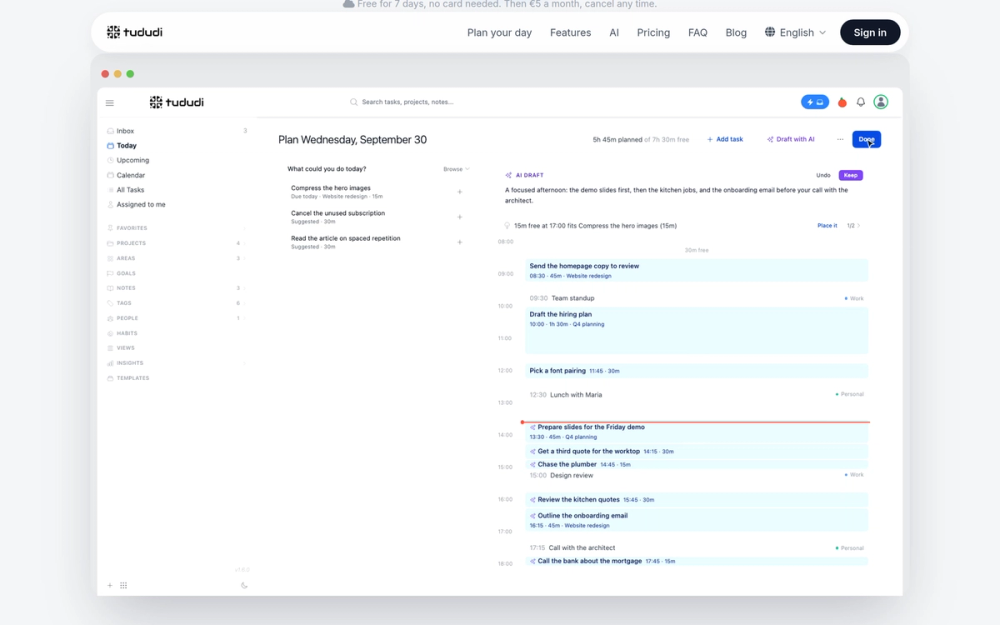
Tududi is the pick if you want your tasks to sync over CalDAV with Tasks.org, Apple Reminders, Thunderbird or Evolution, and you are willing to run a server. It also reaches past tasks into goals, habits and projects on the same instance.
Read moreShow lessKey Features · Pros · Cons · License & Hosting · Best For
Tududi imports CSV and Excel files, with a dry-run preview and a 7-day undo window. Microsoft has not yet published the export instructions, so whether a future Microsoft export would import into Tududi depends on the format Microsoft chooses.
Key Features
- Hierarchy of tasks, projects, and areas with tags for filtering, plus goals and habits
- CalDAV sync with full RRULE recurring task support, bidirectional with Tasks.org, Apple Reminders, Thunderbird, and Evolution
- MCP server exposing 59 tools covering tasks, projects, areas, goals, habits, notes, people, tags, views, inbox, search, and metrics
- Eisenhower Matrix and Kanban board views alongside the standard list view
- PWA installable on Android, iOS, and desktop browsers, with offline read access and queued write operations
- Available in 26 languages, with SSO via OIDC supporting Google, Okta, Keycloak, Authentik, PocketID, and Azure AD
Pros
- MIT licence, so modify and self-host freely with no network-service source obligations
- Tududi Cloud available at 5 euros per month (50 euros per year) until 1 January 2027, when the price goes to 7 euros a month or 70 euros a year, with a 7-day free trial and no card required
- The MCP server connects AI agents directly to your own instance without routing through a third party
- Task attachments up to 10 MB per file, with images, PDFs, and text files previewable inline
- Notifications via Apprise deliver to Pushover, ntfy, Discord, Matrix, email, and other services
Cons
- Import is CSV and Excel only, with no direct connection to Microsoft Graph documented
- The AI assistant calls an OpenAI-compatible provider you configure, so if you use a hosted provider, those request contents go to that provider
License & Hosting
- License: MIT License. Use it commercially or privately, modify it and distribute it, as long as the license and copyright notice stay with it.
- Where it runs: Self-hosted web app. PWA for Android, iOS, and desktop browsers. Tududi Cloud available as a managed option.
- Setup: Node.js with Express.js backend and React 18 frontend. Tududi Cloud handles server, updates, and backups.
- Costs: Self-hosting is free. Tududi Cloud is 5 euros per month or 50 euros per year for one person until 1 January 2027, when the price goes to 7 euros a month or 70 euros a year. Team plans available.
Best For
The CalDAV story and the MCP server are what earn Tududi its spot when you want a full life-management system with goals and habits, or when you need to connect an AI agent directly to your task data without a relay. Check whether Tududi can bring your To Do tasks across before you switch. Its documented import takes CSV or Excel files. If the migration is urgent, Super Productivity or Vikunja are the better starting points.

- 2.8K stars
- AGPL-3.0
- Active this week
- Last commit 1 day ago
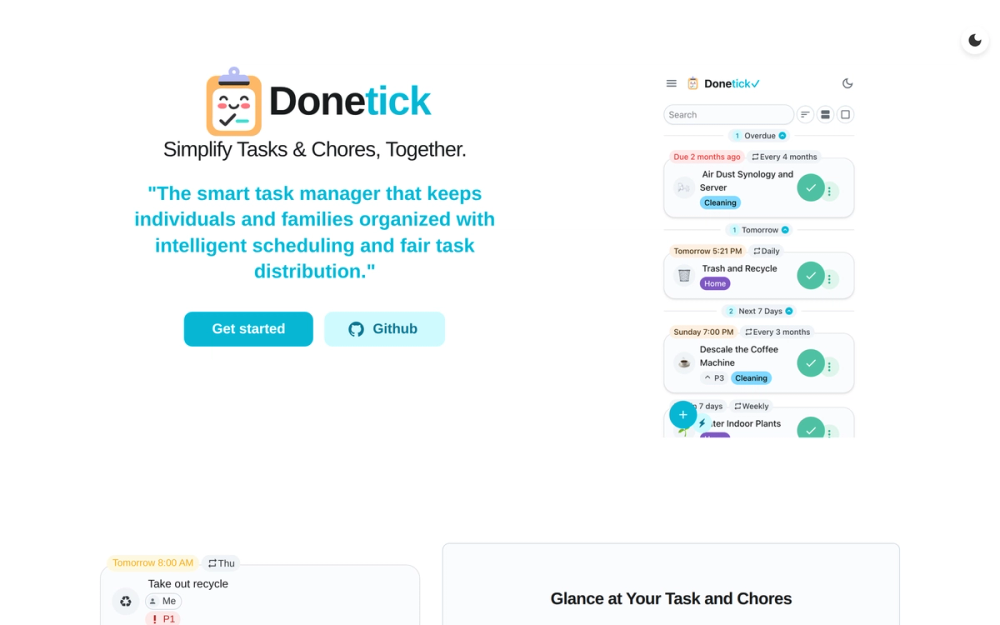
Chore splitting and household coordination are what Donetick is built around. If Microsoft To Do's shared lists were mainly for grocery runs, rotating household tasks, or tracking who does what, Donetick's rotation and assignment features go further than a plain shared list does.
Read moreShow lessKey Features · Pros · Cons · License & Hosting · Best For
Donetick's site links an App Store download, and its GitHub page still describes the iOS app as an alpha on TestFlight. The Android app is an APK from the releases page. The mobile apps require your Donetick instance to be publicly reachable over HTTPS with a valid certificate. A local-only server or a plain HTTP address will not connect.
Key Features
- Group creation, task assignment, and rotation strategies for sharing work
- Recurring tasks with adaptive scheduling that adjusts based on how often you mark a task done
- Natural language task input that parses dates, priorities, and labels
- Subtasks, priorities, labels, tags, and task templates
- Gamification with a points system, leaderboards, and optional admin approval for points
- Home Assistant integration with separate to-do lists per Donetick user
Pros
- Rotation assignment goes further than a plain shared list for splitting household work
- Self-hosted via Docker, Docker Compose, or a binary, with SQLite in its Docker example
- The hosted option at Donetick Web needs no server setup to start
- 2-factor authentication available for account security
- Notifications via Telegram, push, or webhooks alongside the app
Cons
- The iOS and Android apps need the instance to be publicly reachable over HTTPS, which rules out a purely local home server unless you configure TLS and public access
- AGPLv3 licence requires modified versions used to provide a network service to publish source code
- No direct Microsoft To Do import path documented
License & Hosting
- License: AGPL-3.0. Modified versions providing a network service must publish source.
- Where it runs: Self-hosted web app via Docker or binary. Hosted web option available. iOS and Android apps, which need public HTTPS access.
- Setup: Docker run command on port 2021 with a SQLite database. TLS and public internet access needed for mobile apps.
- Costs: Software is free to self-host. Donetick Web is available to create an account and start immediately.
Best For
Household shared lists with rotation scheduling are where Donetick earns its spot. Skip Donetick if your server sits on a home network with no public HTTPS, because its iOS and Android apps will not connect without it. If mobile matters and public hosting is a barrier, Vikunja Cloud or OpenTodo on PikaPods is a managed option without that constraint.

- 2.1K stars
- MIT
- Active this week
- Last commit 6 days ago
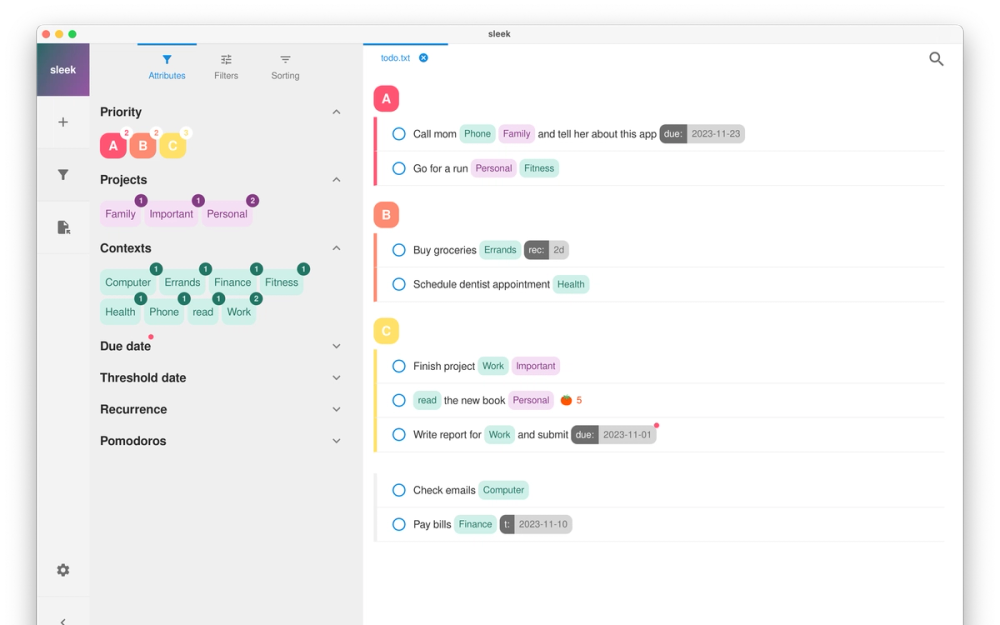
Plain text files are the whole product. Sleek runs on Windows, macOS, and Linux as a desktop app that stores your tasks in plain todo.txt files. If you need a phone app, Super Productivity covers both iOS and Android, and Tasks.org covers Android.
Read moreShow lessKey Features · Pros · Cons · License & Hosting · Best For
Key Features
- Based on the todo.txt syntax: every task is a line of text in a file you own
- Tag-based filtering, customizable grouping, and smart full-text search
- Supports priority, contexts, projects, due date, creation date, completion date, recurrence, threshold dates, and Pomodoro intervals
- Simultaneously manages multiple todo.txt files, with continuous scanning for changes from other apps
- Markdown in task descriptions including custom protocol links (file://, joplin://)
- Due date notifications for today and tomorrow, with a configurable threshold and badge count on macOS
Pros
- Completely portable: everything lives in plain text files you can open in any editor
- Integrates with other todo.txt apps via continuous file scanning
- Available on the Apple Mac App Store, Microsoft Store, Snap Store, Flathub, Homebrew, and Arch User Repository
- Supports 15 languages including English, German, Spanish, French, Simplified Chinese, and Japanese
- MIT licence: permits personal and commercial use, with the licence and copyright notice kept
Cons
- Sleek runs on Windows, macOS and Linux only. For a phone app, Super Productivity or Tasks.org covers that.
- When installed from the Mac App Store with Syncthing or Dropbox sync, the security-scoped bookmark may become invalid and need re-adding
License & Hosting
- License: MIT License. Use it commercially or privately, modify it and distribute it, as long as the license and copyright notice stay with it.
- Where it runs: Local-first desktop app for Windows, macOS, and Linux. No sync of its own: the todo.txt file is synced by a service such as Syncthing, Dropbox or Google Drive.
- Setup: Install from the Microsoft Store, Mac App Store, Snap Store, Flathub, Homebrew, or Arch User Repository.
- Costs: Free. The Mac App Store and Microsoft Store listings carry annual costs for the developer, payable via GitHub Sponsors or liberapay if you want to contribute.
Best For
I'd pick Sleek if plain files and no service dependencies are the whole requirement. One app, nothing to maintain, nothing to configure. Skip it if you need a phone app, shared lists, or sync that works automatically across devices without manual setup. Super Productivity handles the cross-platform sync story, and Tasks.org handles Android.
Decision framework
How to choose
Use this section to narrow the Microsoft To Do replacement by team size, hosting model, license, and migration difficulty.
3 questions decide this: do you need a mobile app, can you run a server, and do you need to pull your tasks out of Microsoft To Do right now.
Licence, mobile support, and import path for each tool:
| Tool | License | Mobile | Server Required | Direct To Do Import |
|---|---|---|---|---|
| Super Productivity | MIT | iOS, Android | No | Yes |
| Vikunja | AGPLv3 | Basic app, CalDAV (alpha) | Yes or Cloud | Yes (OAuth) |
| OpenTodo | AGPLv3 | iOS, Android, PWA | Yes or PikaPods | Yes (script or browser) |
| Tasks.org | GPLv3 | Android | No | Sync (live) |
| Tududi | MIT | PWA | Yes or Cloud | None documented (CSV or Excel file import) |
| Donetick | AGPLv3 | iOS (alpha), Android APK | Yes or Donetick Web | None documented |
| Sleek | MIT | None | No | None documented |
OpenTodo's import moves flagged emails into a "Flagged emails" project once.
Find the line that sounds like you.
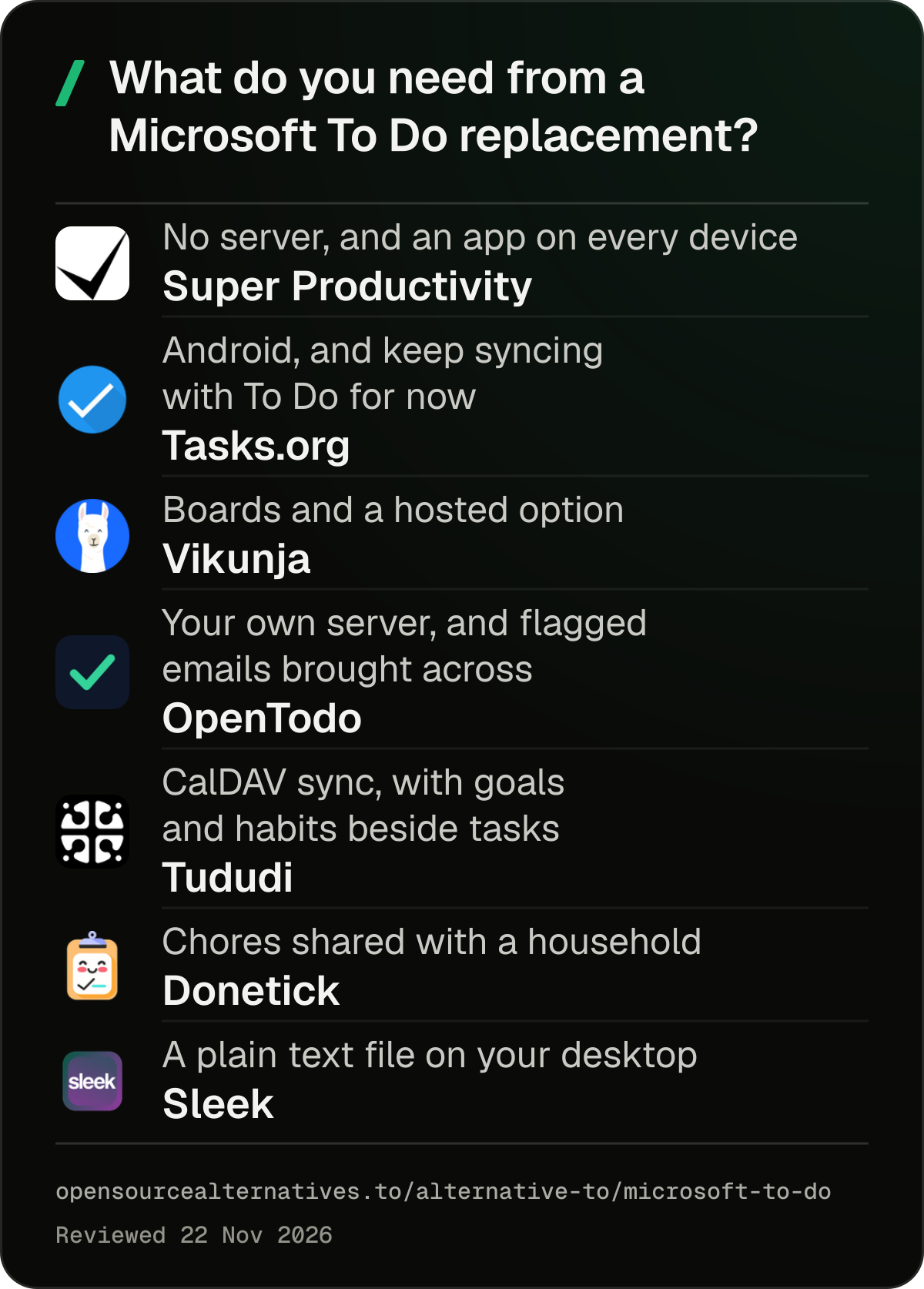
If your Microsoft To Do account is through work or school, Planner is where Microsoft is sending you. The updated My Tasks experience starts rolling out in December 2026. Your tasks and lists will not move there on their own, so you will still need to migrate them yourself, but the destination is a Microsoft product, not an open source one.
Planner does not yet cover everything To Do offers. To Do list groups have no direct equivalent in Planner, and printing and email-list capabilities are not currently planned. File attachments are also not supported on tasks in the new Planner-backed private plan.
Complete directory list
All alternatives to Microsoft To Do

Alternative to Microsoft To Do
Offline-first task manager with time tracking and dev integrations
- 23,913 GitHub stars
- Licence MIT

Alternative toMicrosoft To Do
Command-line task manager with GTD workflows and local storage.
- 6,176 GitHub stars
- Licence MIT
- #CLI

Alternative toMicrosoft To Do
Self-hosted task manager with list, Kanban, Gantt, and table views
- 6,120 GitHub stars
- Licence AGPL-3.0

Alternative toMicrosoft To Do
Native GTK4 task manager for Linux with Todoist and Nextcloud sync.
- 5,813 GitHub stars
- Licence GPL-3.0

Alternative toMicrosoft To Do
GPL-licensed Android to-do app with CalDAV and self-hosted sync
- 5,784 GitHub stars
- Licence GPL-3.0

Alternative toMicrosoft To Do
Self-hosted life manager with AI day planning and MCP server.
- 3,572 GitHub stars
- Licence MIT

Alternative toMicrosoft To Do
Shared chore and task manager with rotation and NFC triggers
- 2,766 GitHub stars
- Licence AGPL-3.0

Alternative toMicrosoft To Do
Cross-platform todo.txt desktop app with filtering and search.
- 2,059 GitHub stars
- Licence MIT

Alternative toMicrosoft To Do
Self-hosted to-do app with offline sync, shared lists, and optional AI
- 667 GitHub stars
- Licence AGPL-3.0

Alternative toMicrosoft To Do
GNOME task manager with CalDAV sync and recurrent tasks.
- 532 GitHub stars
- Licence Zlib
Migration
Migration notes for leaving Microsoft To Do
The table below shows which tools can pull from your Microsoft To Do data, and what method each one uses:
| Tool | Import Method | What Transfers | What Does Not Transfer |
|---|---|---|---|
| Super Productivity | Built-in importer (desktop and official web app only) that signs in with a Microsoft account and downloads directly to your device | Open lists, tasks, notes, steps, categories, importance (optional important tag), due dates, and repeats that Super Productivity can express | Completed tasks, reminders, attachments, My Day |
| Vikunja | OAuth in your browser (self-hosted server needs VIKUNJA_SERVICE_PUBLICURL set) | Tasks (Vikunja's docs give no field list) | Not documented |
| OpenTodo | Short PowerShell script, or Graph Explorer in a browser, to export JSON from Microsoft Graph, then file import | Titles, notes, steps as subtasks, due and start dates, reminders, simple repeats, flagged emails (into Flagged emails project) | Repeats like "the second Thursday of the month", repeat end dates |
| Tasks.org | Live sync via Microsoft Graph API | Tasks, and the recurrence options To Do supports | Start dates, location reminders, attachments, timers, comments, manual sorting |
| Tududi | CSV or Excel file import. No route from Microsoft To Do today, because Microsoft's export is not published yet | Whatever the CSV or Excel file contains | Not applicable |
| Donetick | No Microsoft To Do import documented | Not applicable | Not applicable |
| Sleek | No Microsoft To Do import documented | Not applicable | Not applicable |
4 of these paths work right now. Super Productivity's importer pulls your open tasks directly in the desktop and official web apps. Vikunja's OAuth import works from a browser. OpenTodo's import works through a short PowerShell script or Graph Explorer in a browser. Tasks.org's sync is live on Android and works until Microsoft retires the To Do service and sync, on a date it has not announced.
Microsoft's own export is still to come. The Microsoft support page says: "Microsoft will provide a way to export your To Do data before the apps retire." It also says: "An export does not mean that the content can be imported into Planner or another application."
I'd run Super Productivity's importer or Vikunja's OAuth import now for your open lists, before the June 30, 2027 retirement, and keep your existing To Do access running in parallel until you are confident the new setup covers your routines. For Android users who want a gradual move, Tasks.org syncs live today.
FAQ
Microsoft To Do alternatives FAQ
When does Microsoft To Do shut down?
The apps retire on June 30, 2027: web, Windows, Mac, iOS, and Android, for both work and school accounts and personal Microsoft accounts. The underlying To Do service, APIs, and related synchronization support retire on separate, later timelines that Microsoft has not yet announced. Microsoft states it will provide a way to export your To Do data before the apps retire.
Will my tasks move to Planner automatically?
No. Existing To Do tasks and lists will not migrate to Planner. Microsoft says they remain accessible in Planner through June 30, 2027, and after that date you can no longer view or manage them there. Microsoft states plainly: "An export does not mean that the content can be imported into Planner or another application." Microsoft will provide a way to export your data before the apps retire, but that export path is not yet published.
Is Outlook tasks being discontinued?
Not the Tasks in classic Outlook. Microsoft says classic Outlook's native Tasks experience is separate from the To Do experience hosted in Outlook and will continue working and syncing with Exchange.
Which open source tool imports from Microsoft To Do directly?
4 tools bring your data across without waiting for the official export. Super Productivity has a built-in importer (desktop and official web app only) that signs in with your Microsoft account and downloads open lists directly to your device. Vikunja supports OAuth import from a browser. OpenTodo uses a short PowerShell script, or Graph Explorer in a browser, to read your lists via Microsoft Graph and then imports the resulting file. Tasks.org syncs with Microsoft To Do on Android rather than doing a one-time import.
What does a direct import leave behind?
Super Productivity brings across open lists, tasks, notes, steps, categories, importance (optional important tag), due dates, and repeats that Super Productivity can express. It leaves behind completed tasks, reminders, attachments, and My Day. OpenTodo's import does not carry repeats like the second Thursday of the month, or repeat end dates. Vikunja's docs give no field list. Tasks.org's Microsoft To Do sync does not carry start dates, location reminders, attachments, timers, comments, or manual sorting.
Which tools work on iPhone and Android?
Super Productivity runs on iOS and Android. OpenTodo has an iPhone and iPad app and an installable PWA on Android. Tasks.org's docs describe an Android app. Vikunja's install docs mention a mobile app that supports only the very basic features, and its CalDAV integration is early alpha. Tududi is a PWA installable on iOS and Android with offline read access. Donetick has an iOS app, which its GitHub page still describes as an alpha on TestFlight, and an Android APK in its releases. Both need the server to be reachable over public HTTPS.
Is there a free open source alternative that also offers a managed cloud?
Yes. Vikunja Cloud Personal starts at 4 euros per month (40 euros billed yearly) with a 14-day free trial, made and hosted in the EU. Tududi Cloud starts at 5 euros per month (50 euros per year) until 1 January 2027, when the price goes to 7 euros a month or 70 euros a year, with a 7-day free trial and no card required. OpenTodo can be hosted on PikaPods from $2 per month. Vikunja, Tududi and OpenTodo are open source under AGPLv3 or MIT licences, so you can self-host the same software if you prefer.
Can an open source to do app be shut down like Microsoft To Do?
A maintainer can stop working on it, yes. The code is public and the licence lets you or anyone else keep the project going. MIT (Super Productivity, Tududi, Sleek) lets anyone use, change and share the code. GPLv3 (Tasks.org) and AGPLv3 (Vikunja, OpenTodo, Donetick) do the same and require changed versions to stay open.

By category
Open source tools in these categories


Keep reading