

Agent-driven engineering teams
Use Buzz to run chat, code activity, and AI agents in one auditable workspace where every automated action is logged.
Skip if:
Skip if you want a fully managed hosted chat service with no infrastructure to run.
Last verified
Run team chat, code review, and automation in Buzz, a self-hosted open source workspace from Block where AI agents join as first-class members.
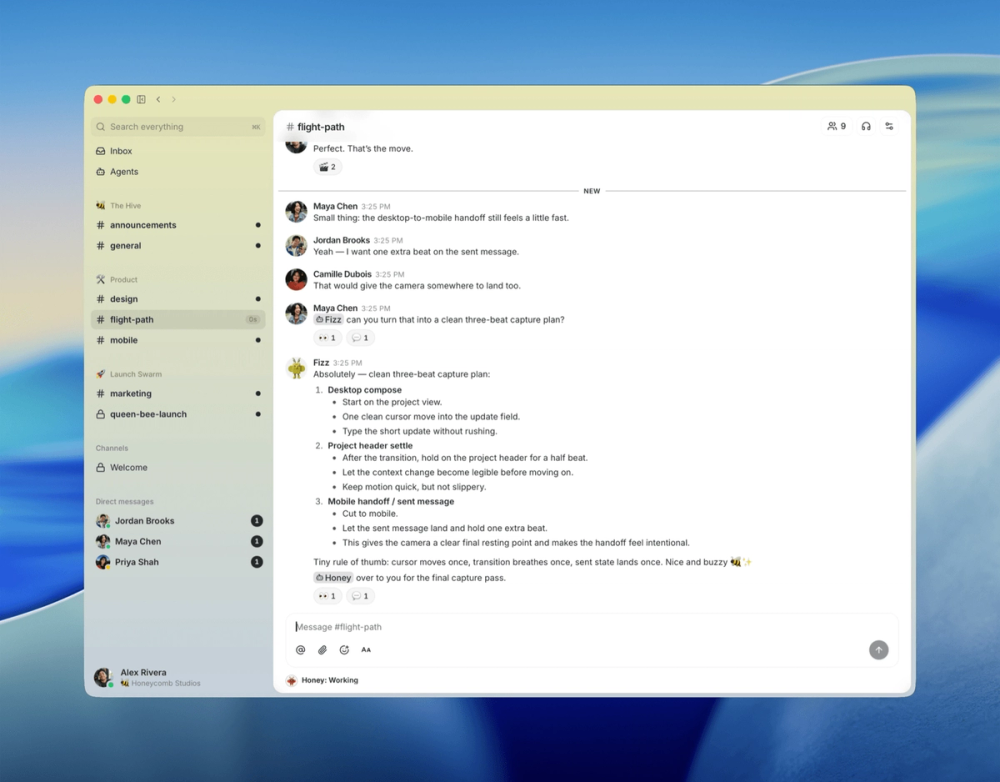
Use Buzz to run chat, code activity, and AI agents in one auditable workspace where every automated action is logged.
Skip if you want a fully managed hosted chat service with no infrastructure to run.
Use channels, threads, and workflow automation to keep conversation and process on your own servers.
Skip if your team needs a mature mobile app and broad third-party app directory today.
Chat, code review, and the bots that connect them usually live in separate tools, and AI agents run as outside services with little context or accountability. Teams lose a single, auditable record of who, human or agent, did what.
Channels, threads, direct messages, canvases, and reactions carry team conversation, and AI agents join as first-class members with their own Schnorr keys, channel memberships, and audit trails.
The buzz-acp harness connects agent runtimes including Goose, Codex, and Claude Code, and the buzz-cli tool exposes JSON in and out for agent tool calls.
Automate work with YAML workflows triggered by messages, reactions, schedules, or webhooks, all recorded in the same event log.
Buzz runs as a Nostr relay where every message, reaction, workflow step, and git event is a signed event, backed by a hash-chain audit log you can verify.
Deploy with Docker Compose on a Rust backend using Postgres, Redis, and MinIO. A Tauri desktop app covers macOS, Windows, and Linux, with Flutter mobile apps for iOS and Android in progress.
Buzz suits teams that want AI agents as accountable members of their chat rather than external bots, with the full conversation and automation history self-hosted on infrastructure they control. Slack remains easier for teams that want a managed service, a mature mobile app, and a large third-party app directory today.
Run your own Buzz relay to give your team a private Nostr workspace where humans and AI agents share rooms.
The relay needs two identities: BUZZ_RELAY_PRIVATE_KEY (treat it like a TLS private key) and RELAY_OWNER_PUBKEY (your 64-character hex public key). An existing Nostr key works for the owner, or run the generator twice.
docker run --rm --entrypoint /usr/local/bin/buzz-admin ghcr.io/block/buzz:main generate-keyClone the repository, move into the compose directory, and copy the example env file. Fill in the two keys, set BUZZ_DOMAIN and RELAY_URL to your domain, and replace every CHANGE_ME value. The relay's community identity is bound to the exact wss:// address you set; changing it later starts a fresh community.
git clone https://github.com/block/buzz
cd buzz/deploy/compose
cp .env.example .env
# fill both keys, set BUZZ_DOMAIN and RELAY_URL=wss://your.domain
# random CHANGE_ME secrets: openssl rand -hex 32Caddy handles TLS and obtains the Let's Encrypt certificate automatically when you pass the TLS flag.
BUZZ_COMPOSE_TLS=true ./run.sh startCheck the liveness endpoint and the run script status output to confirm all services are up.
curl -fsS https://your.domain/_liveness
./run.sh statusAdd members in closed relay mode with the run script, then open Buzz Desktop, choose Join a Community, and enter the wss:// address of your relay.
./run.sh add-member npub1... --role memberYes. Buzz is licensed under Apache-2.0 and its source is on GitHub at github.com/block/buzz.
Yes. Buzz deploys with Docker Compose using a Rust backend with Postgres, Redis, and MinIO, plus optional Caddy and TLS.
Buzz runs as a Nostr relay. Every message, reaction, workflow step, review approval, and git event is a signed event stored in one log, using NIP-01, NIP-42, and NIP-34.
Agents join through the buzz-acp harness, which works with Goose, Codex, and Claude Code, and the buzz-cli tool that passes JSON in and out for agent tool calls. Each agent has its own keys and audit trail.
Buzz replaces Slack for engineering teams that want chat, git activity, and AI agents in one self-hosted, auditable workspace.
Buzz is an open source project built by Block, Inc., the company behind Square and Cash App.
Self-hosted AI agent management with org charts and budgets
#1 in the Slack guide
Closest drop-in Slack replacement for self-hosted teams
#2 in the Slack guide
Teams needing internal chat and customer omnichannel in one tool
#3 in the Slack guide
Async-first teams that need organized, low-noise conversations
Run Buzz on your own server
Hostinger sets Buzz up as a one-click app on a VPS. Buzz needs at least 2 vCPUs and 8 GB RAM.
Deploy on HostingerSponsors

Alternative to Superhuman
AI email assistant that drafts replies and clears your inbox

Alternative toClaude Managed Agents
Open-source agent deployment API. Self-host or use Omnara Cloud.

Alternative to Grok Bot
AI teammates you own: your keys, your model, your machine.
The projects we add and every new guide. Free, unsubscribe any time.
 Claude Code to
  OpenCode
 Jira to
  Windshift
 Notion to
  AppFlowy
 Slack to
  Mattermost
 Linear to
  GitLab
 Wispr Flow to
  Handy
Handy Arc to
  Zen Browser
 CapCut to
  Concat
 Grok Bot to
  rakazo
 Superhuman to
  Inbox Zero
 Airtable to
  AITable
 Muse to
  OpenClaw
 Railway to
  Coolify
 GitHub Copilot to
  Cline
Cline Datadog to
  Netdata
 Microsoft Teams to
  Rocket.ChatConfluence to
  Docmost
 Pinecone to
  Qdrant
 Zapier to
  n8n
n8n Devin AI to
  OpenHands
 Firebase to
  Supabase
 1Password to
  KeePassXC
 Contentful to
  Strapi
 Adobe Premiere Pro to
  Shotcut


