Open Source Alternatives
  • Alternatives
  • Categories
    Categories by size1,151 projects
    • Developer Tools591
    • AI & Machine Learning503
    • Business & Productivity279
    • Web Development209
    • Security & Monitoring173
    • Communication & Collaboration154
    • IT Management146
    • LLMOps & AI Tooling129
    • Cloud & Hosting128
    • Product & Project Management123
    Browse all 21 categoriesDevOps & CI/CD, Data & Analytics and 9 more
  • Blog
  • Advertise
SearchNotion, Slack, password manager.../
Submit
Open Source Alternatives
  • Alternatives
    • Developer Tools591
    • AI & Machine Learning503
    • Business & Productivity279
    • Web Development209
    • Security & Monitoring173
    • Communication & Collaboration154
    • Browse all 21 categories
  • Blog
  • Advertise
Submit your project

New open source projects by email

The projects we add and every new guide. Free, unsubscribe any time.

Open Source Alternatives LogoOpen Source Alternatives

Handpicked Open Source Alternatives to Paid Softwares

Add Open Source Alternatives as a preferred source on Google

Product

  • Categories
  • Tag
  • Advertise

Resources

  • Blog
  • Collection
  • Submit

Company

  • Privacy Policy
  • Terms of Service
  • Refund Policy
  • Sitemap

Alternatives

  • Claude Code
  • Jira
  • Notion
  • Slack
  • Linear
  • Wispr Flow
  • All alternatives
© 2026 Open Source Alternatives. All rights reserved.
Open SourceAlternatives
Home/Categories/Developer Tools/Camber
icon of Camber

Camber

Open source alternative to Arc, Dia and Vivaldi

  • 8 stars
  • GPL-3.0
  • Active this week
  • Last commit today

Last verified Nov 6, 2026

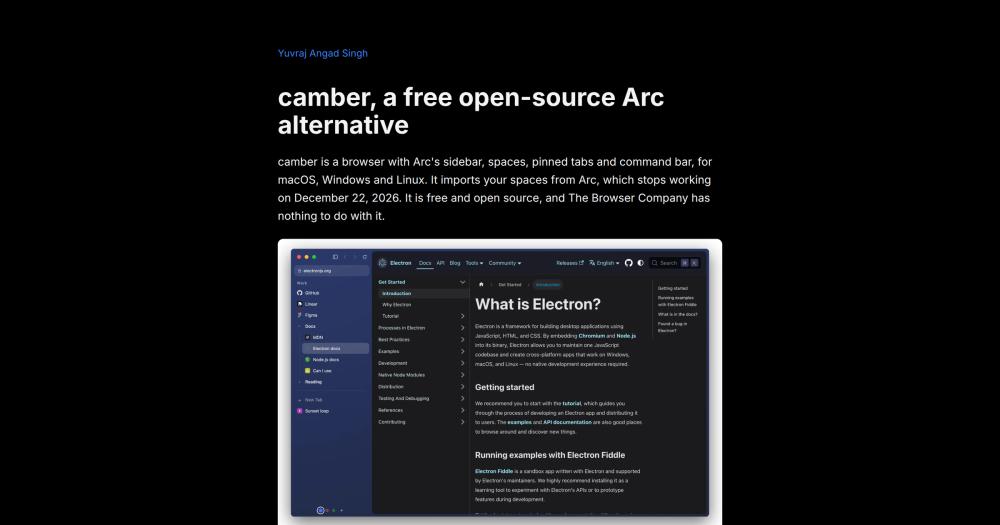
Browse the web in an open source Arc browser alternative with spaces, vertical sidebar, and idle tab management, for macOS, Windows, and Linux.

Visit websiteGitHub8 stars
image of Camber
TL;DR

Camber is an open source browser that replicates Arc's layout: a vertical sidebar with spaces, pinned tabs, nested folders, and a keyboard command bar. It runs on macOS, Windows, and Linux, imports Arc spaces directly (names, colors, profiles, pinned tabs, and folders), and is the GPL-3.0-licensed answer to Arc's December 2026 shutdown. The browser has no account, no telemetry, and no AI features. It is at version 0 and best suited for Arc users who need a working alternative before the December deadline and are comfortable with unsigned builds and known gaps (no DRM streaming, no 1Password support yet, no sync).

Read the full breakdownHide the full breakdownWho it is for, how it works, trade-offs, the quick start and the FAQ
who it's for

Who Camber is for#

Arc users migrating before the December 2026 shutdown

Camber's import reads Arc's sidebar file and brings spaces, profiles, pinned tabs, nested folders, and today tabs over in one step. Users who have invested time organizing their Arc setup get a working browser without rebuilding from scratch. The layout is familiar enough to reduce the transition time significantly.

Skip if:

You need DRM streaming (Netflix, Prime Video, Disney+, Spotify web) in your browser. Camber's lack of Widevine means protected content will not play; keep a secondary browser for those services.

Privacy-focused developers and power users

No account, no analytics, and no telemetry. The browser keeps data locally, runs Chrome Web Store extensions, and supports per-space logins for separating work, personal, and project contexts. The GPL-3.0 source is auditable and forkable.

Skip if:

You need 1Password browser integration. It does not work in camber yet. Bitwarden installs and opens, but autofill with a logged-in vault is untested.

macOS, Windows, and Linux users who want a spaces-based layout

Camber ships installer packages for all three platforms and runs the same Chromium version on each. Spaces with separate browser profiles work on Windows and Linux, not only on macOS. Linux users get both .deb and AppImage packages for x64 and arm64.

Skip if:

You are on Windows arm64. That build is not available yet.

the problem

The problem it solves#

When Arc announced it would stop working on December 22, 2026, it left users who had organized their browsing around spaces, per-space logins, and pinned tabs without a direct replacement. Other browsers offer variations on tab management, but none ship the same combination: a vertical sidebar, Spaces with separate browser profiles, pinned tabs with custom names, nested folders, a command bar, and direct import of an existing Arc setup.

The deeper challenge is that Arc was closed source, making a fork impossible. Every existing open source browser either starts from a different mental model or requires users to rebuild their workflow from scratch on a tool that was not designed around spaces at all.

how Camber solves it

How it solves it#

Arc spaces with per-space browser profiles

Each space is an independent browser profile, so Gmail, Slack, and work tools in one space stay logged in and separate from a personal space. Spaces have names, colors, and can share a profile as in Arc. They are displayed in a vertical sidebar with favorites, pinned tabs, and nested folders per space.

One-step Arc spaces import

File > Import from Arc reads Arc's StorableSidebar.json from its default location on macOS and Windows. On Linux, copy the file and use File > Import Arc File. What transfers: spaces with names and colors, profiles, favorites, pinned tabs with custom names, nested folders, and today tabs. Importing again replaces the earlier import without adding duplicates.

Idle tab memory unloading

Tabs you have not looked at for an hour unload from memory and stay as entries in the sidebar. With 23 tabs open across three spaces, camber measured 4.9 GB RSS, dropping to 0.85 GB after the idle unload on an M5 MacBook Air. The unload timer is configurable: 30 minutes, 1 hour, 3 hours, or off.

No account, no telemetry

No sign-in is required. The browser has no analytics pipeline and no data collection. The only network request it makes for itself is a GitHub check for newer releases, once on startup and every 6 hours. All tabs and settings are stored locally in the app's user data folder.

Chrome Web Store extension support

Extensions install from the Chrome Web Store through File > Chrome Web Store. Their buttons appear in the sidebar. Camber runs on Chromium via Electron, the same rendering engine as Chrome, so most Chrome extensions work without modification.

Split view, Peek, and little windows

Tab > Split with opens two tabs side by side within a space; click a side to make it active. Cmd+Shift+click a pinned tab to Peek at it in a panel over the current page without leaving it. Links from other apps open in a small camber window, and Cmd+O moves them into the current space.

strengths · trade-offs

Strengths and trade-offs#

Strengths

  • GPL-3.0 with public, forkable sourceThe full source is on GitHub under GPL-3.0-only. Unlike Arc (closed source, no fork possible), camber can be audited, modified, and forked. Releases include SHA256SUMS.txt for verification. The build pipeline runs on GitHub Actions with CI for macOS, Windows, and Linux.
  • No account or telemetry, everThere is no sign-in flow, no analytics SDK, and no usage tracking. The browser's only outbound request for itself is a GitHub release check. Settings and tabs stay on your machine. The project's privacy page documents exactly what it sends and keeps.
  • Direct Arc migration in one stepThe import reads Arc's StorableSidebar.json from its documented location on macOS and Windows (or from a manually copied file on Linux). Spaces with names, colors, and profiles transfer, as do favorites, pinned tabs with custom names, nested folders, and today tabs. Subsequent imports replace the previous one without adding copies.
  • Cross-platform from day oneInstaller packages ship for macOS (Apple Silicon and Intel .dmg), Windows x64 (.exe), and Linux x64 and arm64 (.deb and AppImage). The same Chromium version runs on every platform. No platform-specific source build is required to get a working browser.

Trade-offs

  • -No Widevine: DRM streaming does not workCamber ships the standard Electron distribution, which includes no Widevine module. Netflix, Prime Video, Disney+, and Spotify web will not play protected content. Users who rely on streaming video services in their browser need a secondary browser for those sites.
  • -Builds are not code-signedThe installers are not notarized or signed. Opening camber on macOS requires right-clicking and selecting Open, or going to System Settings > Privacy & Security > Open Anyway after a first blocked attempt. On Windows, SmartScreen warns about an unknown publisher; More info, then Run anyway bypasses it.
  • -Version 0 feature gaps1Password does not work yet. Bitwarden installs and opens but autofill is untested. No sync across devices, no Boosts, no Live Folders, no Windows arm64 build. The README's known gaps list is the authority; check it before committing to camber as a daily driver. The README describes it as not yet ready for daily driving.
  • -Electron base overheadCamber is built on Electron, not a native macOS or Windows shell. The idle-unload feature reduces memory use significantly: 4.9 GB to 0.85 GB with 23 tabs on an M5 MacBook Air per the README. The base overhead remains higher than a native browser. The README notes explicitly that Electron is not lighter than Arc's native shell.
versus alternatives

Camber vs alternatives#

Camber vs Arc

Arc stops working on December 22, 2026. It was closed source, making a fork impossible. Camber was built as the open source replacement that keeps the layout Arc users depended on.

FeatureCamberArc
LicenseGPL-3.0Proprietary
PlatformsmacOS, Windows, LinuxmacOS, Windows
Spaces with per-space loginsYesYes
Pinned tabs and foldersYesYes
Command barYesYes
Arc spaces importYesn/a
Boosts and Live FoldersNoYes
1PasswordNot yetYes
Widevine (DRM streaming)NoYes
Code signingNoYes

Camber covers the core Arc workflow: spaces, sidebar, pinned tabs, nested folders, split view, and Air Traffic Control link routing. The gaps that matter most are Widevine (no Netflix or other DRM streaming), 1Password (not yet working), and no Boosts or Live Folders. For users whose main use of Arc was spaces, tabs, and keyboard navigation, camber is a working replacement before the December deadline.

Camber vs Vivaldi

Vivaldi is a commercial browser aimed at power users, with workspaces, tab stacking, sidebar panels, and deep customization. It is fully signed, ships with Widevine, supports 1Password, and has been in active development since 2016.

FeatureCamberVivaldi
LicenseGPL-3.0Proprietary
Arc-style spaces modelYesNo
Arc importYesNo
Widevine (DRM streaming)NoYes
1PasswordNot yetYes
Code-signed buildsNoYes
PlatformsmacOS, Windows, LinuxmacOS, Windows, Linux
PriceFreeFree

Vivaldi is the better choice for most users who need a stable, fully featured browser with DRM support, 1Password, and years of polish. Camber is a better fit for users who specifically want the Arc spaces model (per-space logins, the Arc import path, and familiar keyboard shortcuts) and are comfortable with a v0 tool.

Dia

Dia is the AI-first macOS browser from The Browser Company, the team that made Arc. It runs only on macOS and is designed around AI context features. Camber targets a different set of users: it is cross-platform, has no AI features, and is for users who want spaces and sidebar without AI integration.

install · quick start

Quick start#

bash
Download the installer for your system from GitHub Releases: https://github.com/yuvrajangadsingh/camber/releases/latest
tech stack · detected from GitHub

What it's built on#

Languages
JavaScript
Frameworks
Electron
Runtimes
Chromium
frequently asked

FAQ#

Is Camber made by The Browser Company, the team behind Arc?

No. Camber is an independent project by Yuvraj Angad Singh and is not affiliated with The Browser Company. The Browser Company made Arc and is now building Dia, an AI-first macOS browser. Camber reuses the Arc layout concept with original code written from scratch, not Arc's closed source.

Will Netflix, Spotify web, and other streaming services work in Camber?

No. Camber uses a standard Electron build that does not include the Widevine DRM module. Netflix, Prime Video, Disney+, and Spotify web will not play protected content. If you rely on streaming services in your browser, you need to use a secondary browser for those sites or choose a browser that ships Widevine.

Can I import my Arc spaces, tabs, and folders into Camber?

Yes. File > Import from Arc reads StorableSidebar.json from its default location on macOS and Windows automatically. On Linux, or when migrating from another computer, copy the file and use File > Import Arc File. Spaces with names, colors, and profiles transfer, as do favorites, pinned tabs with custom names, nested folders, and today tabs. Passwords, history, extensions, and bookmarks do not transfer.

Is Camber ready to use as a daily browser?

It is functional but at v0, and the README describes it as not yet ready for daily driving. The installers are unsigned, which requires extra steps to open on macOS and Windows. Missing features include 1Password integration, sync across devices, and Widevine DRM. For general browsing and Arc-compatible spaces the browser works; for tasks that depend on the missing features, keep a backup browser.

Does Camber collect any data or require creating an account?

No account is required. Camber has no analytics, no telemetry, and no usage tracking. The only network request it makes for itself is to GitHub to check for newer releases, once on startup and then every 6 hours. Your tabs, spaces, and settings are stored locally in the app's user data folder. The project's privacy page documents exactly what it sends and keeps.

Looking for more

Other ways to replace Arc, Dia and Vivaldi#

Zen Browser

#1 in the Arc guide

Sidebar Workspaces, split view for up to 4 tabs and Boosts, the closest match to how Arc worked

45,562 GitHub stars

Floorp

#2 in the Arc guide

Workspaces that switch a Firefox container per project, with no account required

8,474 GitHub stars

Brave

#3 in the Arc guide

Chrome Web Store extensions and an Android app, with encrypted sync across devices

3,751 GitHub stars

Firefox

#4 in the Arc guide

Vertical tabs, tab groups and split view built into the browser itself, on 5 platforms

13,727 GitHub stars
All 12 Arc alternatives6 open source Arc alternatives, ranked
by category

Open source tools in these categories#

591

Developer Tools

REA (Reverse Engineer Anything), Skills for Real Engineers, superpowers
280

Business & Productivity

OpenClaw, Excalidraw, RustDesk

Sponsors

Inbox Zero

Alternative toSuperhuman

AI email assistant that drafts replies and clears your inbox

  • 12,915 GitHub stars
  • AGPL-3.0Licence AGPL-3.0
  • #Email

rakazo

Alternative toGrok Bot

AI teammates you own: your keys, your model, your machine.

  • 7,028 GitHub stars
  • Apache-2.0Licence Apache-2.0
  • #AI Agents

SnitchFeed

Live monitoring on LinkedIn, X, Reddit & more. Agentic social listening for startups.

Marketing & Growth

Advertise your product

New open source projects by email

The projects we add and every new guide. Free, unsubscribe any time.

Find open source alternatives to paid software

/
  • Claude Code to OpenCode
  • Jira to Windshift
  • Notion to AppFlowy
  • Slack to Mattermost
  • Linear to GitLab
  • Wispr Flow to Handy
  • Arc to Zen Browser
  • CapCut to Concat
  • Grok Bot to rakazo
  • Superhuman to Inbox Zero
  • Airtable to AITable
  • Muse to OpenClaw
  • Railway to Coolify
  • GitHub Copilot to Cline
  • Datadog to Netdata
  • Confluence to Wiki.js
  • Microsoft Teams to Rocket.Chat
  • Firebase to Supabase
  • Pinecone to Qdrant
  • Zapier to n8n
  • 1Password to KeePassXC
  • Devin AI to OpenHands
  • Asana to Leantime
  • Contentful to Strapi
  • Claude Code to OpenCode
  • Jira to Windshift
  • Notion to AppFlowy
  • Slack to Mattermost
  • Linear to GitLab
  • Wispr Flow to Handy
  • Arc to Zen Browser
  • CapCut to Concat
  • Grok Bot to rakazo
  • Superhuman to Inbox Zero
  • Airtable to AITable
  • Muse to OpenClaw
  • Railway to Coolify
  • GitHub Copilot to Cline
  • Datadog to Netdata
  • Confluence to Wiki.js
  • Microsoft Teams to Rocket.Chat
  • Firebase to Supabase
  • Pinecone to Qdrant
  • Zapier to n8n
  • 1Password to KeePassXC
  • Devin AI to OpenHands
  • Asana to Leantime
  • Contentful to Strapi