Open Source Alternatives
  • Alternatives
  • Categories
    Categories by size939 projects
    • Developer Tools486
    • AI & Machine Learning420
    • Business & Productivity205
    • Web Development199
    • Security & Monitoring140
    • Communication & Collaboration129
    • IT Management128
    • Cloud & Hosting111
    • Data & Analytics108
    • Design & Creative106
    Browse all 21 categoriesLLMOps & AI Tooling, Product & Project Management and 9 more
  • Blog
  • Advertise
SearchNotion, Slack, password manager.../
Submit
Open Source Alternatives
  • Alternatives
    • Developer Tools486
    • AI & Machine Learning420
    • Business & Productivity205
    • Web Development199
    • Security & Monitoring140
    • Communication & Collaboration129
    • Browse all 21 categories
  • Blog
  • Advertise
Submit your project

New open source projects by email

The projects we add and every new guide. Free, unsubscribe any time.

Open Source Alternatives LogoOpen Source Alternatives

Handpicked Open Source Alternatives to Paid Softwares

Product

  • Categories
  • Tag
  • Advertise

Resources

  • Blog
  • Collection
  • Submit

Company

  • Privacy Policy
  • Terms of Service
  • Refund Policy
  • Sitemap

Alternatives

  • Claude Code
  • Jira
  • Notion
  • Slack
  • Linear
  • Wispr Flow
  • All alternatives
© 2026 Open Source Alternatives. All rights reserved.
Open SourceAlternatives
Home/Categories/Security & Monitoring/FlClash
icon of FlClash

FlClash

Open source alternative to Shadowrocket, Surge and Quantumult X

  • 58.8K stars
  • GPL-3.0
  • Active this week
  • Last commit 3 days ago

Last verified Oct 28, 2026

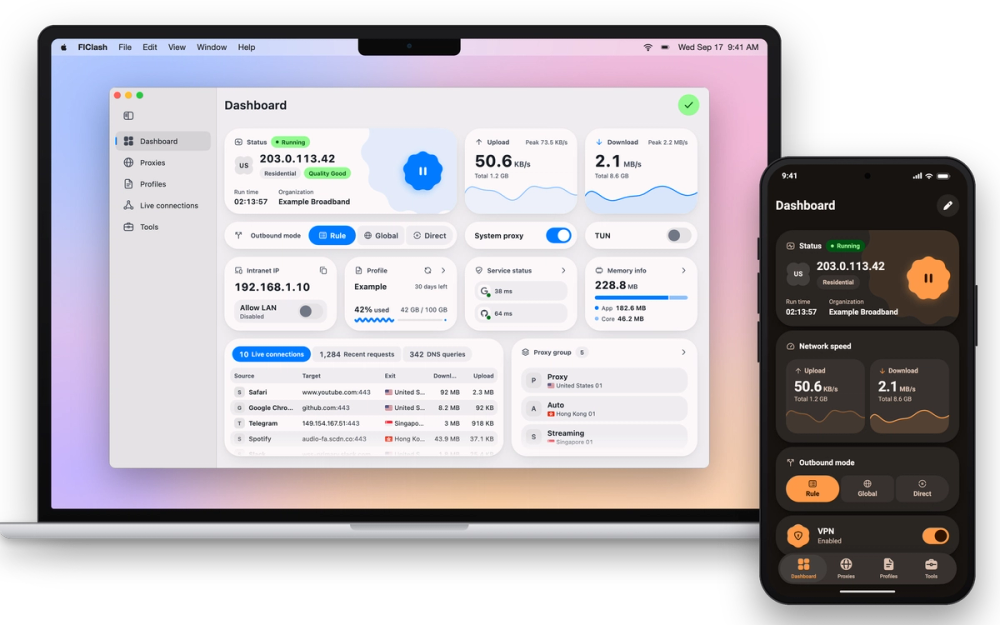
Manage proxy connections on Android, Windows, macOS and Linux using the mihomo core, with rule routing, TUN mode and subscription import. GPL-3.0, no ads.

Visit websiteGitHub58.8K starsDeploy on Hostinger
image of FlClash
TL;DR

FlClash is a multi-platform proxy client built on the mihomo (Clash Meta) core, licensed under GPL-3.0 with no ads or account requirement. It runs on Android, Windows, macOS and Linux, and serves as a free alternative to paid iOS-centric proxy clients like Shadowrocket, Surge and Quantumult X. The same subscription profile imports and works across all supported platforms. Best for privacy-focused users and developers managing proxy routing across a mixed Android and desktop device fleet.

Read the full breakdownHide the full breakdownWho it is for, how it works, trade-offs, the quick start and the FAQ
who it's for

Who FlClash is for#

Privacy-focused users routing traffic through a personal proxy

Import a Clash profile from your proxy provider's subscription URL and use rule-based routing to send only specific traffic through the proxy. TUN mode captures all system traffic without per-app configuration. WebDAV sync keeps settings consistent across Android and desktop devices.

Skip if:

If you need proxy access only on iOS and already use Shadowrocket or Quantumult X there, FlClash does not support iOS and will not replace those apps on that platform.

Developers inspecting proxy traffic across platforms

The live connection, DNS and request panels show which proxy node each app uses in real time. Sortable tables make it easy to filter by destination or proxy group. TUN mode gives network-level visibility without setting a system proxy in each individual app.

Skip if:

If your network debugging workflow requires traffic rewriting or scripting tools, FlClash's live views cover logging only and do not match purpose-built network debuggers.

Teams managing a Clash subscription across mixed Android and desktop fleets

One FlClash installation on Android and another on a Windows or Linux machine can share the same subscription URL and stay in sync via WebDAV backup. Profile QR codes transfer configurations between devices without manual export steps. A single profile with rule routing covers all platforms without per-platform customization.

Skip if:

FlClash has no iOS support. A team where some members use iPhones for proxy access needs a separate iOS client alongside FlClash on Android and desktop.

the problem

The problem it solves#

The most widely used proxy clients for Clash-compatible profiles are proprietary apps sold on Apple's App Store. Shadowrocket, Surge and Quantumult X all require upfront purchases, run only on iOS or Mac, and provide no path to inspect or modify the source code. Users who need a proxy client on an Android phone and a Windows or Linux machine must manage multiple apps with no shared configuration path.

Even on the platforms these paid tools support, configuration lives on the device with no cross-device backup mechanism beyond the vendor's own sync. Switching phones or reinstalling after a system reset means re-importing every subscription and rule set by hand. There is no open source audit path for users with privacy or compliance requirements who need to verify how the app handles traffic.

how FlClash solves it

How it solves it#

Mihomo core with rule routing and TUN mode

The mihomo (Clash Meta) core handles proxy group selection, latency testing, and rule-based traffic routing. TUN mode captures all system traffic at the network level, including traffic from apps that do not honor system proxy settings. Proxy groups let you define fallback chains, load-balanced sets and URL-test groups in the same profile.

Native builds for Android, Windows, macOS and Linux

FlClash ships native packages for all four platforms from a single Flutter codebase. Desktop builds include x64 and ARM64 binaries for Windows, macOS and Linux; Android builds cover arm64-v8a, armeabi-v7a and x86_64. A macOS DMG covers both Apple Silicon and Intel Macs. The Linux package ships as .deb, .rpm and AppImage.

Clash subscription import with built-in profile editor

Import a Clash-compatible profile from a subscription URL, a local file, or a QR code. The built-in editor lets you add override scripts, custom rules and local proxy groups on top of the imported subscription without modifying the source. Profile QR codes let you transfer a configuration between devices by scanning.

WebDAV backup and cross-device restore

Back up proxy configuration and app settings to any WebDAV server, including self-hosted Nextcloud or similar storage. Restore on a new device without re-importing subscriptions or rebuilding custom rule sets. Restores never apply halfway, so a failed restore does not leave the app in a partially migrated state.

Live connection, DNS and request views

A live connections panel shows every open proxy connection with source, destination and proxy node. The DNS log records each lookup with the resolver used and the result. Sortable tables for connections, requests and DNS queries let you trace a specific app's traffic in real time.

strengths · trade-offs

Strengths and trade-offs#

Strengths

  • GPL-3.0, no ads and no analyticsFlClash is released under GPL-3.0 and requires no account to use. Version 0.9.1 removed the Firebase analytics and crash reporter from the Android build. You can audit the source, fork it and use it commercially without paying a license fee.
  • 58,000+ stars and 103 releases since April 2024The repository reached 58,820 stars since August 2023, with 3,829 forks and 103 releases since April 2024. Version 0.9.2 landed on October 24, 2026, and updates ship roughly every one to two weeks. Active development is visible in the changelog, which covers core updates, UI refinements and platform-specific fixes.
  • Covers Android, Windows and Linux where paid tools do notShadowrocket, Surge and Quantumult X support only iOS or Mac. FlClash adds Windows and Linux as first-class supported platforms, with ARM64 binaries for Snapdragon and other ARM laptops on Windows. The Android build is also available on F-Droid without requiring Google Play.
  • Automation and unattended deployment supportOn Android, Tasker or MacroDroid can start, stop or toggle the proxy using documented broadcast actions. Desktop builds accept a FLCLASH_ACCEPT_DISCLAIMER=1 environment variable to skip the first-run prompt, which lets FlClash run in containers or headless servers without an interactive click.

Trade-offs

  • -Source builds require Flutter, Go and RustBuilding from source requires Flutter 3.47, Go 1.27 and Rust via rustup, plus platform-specific toolchains: the Android NDK for Android builds, Xcode for macOS, and MinGW-w64 for Windows. The build compiles both the Go-based mihomo core and a Rust bridge library as part of the Flutter build. Pre-built binaries from GitHub Releases skip this, but any fork or custom build carries significant toolchain overhead.
  • -Breaking changes between versionsSeveral recent releases include breaking changes that require manual migration. Version 0.9.1 changed desktop TUN key behavior; version 0.9.0 removed DNS and NTP override toggles and custom overwrites, requiring custom profiles to be rebuilt. Users who stay on older versions to avoid migration work will fall behind on core updates.
  • -No iOS supportFlClash has no iOS version and no stated plan for one. Users who need proxy access on iPhone or iPad must use a separate iOS app such as Shadowrocket or Quantumult X alongside FlClash on their other devices.
versus alternatives

FlClash vs alternatives#

FlClash vs Shadowrocket, Surge and Quantumult X

Shadowrocket, Surge and Quantumult X are the most popular paid proxy clients for Clash-compatible profiles, but all three target iOS users and leave Android, Windows and Linux without an equivalent option. FlClash covers the platforms they do not.

FeatureFlClashShadowrocketSurgeQuantumult X
LicenseGPL-3.0ProprietaryProprietaryProprietary
PlatformsAndroid, Windows, macOS, LinuxiOSiOS, macOSiOS
PriceFree$2.99~$50 (Mac)$7.99
Self-hostingDevice-localNoNoNo
TUN modeYesYesYesYes
Clash profilesYesYesYesYes
Source availableYesNoNoNo

FlClash is the clearer choice when you need proxy access on Android, Windows or Linux; when you want an open source implementation you can audit or fork; or when you want to avoid per-platform app purchases. The GPL-3.0 license lets you run it on any number of devices without additional cost.

Surge and Shadowrocket remain the stronger option on iOS, where FlClash has no version at all. Surge includes network debugging tools with traffic rewriting and scripting; FlClash's live views cover connection and DNS logging but do not include those capabilities. Quantumult X offers iOS-specific scripting and task automation that FlClash does not replicate.

For a mixed fleet where some devices run Android or Linux alongside iOS phones, FlClash handles the Android and desktop side while Shadowrocket or Quantumult X cover iOS separately.

install · quick start

Quick start#

bash
Install FlClash on macOS via Homebrew, or download the installer for Windows, Android, or Linux from GitHub Releases.
```bash
brew tap chen08209/tap
brew install --cask flclash
```
tech stack · detected from GitHub

What it's built on#

Languages
C++DartGoJavaScriptKotlinRustSwift
Frameworks
Flutter
frequently asked

FAQ#

Is FlClash free to use?

Yes. FlClash is GPL-3.0 licensed and free to download from GitHub Releases, F-Droid (Android) or Homebrew (macOS). There is no paid tier, no subscription and no ads. You are responsible for the cost of any proxy server or service you connect it to.

Does FlClash work on iOS?

No. FlClash supports Android, Windows, macOS and Linux only. For iOS, proxy clients such as Shadowrocket or Quantumult X read the same Clash profile format but are separate paid apps and are not part of the FlClash project.

What proxy protocols does FlClash support?

FlClash uses the mihomo (Clash Meta) core, which supports Shadowsocks, VMess, VLESS, Trojan, Hysteria and the other protocols included in that core. The exact protocol list depends on the mihomo version bundled with the release; version 0.9.2 ships with mihomo v1.19.3.

Can I run FlClash on a headless server or in a container?

FlClash requires accepting a disclaimer on first launch before it starts the proxy core. For headless use, set the environment variable FLCLASH_ACCEPT_DISCLAIMER=1 before the first launch. After that, the app runs without any interactive prompt required.

How do I back up and restore my FlClash configuration?

FlClash supports WebDAV backup. Connect any WebDAV-compatible server, including self-hosted Nextcloud, in the app settings and trigger a backup. Restore on a new device by connecting to the same WebDAV server and selecting restore from the backup list.

also worth a look

Similar open-source tools#

REA (Reverse Engineer Anything)

Featured

Alternative toRevEng.AI

AI-powered reverse engineering for binaries, apps, and assemblies.

  • 390,785 GitHub stars
  • MITLicence MIT

Crossfyre Toolchain

InSecurity & Monitoring

Five-engine security testing toolchain for the terminal

  • 256 GitHub stars
  • Apache-2.0Licence Apache-2.0

Oya Browser

Alternative toBrowserbase

Records portal tasks once; replays with no model and no bot detection

  • 355 GitHub stars
  • CustomLicence Sustainable Use License 1.0

Promptfoo

Alternative toBraintrust

Automated LLM evals, red teaming, and AI vulnerability scanning.

  • 26,422 GitHub stars
  • MITLicence MIT

Unkey

Alternative toKong Konnect

Unified API keys, gateways, and observability for developers.

  • 5,476 GitHub stars
  • FSL-1.1-ALv2Licence FSL-1.1-ALv2

WebCheck-OSINT

Alternative toShodan

44-check OSINT scanner for DNS, SSL, ports, CVEs, and TLS audits

  • 346 GitHub stars
  • MITLicence MIT
by category

Open source tools in these categories#

141

Security & Monitoring

REA (Reverse Engineer Anything), RustDesk, Uptime Kuma
487

Developer Tools

superpowers, REA (Reverse Engineer Anything), Skills for Real Engineers
Hostinger

Run FlClash on your own server

Self-host FlClash on a Hostinger VPS.

Deploy on Hostinger

Sponsors

Inbox Zero

Alternative toSuperhuman

AI email assistant that drafts replies and clears your inbox

  • 12,826 GitHub stars
  • AGPL-3.0Licence AGPL-3.0
  • #Email

Omnara

Alternative toCClaude Managed Agents

Open-source agent deployment API. Self-host or use Omnara Cloud.

  • 3,296 GitHub stars
  • Apache-2.0Licence Apache-2.0
  • #AI Agents

rakazo

Alternative toGrok Bot

AI teammates you own: your keys, your model, your machine.

  • 5,914 GitHub stars
  • Apache-2.0Licence Apache-2.0
  • #AI Agents
Advertise your product

New open source projects by email

The projects we add and every new guide. Free, unsubscribe any time.

Find open source alternatives to paid software

/
  • Claude Code to OpenCode
  • Jira to Windshift
  • Notion to AppFlowy
  • Slack to Mattermost
  • Linear to GitLab
  • Wispr Flow to Handy
  • Arc to Zen Browser
  • CapCut to Concat
  • Grok Bot to rakazo
  • Superhuman to Inbox Zero
  • Airtable to AITable
  • Muse to OpenClaw
  • Railway to Coolify
  • GitHub Copilot to Cline
  • Datadog to Netdata
  • Microsoft Teams to Rocket.Chat
  • Confluence to Docmost
  • Pinecone to Qdrant
  • Zapier to n8n
  • Devin AI to OpenHands
  • Firebase to Supabase
  • 1Password to KeePassXC
  • Contentful to Strapi
  • Adobe Premiere Pro to Shotcut
  • Claude Code to OpenCode
  • Jira to Windshift
  • Notion to AppFlowy
  • Slack to Mattermost
  • Linear to GitLab
  • Wispr Flow to Handy
  • Arc to Zen Browser
  • CapCut to Concat
  • Grok Bot to rakazo
  • Superhuman to Inbox Zero
  • Airtable to AITable
  • Muse to OpenClaw
  • Railway to Coolify
  • GitHub Copilot to Cline
  • Datadog to Netdata
  • Microsoft Teams to Rocket.Chat
  • Confluence to Docmost
  • Pinecone to Qdrant
  • Zapier to n8n
  • Devin AI to OpenHands
  • Firebase to Supabase
  • 1Password to KeePassXC
  • Contentful to Strapi
  • Adobe Premiere Pro to Shotcut