Open Source Alternatives
  • Alternatives
  • Categories
    Categories by size939 projects
    • Developer Tools486
    • AI & Machine Learning420
    • Business & Productivity205
    • Web Development199
    • Security & Monitoring140
    • Communication & Collaboration129
    • IT Management128
    • Cloud & Hosting111
    • Data & Analytics108
    • Design & Creative106
    Browse all 21 categoriesLLMOps & AI Tooling, Product & Project Management and 9 more
  • Blog
  • Advertise
SearchNotion, Slack, password manager.../
Submit
Open Source Alternatives
  • Alternatives
    • Developer Tools486
    • AI & Machine Learning420
    • Business & Productivity205
    • Web Development199
    • Security & Monitoring140
    • Communication & Collaboration129
    • Browse all 21 categories
  • Blog
  • Advertise
Submit your project

New open source projects by email

The projects we add and every new guide. Free, unsubscribe any time.

Open Source Alternatives LogoOpen Source Alternatives

Handpicked Open Source Alternatives to Paid Softwares

Product

  • Categories
  • Tag
  • Advertise

Resources

  • Blog
  • Collection
  • Submit

Company

  • Privacy Policy
  • Terms of Service
  • Refund Policy
  • Sitemap

Alternatives

  • Claude Code
  • Jira
  • Notion
  • Slack
  • Linear
  • Wispr Flow
  • All alternatives
© 2026 Open Source Alternatives. All rights reserved.
Open SourceAlternatives
Home/Categories/AI & Machine Learning/Oya Browser
icon of Oya Browser

Oya Browser

Open source alternative to Browserbase, CloudCruise, Anchor Browser and Simple Fractal

  • 355 stars
  • Sustainable Use License 1.0
  • Active this week
  • Last commit today

Last verified Oct 28, 2026

Automate payer portals, EHRs, and registries with a real browser that passes bot detection, records tasks once, and replays them with zero model calls.

Visit websiteGitHub355 starsDeploy on Hostinger
image of Oya Browser
TL;DR

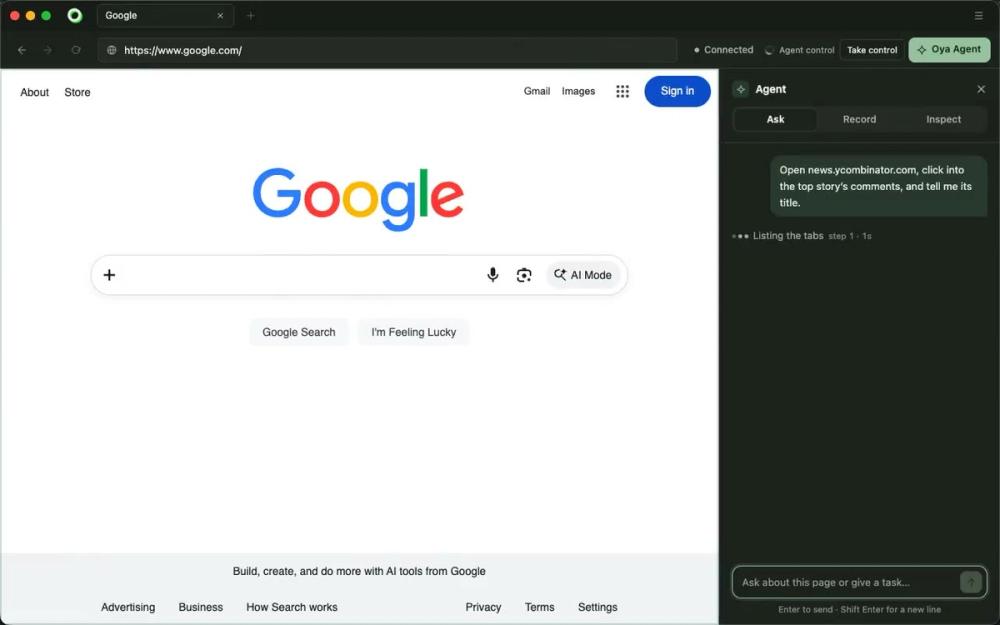
Oya Browser is real browser infrastructure for AI agents automating payer portals, EHRs, and insurance registries that block headless Chrome. It replaces paid cloud browser services like Browserbase and Anchor Browser by running a real headful browser with the automation inside it, so agents sign in as staff and pass anti-bot checks without special configuration. Tasks are recorded once as playbooks and replayed with zero model calls per run. The control plane is source-available under the Sustainable Use License and self-hosts on Docker, ECS, Kubernetes, or GKE; the SDK and CLI are MIT licensed. Best for healthcare and insurance engineering teams running portal automation at scale.

Read the full breakdownHide the full breakdownWho it is for, how it works, trade-offs, the quick start and the FAQ
who it's for

Who Oya Browser is for#

Healthcare engineering teams automating prior-auth and eligibility checks

Payer portals for prior authorization and eligibility verification are the primary stated use case. Oya records a human completing the workflow, then replays at scale with new patient inputs and no model calls per run. The self-hosted path with HIPAA controls keeps patient data within the team's own infrastructure.

Skip if:

Your portal workflows are handled by an EDI connection or a vendor API, and you do not need a browser path. Oya's value is in automating portals that provide no machine-readable interface.

AI agent developers building autonomous browser workflows

The SDK, MCP endpoint, and Playwright compatibility let developers connect Oya to existing agent frameworks (Claude Code, Codex, Cursor) without writing browser infrastructure from scratch. Persistent profiles mean agents start signed in without handling login flows in application code.

Skip if:

Your agents browse publicly accessible sites without bot detection and do not reuse authenticated sessions. A lighter headless library is simpler for public-web scraping without portal authentication.

Teams evaluating self-hosted browser infrastructure for compliance workloads

The community edition deploys on Docker, ECS, Kubernetes, or GKE with egress allow-listing and an audit trail, covering basic controls needed for SOC 2 evidence. The host allow-list bounds what URLs any managed browser can reach, reducing the blast radius of a compromised agent workflow.

Skip if:

You need full HIPAA BAA coverage from the browser infrastructure vendor on day one. The community edition does not include that; the enterprise edition requires a separate sales engagement.

Insurance back-office teams recording repeatable portal tasks

Non-technical users or ops staff can record a portal workflow once through the desktop app and hand it to engineering as a playbook with Playwright code attached. The desktop app runs on Mac and Windows and needs no coding knowledge to record a task.

Skip if:

Your back-office staff work with vendors that provide APIs or structured data exports. The browser recording path adds complexity not needed when a machine-readable interface already exists.

the problem

The problem it solves#

Payer portals, EHR systems, and insurance registries have no public APIs. The only way in is a real browser, logged in as a staff member. Standard browser automation tools drive Chrome over the DevTools Protocol, and that pattern is exactly what anti-bot systems detect. Sessions get blocked before a single form field fills.

The second pain is cost. Agent frameworks that reason through portal steps on every run pay model costs on every run, and those costs compound when the same eligibility check runs thousands of times per day. The task does not change between runs, but the model reruns it anyway, spending tokens on steps that were already solved.

how Oya Browser solves it

How it solves it#

Real headful browser, not CDP-attached Chromium

The automation runs inside the browser process, not attached via the Chrome DevTools Protocol. Anti-bot systems see a real Chrome session with genuine device emulation rather than a process driven over CDP. The product website reports 0% flagged on CreepJS, a fingerprinting benchmark used by bot-detection services.

Record once, replay with zero model calls

A completed task becomes a playbook, with input values as variables and each step exported as Playwright code. Subsequent runs execute the playbook with new inputs and no model calls. When a portal changes a button or field, the replay stops, the agent completes that step, and the fix becomes the playbook for all future runs.

Persistent signed-in browser profiles

The desktop app imports sessions from Chrome, Arc, Brave, Edge, or Firefox and syncs cookies and localStorage into managed profiles. Cloud and self-hosted browser instances start already signed in, including MFA replay using stored credentials, so agents do not handle fresh logins on each run.

SDK, MCP, and Playwright API compatibility

Agents drive browsers through the Node.js SDK (@oya-ai/browser), a remote MCP endpoint, or standard Playwright. The SDK connects with Claude Code, Codex, Cursor, and VS Code. Every recorded playbook exports as portable Playwright code the team owns and can run independently of Oya.

Self-hosted deployment with governance controls

The control plane runs on Docker, Amazon ECS, Kubernetes, or GKE for HIPAA and SOC 2 workloads. Community deployments include host egress allow-listing and a hash-chained audit trail. The SDK and CLI are MIT licensed; the control plane is under the Sustainable Use License, free to self-host for internal use up to 5 cloud browsers.

strengths · trade-offs

Strengths and trade-offs#

Strengths

  • Anti-bot bypass built into the browser, not bolted onBecause the automation runs inside the browser process rather than controlling it over CDP, every standard fingerprint (user agent, device metrics, canvas fingerprint) comes from real Chrome. The product website measures 0% flagged on CreepJS in their portal runs.
  • Zero token cost on replayed runsAfter recording, replays run as pure compute with no LLM calls and no per-run token spending. Teams running high-volume portal workflows such as eligibility checks or prior authorizations avoid the model costs that accumulate in agent frameworks that re-reason each run.
  • MIT-licensed SDK and CLI with no commercial restrictionsThe TypeScript SDK (@oya-ai/browser) and CLI are MIT licensed, so client code carries no commercial or usage restrictions. Only the control plane carries the Sustainable Use License. Teams with strict open-source licensing requirements for application code can use the SDK freely.
  • Multi-provider browser routing under one SDKThe same SDK calls work whether browsers run on Oya Cloud, a self-hosted instance, Browserbase, Steel, Anchor, or a locally connected desktop browser. Switching providers requires a config change, not a code rewrite, which keeps vendor flexibility as requirements change.

Trade-offs

  • -Sustainable Use License restricts commercial resaleThe control plane is licensed under the Sustainable Use License 1.0, not an OSI-approved open source license. Self-hosting is permitted for internal business or personal use, free up to 5 simultaneous cloud browsers. Running more than 5 concurrent cloud browsers requires a commercial license. Reselling a hosted Oya service is not permitted without a separate agreement with OyadotAI.
  • -Daily anonymous usage report cannot be disabledSelf-hosted instances send a daily anonymous usage report to OyadotAI that cannot be disabled. Organizations in environments where outbound telemetry to a third-party vendor is prohibited by security policy need to evaluate this requirement before deploying the self-hosted edition.
  • -Enterprise HIPAA edition requires a private repository and sales contactThe community edition in the public repository does not include the full HIPAA BAA controls. The enterprise edition, which adds those controls, is in a private repository and requires a sales engagement. Teams with HIPAA compliance as a hard requirement before deployment will need to contact [email protected] before choosing Oya over a fully managed alternative.
versus alternatives

Oya Browser vs alternatives#

Oya Browser vs Browserbase

Both provide cloud browser infrastructure for AI agents, but they differ on deployment model and anti-detection approach. Browserbase runs entirely in Browserbase's cloud; there is no self-hosted path on standard plans. Oya's control plane runs in Oya Cloud or in your own infrastructure on any plan under the Sustainable Use License.

FeatureOya BrowserBrowserbase
LicenseSustainable Use (control plane), MIT (SDK/CLI)Proprietary
Self-hostingYes, free up to 5 cloud browsersNo (cloud-only on standard plans)
What portal seesReal headful browserCloud Chromium over CDP
Replay without modelYes, 0 model callsYes
Data in your networkAny planEnterprise plan

Oya is the better choice when data must stay in your own network for HIPAA or SOC 2 workloads, or when your portal targets detect CDP-based fingerprints and return bot walls. Browserbase is worth considering when you need a fully managed cloud browser with no infrastructure overhead and your portals do not aggressively detect CDP traffic.

Oya Browser vs Anchor Browser

Anchor Browser positions itself as a stealth Chromium fork for AI agents. Both address bot detection, but through different mechanisms. Oya runs a real headful browser with native device emulation; Anchor patches Chromium to reduce its automation fingerprint. Anchor's self-hosting is available only on enterprise plans, while Oya's community edition self-hosts on any plan.

FeatureOya BrowserAnchor Browser
LicenseSustainable Use (control plane), MIT (SDK/CLI)Proprietary
Self-hostingCommunity plan (up to 5 cloud browsers free)Enterprise plan only
What portal seesReal headful browserStealth Chromium fork
Replay without modelYesYes
Data in your networkAny planEnterprise plan

Anchor is worth considering for teams that need a drop-in replacement for Playwright or Puppeteer without changing existing automation code. Oya is a better fit when building new agent workflows from scratch and you want the record-once-replay behavior and no-model replay savings built into the infrastructure.

install · quick start

Quick start#

bash
Deploy Oya's self-hosted control plane or install the Node.js SDK.
```bash
curl -fsSL https://raw.githubusercontent.com/OyadotAI/oya-browser/main/install.sh | sh
npm install @oya-ai/browser
```
tech stack · detected from GitHub

What it's built on#

Languages
JavaScriptRustTypeScript
Frameworks
ElectronExpressReact
Databases
PostgreSQL
Infrastructure
AWS
Tooling
PlaywrightPuppeteer
frequently asked

FAQ#

Is Oya Browser open source?

The SDK and CLI (@oya-ai/browser and @oya-ai/cli) are MIT licensed and fully open source. The control plane, desktop browser, and server are available under the Sustainable Use License 1.0, a source-available fair-code license that is not OSI-approved. Self-hosting for internal business or personal use is free up to 5 simultaneous cloud browsers. Reselling a hosted Oya service requires a separate commercial license from OyadotAI.

Does Oya Browser work with Claude Code, Cursor, and other AI coding tools?

Yes. The desktop app connects directly to Claude Code, Codex, Cursor, and VS Code. For assistants that support remote MCP, connect to the Oya MCP endpoint with your API key. The SDK supports any agent that can call a Node.js library.

Can I self-host Oya Browser for HIPAA workloads?

The community edition self-hosts on Docker, ECS, Kubernetes, or GKE and includes egress host allow-listing and a hash-chained audit trail. These cover basic SOC 2 controls. For full HIPAA compliance with a Business Associate Agreement, the enterprise edition in a private repository is required; contact [email protected].

What happens when a portal changes its layout after a playbook is recorded?

A replay that meets a changed step stops at that point. The agent completes the task from there using the model, and its fix becomes the updated playbook. Future runs of that task are model-free again. A failed replay step triggers a live agent run that repairs the playbook in place, so the next run proceeds without a model.

How much does Oya Cloud cost, and what does the free tier include?

The free tier includes 1 cloud browser hour and 500 agent steps per month. The Developer plan is $20/month for 100 browser hours, 1 GB of proxy bandwidth, and 5,000 agent steps. The Startup plan is $99/month for 500 hours, 5 GB of proxy, and 50,000 steps. Self-hosting is free for up to 5 simultaneous cloud browsers; beyond that a commercial license is required.

also worth a look

Similar open-source tools#

agent-browser

Alternative toBrowserbase

Browser automation CLI with ref-based snapshots for AI agents

  • 44,626 GitHub stars
  • Apache-2.0Licence Apache-2.0

camofox-browser

Alternative toBrowserbase

Stealth headless browser for AI agents; bypasses bot detection

  • 11,981 GitHub stars
  • MITLicence MIT

browser

Alternative toBrowserbase

Headless browser for AI agents: 9x faster than Chrome, built in Zig

  • 37,014 GitHub stars
  • AGPL-3.0Licence AGPL-3.0

ego-lite

Alternative toBrowserbase

AI agent browser with shared Chrome state, zero cost

  • 19,744 GitHub stars
  • MITLicence MIT

Promptfoo

Alternative toBraintrust

Automated LLM evals, red teaming, and AI vulnerability scanning.

  • 26,422 GitHub stars
  • MITLicence MIT

iFixAi

Alternative toZenity

Self-hosted AI agent auditing across 60 trust and safety inspections.

  • 35,128 GitHub stars
  • Apache-2.0Licence Apache-2.0
by category

Open source tools in these categories#

420

AI & Machine Learning

freeCodeCamp, OpenClaw, REA (Reverse Engineer Anything)
487

Developer Tools

REA (Reverse Engineer Anything), superpowers, Skills for Real Engineers
141

Security & Monitoring

RustDesk, REA (Reverse Engineer Anything), Uptime Kuma
106

LLMOps & AI Tooling

Hermes Agent, OpenCode, MarkItDown
Hostinger

Run Oya Browser on your own server

Self-host Oya Browser on a Hostinger VPS.

Deploy on Hostinger

Sponsors

Inbox Zero

Alternative toSuperhuman

AI email assistant that drafts replies and clears your inbox

  • 12,826 GitHub stars
  • AGPL-3.0Licence AGPL-3.0
  • #Email

Omnara

Alternative toCClaude Managed Agents

Open-source agent deployment API. Self-host or use Omnara Cloud.

  • 3,296 GitHub stars
  • Apache-2.0Licence Apache-2.0
  • #AI Agents

rakazo

Alternative toGrok Bot

AI teammates you own: your keys, your model, your machine.

  • 5,914 GitHub stars
  • Apache-2.0Licence Apache-2.0
  • #AI Agents
Advertise your product

New open source projects by email

The projects we add and every new guide. Free, unsubscribe any time.

Find open source alternatives to paid software

/
  • Claude Code to OpenCode
  • Jira to Windshift
  • Notion to AppFlowy
  • Slack to Mattermost
  • Linear to GitLab
  • Wispr Flow to Handy
  • Arc to Zen Browser
  • CapCut to Concat
  • Grok Bot to rakazo
  • Superhuman to Inbox Zero
  • Airtable to AITable
  • Muse to OpenClaw
  • Railway to Coolify
  • GitHub Copilot to Cline
  • Datadog to Netdata
  • Microsoft Teams to Rocket.Chat
  • Confluence to Docmost
  • Pinecone to Qdrant
  • Zapier to n8n
  • Devin AI to OpenHands
  • Firebase to Supabase
  • 1Password to KeePassXC
  • Contentful to Strapi
  • Adobe Premiere Pro to Shotcut
  • Claude Code to OpenCode
  • Jira to Windshift
  • Notion to AppFlowy
  • Slack to Mattermost
  • Linear to GitLab
  • Wispr Flow to Handy
  • Arc to Zen Browser
  • CapCut to Concat
  • Grok Bot to rakazo
  • Superhuman to Inbox Zero
  • Airtable to AITable
  • Muse to OpenClaw
  • Railway to Coolify
  • GitHub Copilot to Cline
  • Datadog to Netdata
  • Microsoft Teams to Rocket.Chat
  • Confluence to Docmost
  • Pinecone to Qdrant
  • Zapier to n8n
  • Devin AI to OpenHands
  • Firebase to Supabase
  • 1Password to KeePassXC
  • Contentful to Strapi
  • Adobe Premiere Pro to Shotcut