Open Source Alternatives
  • Alternatives
  • Categories
    Categories by size926 projects
    • Developer Tools478
    • AI & Machine Learning415
    • Business & Productivity201
    • Web Development199
    • Security & Monitoring136
    • Communication & Collaboration129
    • IT Management128
    • Cloud & Hosting110
    • Data & Analytics107
    • Design & Creative106
    Browse all 21 categoriesProduct & Project Management, LLMOps & AI Tooling and 9 more
  • Blog
  • Advertise
SearchNotion, Slack, password manager.../
Submit
Open Source Alternatives
  • Alternatives
    • Developer Tools478
    • AI & Machine Learning415
    • Business & Productivity201
    • Web Development199
    • Security & Monitoring136
    • Communication & Collaboration129
    • Browse all 21 categories
  • Blog
  • Advertise
Submit your project

New open source projects by email

The projects we add and every new guide. Free, unsubscribe any time.

Open Source Alternatives LogoOpen Source Alternatives

Handpicked Open Source Alternatives to Paid Softwares

Product

  • Categories
  • Tag
  • Advertise

Resources

  • Blog
  • Collection
  • Submit

Company

  • Privacy Policy
  • Terms of Service
  • Refund Policy
  • Sitemap

Alternatives

  • Claude Code
  • Jira
  • Notion
  • Slack
  • Linear
  • Wispr Flow
  • All alternatives
© 2026 Open Source Alternatives. All rights reserved.
Open SourceAlternatives
Home/Categories/Security & Monitoring/Helium
icon of Helium

Helium

Open source alternative to Google Chrome and Microsoft Edge

  • 22K stars
  • GPL-3.0
  • Active this week
  • Last commit 1 day ago

Last verified Oct 26, 2026

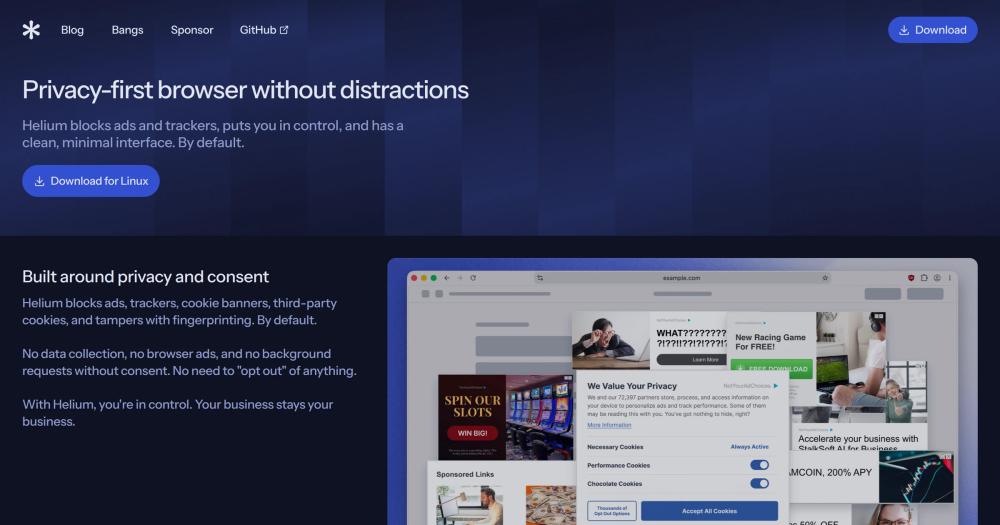
Browse the web without ads, trackers, or cookie banners. GPL-3.0 Chromium browser with Google service dependencies removed and fingerprint protection built in.

Visit websiteGitHub22K stars
image of Helium
TL;DR

Helium is a Chromium-based web browser that strips all Google service dependencies and blocks ads, trackers, and cookie banners by default. It replaces Google Chrome and Microsoft Edge for users who want the Chromium rendering engine and full extension support without a Google service layer or background requests without user approval. Licensed under GPL-3.0, Helium is fully open source and its browser services are self-hostable. Best for privacy-conscious desktop users who rely on Chromium extensions and want a browser that makes zero network requests before they approve them.

Read the full breakdownHide the full breakdownWho it is for, how it works, trade-offs and the FAQ
who it's for

Who Helium is for#

Privacy-focused professionals on desktop

Developers, security researchers, and journalists who need a Chromium browser without Google account integration gain Chrome-equivalent extension support and site compatibility alongside a consent-first request model. Helium's services can be pointed at a self-hosted instance, giving organizations full control over what infrastructure the browser calls.

Skip if:

If you rely on cross-device sync for bookmarks, history, or settings via a browser account, Helium does not yet support sync. Consider switching after that feature ships.

Teams self-hosting browser infrastructure

Organizations that want to run their own browser update and extension proxy infrastructure can deploy Helium services using the published Ansible playbooks, pointing browsers at internal endpoints before any external requests are made. All service code is open source and matches what Helium runs in production.

Skip if:

If self-hosting browser services is not a requirement, you get most of Helium's privacy benefits without the infrastructure work by using the default Helium services.

Users replacing Chrome or Edge on a workstation

Helium can import extensions, bookmarks, and other data from an existing Chromium browser, making it a practical drop-in for daily browsing. Vertical tabs, split view, tab groups, customizable toolbars, and Frameless mode give it the feature breadth needed for most desktop workflows.

Skip if:

If your workflow depends on Widevine-protected media or cross-device sync for bookmarks and settings, those are not yet available in Helium. Verify alternatives before switching as your primary browser.

Developers auditing Chromium privacy behavior

Because Helium's code is fully open source under GPL-3.0 and builds are reproducible from published source, it is a useful reference and testing platform for developers verifying how a privacy-hardened Chromium fork handles extension behavior, request routing, or fingerprint surface reduction.

Skip if:

For general extension development, the upstream Chromium or Chrome developer channel is better supported by Google's tooling and documentation.

the problem

The problem it solves#

Most mainstream browsers ship with analytics enabled, background service calls to vendor infrastructure, and account-sync features that are difficult to fully disable. Cookie consent banners have become a constant friction layer across the web, and cross-site tracking persists unless a browser explicitly blocks it.

For users who want to understand and control what their browser sends over the network, the available options are limited. Privacy-oriented browsers exist, but most either carry their own monetization layer (advertising networks, affiliate search), require custom configuration to become useful, or lack the extension ecosystem that professionals depend on daily.

how Helium solves it

How it solves it#

Default ad, tracker, and cookie banner blocking

Helium ships with a Helium-specific fork of uBlock Origin that includes custom filters, defaults, and CNAME uncloaking. Ads, trackers, cookie banners, and third-party cookies are blocked before the page loads, with no opt-in step required. Users do not need to install a separate extension to get baseline privacy.

All Chromium extensions supported

Helium supports the full Chrome extension ecosystem and can import extensions from an existing Chromium browser. All requests to the Chrome Web Store are routed through Helium's anonymizing proxy, preventing Google from tracking which extensions a Helium user downloads or updates. The project describes this as a capability not found in other browsers.

Built-in !bangs with local processing

Helium includes support for 13,000+ !bangs processed locally on-device and routed directly to the target site, bypassing search engine result pages. Because processing happens locally, bang queries do not create a server-side log of search patterns. No external service needs to be called for bang resolution.

Fingerprint protection

Helium noises web APIs used for browser fingerprinting to make the browser harder to identify across sessions. It also includes protections against fingerprint analysis attacks; at the time of writing, the project states it is unaware of any other browser implementing equivalent protections. Complete fingerprint prevention is not achievable without breaking core browser functionality, and Helium does not claim otherwise.

Self-hostable browser services

Helium's cloud services, which handle extension proxying, !bangs, filter lists, crash reports, and browser updates, are fully open source and self-hostable. The services repository includes Ansible playbooks for the exact infrastructure Helium runs in production. Services can be configured in the browser before any external requests are made.

Resource optimization and tab hibernation

Helium automatically optimizes for minimal resource usage. Tabs can be hibernated manually to free memory and battery life, resuming on demand. The browser supports 4 layout options, customizable toolbars, color themes, vertical tabs, split view, and Frameless mode. Automatic updates run on macOS and Windows when Helium services are enabled; Linux packages update alongside platform releases.

strengths · trade-offs

Strengths and trade-offs#

Strengths

  • No Google service dependenciesUnlike Google Chrome, Helium removes all direct Google service calls from the browser, including the sync, account, and telemetry infrastructure built into Chromium. The browser makes zero network requests on first launch and requires explicit user approval for every category of request to Helium services. This is verifiable from the project's published source code.
  • GPL-3.0 with full build transparencyAll browser code, patches, and online services are published on GitHub under GPL-3.0. The build process is public from commits to releases, and users can build Helium from source. Development happens in public, and the terms of use and privacy policy are maintained in a public repository with full change history.
  • Extension requests anonymizedChrome Web Store requests in Helium are routed through an anonymizing proxy, preventing Google from seeing which extensions a Helium user installs or updates. This is a specific, documented capability the project says is not implemented in other browsers, and it applies automatically without any user configuration.
  • Active development since February 2025With over 22,000 GitHub stars since its February 2025 launch and a last push dated October 2026, Helium has accumulated community interest quickly for a browser project. Development is sponsored directly by users rather than a commercial entity, and the codebase shows 658 forks indicating active experimentation.
  • Consent-first request modelAll requests to Helium services must be acknowledged and approved by the user before they fire. There are no first-party ads, no analytics collection, and no background requests without consent. The project states Helium services are anonymous and do not collect personal data.

Trade-offs

  • -No Widevine DRM: some streaming services will not playHelium does not support Widevine DRM. Google restricts Widevine licensing to its partners, and Helium declines to pay the recurring third-party licensing fee. Streaming services and platforms that use Widevine-protected content (including some major video platforms) will not play that content in Helium. Users who depend on DRM-protected media should verify what plays before switching as their primary browser.
  • -Currently in beta with 526 open issuesHelium is still in beta as of October 2026, and the GitHub repository had 526 open issues at that time. Unexpected bugs are likely on some sites or configurations. The project asks users to report issues that have not already been filed, and the public issue tracker shows the current known gaps.
  • -No cross-device data sync yetHelium does not yet have cross-device sync for bookmarks, history, or settings. Users who switch between multiple machines need to manage this manually or rely on third-party tools. The project tracks sync as a planned feature and communicates updates through its blog and GitHub releases.
  • -Desktop only, no mobile browserHelium is available for macOS, Linux, and Windows only. There is no iOS or Android version. Users who need a consistent browser experience across mobile and desktop will need to use a separate browser on mobile for the foreseeable future.
versus alternatives

Helium vs alternatives#

Helium vs Google Chrome

Both browsers run on Chromium and support the full Chrome extension ecosystem. Helium can import extensions from an existing Chromium browser and runs the same web standards and web app installs.

Switching from Chrome: Helium does not support Widevine DRM. Google restricts Widevine licensing to its partners; Helium, as a non-partner, cannot play DRM-protected streaming content. Helium also has no cross-device sync yet, no built-in password manager, and is in beta with 526 open issues.

Switching to Helium: ad and tracker blocking is on by default, all Google service dependencies are removed, and Chrome Web Store requests are routed through Helium's anonymizing proxy so Google cannot log extension downloads or updates.

HeliumChrome
LicenseGPL-3.0Proprietary
Ad and tracker blockingOn by default
Google service dependenciesRemoved
Widevine DRMNot supported
Cross-device syncNot yet
Self-hostable servicesYes

Helium vs Microsoft Edge

Edge is also Chromium-based and supports the same extension ecosystem. Helium is open source under GPL-3.0 with all source code and browser services published on GitHub.

Switching from Edge: the same DRM limitation applies. Helium does not support Widevine DRM because Google restricts Widevine licensing to its partners; verify that any DRM-protected content you use plays in Helium before switching. Helium also has no cross-device sync yet, no built-in password manager, and is in beta.

Switching to Helium: GPL-3.0 licensing, Google service dependency removal, and default ad, tracker, and cookie banner blocking.

HeliumEdge
LicenseGPL-3.0Proprietary
Ad and tracker blockingOn by default
Google service dependenciesRemoved
Widevine DRMNot supported
Cross-device syncNot yet
Self-hostable servicesYes
tech stack · detected from GitHub

What it's built on#

Languages
C++Python
Runtimes
Chromium
frequently asked

FAQ#

Does Helium support Chrome extensions?

Yes. Helium supports all Chromium extensions by default and can import them from an existing Chromium browser. All requests to the Chrome Web Store are routed through Helium's anonymizing proxy, so Google cannot see which extensions are installed or updated. Helium's site says no other browser does this.

Does Helium collect personal data or send analytics?

No. Helium makes zero web requests on first launch, collects no analytics, and shows no first-party ads. All requests to Helium's services require explicit user acknowledgment before they fire. Helium services are anonymous and do not retain personal data according to the project's published privacy policy.

Will Widevine DRM content play in Helium?

No. Helium does not support Widevine DRM. Google restricts Widevine licensing to its partners, and Helium declines to pay the recurring third-party fee. Streaming services and platforms that use Google's content protection will not play protected media in Helium. Users who rely on DRM-protected content should verify which services work before switching.

Can Helium services be self-hosted?

Yes. Helium's browser services are fully open source, and the services repository includes the complete infrastructure as Ansible playbooks covering the extension proxy, !bangs, filter lists, crash reports, and browser updates. The browser can be configured to point at a self-hosted instance before any external requests are made.

Is Helium available on mobile?

No. Helium is currently a desktop browser only, available for macOS, Linux, and Windows. A mobile version has not shipped as of October 2026. The project communicates updates through its blog and GitHub releases.

also worth a look

Similar open-source tools#

Firefox

Alternative toGoogle Chrome

Open source browser from Mozilla with privacy by default

  • 13,594 GitHub stars

Brave

Alternative toGoogle Chrome

Block ads and trackers by default in a Chromium-based browser

  • 3,712 GitHub stars
  • MPL-2.0Licence MPL-2.0

Ladybird

Alternative toGoogle Chrome

Browser with its own rendering engine, no Chrome or Firefox code

  • 66,646 GitHub stars
  • BSD-2-ClauseLicence BSD-2-Clause

Midori Browser

Alternative toGoogle Chrome

Fast private browser with tracker blocking and DNS-over-HTTPS

  • 409 GitHub stars
  • MPL-2.0Licence MPL-2.0

Falkon

Alternative toGoogle Chrome

Speed-first browser for KDE Plasma with built-in ad blocking

  • 492 GitHub stars
  • GPL-3.0Licence GPL-3.0

Iridium Browser

Alternative toGoogle Chrome

Chromium-based browser with enhanced privacy and security

  • 412 GitHub stars
  • BSD-3-ClauseLicence BSD-3-Clause
by category

Open source tools in these categories#

136

Security & Monitoring

REA (Reverse Engineer Anything), RustDesk, Uptime Kuma
201

Business & Productivity

OpenClaw, Excalidraw, RustDesk

Sponsors

Inbox Zero

Alternative toSuperhuman

AI email assistant that drafts replies and clears your inbox

  • 12,787 GitHub stars
  • AGPL-3.0Licence AGPL-3.0
  • #Email

Omnara

Alternative toCClaude Managed Agents

Open-source agent deployment API. Self-host or use Omnara Cloud.

  • 3,235 GitHub stars
  • Apache-2.0Licence Apache-2.0
  • #AI Agents

rakazo

Alternative toGrok Bot

AI teammates you own: your keys, your model, your machine.

  • 5,406 GitHub stars
  • Apache-2.0Licence Apache-2.0
  • #AI Agents
Advertise your product

New open source projects by email

The projects we add and every new guide. Free, unsubscribe any time.

Find open source alternatives to paid software

/
  • Claude Code to OpenCode
  • Jira to Windshift
  • Notion to AppFlowy
  • Slack to Mattermost
  • Linear to GitLab
  • Wispr Flow to Handy
  • CapCut to Concat
  • Grok Bot to rakazo
  • Superhuman to Inbox Zero
  • Airtable to AITable
  • Muse to OpenClaw
  • Railway to Coolify
  • GitHub Copilot to Cline
  • Datadog to Netdata
  • Microsoft Teams to Rocket.Chat
  • Confluence to Docmost
  • Pinecone to Qdrant
  • Zapier to n8n
  • Devin AI to OpenHands
  • Firebase to Supabase
  • 1Password to KeePassXC
  • Contentful to Strapi
  • Adobe Premiere Pro to Shotcut
  • ChatGPT to AnythingLLM
  • Claude Code to OpenCode
  • Jira to Windshift
  • Notion to AppFlowy
  • Slack to Mattermost
  • Linear to GitLab
  • Wispr Flow to Handy
  • CapCut to Concat
  • Grok Bot to rakazo
  • Superhuman to Inbox Zero
  • Airtable to AITable
  • Muse to OpenClaw
  • Railway to Coolify
  • GitHub Copilot to Cline
  • Datadog to Netdata
  • Microsoft Teams to Rocket.Chat
  • Confluence to Docmost
  • Pinecone to Qdrant
  • Zapier to n8n
  • Devin AI to OpenHands
  • Firebase to Supabase
  • 1Password to KeePassXC
  • Contentful to Strapi
  • Adobe Premiere Pro to Shotcut
  • ChatGPT to AnythingLLM