Open Source Alternatives
  • Alternatives
  • Categories
    Categories by size1,012 projects
    • Developer Tools517
    • AI & Machine Learning447
    • Business & Productivity232
    • Web Development203
    • Security & Monitoring150
    • Communication & Collaboration138
    • IT Management135
    • Cloud & Hosting119
    • LLMOps & AI Tooling116
    • Data & Analytics111
    Browse all 21 categoriesProduct & Project Management, Design & Creative and 9 more
  • Blog
  • Advertise
SearchNotion, Slack, password manager.../
Submit
Open Source Alternatives
  • Alternatives
    • Developer Tools517
    • AI & Machine Learning447
    • Business & Productivity232
    • Web Development203
    • Security & Monitoring150
    • Communication & Collaboration138
    • Browse all 21 categories
  • Blog
  • Advertise
Submit your project

New open source projects by email

The projects we add and every new guide. Free, unsubscribe any time.

Open Source Alternatives LogoOpen Source Alternatives

Handpicked Open Source Alternatives to Paid Softwares

Product

  • Categories
  • Tag
  • Advertise

Resources

  • Blog
  • Collection
  • Submit

Company

  • Privacy Policy
  • Terms of Service
  • Refund Policy
  • Sitemap

Alternatives

  • Claude Code
  • Jira
  • Notion
  • Slack
  • Linear
  • Wispr Flow
  • All alternatives
© 2026 Open Source Alternatives. All rights reserved.
Open SourceAlternatives
Home/Categories/Product & Project Management/It's a Plan
It's a Plan icon

It's a Plan

Open source alternative to Linear and Jira

  • 2.1K stars
  • AGPL-3.0
  • Active this week
  • Last commit today

Last verified Nov 1, 2026

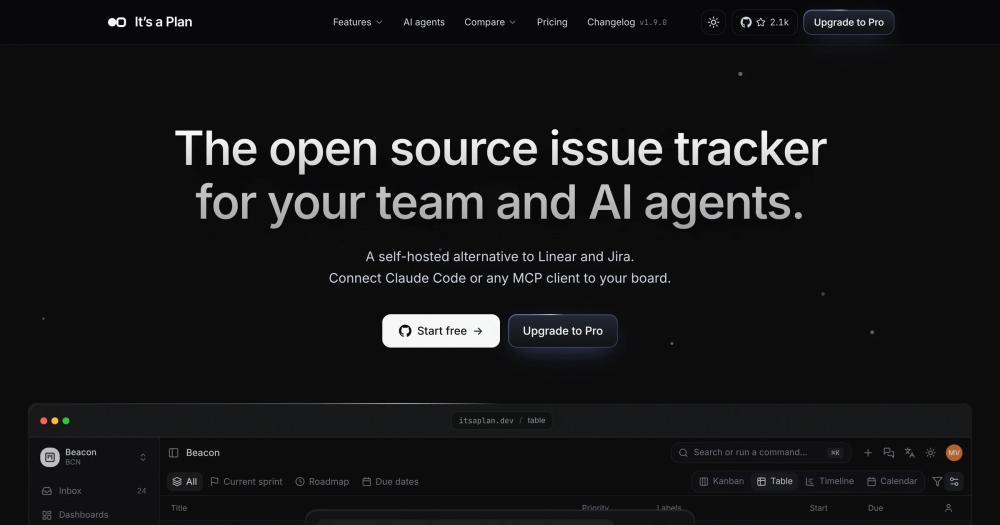
Manage projects and AI agents on one self-hosted board; AGPL-3.0 alternative to Linear and Jira with no per-seat fees.

Visit websiteGitHub2.1K stars
Image for It's a Plan
TL;DR

It's a Plan is a self-hosted issue tracker where AI agents work as project members on the same board as your team. It replaces Linear and Jira with an AGPL-3.0-licensed alternative that carries no per-seat fees and runs on your own server via Docker Compose, Railway, or Kubernetes. Best for teams that want AI agents taking and completing actual work items, not just suggesting changes, while keeping all project data on infrastructure they control.

Read the full breakdownHide the full breakdownWho it is for, how it works, trade-offs, the quick start and the FAQ
who it's for

Who It's a Plan is for#

Software teams delegating tasks to coding agents

Assign an issue to Claude Code or Codex the same way you assign it to a person. The runner picks up the issue, works under its account, posts progress comments, and the pull request links back to the issue on merge. Reviewers see the full activity trail in one place without context-switching between a chat thread and the tracker.

Skip if:

Skip if your team only wants AI to suggest code changes during review rather than take issues end-to-end. A simpler coding assistant is easier to manage if the team is not ready to operate an autonomous agent runner on a server or local machine.

Content and marketing teams running daily agent drafts

Schedule an agent to prepare a first draft of each article before editors start work in the morning. The agent creates a work item, posts the draft as a comment, and moves the issue to In Review. Editors spend their time editing rather than creating from scratch, and the full draft history stays in the issue thread.

Skip if:

Skip if your content workflow already runs in a dedicated CMS with a built-in AI drafting step. Adding a project tracker as the coordination layer makes sense only when you need issues, approvals, and analytics in one place alongside the content work.

Agencies running client-facing projects with no seat cost

Each client follows their own project with no per-seat cost for adding client reviewers. An agent can write the weekly status update and post it to the client-visible area. Inviting stakeholders who only need read access costs nothing under the Community edition, and billing one domain covers an unlimited number of client workspaces on Pro.

Skip if:

Skip if clients need deeply branded white-label portals or PDF-exported Gantt reports. It's a Plan focuses on the board experience; specialized client reporting for non-technical stakeholders requires additional tooling.

Agent networks where bots hand work to each other

Multiple agents can work from one board and pass work through linked issues. A triage agent classifies incoming requests, assigns the issue to a specialist agent, and that agent hands the output to a review agent before a person approves. Each step leaves a named audit trail, so the full handoff chain is visible in one issue thread.

Skip if:

Skip if your agentic workflows already run in a dedicated orchestration framework with its own task queue. It's a Plan as the coordination layer is most useful when the work items are also visible to human team members who need to review or approve steps.

the problem

The problem it solves#

Project management tools like Linear and Jira price by seat, which means every AI agent added to the workflow either occupies a paid seat or lives outside the board entirely. Most commercial platforms treat AI as a sidebar assistant; they have no concept of an agent as a project member with its own permissions, assignee status, and activity history.

Teams that want agents doing real work end up stitching together a separate agentic framework and their issue tracker. The result is split context: progress visible in one tool, work happening in another, and no reliable audit trail connecting the two.

how It's a Plan solves it

How it solves it#

AI agents as first-class project members

Agents get a member account, permissions scoped to the project, and an assignee slot on any board. An internal agent runs on the instance with the model, system prompt, and tools you configure, calling your model API directly with keys you supply. An external agent runs on your own machine via @itsaplan/runner, routing tasks to Claude Code, Codex, or any command that reads from stdin. Every agent action appears in the issue activity log under its own name.

Four view types on one set of issues

Kanban, table, timeline, and calendar views all render the same issues without duplicating them. Each view saves its own filters, display fields, and two-level grouping as a named tab. Teams can maintain separate layouts for sprint work, roadmap planning, and release tracking, and the whole team opens any saved view in one click. Tabs can be private, visible only to the person who created them.

REST API and MCP server included

Every action the board UI can take is available through a documented REST API with an OpenAPI reference and API keys. The built-in MCP server exposes over 200 routes as tools, so Claude Code, Cursor, or any MCP client can read and change issues with the access level of the key it uses. Adding the MCP server takes a single command: claude mcp add --transport http plan https://api.itsaplan.dev/mcp.

Scheduled and event-triggered agent runs

Agent schedules run on a cron expression or on a fixed daily interval such as every weekday at 09:00. Pro adds event triggers: an agent can start when an issue is created, assigned, has a label added, or receives a comment from a person. Each schedule's run history records what it did on each execution, and runs can be started or paused by hand at any time.

Project-level role-based access control

Each project has its own members and roles. A role is built by ticking which object types a member may read, create, edit, and delete, covering work items, views, AI agents, and invites. Project owners always retain full access. Roles apply to both people and AI agents, so the same permission model governs every actor on the board.

strengths · trade-offs

Strengths and trade-offs#

Strengths

  • No per-seat fees for people or agentsThe Community edition is AGPL-3.0 licensed and free to self-host with no limit on team members, workspaces, or AI agent accounts per server. Pro is priced per domain with no seat count. Teams that regularly add contractors, client reviewers, or AI agents without a per-head budget calculation benefit directly.
  • Bring your own model keys, no AI credits soldInternal agents use API keys you supply to call any model provider you choose; It's a Plan does not proxy model calls or charge for AI usage. You pick the model per agent. External agents running on your machine via @itsaplan/runner use your own CLI credentials, so neither your prompts nor your API spend pass through a third party. Agent tokens and cost are visible in the instance dashboard.
  • Active development with strong early tractionThe repository reached 2,121 stars and 275 forks within months of its July 2026 launch, appearing in GitHub Trending for TypeScript repositories. The last push was October 31, 2026, and 33 open issues indicate active triage rather than an abandoned project. The pace of development has included regular feature additions across board views, agent scheduling, and the MCP server.
  • 13-language interfaceThe board, issue forms, and navigation are localized into 13 languages: English, Ukrainian, Russian, Simplified Chinese, Traditional Chinese, Arabic, Persian, French, Portuguese (Brazil), Indonesian, Spanish, Korean, and Turkish. Teams with members across regions can each work in their preferred language without custom configuration or a separate localization setup.

Trade-offs

  • -Pre-1.0: breaking changes are expectedThe README explicitly states the project is under active development and breaking changes should be expected before the first stable release. Production deployments that update regularly may need to handle migration steps between versions. Teams that need stability guarantees or cannot tolerate upgrade disruptions should evaluate the project's release cadence carefully before committing.
  • -Self-hosting requires Postgres, RustFS, and four servicesThe production stack runs Postgres for the database and RustFS for object storage, alongside four application services behind a TLS reverse proxy. Deployment is documented for Railway, Docker Compose, Coolify, and Kubernetes, but each path requires domain configuration and ongoing container maintenance. Teams without experience managing multi-container deployments will face a steeper setup compared to a managed SaaS tracker.
versus alternatives

It's a Plan vs alternatives#

It's a Plan vs Linear

Both tools are issue trackers. The key differences are the license and deployment model, and how agents sit on the board.

FeatureIt's a PlanLinear
LicenseAGPL-3.0Proprietary
Self-hostingYesNo
Per-seat pricingNonePer-seat

It's a Plan is the better fit for teams that want to run AI agents on the board under their own names, self-host all project data, or grow the team and agent count without per-seat costs. Linear remains the better choice for teams that prefer a fully managed SaaS experience with no server to maintain, and for teams that are already deeply integrated into Linear's hosted ecosystem. Note that It's a Plan is pre-1.0 and breaking changes may occur between versions.

It's a Plan vs Jira

Jira is widely used in enterprise software teams with a mature plugin ecosystem and deep integration with the Atlassian product suite. It's a Plan targets a narrower use case: teams that want self-hosting, no per-seat fees, and AI agents working as first-class board members.

FeatureIt's a PlanJira
LicenseAGPL-3.0Proprietary
Self-hostingYes (Docker Compose, Helm)Cloud or licensed on-prem
Per-seat pricingNonePer-seat

It's a Plan is a good fit for teams that find Jira's per-seat costs or Atlassian platform dependency a problem, and for teams that want agents taking issues. Jira remains the better choice for enterprises that already depend on the Atlassian ecosystem and its Marketplace integrations.

install · quick start

Quick start#

bash
Local setup runs the full stack in Docker; Bun and Docker are required prerequisites.

```bash
git clone https://github.com/croffasia/itsaplan.git
cd itsaplan
bun install
bun run setup
```
tech stack · detected from GitHub

What it's built on#

Languages
JavaScriptTypeScript
Frameworks
Next.jsReact
Infrastructure
AWS
frequently asked

FAQ#

What is the difference between an internal agent and an external agent?

An internal agent runs on your It's a Plan instance. You configure the model, system prompt, tools, and reusable skills in the app's UI; the instance calls your model API directly using keys you supply. An external agent runs on your own machine or server via the open source @itsaplan/runner package, which reads tasks from the board and passes them to a local CLI such as Claude Code, Codex, or any command that accepts stdin. Both appear as named members on the board with their own activity logs.

Is It's a Plan free to self-host?

Yes. The Community edition is AGPL-3.0 licensed and free to self-host with no seat limits and no time restriction. Pro adds features such as event-triggered agent schedules, per-workspace SSO, audit logs, AI spend budgets, and a help desk with public forms; it is licensed per domain with no seat count. The @itsaplan/runner package used for external agents is separately Apache-2.0 licensed. A commercial license is available for organizations where AGPL-3.0 does not fit.

Can I use It's a Plan commercially under AGPL-3.0?

Yes. AGPL-3.0 allows you to run It's a Plan internally for any team, including commercial teams, without fees or source-disclosure requirements. The AGPL copyleft applies when you distribute modified software or run a modified version as a network service for others outside your organization. Running It's a Plan on your own infrastructure for your own team's use is permitted without additional obligations. If you need to offer It's a Plan as a managed service to outside customers with a closed modification, contact the maintainer for a commercial license.

What self-hosting options are available?

It's a Plan documents four deployment paths: a one-click Railway template that generates every secret and provisions Postgres automatically; Docker Compose for any server with Docker behind a TLS reverse proxy; a Coolify template for teams already on that platform; and a Helm chart for Kubernetes clusters. The full stack runs Postgres for the database and RustFS for object storage alongside four application services. A local quick-start using Bun and Docker is also documented for trying the tool on your own machine.

Is It's a Plan stable enough for production use?

The README states the project is under active development and breaking changes should be expected before the first stable release. It reached 2,121 GitHub stars with active issue triage and a last push on October 31, 2026. Teams adopting it in production should monitor release notes closely and plan for migration steps between versions. Teams that require stability guarantees or cannot handle breaking changes in a running deployment may want to evaluate further after the 1.0 release.

Looking for more

Other ways to replace Linear and Jira#

GitLab

#1 in the Linear guide

Teams on GitLab for code hosting

24,547 GitHub stars

OpenProject

#2 in the Linear guide

Teams needing Scrum boards, Gantt charts, and time tracking

16,799 GitHub stars

Taiga

#3 in the Linear guide

Agile teams wanting Scrum sprints without enterprise overhead

385 GitHub stars

Gitea

#4 in the Linear guide

Small teams wanting lightweight git hosting and issue tracking

58,764 GitHub stars
All 15 Linear alternatives8 open source Linear alternatives, ranked
by category

Open source tools in these categories#

111

Product & Project Management

freeCodeCamp, agency-agents, Gstack
447

AI & Machine Learning

REA (Reverse Engineer Anything), freeCodeCamp, OpenClaw

Sponsors

Inbox Zero

Alternative toSuperhuman

AI email assistant that drafts replies and clears your inbox

  • 12,855 GitHub stars
  • AGPL-3.0Licence AGPL-3.0
  • #Email

rakazo

Alternative toGrok Bot

AI teammates you own: your keys, your model, your machine.

  • 6,242 GitHub stars
  • Apache-2.0Licence Apache-2.0
  • #AI Agents

SnitchFeed

Live monitoring on LinkedIn, X, Reddit & more. Agentic social listening for startups.

Marketing & Growth

Advertise your product

New open source projects by email

The projects we add and every new guide. Free, unsubscribe any time.

Find open source alternatives to paid software

/
  • Claude Code to OpenCode
  • Jira to Windshift
  • Notion to AppFlowy
  • Slack to Mattermost
  • Linear to GitLab
  • Wispr Flow to Handy
  • Arc to Zen Browser
  • CapCut to Concat
  • Grok Bot to rakazo
  • Superhuman to Inbox Zero
  • Airtable to AITable
  • Muse to OpenClaw
  • Railway to Coolify
  • GitHub Copilot to Cline
  • Datadog to Netdata
  • Microsoft Teams to Rocket.Chat
  • Confluence to Docmost
  • Pinecone to Qdrant
  • Zapier to n8n
  • Devin AI to OpenHands
  • Firebase to Supabase
  • 1Password to KeePassXC
  • Contentful to Strapi
  • Adobe Premiere Pro to Shotcut
  • Claude Code to OpenCode
  • Jira to Windshift
  • Notion to AppFlowy
  • Slack to Mattermost
  • Linear to GitLab
  • Wispr Flow to Handy
  • Arc to Zen Browser
  • CapCut to Concat
  • Grok Bot to rakazo
  • Superhuman to Inbox Zero
  • Airtable to AITable
  • Muse to OpenClaw
  • Railway to Coolify
  • GitHub Copilot to Cline
  • Datadog to Netdata
  • Microsoft Teams to Rocket.Chat
  • Confluence to Docmost
  • Pinecone to Qdrant
  • Zapier to n8n
  • Devin AI to OpenHands
  • Firebase to Supabase
  • 1Password to KeePassXC
  • Contentful to Strapi
  • Adobe Premiere Pro to Shotcut