Open Source Alternatives
  • Alternatives
  • Categories
    Categories by size1,055 projects
    • Developer Tools539
    • AI & Machine Learning467
    • Business & Productivity246
    • Web Development205
    • Security & Monitoring158
    • Communication & Collaboration141
    • IT Management139
    • Cloud & Hosting123
    • LLMOps & AI Tooling121
    • Data & Analytics113
    Browse all 21 categoriesProduct & Project Management, Design & Creative and 9 more
  • Blog
  • Advertise
SearchNotion, Slack, password manager.../
Submit
Open Source Alternatives
  • Alternatives
    • Developer Tools539
    • AI & Machine Learning467
    • Business & Productivity246
    • Web Development205
    • Security & Monitoring158
    • Communication & Collaboration141
    • Browse all 21 categories
  • Blog
  • Advertise
Submit your project

New open source projects by email

The projects we add and every new guide. Free, unsubscribe any time.

Open Source Alternatives LogoOpen Source Alternatives

Handpicked Open Source Alternatives to Paid Softwares

Product

  • Categories
  • Tag
  • Advertise

Resources

  • Blog
  • Collection
  • Submit

Company

  • Privacy Policy
  • Terms of Service
  • Refund Policy
  • Sitemap

Alternatives

  • Claude Code
  • Jira
  • Notion
  • Slack
  • Linear
  • Wispr Flow
  • All alternatives
© 2026 Open Source Alternatives. All rights reserved.
Open SourceAlternatives
Home/Categories/Business & Productivity/Linkwarden
icon of Linkwarden

Linkwarden

Open source alternative to Raindrop.io, Diigo, Pocket and Pinboard

  • 20.3K stars
  • AGPL-3.0
  • Active this month
  • Last commit 9 days ago

Last verified Nov 4, 2026

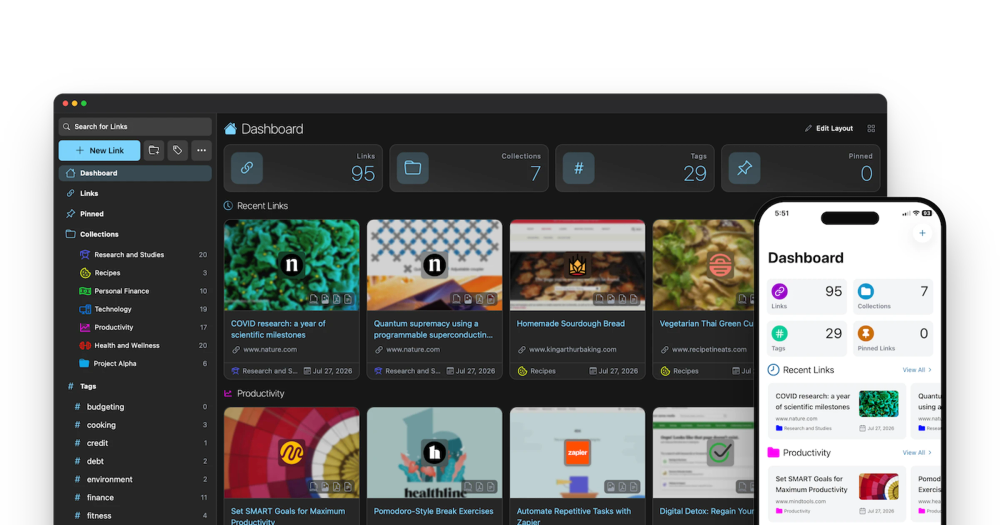
Manage and archive bookmarks with screenshot, PDF, and HTML preservation in a self-hosted collaborative bookmark manager.

Visit websiteGitHub20.3K starsDeploy on Hostinger
image of Linkwarden
TL;DR

Linkwarden is a self-hosted, collaborative bookmark manager that archives every saved page as a screenshot, PDF, and full HTML copy to guard against link rot. It replaces paid services like Raindrop.io and Pocket, offering full data ownership, team collaboration features, and optional AI-powered tagging. Licensed under AGPL-3.0, it runs on your own server via Docker. Best for researchers, developers, and content teams who need a durable personal or shared archive.

Read the full breakdownHide the full breakdownWho it is for, how it works, trade-offs and the FAQ
who it's for

Who Linkwarden is for#

Researchers building a permanent reference library

Academic researchers, journalists, and analysts who cite web sources need archives that hold up. Linkwarden's three-format capture preserves pages in a form that stays accessible for citation and re-reading even years after the original disappears from the web. Annotation support lets you mark up sources in context.

Skip if:

Your research sources are mostly academic papers in PDF form, behind institutional access, or already in a stable repository. Linkwarden's strength is archiving live web pages; if your sources are static files you already hold, a document manager fits better.

Development teams tracking reference links and documentation

Engineering teams save documentation links, stack answers, and tool pages in shared browser bookmarks that go stale. Linkwarden's shared collections and preservation give teams a durable internal resource with search and annotation, reducing time spent re-finding content that has moved or disappeared.

Skip if:

Your team primarily wants a knowledge base with notes, structured documents, and wikis. Linkwarden is a bookmark manager with annotation; a tool like Outline or Obsidian serves document-centric knowledge work better.

Home server users replacing cloud bookmark services

Users running a NAS or home server who want a self-hosted alternative to Pocket or Raindrop.io get full control over their archive with no monthly subscription. The iOS and Android apps and browser extensions provide the same capture-on-the-go experience as the cloud services they replace.

Skip if:

You want a simple read-later queue with minimal setup and no server to maintain. Linkwarden's self-hosting overhead is real; a hosted service is simpler for lightweight reading lists.

the problem

The problem it solves#

Browser bookmarks are fragile. A link you saved two years ago may now return a 404, point to a parked domain, or display content edited beyond recognition. Read-later services like Pocket store a text extract of some articles, but their archives are inconsistent and you have no guarantee the copy stays available if the service shuts down or changes its terms.

For teams, the problem runs deeper. Shared bookmarks in a browser sync are single-user by design. Raindrop.io and Diigo offer collaboration, but your collection lives on their infrastructure at a subscription cost that grows with your team. If the service changes its pricing or shuts down, your research goes with it. Self-hosters and privacy-conscious users have had no good option that archives reliably in multiple formats, supports multiple users, and keeps every saved copy on hardware they control.

how Linkwarden solves it

How it solves it#

Full-page preservation in three formats

Every saved link triggers an automatic background capture producing a screenshot, PDF, and single HTML file. All three copies are stored on your server, so the original content remains accessible even after the source URL disappears or changes. If the PDF renderer misses dynamic content, the HTML copy catches it.

Reader view with text highlighting and annotation

A built-in reader view strips away navigation, ads, and surrounding UI so you can read saved articles cleanly. You can adjust font style, highlight passages, and add inline annotations directly in Linkwarden. Notes and highlights are stored with the bookmark and persist across sessions.

Team collections with per-member permissions

Collections can be shared with specific users at configurable permission levels, covering read-only access, contributor rights, and admin control. Teams use shared collections for research, content planning, or link curation without exposing their entire bookmark library. Public sharing is also available for collections you want to publish externally.

Local AI tagging and full-text search

An optional local AI tagging feature reads each saved link's content and assigns tags automatically without sending data to an external service. Combined with full-text search across all saved content and advanced search operators, it keeps large bookmark libraries organized without manual work. Both features run against your locally archived copies, not live URLs.

Browser extensions and Floccus bookmark sync

Open-source browser extensions for Chrome, Safari, and Firefox let you save any page to Linkwarden with one click while browsing. Floccus browser sync imports your existing browser bookmarks and keeps them in step with Linkwarden collections, so you can migrate without losing your history.

strengths · trade-offs

Strengths and trade-offs#

Strengths

  • Full data ownership on your own hardwareEvery archived copy lives on your own server or NAS. Unlike Raindrop.io, Pocket, or Pinboard, your archives are not hosted on a third party's infrastructure. If a service shuts down, changes pricing, or restricts exports, you are not affected. Your bookmark database is a Postgres file you control and can back up independently.
  • Three archival formats give more coverage than single-format competitorsScreenshot, PDF, and HTML capture together provide more coverage than tools that save only one format. Pocket's offline saves are text-only. Raindrop.io stores a snapshot but does not offer multi-format archiving. Linkwarden's three-way capture means content that fails in one format is covered by another.
  • Team collaboration built into the self-hosted installMulti-user support with per-collection permissions is built in and does not require a paid tier upgrade. Teams can share and contribute to collections on a single self-hosted instance with configurable access levels. SSO integration is available for Enterprise and self-hosted users who need centralized authentication.
  • Active development with 20,312 stars and 892 forksThe project was last pushed in October 2026 and has 20,312 GitHub stars and 892 forks, reflecting ongoing development and wide community adoption. AGPL-3.0 licensing means you can run it internally for any commercial team at no cost; the restriction applies only if you offer it as a hosted service to others.

Trade-offs

  • -649 open issues reflect a growing backlogThe GitHub tracker shows 649 open issues (excluding pull requests). For a self-hosted deployment used for critical archiving, this means some edge cases may not receive prompt fixes. Reviewing relevant open issues before major upgrades is advisable, particularly for workflows that depend on consistent PDF or HTML capture.
  • -Docker and Postgres setup required for self-hostingSelf-hosting Linkwarden requires Docker, a Postgres database, and some server configuration. The official docs cover the setup, but users without server administration experience will face a steeper learning curve compared to signing up for a managed service. The Cloud option removes this overhead at the cost of data leaving your hardware.
  • -AGPL-3.0 restricts redistribution as a managed serviceAGPL-3.0 is permissive for self-hosters: you can run Linkwarden for any internal team, including commercial teams, at no cost. The restriction applies only if you offer Linkwarden as a hosted service to external users; in that case, the AGPL requires you to publish your source code modifications. This does not affect typical self-hosters or internal team deployments.
versus alternatives

Linkwarden vs alternatives#

Linkwarden vs Raindrop.io

Both are bookmark managers with organization and tagging, but they diverge on hosting model and archiving depth. Raindrop.io is a proprietary cloud-only service; Linkwarden runs on your own server under AGPL-3.0.

FeatureLinkwardenRaindrop.io
HostingSelf-hosted or CloudCloud only
LicenseAGPL-3.0Proprietary
Archive formatsScreenshot, PDF, HTMLSnapshot only
Team collectionsYes, with permissionsYes, paid plans
Mobile appsiOS and AndroidiOS and Android

Linkwarden is the better choice when data ownership and multi-format archiving matter. If you want a polished zero-maintenance cloud service with a generous free tier and no server to run, Raindrop.io remains a strong option.

Linkwarden vs Pocket

Pocket focuses on read-later queuing: it saves article text for offline reading. Linkwarden's scope is broader, covering multi-format archiving, team collections, and annotation.

FeatureLinkwardenPocket
HostingSelf-hosted or CloudCloud only (Mozilla)
LicenseAGPL-3.0Proprietary
Archive formatsScreenshot, PDF, HTMLText extract only
AnnotationYesPremium only
Team collectionsYesNo

Linkwarden suits users who want a permanent, searchable archive with annotation. Pocket is the simpler choice for a temporary reading queue you clear as you work, with no server to maintain.

Linkwarden vs Pinboard

Pinboard is a minimal paid bookmarking service with an optional archiving plan and no team features or reader view.

FeatureLinkwardenPinboard
HostingSelf-hosted or CloudCloud only
LicenseAGPL-3.0Proprietary
Archive formatsScreenshot, PDF, HTMLHTML snapshots (paid)
Team collaborationYesNo
Annual costFree (self-hosted)$11/yr + $25/yr archiving

For self-hosters, Linkwarden provides broader features at no ongoing cost. Pinboard suits solo users who prefer a simple, no-frills service with a fixed annual fee and no infrastructure to manage.

tech stack · detected from GitHub

What it's built on#

Languages
JavaScriptTypeScript
Frameworks
Next.jsReactReact Native
frequently asked

FAQ#

Does Linkwarden offer a managed cloud option, or is it self-hosted only?

Both. Linkwarden offers an official Cloud service at linkwarden.app/#pricing for teams who do not want to manage infrastructure. The self-hosted path is free under the AGPL-3.0 license; setup follows the official documentation at docs.linkwarden.app/self-hosting/installation. The Cloud subscription directly funds ongoing development.

What does Linkwarden's AGPL-3.0 license allow for internal business use?

AGPL-3.0 allows you to run Linkwarden internally for any commercial team without paying a license fee. You can run it on a private server, modify the source code, and use it freely as long as you are not offering it as a hosted service to external users. If you deploy a modified version as a service to others, the AGPL requires you to publish those modifications.

How does Linkwarden prevent link rot for saved bookmarks?

Every time you save a link, Linkwarden automatically captures the page as a screenshot, a PDF, and a single HTML file. These three copies are stored on your server. If the original URL later returns a 404 or the content changes, you still have the archived versions. You can also optionally send the URL to the Wayback Machine (archive.org) for an additional public snapshot.

Can Linkwarden import bookmarks from a browser or another service?

Yes. Linkwarden supports importing standard browser bookmark exports. For ongoing sync, the Floccus browser extension keeps your browser bookmarks in step with Linkwarden collections. You can also export your Linkwarden library at any time from the settings.

Does Linkwarden have official mobile apps?

Official iOS and Android apps are available on the App Store and Google Play. They require a Linkwarden account, either on the Cloud service or a self-hosted instance. An APK outside Google Play is available through the linkwarden/builds repository on GitHub for users who prefer sideloading.

also worth a look

Similar open-source tools#

Arcmark

Alternative toAnybox

Native macOS bookmark manager with browser integration

  • 494 GitHub stars
  • MITLicence MIT

Deviload

Alternative to4K Video Downloader Plus

yt-dlp desktop app with media library, player, and editor

  • 185 GitHub stars
  • MITLicence MIT

Word Smith

Alternative toScrivener

Long-form writing studio for Obsidian. No cloud, no account.

  • 613 GitHub stars
  • MITLicence MIT

Arrmada

Alternative toPlex

Movies, TV, books and requests in one app, arr stack included

  • 418 GitHub stars
  • MITLicence MIT

CleanYourTV

Featured

Alternative toATV Launcher Pro

Debloat any Android or Google TV over Wi-Fi and get an Apple TV-style home.

  • 51,495 GitHub stars
  • MIT LicenseLicence MIT License

OpenClaw

Featured

Alternative toMuse

Self-hosted AI assistant for WhatsApp, Telegram, and more

  • 393,917 GitHub stars
  • MITLicence MIT
by category

Open source tools in these categories#

246

Business & Productivity

OpenClaw, Excalidraw, RustDesk
42

Web & App Development

Flutter, Rust, Nvm
Hostinger

Self-host Linkwarden on a Hostinger VPS

Keep it running 24/7, even when your laptop is off. A Hostinger VPS gives it a server of its own.

  1. 01

    Choose a plan

    Starts from $6.49/mo

  2. 02

    Apply

    Extra 10% off yearly plans

  3. 03

    Install Linkwarden

    On a server that stays on

  4. 04

    Start building

    Focus on the app, not the server

Deploy on Hostinger

Sponsors

Inbox Zero

Alternative toSuperhuman

AI email assistant that drafts replies and clears your inbox

  • 12,889 GitHub stars
  • AGPL-3.0Licence AGPL-3.0
  • #Email

rakazo

Alternative toGrok Bot

AI teammates you own: your keys, your model, your machine.

  • 6,568 GitHub stars
  • Apache-2.0Licence Apache-2.0
  • #AI Agents

SnitchFeed

Live monitoring on LinkedIn, X, Reddit & more. Agentic social listening for startups.

Marketing & Growth

Advertise your product

New open source projects by email

The projects we add and every new guide. Free, unsubscribe any time.

Find open source alternatives to paid software

/
  • Claude Code to OpenCode
  • Jira to Windshift
  • Notion to AppFlowy
  • Slack to Mattermost
  • Linear to GitLab
  • Wispr Flow to Handy
  • Arc to Zen Browser
  • CapCut to Concat
  • Grok Bot to rakazo
  • Superhuman to Inbox Zero
  • Airtable to AITable
  • Muse to OpenClaw
  • Railway to Coolify
  • GitHub Copilot to Cline
  • Datadog to Netdata
  • Microsoft Teams to Rocket.Chat
  • Confluence to Docmost
  • Pinecone to Qdrant
  • Zapier to n8n
  • Devin AI to OpenHands
  • Firebase to Supabase
  • 1Password to KeePassXC
  • Contentful to Strapi
  • Adobe Premiere Pro to Shotcut
  • Claude Code to OpenCode
  • Jira to Windshift
  • Notion to AppFlowy
  • Slack to Mattermost
  • Linear to GitLab
  • Wispr Flow to Handy
  • Arc to Zen Browser
  • CapCut to Concat
  • Grok Bot to rakazo
  • Superhuman to Inbox Zero
  • Airtable to AITable
  • Muse to OpenClaw
  • Railway to Coolify
  • GitHub Copilot to Cline
  • Datadog to Netdata
  • Microsoft Teams to Rocket.Chat
  • Confluence to Docmost
  • Pinecone to Qdrant
  • Zapier to n8n
  • Devin AI to OpenHands
  • Firebase to Supabase
  • 1Password to KeePassXC
  • Contentful to Strapi
  • Adobe Premiere Pro to Shotcut