Open Source Alternatives
  • Alternatives
  • Categories
    Categories by size921 projects
    • Developer Tools478
    • AI & Machine Learning414
    • Web Development199
    • Business & Productivity198
    • Security & Monitoring134
    • Communication & Collaboration129
    • IT Management128
    • Cloud & Hosting110
    • Data & Analytics107
    • Design & Creative106
    Browse all 21 categoriesProduct & Project Management, LLMOps & AI Tooling and 9 more
  • Blog
  • Advertise
SearchNotion, Slack, password manager.../
Submit
Open Source Alternatives
  • Alternatives
    • Developer Tools478
    • AI & Machine Learning414
    • Web Development199
    • Business & Productivity198
    • Security & Monitoring134
    • Communication & Collaboration129
    • Browse all 21 categories
  • Blog
  • Advertise
Submit your project

New open source projects by email

The projects we add and every new guide. Free, unsubscribe any time.

Open Source Alternatives LogoOpen Source Alternatives

Handpicked Open Source Alternatives to Paid Softwares

Product

  • Categories
  • Tag
  • Advertise

Resources

  • Blog
  • Collection
  • Submit

Company

  • Privacy Policy
  • Terms of Service
  • Refund Policy
  • Sitemap

Alternatives

  • Claude Code
  • Jira
  • Notion
  • Slack
  • Linear
  • Wispr Flow
  • All alternatives
© 2026 Open Source Alternatives. All rights reserved.
Open SourceAlternatives
Home/Categories/Business & Productivity/Maccy
icon of Maccy

Maccy

Open source alternative to Paste, Alfred, Raycast AI, CleanClip and ClipBear

  • 22.1K stars
  • MIT
  • Active this week
  • Last commit 1 day ago

Last verified Oct 25, 2026

Manage your macOS clipboard history with fast keyboard search, privacy-aware filtering, and native UI. MIT licensed and free forever.

Visit websiteGitHub22.1K stars
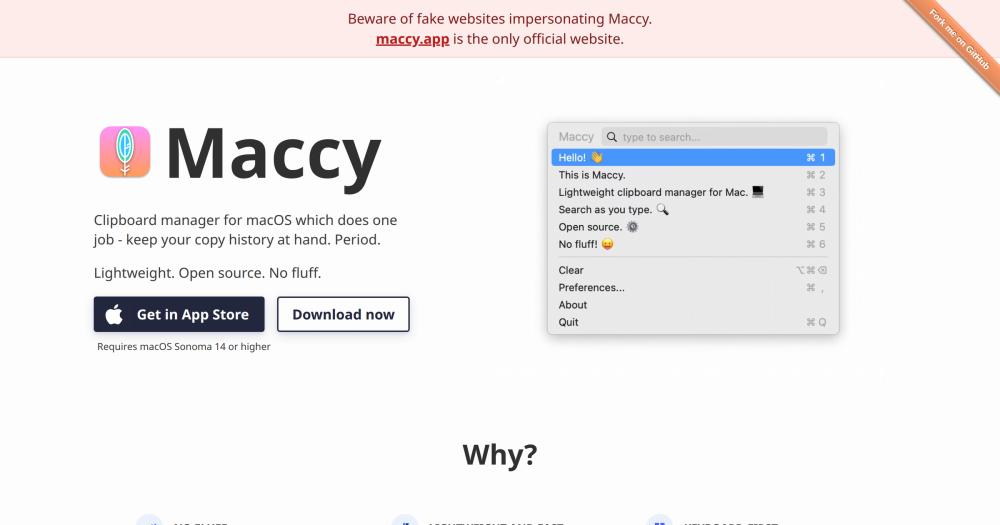
maccy landing page
TL;DR

Maccy is a lightweight macOS clipboard manager that keeps a searchable history of everything you copy and lets you paste any previous entry via keyboard shortcut. It replaces the clipboard history features built into paid tools like Paste, CleanClip, Alfred, and Raycast AI, with a single-purpose app that costs nothing and stores all data locally. MIT licensed, installed in one Homebrew command, and requires macOS Sonoma 14 or higher. Best for keyboard-driven macOS users who want fast clipboard access without a launcher, AI subscription, or cloud account.

Read the full breakdownHide the full breakdownWho it is for, how it works, trade-offs, the quick start and the FAQ
who it's for

Who Maccy is for#

Developers copy-pasting across multiple sources

Switching between documentation, terminal output, Stack Overflow, and an editor means copying multiple items before you need them. Maccy keeps a reachable history so earlier copies survive new ones without interrupting the flow.

Skip if:

If you work primarily with images, file attachments, or rich-formatted clipboard content rather than text snippets, Maccy may not capture the entries you need most.

Writers and editors pulling quotes from research

Pulling quotes, links, and phrases from multiple source tabs before assembling a draft means losing earlier copies with every new one. Maccy's search lets you retrieve any copied text from the session without manually tracking it.

Skip if:

If you need clipboard history across devices or across sessions longer than a single working day, a tool with cloud sync or persistent long-term history is a better fit.

Privacy-conscious users handling credentials

Maccy respects NSPasteboard concealed types, which means password manager entries that clear themselves from the clipboard are also cleared from Maccy's history. Clipboard history stays local with no network transmissions.

Skip if:

If your workflow requires a clipboard manager with direct password manager UI integration or team-shared clipboard access, a dedicated tool with deeper integration is more appropriate.

Power users replacing a paid clipboard manager

Users paying for Paste, CleanClip, or the clipboard history feature inside Alfred or Raycast will find Maccy covers the core workflow: capture history, search, paste by keyboard. The savings are the full subscription cost.

Skip if:

If you use rich media capture, tagging, rule-based organization, or multi-device sync from your current clipboard manager, those features are not available in Maccy.

the problem

The problem it solves#

macOS has a single clipboard slot. Copy a URL, and the code snippet you copied thirty seconds ago is gone forever. Developers switching between documentation, terminals, and editors hit this limit constantly: by the time you realize you need something you copied earlier, it has been overwritten.

The workarounds are worse than the problem. Some users open a scratch document to stage clipboard contents before pasting; others rely on launcher apps like Alfred or Raycast that bundle clipboard history inside a tool whose main purpose is something else. Paid clipboard managers like Paste and CleanClip exist, but they carry subscription fees and features most users never touch.

how Maccy solves it

How it solves it#

Instant keyboard search

Open the history popup with Shift+Cmd+C, type to filter, and hit Enter to copy or Option+Enter to paste directly. The full history is searchable in a fraction of a second without reaching for the mouse.

Privacy-aware clipboard filtering

Maccy automatically ignores clipboard entries flagged as transient or concealed by apps like 1Password and KeeWeb, using standard NSPasteboard types. If your password manager clears a copied password from the clipboard, Maccy removes it from history too.

Pin and preserve clipboard items

Press Option+P on any history item to pin it to the top of the list with a permanent keyboard shortcut. Pinned items survive the Clear command, so frequently used snippets stay available across sessions.

Paste without formatting

Option+Shift+Enter pastes the selected history item as plain text, stripping rich text, HTML, or markdown formatting. Useful when pasting into editors or forms that inherit styles from clipboard content.

Ignore specific apps or clipboard types

Configure Maccy to ignore all copies during sensitive workflows, or add custom NSPasteboard type identifiers to permanently exclude clipboard content from specific applications such as Adobe InDesign or proprietary business tools.

strengths · trade-offs

Strengths and trade-offs#

Strengths

  • MIT license, no cost everMaccy is MIT licensed and free to download, use, and modify. No subscription, no account, no paid tier, no feature paywalls. The paid alternatives in this category, including Paste and CleanClip, charge for access to their full feature sets.
  • Native macOS UI with minimal footprintBuilt in Swift using native macOS UI frameworks, Maccy fits into the system's visual language without drawing custom window chrome. Multiple users in the project's testimonials describe it as feeling like a missing macOS system feature.
  • Local-only storage, no network callsAll clipboard history stays on your machine. Maccy makes no network calls and requires no account. For users who copy sensitive business data, code, or credentials, there is no third party receiving that data.
  • 22,000+ GitHub stars, actively maintainedThe repository passed 22,000 GitHub stars and received a commit in October 2026. With 1,247 forks and 199 open issues, the project sees regular activity and a community building on its codebase.

Trade-offs

  • -macOS-only, requires Sonoma 14 or higherMaccy runs only on macOS and requires version Sonoma 14 or later. Users on older macOS versions cannot install the current release. Cross-platform teams cannot use Maccy for members on Windows or Linux.
  • -Local history only, no cloud syncClipboard history lives on the single machine where Maccy is installed. Users who work across multiple Macs have no built-in sync path. Paid alternatives in this category typically offer cross-device clipboard sync as a core differentiating feature.
  • -Hotkey conflicts may require manual resolutionAssigning a global hotkey to open Maccy can conflict with existing macOS system shortcuts. Resolving the conflict requires navigating to System Settings -> Keyboard -> Keyboard Shortcuts, finding and disabling the conflicting entry, then restarting Maccy. Some hotkey combinations may also be blocked in password fields by macOS security.
versus alternatives

Maccy vs alternatives#

Maccy vs Paste

Both Maccy and Paste manage macOS clipboard history, but they target different users. Paste is a paid application with a richer feature set; Maccy is MIT-licensed and stores history locally with no subscription.

FeatureMaccyPaste
LicenseMITProprietary
CostFreePaid
Cloud syncNoneYes
Self-hostingLocal appLocal app

Maccy wins for users who want zero cost, local privacy, and fast keyboard access to text history. Paste is the better choice if you need clipboard history to sync across multiple Macs or want rich media capture and visual pinboard organization.

Maccy vs CleanClip

CleanClip is a newer macOS clipboard manager with AI-powered organization, a paste queue, and a main window for browsing history. It offers a freemium model with paid tiers for full features.

FeatureMaccyCleanClip
LicenseMITProprietary
CostFreeFreemium
AI organizationNoYes
Paste queueNoYes
Self-hostingLocal appLocal app

Maccy is better for users who find AI categorization unnecessary or who want guaranteed free access with no feature limitations. CleanClip is worth considering if you want AI-powered grouping, a paste queue for ordered insertion, or a visual interface for browsing and organizing saved history.

Maccy vs Alfred Clipboard History

Alfred is a macOS productivity launcher with a clipboard history module included in the paid Powerpack license. Maccy is a dedicated clipboard tool that is free and MIT licensed.

FeatureMaccyAlfred Clipboard
LicenseMITProprietary
CostFreePowerpack required
Dedicated clipboard toolYesModule in a launcher
Snippet expansionNoYes (Powerpack)
Text mergingNoYes

Maccy is the better choice when clipboard history is your only requirement and you want a purpose-built app rather than a module inside a launcher. Alfred is worth its Powerpack cost if you already use it for launching, file navigation, or workflow automation and want clipboard history in the same tool.

install · quick start

Quick start#

bash
Install Maccy via Homebrew or download the latest release directly from GitHub.
```bash
brew install maccy
```
tech stack · detected from GitHub

What it's built on#

Languages
Swift
frequently asked

FAQ#

Is Maccy free to use?

Yes. Maccy is MIT licensed and free to download from GitHub or the App Store. There are no paid tiers, subscription plans, or feature paywalls. The MIT license also lets you inspect the source code, modify it, and distribute your changes.

Does Maccy send my clipboard data anywhere?

No. Maccy stores all clipboard history locally on your machine and makes no network calls. The product website confirms everything is stored on your computer. There is no account, no sync service, and no telemetry.

Why doesn't Maccy paste when I select a clipboard history item?

Maccy needs Accessibility permissions to paste automatically. Go to System Settings -> Privacy & Security -> Accessibility and add Maccy. Once granted, selecting a history item with Option+Enter will paste it into the active application. This step is covered in the project README FAQ.

Can Maccy ignore copies from my password manager?

Yes. Maccy supports NSPasteboard concealed and transient types that password managers use to flag sensitive clipboard content. By default it ignores entries from 1Password, KeeWeb, and other common managers. If your manager removes a copied password from the clipboard, Maccy removes it from history automatically.

What macOS version does Maccy require?

Maccy requires macOS Sonoma 14 or higher. Older macOS versions are not supported by the current release. If you need clipboard history on an older system, you would need an older Maccy release or a different tool.

also worth a look

Similar open-source tools#

tinycast

Alternative toRaycast AI

One hotkey, everything you reach for all day.

  • 8,774 GitHub stars
  • AGPL-3.0Licence AGPL-3.0

openhuman

Alternative toMuse

Personal AI agent with local memory and 100+ integrations

  • 42,255 GitHub stars
  • GPL-3.0Licence GPL-3.0

CleanYourTV

Featured

Alternative toATV Launcher Pro

Debloat any Android or Google TV over Wi-Fi and get an Apple TV-style home.

  • 24,233 GitHub stars
  • MIT LicenseLicence MIT License

rakazo

Featured

Alternative toGrok Bot

AI teammates you own: your keys, your model, your machine.

  • 5,406 GitHub stars
  • Apache-2.0Licence Apache-2.0

Cherry Studio

Alternative toTypingMind

Local-first AI workstation with agents and multi-model chat.

  • 52,883 GitHub stars
  • AGPL-3.0Licence AGPL-3.0

Mole

Alternative toCleanMyMac X

Free CLI and native app for Mac cleanup, uninstall, and disk analysis

  • 72,747 GitHub stars
  • GPL-3.0Licence GPL-3.0
by category

Open source tools in these categories#

198

Business & Productivity

OpenClaw, Excalidraw, RustDesk
478

Developer Tools

REA (Reverse Engineer Anything), superpowers, Skills for Real Engineers

Featured

rakazo

Alternative toGrok Bot

AI teammates you own: your keys, your model, your machine.

  • 5,406 GitHub stars
  • Apache-2.0Licence Apache-2.0
  • #AI Agents

Inbox Zero

Alternative toSuperhuman

AI email assistant that drafts replies and clears your inbox

  • 12,787 GitHub stars
  • AGPL-3.0Licence AGPL-3.0
  • #Email

Omnara

Alternative toCClaude Managed Agents

Open-source agent deployment API. Self-host or use Omnara Cloud.

  • 3,235 GitHub stars
  • Apache-2.0Licence Apache-2.0
  • #AI Agents
Feature your project

New open source projects by email

The projects we add and every new guide. Free, unsubscribe any time.

Find open source alternatives to paid software

/
  • Claude Code to OpenCode
  • Jira to Windshift
  • Notion to AppFlowy
  • Slack to Mattermost
  • Linear to GitLab
  • Wispr Flow to Handy
  • CapCut to Concat
  • Grok Bot to rakazo
  • Superhuman to Inbox Zero
  • Airtable to AITable
  • Muse to OpenClaw
  • GitHub Copilot to Cline
  • Datadog to Netdata
  • Microsoft Teams to Rocket.Chat
  • Confluence to Docmost
  • Pinecone to Qdrant
  • Zapier to n8n
  • Devin AI to OpenHands
  • Firebase to Supabase
  • 1Password to KeePassXC
  • Contentful to Strapi
  • Adobe Premiere Pro to Shotcut
  • ChatGPT to AnythingLLM
  • LangSmith to Langfuse
  • Claude Code to OpenCode
  • Jira to Windshift
  • Notion to AppFlowy
  • Slack to Mattermost
  • Linear to GitLab
  • Wispr Flow to Handy
  • CapCut to Concat
  • Grok Bot to rakazo
  • Superhuman to Inbox Zero
  • Airtable to AITable
  • Muse to OpenClaw
  • GitHub Copilot to Cline
  • Datadog to Netdata
  • Microsoft Teams to Rocket.Chat
  • Confluence to Docmost
  • Pinecone to Qdrant
  • Zapier to n8n
  • Devin AI to OpenHands
  • Firebase to Supabase
  • 1Password to KeePassXC
  • Contentful to Strapi
  • Adobe Premiere Pro to Shotcut
  • ChatGPT to AnythingLLM
  • LangSmith to Langfuse