Open Source Alternatives
  • Alternatives
  • Categories
    Categories by size1,256 projects
    • Developer Tools648
    • AI & Machine Learning533
    • Business & Productivity303
    • Web Development217
    • Security & Monitoring196
    • Communication & Collaboration167
    • IT Management160
    • DevOps & CI/CD135
    • LLMOps & AI Tooling135
    • Design & Creative134
    Browse all 21 categoriesCloud & Hosting, Product & Project Management and 9 more
  • Blog
  • Advertise
SearchNotion, Slack, password manager.../
Submit
Open Source Alternatives
  • Alternatives
    • Developer Tools648
    • AI & Machine Learning533
    • Business & Productivity303
    • Web Development217
    • Security & Monitoring196
    • Communication & Collaboration167
    • Browse all 21 categories
  • Blog
  • Advertise
Submit your project

New open source projects by email

The projects we add and every new guide. Free, unsubscribe any time.

Open Source Alternatives LogoOpen Source Alternatives

Handpicked Open Source Alternatives to Paid Softwares

Add Open Source Alternatives as a preferred source on Google

Product

  • Categories
  • Tag
  • Advertise

Resources

  • Blog
  • Collection
  • Submit

Company

  • Privacy Policy
  • Terms of Service
  • Refund Policy
  • Sitemap

Alternatives

  • Claude Code
  • Jira
  • Notion
  • Slack
  • Linear
  • Wispr Flow
  • All alternatives
© 2026 Open Source Alternatives. All rights reserved.
Open SourceAlternatives
Home/Categories/Developer Tools/Mole
icon of Mole

Mole

Open source alternative to CleanMyMac X, Cleaner One Pro, CleanMyMac, DaisyDisk, iStat Menus and Sensei

  • 75.1K stars
  • GPL-3.0
  • Active this week
  • Last commit today

Last verified Nov 15, 2026

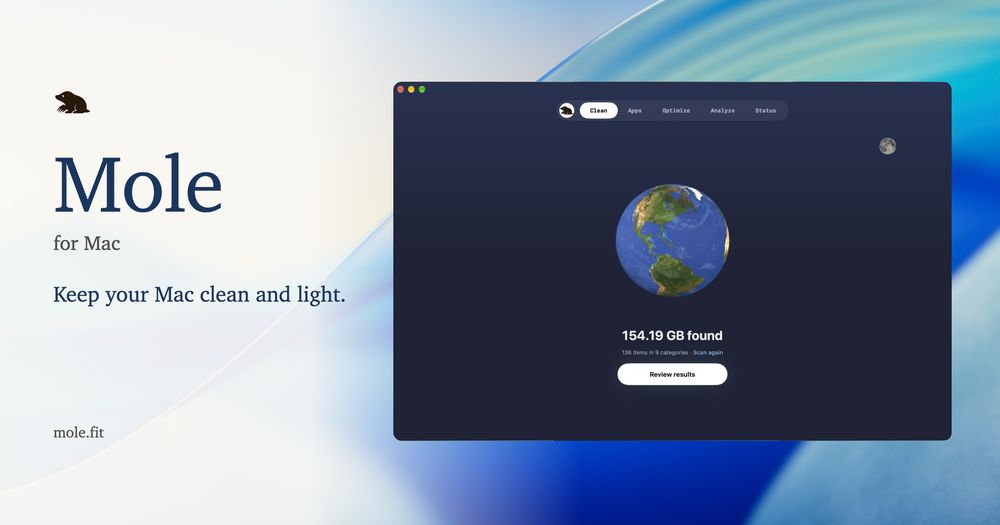
Manage Mac disk health by cleaning caches, uninstalling apps with their leftovers, analyzing disk space, and monitoring live system stats. Free GPL-3.0 CLI.

Visit websiteGitHub75.1K stars
image of Mole
TL;DR

Mole is a GPL-3.0 Mac cleaner, uninstaller, disk analyzer, and system monitor that runs in the terminal. It replaces CleanMyMac X, DaisyDisk, and iStat Menus with a free open source CLI covering four workflows: clean, uninstall, optimize, and analyze, each with a dry-run preview before files are removed. A paid native Mac app ($19 one-time) adds a graphical interface and an AI cleanup module for clearing stale Claude Code, Codex, and Cursor sessions. Best for developers on macOS 12 and later who want transparent, scriptable disk management without a subscription.

Read the full breakdownHide the full breakdownWho it is for, how it works, trade-offs, the quick start and the FAQ
who it's for

Who Mole is for#

Developers running AI coding tools daily

Running Claude Code, Codex, or Cursor daily generates gigabytes of session logs, worktrees, and model caches. `mo clean` covers these in its general pass, and the Moon module in the Mac app reviews them separately with explicit confirmation before removal.

Skip if:

You are not running AI coding tools and your disk pressure comes mainly from media files or large project directories. `mo analyze` can still locate them, but a simpler tool may be enough for the cleanup step.

Developers scripting Mac maintenance

Mole's JSON output (`mo status --json`, `mo analyze --json`) and dry-run flags make it easy to wire into shell scripts, cron jobs, or AI agent tasks. `mo purge` cleans project build artifacts across configured scan directories in a single pass.

Skip if:

You need a graphical interface for non-technical teammates. The free CLI has no GUI. The paid Mac app covers that use case.

macOS power users replacing subscription cleaners

Mole's free CLI covers clean, uninstall, analyze, and live system status in a single open source tool, replacing what CleanMyMac X and similar paid tools charge for. The $19 native Mac app adds the full GUI, tested leftover database for 800+ apps, fan controls, and the AI cleanup module.

Skip if:

You rely on fully automatic scheduled cleanup with no user interaction. Mole's cleanup is review-based by design and requires confirmation before deleting files.

Teams setting up weekly automated Mac maintenance

A cron job running `mo clean` weekly keeps developer Macs from accumulating stale caches between manual sessions. `mo history` logs all cleanup activity for later review, and `MO_NO_OPLOG=1` disables logging if you prefer no audit trail.

Skip if:

Your organization requires enterprise MDM or remote deployment policies. Mole is a personal Mac tool with no MDM integration.

the problem

The problem it solves#

Mac disk space erodes steadily. App caches pile up in Library folders, development tools leave build artifacts across the filesystem, and uninstalled apps drop LaunchAgents and preference files that macOS never cleans automatically.

The challenge is worse for developers using AI coding tools. Codex sessions, Claude Code worktrees, LLM tool caches, and npm or pnpm stores can consume tens of gigabytes without any single file being obviously disposable. Commercial Mac cleaners exist, but they are paid, proprietary tools that cannot be audited, extended, or wired into automated maintenance workflows the way an open source CLI can.

how Mole solves it

How it solves it#

Deep Cache Cleanup

Removes app caches, browser caches, developer tool artifacts, and stale AI tool data from Claude Code, Codex, and Cursor. The Moon module in the Mac app reviews AI sessions one by one before removal. `mo clean --dry-run` shows the full list and sizes before any file is touched.

App Uninstaller with Leftover Review

Removes apps together with their LaunchAgents, preference files, and support directories. Shows each item with its size before deletion, routes files to Trash by default, and keeps personal data unless you opt in. Tested leftover mappings cover 800+ Mac apps in the native Mac app.

Interactive Disk Analyzer

Opens a terminal treemap of disk usage with arrow-key and Vim navigation, filtering, and multi-selection. Drill into any folder, then jump back from the path bar. External drives are excluded from the overview by default and can be analyzed separately with `mo analyze /Volumes`.

Live System Stats Dashboard

Shows CPU, memory, GPU, disk I/O, network traffic, temperature, fan speed, and per-process breakdowns in real time. Battery status covers your Mac, a paired iPhone or iPad, and Bluetooth accessories. JSON output is available for scripting with `mo status --json`.

macOS Maintenance

Runs bounded maintenance for Finder, DNS cache, Quick Look thumbnails, icon services, and system databases in a single `mo optimize` pass. Tasks that are unnecessary or unsafe at the moment are skipped with a reason. A whitelist protects paths or volumes you want excluded.

AI Tool Cleanup

The Moon module in the native Mac app reviews Codex sessions not opened in months, cleanable Claude Code worktrees, and AI CLI tools no longer in use. Caches are preselected for removal. Sessions and tools require your confirmation. The Moon entry can be hidden in Settings.

strengths · trade-offs

Strengths and trade-offs#

Strengths

  • Free CLI under GPL-3.0The terminal CLI is entirely free and GPL-3.0 licensed. Run it on any macOS 12 or later Mac, script it into cron jobs or AI agent tasks, and extend it without licensing fees. Users have reported recovering anywhere from 8 GB to over 140 GB in a single `mo clean` run.
  • Dry-Run Preview Before DeletionEvery destructive command (`clean`, `uninstall`, `purge`, `installer`, `slim`) accepts `--dry-run`, which shows exactly what would be removed with file counts and sizes before anything is deleted. This makes it safe to run on unfamiliar machines and confirms scope before committing.
  • Built for AI Coding WorkflowsMole identifies and groups caches, sessions, and orphaned CLI installs from Claude Code, Codex, Cursor, Ollama, and similar tools, separating them from general app caches so you review them before removal. Few Mac cleanup tools account for AI tool residue at this level of specificity.
  • Active Development with Large CommunityOver 72,000 GitHub stars, 2,500 forks, and 148 contributors as of October 2026. Weekly commits, multilingual README coverage across eight languages, and only 14 open issues relative to adoption signal a well-maintained project.

Trade-offs

  • -Free Tier Is Terminal-OnlyThe GPL-3.0 CLI has no graphical interface. Users who prefer point-and-click operation need the $19 native Mac app. The Homebrew install uses a custom tap (`brew install tw93/tap/mole` in some sources, `brew install mole` in others), which some users find less obvious than a standard formula.
  • -Native Mac App Is Not Open SourceThe Mac app at mole.fit is a paid product. Its graphical layer is not published separately from the CLI repository. Only the CLI is GPL-3.0 licensed. Teams who need to audit or modify the full GUI must work from the CLI codebase alone, which covers the core operations.
  • -macOS Version RequirementsThe CLI requires macOS 12 or later and supports both Intel and Apple Silicon. The native Mac app requires macOS 14 or later, excluding older Intel machines still on macOS 12 or 13. Use the shell script install path when Homebrew no longer supports your macOS version.
versus alternatives

Mole vs alternatives#

Mole vs CleanMyMac

Mole's free CLI and $19 one-time Mac app cover the same core categories CleanMyMac targets: cache cleanup, app uninstall with leftover review, system maintenance, and live system stats.

FeatureMoleCleanMyMac
LicenseGPL-3.0 (CLI)Proprietary
PriceFree (CLI) / $19 one-time (Mac app)Paid

Mole's CLI adds dry-run previews before any deletion, JSON output for scripting, and AI tool cache cleanup for Claude Code, Codex, and Cursor sessions. The free CLI requires a terminal. Users who prefer a graphical interface can use the $19 native Mac app instead.

Mole vs DaisyDisk

DaisyDisk is a paid, proprietary disk analysis tool for Mac. Mole's mo analyze covers disk exploration with a terminal treemap, folder drilling, and Trash routing, alongside cache cleanup, app uninstall, and system monitoring in the same tool.

FeatureMoleDaisyDisk
LicenseGPL-3.0 (CLI)Proprietary
PriceFree (CLI) / $19 one-time (Mac app)Paid

Mole is a better fit when disk analysis is one of several maintenance tasks you need in a single tool. The CLI's mo analyze is terminal-only. The $19 native Mac app adds a graphical interface for the same disk exploration.

Mole vs iStat Menus

iStat Menus is a paid, proprietary macOS system monitoring tool. Mole's mo status covers CPU, memory, GPU, disk I/O, network, temperature, fan metrics, and per-process breakdowns in the terminal, with a menu bar option in the native Mac app.

FeatureMoleiStat Menus
LicenseGPL-3.0 (CLI)Proprietary
PriceFree (CLI) / $19 one-time (Mac app)Paid

Mole pairs system stats with cache cleanup, app uninstall, disk analysis, and maintenance in a single tool. It is the better choice when you want system monitoring as part of a broader maintenance workflow rather than a standalone monitoring tool.

install · quick start

Quick start#

bash
Install the CLI via Homebrew or use the shell script for macOS versions Homebrew no longer supports.
```bash
brew install mole

curl -fsSL https://raw.githubusercontent.com/tw93/mole/main/install.sh | bash
```
tech stack · detected from GitHub

What it's built on#

Languages
GoPython
frequently asked

FAQ#

Is Mole free to use?

The terminal CLI is free and GPL-3.0 licensed, with no usage limits. The native Mac app costs $19 one-time and includes a graphical interface, tested leftover mappings for 800+ apps, AI cleanup for coding tool sessions, fan controls, and free lifetime updates. The CLI alone covers most developer cleanup needs.

Is Mole safe to run? Will it delete important files?

Every destructive command supports --dry-run, which shows exactly what would be removed before anything is deleted. Mole validates paths, protects system-owned locations, and routes uninstall deletions to Trash by default. Cleanup activity is logged in ~/Library/Logs/mole/operations.log and reviewable with mo history.

How does Mole compare to CleanMyMac?

Mole's free CLI covers the same core categories as CleanMyMac: cache cleanup, app uninstall with leftovers, disk analysis, and live system stats. CleanMyMac is a paid, proprietary Mac cleaner. Mole's native Mac app is a one-time $19 purchase and adds AI tool cleanup for Claude Code, Codex, and Cursor sessions.

Does Mole support Apple Silicon and Intel Macs?

Yes. The CLI supports both Intel and Apple Silicon Macs running macOS 12 or later. The native Mac app requires macOS 14 or later. A Windows CLI is available separately on the windows branch of the same repository.

Can Mole clean AI coding tool caches?

Yes. The free CLI's mo clean command picks up AI tool caches in its general cleanup pass. The Moon module in the native Mac app goes further, reviewing Codex sessions, Claude Code worktrees, Cursor caches, and orphaned AI CLI tool installs separately, with explicit confirmation before each removal.

also worth a look

Similar open-source tools#

Tidymint

Alternative toCleanMyMac

Free Mac disk cleaner with cache cleaning, duplicates, and space map

  • 9 GitHub stars
  • MITLicence MIT

PureMac

Alternative toCleanMyMac

Free native Mac cleaner with app uninstall, cache scans, no telemetry.

  • 7,799 GitHub stars
  • MITLicence MIT

Cleaner

Alternative toCleanMyMac

Mac disk cleaner that shows every item before it removes anything.

  • 5 GitHub stars
  • MITLicence MIT

Blitzclean

Alternative toCleanMyMac

macOS menu-bar monitor and storage cleaner for developers

  • 262 GitHub stars
  • MITLicence MIT

chippytea

Alternative toCleanMyMac

Free up Mac disk space with no account and no telemetry.

  • 234 GitHub stars
  • MITLicence MIT

Stats

Alternative toiStat Menus

Free macOS menu bar system monitor, MIT-licensed.

  • 43,352 GitHub stars
  • MITLicence MIT
by category

Open source tools in these categories#

650

Developer Tools

REA (Reverse Engineer Anything), Skills for Real Engineers, superpowers
160

IT Management

RustDesk, Immich, Stirling PDF
305

Business & Productivity

OpenClaw, Excalidraw, RustDesk

Sponsors

Inbox Zero

Alternative toSuperhuman

AI email assistant that drafts replies and clears your inbox

  • 13,025 GitHub stars
  • AGPL-3.0Licence AGPL-3.0
  • #Email

rakazo

Alternative toGrok Bot

AI teammates you own: your keys, your model, your machine.

  • 8,291 GitHub stars
  • Apache-2.0Licence Apache-2.0
  • #AI Agents

SnitchFeed

Live monitoring on LinkedIn, X, Reddit & more. Agentic social listening for startups.

Marketing & Growth

Advertise your product

New open source projects by email

The projects we add and every new guide. Free, unsubscribe any time.

Find open source alternatives to paid software

/
  • Claude Code to OpenCode
  • Jira to Windshift
  • Notion to AppFlowy
  • Slack to Mattermost
  • Linear to GitLab
  • Wispr Flow to Handy
  • Arc to Zen Browser
  • CapCut to Concat
  • Grok Bot to rakazo
  • Superhuman to Inbox Zero
  • Discord to Stoat
  • Airtable to AITable
  • Datadog to SigNoz
  • Muse to OpenClaw
  • Railway to Coolify
  • GitHub Copilot to Cline
  • Confluence to Wiki.js
  • Microsoft Teams to Rocket.Chat
  • 1Password to KeePassXC
  • Firebase to Supabase
  • Pinecone to Qdrant
  • Zapier to n8n
  • Devin AI to OpenHands
  • Asana to Leantime