Who tinycast is for#
Raycast users moving away from AI subscription features
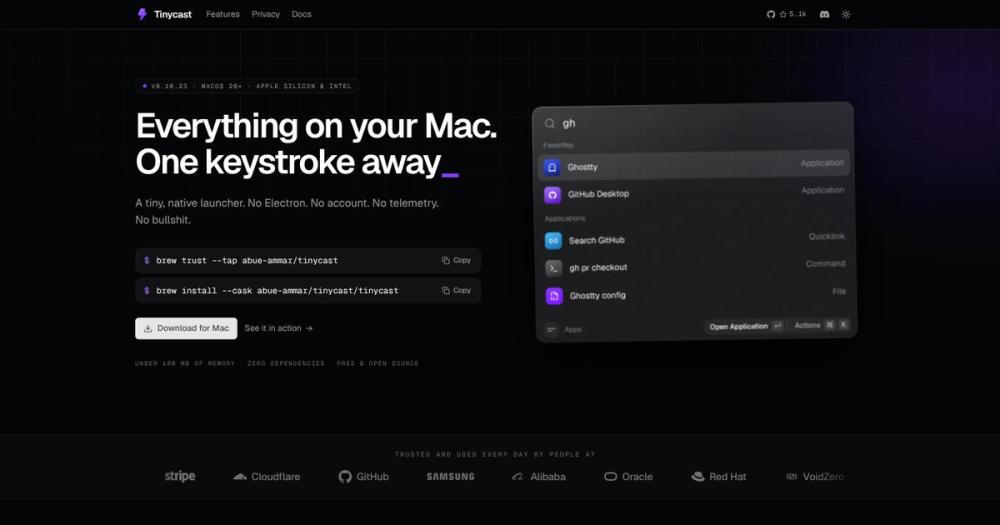
Tinycast covers the same daily workflow: app launching, clipboard history, snippets, quicklinks, and window management. It migrates your existing Raycast setup via the .rayconfig import. Extensions run natively. The main trade is giving up Raycast's cloud-synced AI and Pro features in exchange for no account and no telemetry.
Skip if:
You depend on Raycast's managed AI features or cloud sync, or you use Raycast Pro extensions that require Raycast's hosted backend.
Developers running local AI tools from the palette
Tinycast's AI chat accepts any API key, including Claude, OpenAI, and Codex. The Quick Actions feature (fix grammar, rewrite, translate, summarize selected text) works with the same key. Both features are off by default and store no conversation history until you enable them.
Skip if:
You need a full AI coding assistant integrated into your editor. Tinycast's AI chat is a palette-based tool, not a code-context-aware IDE integration.
macOS power users who want built-in window management
Tinycast bundles 34 window-management actions covering all standard Rectangle layouts. If your current setup is Raycast plus Rectangle (or Magnet), Tinycast consolidates both into one tool with a single settings interface and one source of global hotkeys.
Skip if:
You use advanced window management automation (custom scripts, Hammerspoon, or Stage Manager workflows) that go beyond Tinycast's 34 built-in actions.
The problem it solves#
Raycast has become the default macOS launcher for developers, but its trajectory toward a cloud-connected AI platform means users trade privacy for convenience. AI features require a Raycast account, usage data flows to their servers, and the free tier limits are tightening as the Pro tier grows. Alfred and LaunchBar are solid alternatives that respect privacy, but neither runs Raycast extensions natively or includes window management in the same palette.
The other pain point is Electron. Many cross-platform productivity tools run in a Chromium wrapper that can consume hundreds of megabytes of RAM just at launch, competing with real apps for resources. For developers running multiple resource-intensive tools at once, a launcher that adds another 300 MB overhead defeats its own purpose.
How it solves it#
Fuzzy app launcher with per-app hotkeys
Searches every installed app with fuzzy matching and opens it with Return. Pin favorites for one-key access to your most-used apps, or bind a dedicated hotkey to any app: press once to focus, press again to hide. Quit apps or all open apps at once without reaching for the Dock.
Clipboard history with image and file support
Saves every text snippet, image, file path, and hex color you copy. The history is searchable from the palette and pastes straight back into the app you were using. Retention is configurable up to forever; all history stays on your Mac and never syncs to a server.
Inline calculator with live currency and time zones
Evaluates math expressions, unit conversions, live currency and crypto rates, and date arithmetic (such as 'days until 9 Apr') directly in the search field. No need to open a separate app; results copy to clipboard with Return.
Window management with 34 keyboard actions
Covers halves, thirds, quarters, nudges, display moves, fullscreen, and Spaces assignments from the keyboard. Actions follow Rectangle's naming conventions, so existing muscle memory transfers. No mouse required for any window arrangement.
Raycast extensions running natively in SwiftUI
Installs and runs Raycast extensions from the store using JavaScriptCore for logic and SwiftUI for rendering. No Node.js, no toolchain setup. Tinycast also reads a .rayconfig export directly to bring over shortcuts, favorites, snippets, and quicklinks from an existing Raycast setup.
Privacy-first defaults with granular permissions
On a fresh install, only the launcher, calculator, and clipboard history are active. Every other feature (AI chat, extensions, snippets, calendar) is off until you enable it. Permissions are requested only when a feature needs them, never at launch.
Strengths and trade-offs#
Strengths
- Zero third-party dependencies, native Swift 6The entire app is built with SwiftUI and AppKit using only Apple's own frameworks. This means no supply chain risk from npm packages, no Electron binary, and no runtime beyond what macOS already provides. The result is a consistent under 100 MB memory footprint regardless of which features you enable.
- Raycast migration in three stepsTinycast reads a .rayconfig export from Raycast v2.0 or later directly. Point it at the file, enter the passphrase, choose what to bring, and restart. Shortcuts, favorites, clipboard history, snippets, quicklinks, and aliases transfer. No manual re-entry.
- No account and no telemetry, by designThere is no registration step, no login screen, and no outbound analytics. AI features are off by default; when you enable them, you supply your own API key and the requests go directly to your chosen provider. No usage data is routed through Tinycast's servers because there are none.
- Free, AGPL-3.0, with full source accessThe AGPL-3.0 license means the source is readable, buildable, and auditable. There is no paid Pro tier waiting behind a feature flag. Development is supported by voluntary tips; the feature set itself is deliberately scoped to stay small and fast.
Trade-offs
- -macOS only, no Windows or Linux buildTinycast runs only on macOS. There is no Windows or Linux build, and cross-platform teams cannot share a single launcher setup. The stable cask targets macOS 26; the macOS 15 Sequoia cask exists but is listed as no longer maintained in the current install documentation.
- -Deliberately closed feature setThe project explicitly states its feature set is closed, and contributions that add features are rejected unless pre-approved in an issue. Users who need custom integrations or niche workflows that Tinycast does not ship may find the extension model insufficient for their needs.
- -AGPL-3.0 restricts redistribution as a serviceUsing Tinycast on your own Mac is unrestricted. Modifying the source and distributing or deploying it to others as a service requires releasing those changes under AGPL-3.0. Teams building internal forks for redistribution should review the LICENSE file before doing so.
- -Active development, pre-1.0 version stabilityThe project launched in June 2026 and is still at v0.10.x. The extension API, import format, and feature set continue to stabilize. With 51 open issues at the time of writing, workflows built around current behavior may need adjustment as the app matures.
tinycast vs alternatives#
Tinycast vs Raycast AI
Both tools serve the same daily-driver role: a hotkey-triggered palette for app launching, clipboard history, snippets, quicklinks, and window management. The decision hinges on cloud connectivity and licensing.
| Feature | Tinycast | Raycast AI |
|---|---|---|
| License | AGPL-3.0 | Proprietary |
| Account required | No | Yes (for AI features) |
| Telemetry | None | Yes |
| AI features | BYOK, off by default | Managed, cloud-connected |
| Raycast extensions | Yes (JavaScriptCore + SwiftUI) | Yes (native) |
| Window management | Yes (34 actions) | Via extensions only |
| Price | Free | Free tier + Pro |
Tinycast is the better choice for users who want Raycast's workflow without its account requirement and cloud-connected AI. Extension compatibility means most Raycast users can migrate without losing their tools. Raycast is still the better fit when you rely on its hosted AI features, cloud sync across machines, or Pro-only extensions that depend on Raycast's backend.
Tinycast vs Alfred
Alfred is a long-running, privacy-respecting macOS launcher with no telemetry and local-only data. Both tools avoid cloud connectivity by default. Alfred is proprietary and free at a basic tier, with a paid Powerpack for advanced features.
| Feature | Tinycast | Alfred |
|---|---|---|
| License | AGPL-3.0 | Proprietary |
| Price | Free | Free basic, paid Powerpack |
| Raycast extensions | Yes | No |
| Window management | Yes (34 actions) | No (separate app needed) |
| AI chat | Yes (BYOK) | No |
| Source available | Yes | No |
Tinycast covers more surface area than Alfred's free tier and does not require a paid upgrade for clipboard history or extensions. Alfred's Powerpack offers a broader workflow scripting system (Applescript, shell integration) that Tinycast's deliberately closed feature set does not match. For users who have invested heavily in Alfred workflows, Alfred remains the more extensible choice.
Tinycast vs LaunchBar
LaunchBar is a commercial launcher with a long history on macOS. It does not require an account and has strong keyboard-centric design, but carries a one-time or subscription license fee.
| Feature | Tinycast | LaunchBar |
|---|---|---|
| License | AGPL-3.0 | Proprietary |
| Price | Free | Paid (one-time or subscription) |
| Clipboard history | Yes | Yes |
| Window management | Yes (34 actions) | No |
| AI features | Yes (BYOK) | No |
| Raycast extensions | Yes | No |
Tinycast matches LaunchBar on core launcher functionality and adds window management and AI chat at no cost. LaunchBar's advantage is its mature, stable feature set with years of polish; Tinycast is still at v0.x with an actively evolving API. For users who want a proven tool with commercial support and long-term stability, LaunchBar is the more conservative choice.

Quick start#
Install via Homebrew by adding the tap first, then installing the cask.
```bash
brew trust --tap abue-ammar/tinycast
brew tap abue-ammar/tinycast
brew install --cask tinycast
```What it's built on#
- Languages
- JavaScriptSwiftTypeScript
- Frameworks
- Next.jsReact
- Tooling
- esbuild
FAQ#
Is Tinycast free?
Yes. Tinycast is free to download and use with no feature limits. There is no Pro tier or paid plan. Development is supported by voluntary tips from users who want to keep it maintained.
Can I migrate my existing Raycast setup to Tinycast?
Yes, if you are on Raycast v2.0 or later. Export your settings from Raycast (Settings then Backup, set a passphrase), then open Tinycast Settings then Backup and point it at the .rayconfig file. Shortcuts, favorites, clipboard history, snippets, quicklinks, and aliases transfer. The Raycast v1.x format is not supported.
What does the AGPL-3.0 license allow?
You can run Tinycast on your own Mac, read and modify the source, and build it yourself without restriction. What AGPL-3.0 prohibits is distributing a modified version, including deploying it to others as a service, without releasing your changes under the same license. For personal and team use on your own machines, there are no restrictions.
Does Tinycast work on Intel Macs?
Yes, via the tinycast-universal Homebrew cask, which requires macOS 26. An Apple silicon build is available as the default cask. A macOS 15 Sequoia build exists but is listed as no longer maintained in the current install documentation.
How does Tinycast run Raycast extensions?
Raycast extensions run in JavaScriptCore (Apple's built-in JS engine) and are drawn in SwiftUI. No Node.js or build toolchain is required on your machine. You install extensions from the Tinycast store; they run entirely on your Mac with no external runtime.
Similar open-source tools#
openhuman
Personal AI agent with local memory and 100+ integrations
CC-Beeper
A floating macOS pager for Claude Code.
rakazo
AI teammates you own: your keys, your model, your machine.
JellyBoxPlayer
Native Jellyfin and Emby music player for every platform
winmux
Project-based window manager for macOS with sidebar and tab groups
FckSignups
Open-source tools that work instantly, no signup required