Open Source Alternatives
  • Alternatives
  • Categories
    Categories by size1,013 projects
    • Developer Tools517
    • AI & Machine Learning448
    • Business & Productivity232
    • Web Development203
    • Security & Monitoring151
    • Communication & Collaboration138
    • IT Management135
    • Cloud & Hosting119
    • LLMOps & AI Tooling116
    • Data & Analytics111
    Browse all 21 categoriesProduct & Project Management, Design & Creative and 9 more
  • Blog
  • Advertise
SearchNotion, Slack, password manager.../
Submit
Open Source Alternatives
  • Alternatives
    • Developer Tools517
    • AI & Machine Learning448
    • Business & Productivity232
    • Web Development203
    • Security & Monitoring151
    • Communication & Collaboration138
    • Browse all 21 categories
  • Blog
  • Advertise
Submit your project

New open source projects by email

The projects we add and every new guide. Free, unsubscribe any time.

Open Source Alternatives LogoOpen Source Alternatives

Handpicked Open Source Alternatives to Paid Softwares

Product

  • Categories
  • Tag
  • Advertise

Resources

  • Blog
  • Collection
  • Submit

Company

  • Privacy Policy
  • Terms of Service
  • Refund Policy
  • Sitemap

Alternatives

  • Claude Code
  • Jira
  • Notion
  • Slack
  • Linear
  • Wispr Flow
  • All alternatives
© 2026 Open Source Alternatives. All rights reserved.
Open SourceAlternatives
Home/Categories/Developer Tools/Muxin
icon of Muxin

Muxin

Open source alternative to Royal TSX

  • 383 stars
  • Apache-2.0
  • Active this week
  • Last commit 3 days ago

Last verified Nov 2, 2026

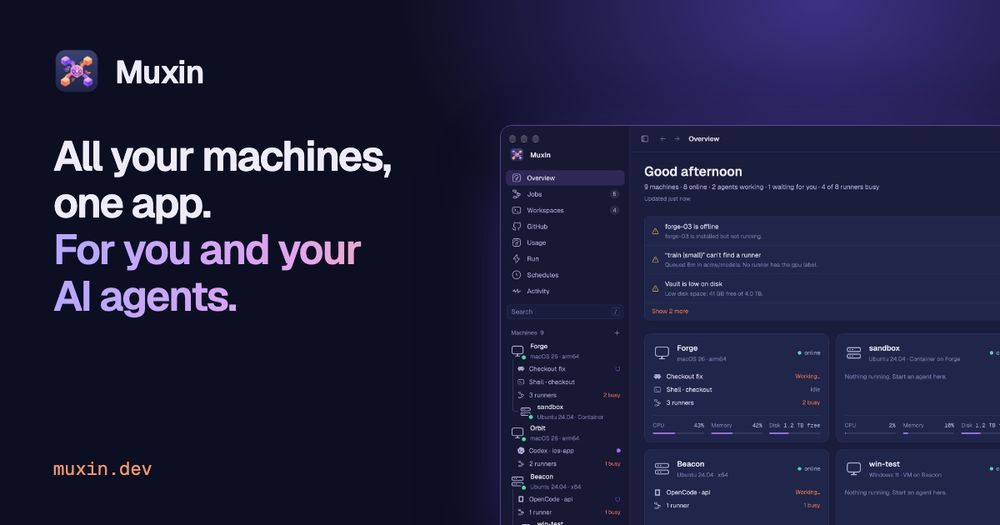
Manage all your machines from one native desktop app with AI agent sessions, live desktops, file transfer, logs, and an 80-tool MCP server.

Visit websiteGitHub383 starsDeploy on Hostinger
image of Muxin
TL;DR

Muxin is a native desktop app that brings every machine you own into one window for you and your AI coding agents, with terminal sessions, live desktops, file transfer, Docker management, GitHub runner control, and an MCP server with 80+ tools. It replaces fragmented SSH sessions and remote desktop tools like Royal TSX with a single interface designed for development and AI agent workflows. Apache-2.0 licensed and free, it runs on macOS, Linux, and Windows. Best for developers managing multiple machines who run Claude Code, Codex, or other AI coding agents and want to track their work, ship code, and manage services from one window.

Read the full breakdownHide the full breakdownWho it is for, how it works, trade-offs, the quick start and the FAQ
who it's for

Who Muxin is for#

Developers running AI coding agents across multiple machines

If you run Claude Code or Codex on several machines simultaneously, Muxin gives you a single window to see each agent's activity, review its git diff, approve a pull request, or send it a follow-up prompt. The Activity timeline shows every command every agent ran across your fleet, with exit codes and output.

Skip if:

If you run agents on a single machine and are comfortable with your existing terminal workflow, Muxin adds overhead without meaningful benefit.

Teams managing self-hosted GitHub Actions runners

Muxin installs and monitors self-hosted GitHub Actions runners with minimal friction. The app shows which runners are busy, idle, or offline, which queued jobs cannot be picked up, and lets you start or stop runners from the UI. Install runners on any SSH-accessible machine in one step without touching the machine directly.

Skip if:

If you use GitHub-hosted runners exclusively or manage runners with a dedicated CI platform, Muxin's runner management adds no value.

Solo developers with a personal machine fleet

Muxin is designed for people who own several machines and want them all visible at once. Its overview shows CPU, memory, disk, running agents, open ports, and Docker containers for each machine at a glance. File transfer, live desktops, and the shared clipboard remove the friction of moving data between boxes.

Skip if:

If you manage a large fleet of identical servers or need enterprise features like role-based access control or audit logs, Muxin's current version is not built for that scale.

Developers building or testing AI agent integrations

Muxin ships an MCP server with 80+ tools covering machines, sessions, files, logs, GitHub, runners, Docker, and schedules. The --demo flag lets agents practice on simulated machines without touching anything real. The CLI exposes every capability with --json output for scripting and integration testing.

Skip if:

If your agents only need a single machine and you already have an MCP setup for it, adding Muxin for its MCP server alone may be unnecessary.

the problem

The problem it solves#

Developers working with multiple machines face the same fragmentation problem every day: separate SSH terminals for each box, a different tool to check logs, another to manage Docker containers, and no unified view of which AI agents are running and what they have changed. The overhead compounds quickly once the machine count grows past two or three.

The situation worsens when AI coding agents enter the picture. Agents like Claude Code or Codex run on specific machines, write to specific branches, and produce output you need to review before shipping. Tracking which agent is waiting for input, what it changed, and where the pull request stands requires checking multiple windows and tools. When agents are running on remote or headless machines, coordinating their work becomes a real operational overhead.

how Muxin solves it

How it solves it#

Agent Sessions on Any Machine

Run Claude Code, Codex, OpenCode, Gemini CLI, Amp, Pi, or a plain shell on any machine in your fleet from a real terminal inside the app. Sessions keep running on the machine after you close the window, so you can pick up where an agent left off without re-launching. The sidebar shows each session with a spinner while the agent works and a colored dot when it needs your input.

Live Desktops with Mouse and Keyboard

See any Linux or Mac machine's screen live alongside its terminal, at resolutions from 720p to 4K. You can take the mouse and keyboard when you need to, add a virtual monitor to a headless machine, or open a single application from a machine in its own window as if it ran on your computer.

MCP Server with 80+ Tools for AI Agents

Muxin ships a built-in Model Context Protocol server that exposes your entire machine fleet to AI agents. With a one-time muxin mcp setup, Claude Code, Codex, and any other MCP client can read logs, check services, start sessions, copy files, and run commands across your machines. Muxin tells agents to request your approval before making changes.

GitHub Runner and Issue Management

Watch your self-hosted GitHub Actions runners from inside the app: which are busy, idle, or offline, and which queued jobs have no runner to take them. Install runners on any machine in one step. Your GitHub issues and pull requests appear in the app, and one click hands an issue to a running agent on the machine you choose.

File Transfer and Shared Clipboard

Copy files and folders between any two machines in your fleet, including ones that cannot directly reach each other, through a two-pane dialog. The shared clipboard lets you copy text on your computer and paste it on any machine's screen, and copy back the other way.

Docker, Compose, and Service Management

See every machine's running services, Docker containers, and Compose projects with live CPU and memory readings. Start, stop, restart, or open a shell inside individual containers. Open a Compose project to see its services as a diagram. Works with systemd, Homebrew, Windows services, and Docker.

strengths · trade-offs

Strengths and trade-offs#

Strengths

  • Agent-First Design with MCP IntegrationUnlike Royal TSX and most remote management tools, Muxin was designed from the start for AI coding agent workflows. Its 80-tool MCP server and scriptable CLI let agents check machine health, start sessions, read logs, and ship pull requests without leaving their context. Every command an agent runs appears in the app's Activity view.
  • Native Performance with No Machine Setup RequiredMuxin is built in Rust using GPUI, the GPU-accelerated framework behind the Zed editor. It requires no manual configuration on managed machines: if you can SSH in with a key, Muxin installs its own lightweight agent over SSH and keeps it updated automatically. This gives native app speed without Electron overhead.
  • Apache-2.0 License with No Paid TierMuxin is free and Apache-2.0 licensed. You can use it commercially, modify it, and redistribute it without restriction. There is no paid tier, per-seat pricing, or managed-cloud dependency. The source is on GitHub at LumaryLabsLLC/muxin.
  • Uses Infrastructure You Already HaveMuxin reads your existing ~/.ssh/config aliases and SSH keys, uses your Tailscale network for machines away from home, and reuses your gh auth login for GitHub access. No new accounts, no agents to pre-install on your machines, and no network reconfiguration.

Trade-offs

  • -Very New Project with Limited Community ResourcesMuxin launched in October 2026 and had 383 GitHub stars at review time. As a young project with 3 open issues, the API surface will change, some workflows may be rough at the edges, and community resources like third-party guides and integrations are limited. The Windows installer is not yet signed, which triggers a security warning on Windows 11 requiring an extra click to proceed.
  • -Full Desktop App Required on the Controlling MachineMuxin requires installing the full desktop app on your primary machine. There is no web dashboard or browser-only interface for full fleet management. The session-sharing feature gives view or input access to individual sessions in a browser, but it is not a substitute for the full app.
  • -Cloud Machine Provisioning Limited to DigitalOceanCreating cloud machines from within Muxin currently works only with DigitalOcean. If you primarily use AWS, GCP, Azure, or Hetzner, you add those machines via SSH like any other host but cannot provision new ones from inside the app.
versus alternatives

Muxin vs alternatives#

Muxin vs Royal TSX

Royal TSX is a paid remote connection management tool aimed at sysadmins and developers who manage infrastructure over SSH, RDP, VNC, FTP, and other protocols. Muxin and Royal TSX overlap on SSH-based machine access, but they target different workflows and user profiles.

FeatureMuxinRoyal TSX
LicenseApache-2.0 (free)Proprietary (paid)
AI agent MCP serverYes (80+ tools)No
GitHub runner managementYesNo
Docker and service managementBuilt inNo
Multi-protocol support (RDP, VNC)NoYes
Linux as host platformYesNo

Muxin is the better choice for developers running AI coding agents across multiple machines. Its MCP server, agent session tracking, Git diff view, and GitHub runner management are purpose-built for development workflows that Royal TSX does not address. Muxin is also free under the Apache-2.0 license, with no per-seat fees.

Royal TSX is the better fit when you need broad remote protocol support across mixed infrastructure: RDP for Windows servers, VNC for legacy systems, and a credential vault with session sharing across a team. If multi-protocol remote desktop management is your primary need, Royal TSX provides capabilities that Muxin's current version does not.

install · quick start

Quick start#

bash
Install Muxin on macOS or Linux using the Homebrew cask.

```bash
brew install --cask lumarylabsllc/tap/muxin
```

Download the signed macOS .dmg, Linux packages (.deb, .rpm, AppImage), or Windows installer from GitHub Releases: https://github.com/LumaryLabsLLC/muxin/releases/latest
tech stack · detected from GitHub

What it's built on#

Languages
JavaScriptObjective-CRust
frequently asked

FAQ#

Is Muxin free to use?

Yes. Muxin is free and open source under the Apache License 2.0. There is no paid tier, no usage-based pricing, and no managed cloud service. The code is on GitHub. You can use it commercially without restriction.

Which AI agents work with Muxin?

For terminal sessions, Muxin supports Claude Code, Codex, OpenCode, Gemini CLI, Amp, Pi, and any plain shell. For agent-to-Muxin integration via MCP, the muxin mcp server works with any MCP client, including Claude Code, Codex, and Claude Desktop. The CLI with --json output is available for agents that do not support MCP.

Do I need to install anything on the machines I manage?

No manual setup is needed on managed machines. If you can SSH into a machine with a key, Muxin installs its own small agent over SSH and keeps it updated automatically. On Windows machines you manage, you need to enable OpenSSH Server first.

Which platforms does Muxin run on?

The desktop app runs on macOS 12 or later (Apple silicon and Intel), Linux (x86_64 and arm64 with glibc 2.35 or newer, available as .deb, .rpm, AppImage, AUR, or a rootless tar.gz installer), and Windows 11. It can manage any Mac, Linux, or Windows machine reachable over SSH.

How does Muxin differ from Royal TSX?

Royal TSX is a paid remote connection manager with broad protocol support (RDP, VNC, SSH, FTP, and more), suited for teams managing heterogeneous server environments. Muxin is designed for developer and AI agent workflows: its MCP server, Git integration, GitHub runner management, and agent session tracking are not features Royal TSX offers. Royal TSX is the better fit when you need multi-protocol remote desktop management; Muxin is the better fit for developers running AI coding agents across their machines.

also worth a look

Similar open-source tools#

FckSignups

InCustomer Support

Open-source tools that work instantly, no signup required

  • 4,531 GitHub stars
  • GPL-3.0Licence GPL-3.0

Gitea

Alternative toGitHub

Self-hosted Git server with CI, issues, and pull requests

  • 58,808 GitHub stars
  • MITLicence MIT

Gogs

Alternative toGitHub

Lightweight self-hosted Git server that is painless to set up

  • 47,914 GitHub stars
  • MITLicence MIT

dyrector.io

Alternative toOctopus Deploy

Open source container management and CD platform

  • 1,845 GitHub stars
  • Apache-2.0Licence Apache-2.0

Shannon

Alternative toXBOW

Autonomous AI pentester for web apps and APIs, AGPL-licensed

  • 50,850 GitHub stars
  • AGPL-3.0Licence AGPL-3.0

Self Host

Alternative toEasypanel

CLI tool for 93 self-hosted apps with an agent-ready install workflow.

  • 1,480 GitHub stars
  • Apache-2.0Licence Apache-2.0
by category

Open source tools in these categories#

522

Developer Tools

REA (Reverse Engineer Anything), superpowers, Skills for Real Engineers
103

DevOps & CI/CD

Nvm, Uptime Kuma, Netdata
136

IT Management

RustDesk, Immich, Stirling PDF
Hostinger

Self-host Muxin on a Hostinger VPS

Keep it running 24/7, even when your laptop is off. A Hostinger VPS gives it a server of its own.

  1. 01

    Choose a plan

    Starts from $6.49/mo

  2. 02

    Apply

    Extra 10% off yearly plans

  3. 03

    Install Muxin

    On a server that stays on

  4. 04

    Start building

    Focus on the app, not the server

Deploy on Hostinger

Sponsors

Inbox Zero

Alternative toSuperhuman

AI email assistant that drafts replies and clears your inbox

  • 12,855 GitHub stars
  • AGPL-3.0Licence AGPL-3.0
  • #Email

rakazo

Alternative toGrok Bot

AI teammates you own: your keys, your model, your machine.

  • 6,568 GitHub stars
  • Apache-2.0Licence Apache-2.0
  • #AI Agents

SnitchFeed

Live monitoring on LinkedIn, X, Reddit & more. Agentic social listening for startups.

Marketing & Growth

Advertise your product

New open source projects by email

The projects we add and every new guide. Free, unsubscribe any time.

Find open source alternatives to paid software

/
  • Claude Code to OpenCode
  • Jira to Windshift
  • Notion to AppFlowy
  • Slack to Mattermost
  • Linear to GitLab
  • Wispr Flow to Handy
  • Arc to Zen Browser
  • CapCut to Concat
  • Grok Bot to rakazo
  • Superhuman to Inbox Zero
  • Airtable to AITable
  • Muse to OpenClaw
  • Railway to Coolify
  • GitHub Copilot to Cline
  • Datadog to Netdata
  • Microsoft Teams to Rocket.Chat
  • Confluence to Docmost
  • Pinecone to Qdrant
  • Zapier to n8n
  • Devin AI to OpenHands
  • Firebase to Supabase
  • 1Password to KeePassXC
  • Contentful to Strapi
  • Adobe Premiere Pro to Shotcut
  • Claude Code to OpenCode
  • Jira to Windshift
  • Notion to AppFlowy
  • Slack to Mattermost
  • Linear to GitLab
  • Wispr Flow to Handy
  • Arc to Zen Browser
  • CapCut to Concat
  • Grok Bot to rakazo
  • Superhuman to Inbox Zero
  • Airtable to AITable
  • Muse to OpenClaw
  • Railway to Coolify
  • GitHub Copilot to Cline
  • Datadog to Netdata
  • Microsoft Teams to Rocket.Chat
  • Confluence to Docmost
  • Pinecone to Qdrant
  • Zapier to n8n
  • Devin AI to OpenHands
  • Firebase to Supabase
  • 1Password to KeePassXC
  • Contentful to Strapi
  • Adobe Premiere Pro to Shotcut