Open Source Alternatives
  • Alternatives
  • Categories
    Categories by size991 projects
    • Developer Tools507
    • AI & Machine Learning435
    • Business & Productivity226
    • Web Development202
    • Security & Monitoring149
    • Communication & Collaboration135
    • IT Management134
    • Cloud & Hosting118
    • LLMOps & AI Tooling111
    • Product & Project Management109
    Browse all 21 categoriesData & Analytics, Design & Creative and 9 more
  • Blog
  • Advertise
SearchNotion, Slack, password manager.../
Submit
Open Source Alternatives
  • Alternatives
    • Developer Tools507
    • AI & Machine Learning435
    • Business & Productivity226
    • Web Development202
    • Security & Monitoring149
    • Communication & Collaboration135
    • Browse all 21 categories
  • Blog
  • Advertise
Submit your project

New open source projects by email

The projects we add and every new guide. Free, unsubscribe any time.

Open Source Alternatives LogoOpen Source Alternatives

Handpicked Open Source Alternatives to Paid Softwares

Product

  • Categories
  • Tag
  • Advertise

Resources

  • Blog
  • Collection
  • Submit

Company

  • Privacy Policy
  • Terms of Service
  • Refund Policy
  • Sitemap

Alternatives

  • Claude Code
  • Jira
  • Notion
  • Slack
  • Linear
  • Wispr Flow
  • All alternatives
© 2026 Open Source Alternatives. All rights reserved.
Open SourceAlternatives
Home/Categories/Product & Project Management/Ordi
icon of Ordi

Ordi

Open source alternative to Zoho One, Bitrix24, Flowlu, Agiled, Linear and Odoo

  • 2 stars
  • AGPL-3.0
  • Active this week
  • Last commit today

Last verified Oct 31, 2026

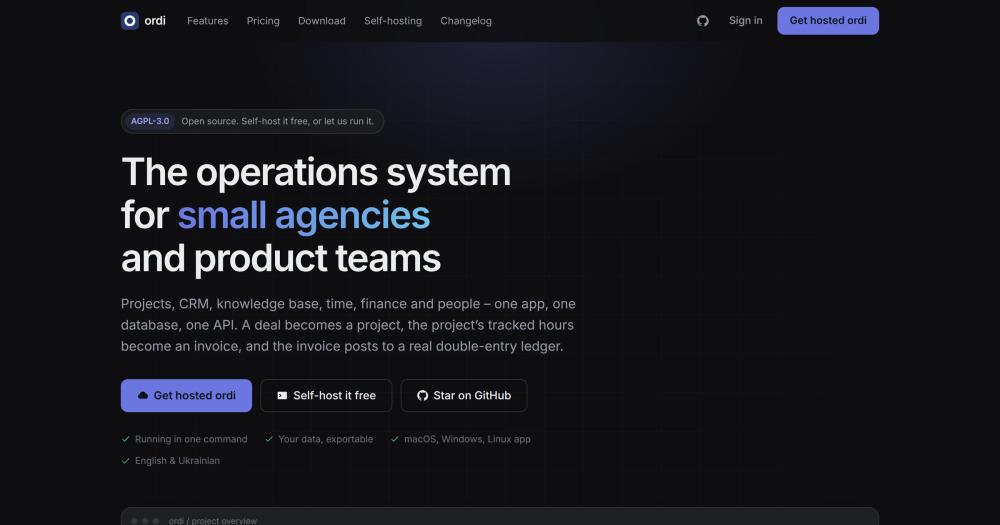
Manage projects, CRM, time, invoicing, knowledge base, and people from one Postgres-backed app that self-hosts free under AGPL-3.0.

Visit websiteGitHub2 starsDeploy on Hostinger
image of Ordi
TL;DR

Ordi is a self-hosted operations system for small agencies and product teams, combining projects, CRM, time tracking, invoicing, knowledge base, and HR in one Postgres database. It replaces the typical stack of Linear, a CRM, Notion, a timer app, and invoicing software with one AGPL-3.0 tool where a deal becomes a project, tracked hours become an invoice, and the invoice posts to a real ledger. Self-hosting is one Docker compose command; the managed hosted option is $20 per instance per month with the whole team included. Best for teams of 3 to 50 people who bill by the hour and need project profitability without spreadsheet work.

Read the full breakdownHide the full breakdownWho it is for, how it works, trade-offs, the quick start and the FAQ
who it's for

Who Ordi is for#

Agencies that bill clients by the hour

The core workflow Ordi automates is deal-to-invoice: a won CRM deal becomes a project, project hours carry billable rates, and the finance module generates an invoice from unbilled time in one step. Project profitability is visible in the ledger without any spreadsheet work.

Skip if:

Your billing is fixed-fee or retainer with no need to track hours against tasks. The time-to-invoice integration is Ordi's primary differentiator; without billable hours, a simpler task tracker plus an invoicing tool may be enough.

Product teams wanting Linear-style tracking plus CRM

The task experience is deliberately modelled on Linear: keyboard-first, fast, with cycles, milestones, custom fields, and GitHub integration that links branches and pull requests to tasks. Teams that also run a sales pipeline can manage leads, deals, and project delivery from the same workspace.

Skip if:

You only need a task tracker with no use for CRM or billing. Linear itself is a stronger choice for pure issue tracking; Ordi's advantage appears when multiple modules are used together.

Small teams replacing multiple SaaS subscriptions

A team running a task tracker, a CRM, a document tool, a timer, and invoicing software can replace all five with one self-hosted instance. Setup takes one Docker compose command; the setup wizard creates the workspace and lets each module be toggled off if not needed.

Skip if:

Your team has specific deep requirements in one area, such as complex CRM automations or advanced accounting. Ordi provides good coverage across modules but does not go as deep as a dedicated tool in any single category.

Teams that use AI coding tools in their workflow

Ordi ships a built-in MCP server that lets Claude or Cursor connect to the workspace over OAuth; an AI agent can be added as a team member, assigned tasks, and opens pull requests for human review. The agent gets exactly the permissions of its API token.

Skip if:

You do not use AI coding tools or have no need for agent teammates. This feature adds no overhead when unused, but if it is the primary draw, evaluate the MCP implementation against your specific models and workflow.

the problem

The problem it solves#

A small agency running five separate subscriptions ends up with hours logged in the task tracker that never reach the invoice, a deal that converts into a project retyped by hand, and no direct way to answer "did we make money on this client?" without a spreadsheet.

The per-seat pricing on individual tools adds up fast. A task tracker, a CRM, a document tool, a timer, and invoicing software each carry a monthly per-user cost; at ten people, the combined bill routinely exceeds what a self-hosted alternative requires, and the data still lives in five separate systems that do not talk to each other.

how Ordi solves it

How it solves it#

Integrated deal-to-invoice pipeline

A deal won in the CRM pipeline carries client, budget, and name directly into a new project. Logged hours against tasks carry billable and cost rates; the finance module generates an invoice from unbilled time in one step. Project margin is visible in the ledger without any spreadsheet reconciliation.

Linear-style task tracker with multiple views

Board, list, calendar, timeline, and spreadsheet views alongside cycles with burn-up, milestones, sub-tasks, dependencies, and custom fields per project. Tasks connect to GitHub: a task key on a branch name or commit message automatically attaches the branch, commit, and pull request to the task.

Double-entry finance module

Quotes, invoices, and payments post balanced entries to a real double-entry ledger; credit notes, recurring invoices, and expenses follow the same path. Receivables aging and overdue reminders are built in. Project profitability appears out of the box because every financial transaction is tied to a project.

CRM with weighted pipeline forecast

Leads before qualification, deals after: a drag-and-drop pipeline with a weighted forecast, sales activities, playbooks, message templates, and follow-up sequences. An analytics tab shows funnel, conversion, pipeline by stage, and win rate. A won deal becomes a project without retyping anything.

Knowledge base with per-space permissions

A Notion-style editor with nested pages, backlinks, per-space permissions, version history, and Markdown export. Pages can be exported as PDFs. Permissions are enforced server-side on every request, not just hidden in the navigation.

Built-in MCP server and AI agent teammates

A built-in MCP server lets Claude or Cursor connect to the workspace over OAuth; the agent gets exactly the permissions of its API token. An AI agent can be added as a team member, assigned a task, and it works through the project repository to open a pull request for human review.

strengths · trade-offs

Strengths and trade-offs#

Strengths

  • No per-seat fee on the self-hosted tierThe self-hosted version is AGPL-3.0 and costs nothing regardless of team size. Unlike Zoho One or Bitrix24, which price per user per month, Ordi's hosting costs are a single server. A ten-person team pays nothing in software licensing; growth does not increase the subscription bill.
  • Single database for all six modulesAll modules run on one Postgres database with one API and one permission layer. There are no integration fees, no API limits between modules, and no data export needed when a deal moves to a project. The ledger sees every transaction across the business because it shares the same schema.
  • Modules can be switched off entirelyIf a team only needs a task tracker and a CRM, the finance and people modules switch off entirely: they disappear from the navigation, the search index, and the permission layer. The app carries no overhead from features a team does not use.
  • Data portability between self-hosted and managedThe same Docker image runs on the managed hosting service and on a self-hosted machine. A database dump moves a workspace between the two with no schema changes. The managed hosting service provides the dump on request when a customer cancels.

Trade-offs

  • -Very early project with minimal community testingOrdi was created in July 2026 and had 2 GitHub stars at the time this research was compiled. The project is under active development (last push October 2026), but has minimal community testing, limited third-party documentation, and no track record in production environments. Teams considering it should evaluate the codebase directly and expect rough edges.
  • -AGPL-3.0 restricts resale as a hosted serviceAGPL-3.0 permits running Ordi for your own company or clients. What it prohibits is offering a modified Ordi as a managed service to others without publishing your source modifications. Teams that want to resell hosted Ordi as a product need to publish their changes or negotiate a separate license.
  • -Not designed for teams above 50 peopleThe maker explicitly documents that Ordi is built for teams of roughly 3 to 50 people. It does not include SSO, a workflow engine, manufacturing, inventory, payroll runs, or other modules a larger organization expects. Teams above 50 people or with enterprise procurement requirements should look at Odoo or similar systems.
versus alternatives

Ordi vs alternatives#

Ordi vs Linear

Linear is a task and issue tracker built for software teams, keyboard-first and fast. Ordi deliberately models its task experience on Linear, covering board, list, calendar, timeline and spreadsheet views, cycles, milestones, sub-tasks, custom fields, and GitHub integration that attaches branches and pull requests to tasks.

The difference is scope. Linear has no CRM, no invoicing, no time tracking tied to tasks, and no finance module. Ordi connects the task to the business: hours logged on a task carry billable and cost rates, and the finance module turns those hours into an invoice. For a software product company tracking issues, Linear is more polished and has a broader ecosystem. For an agency that bills by the hour and needs to know whether a project made money, Ordi covers the full loop that Linear does not.

Ordi vs Odoo

Odoo is a self-hosted ERP covering CRM, projects, invoicing, HR, manufacturing, and inventory. Ordi covers a similar six modules (projects, CRM, knowledge base, time, finance, people) with a smaller footprint.

The trade-off is scope versus setup speed. Odoo handles larger organizations, manufacturing workflows, inventory, and complex accounting. Ordi's self-hosted setup is a single Docker compose command that creates a working workspace in minutes; Odoo typically requires a dedicated implementation effort. Teams above 50 people, or teams that need manufacturing and inventory management, should evaluate Odoo instead.

Ordi vs Zoho One and Bitrix24

Zoho One and Bitrix24 are commercial platforms bundling projects, CRM, finance, HR, and collaboration at a per-user monthly fee. Ordi covers the same module set as self-hosted software with no per-seat pricing.

The practical difference appears at ten or more people. A ten-person team on Zoho One or Bitrix24 pays a monthly subscription that scales with headcount; the same team on self-hosted Ordi pays nothing in software licensing. The trade-off is infrastructure management: commercial platforms handle uptime, backups, and upgrades. Ordi's managed hosting at $20 per instance per month covers those concerns at a fixed price, but the self-hosted path requires the team to manage the server.

install · quick start

Quick start#

bash
Self-hosting uses Docker; the compose file starts the app and a Postgres database in the same stack.

```bash
mkdir ordi && cd ordi
curl -fsSLO https://raw.githubusercontent.com/romirom11/ordi/master/docker-compose.yml
docker compose up -d
```
tech stack · detected from GitHub

What it's built on#

Languages
TypeScript
Frameworks
React
Infrastructure
AWS
frequently asked

FAQ#

Is Ordi really free to self-host?

Yes. Ordi is AGPL-3.0 licensed and every feature in the repository ships in the self-hosted version, with no paid tier holding anything back. You pay nothing in software licensing; the only costs are the server you run it on. The maker also offers managed hosting at $20 per instance per month, which covers the whole team and includes nightly backups, TLS, and upgrades, but that is optional.

What does AGPL-3.0 mean for my company?

You can run Ordi for your own company and modify it freely. The restriction applies if you offer a modified Ordi to others over a network as a service: you are then required to publish your source changes. Running it internally for your own team, including for commercial client work, does not trigger this requirement.

Can I move between self-hosted and Ordi's managed hosting?

Yes, in both directions. The managed hosting and self-hosted versions run the same Docker image with the same database schema, so a Postgres dump carries the workspace between them with no conversion. The maker provides the dump on request when you cancel the managed service.

How does the CRM-to-invoice workflow actually work?

A won deal in the CRM pipeline carries the client, budget, and project name directly into a new project. Team members log time against tasks in the project with billable and cost rates. The finance module generates an invoice from unbilled time on the project, and the invoice posts to the double-entry ledger.

Is there a desktop app for macOS, Windows, and Linux?

Yes. Desktop apps for macOS, Windows, and Linux are available, built with Tauri. They connect to your own instance (self-hosted or managed) and include native notifications, a global quick-add shortcut, and signed auto-updates. Download links are available at ordi.one/download or from GitHub Releases at https://github.com/romirom11/ordi/releases/latest.

Looking for more

Other ways to replace Zoho One, Bitrix24, Flowlu, Agiled, Linear and Odoo#

GitLab

#1 in the Linear guide

Teams on GitLab for code hosting

24,547 GitHub stars

OpenProject

#2 in the Linear guide

Teams needing Scrum boards, Gantt charts, and time tracking

16,799 GitHub stars

Taiga

#3 in the Linear guide

Agile teams wanting Scrum sprints without enterprise overhead

385 GitHub stars

Gitea

#4 in the Linear guide

Small teams wanting lightweight git hosting and issue tracking

58,764 GitHub stars
All 14 Linear alternatives8 open source Linear alternatives, ranked
by category

Open source tools in these categories#

109

Product & Project Management

freeCodeCamp, agency-agents, Gstack
226

Business & Productivity

OpenClaw, Excalidraw, RustDesk
35

Finance & Fintech

TradingAgents, MiroFish, OpenBB
Hostinger

Self-host Ordi on a Hostinger VPS

Keep it running 24/7, even when your laptop is off. A Hostinger VPS gives it a server of its own.

  1. 01

    Choose a plan

    Starts from $6.49/mo

  2. 02

    Apply

    Extra 10% off yearly plans

  3. 03

    Install Ordi

    On a server that stays on

  4. 04

    Start building

    Focus on the app, not the server

Deploy on Hostinger

Sponsors

Inbox Zero

Alternative toSuperhuman

AI email assistant that drafts replies and clears your inbox

  • 12,855 GitHub stars
  • AGPL-3.0Licence AGPL-3.0
  • #Email

Omnara

Alternative toCClaude Managed Agents

Open-source agent deployment API. Self-host or use Omnara Cloud.

  • 3,325 GitHub stars
  • Apache-2.0Licence Apache-2.0
  • #AI Agents

rakazo

Alternative toGrok Bot

AI teammates you own: your keys, your model, your machine.

  • 6,242 GitHub stars
  • Apache-2.0Licence Apache-2.0
  • #AI Agents
Advertise your product

New open source projects by email

The projects we add and every new guide. Free, unsubscribe any time.

Find open source alternatives to paid software

/
  • Claude Code to OpenCode
  • Jira to Windshift
  • Notion to AppFlowy
  • Slack to Mattermost
  • Linear to GitLab
  • Wispr Flow to Handy
  • Arc to Zen Browser
  • CapCut to Concat
  • Grok Bot to rakazo
  • Superhuman to Inbox Zero
  • Airtable to AITable
  • Muse to OpenClaw
  • Railway to Coolify
  • GitHub Copilot to Cline
  • Datadog to Netdata
  • Microsoft Teams to Rocket.Chat
  • Confluence to Docmost
  • Pinecone to Qdrant
  • Zapier to n8n
  • Devin AI to OpenHands
  • Firebase to Supabase
  • 1Password to KeePassXC
  • Contentful to Strapi
  • Adobe Premiere Pro to Shotcut
  • Claude Code to OpenCode
  • Jira to Windshift
  • Notion to AppFlowy
  • Slack to Mattermost
  • Linear to GitLab
  • Wispr Flow to Handy
  • Arc to Zen Browser
  • CapCut to Concat
  • Grok Bot to rakazo
  • Superhuman to Inbox Zero
  • Airtable to AITable
  • Muse to OpenClaw
  • Railway to Coolify
  • GitHub Copilot to Cline
  • Datadog to Netdata
  • Microsoft Teams to Rocket.Chat
  • Confluence to Docmost
  • Pinecone to Qdrant
  • Zapier to n8n
  • Devin AI to OpenHands
  • Firebase to Supabase
  • 1Password to KeePassXC
  • Contentful to Strapi
  • Adobe Premiere Pro to Shotcut