Open Source Alternatives
  • Alternatives
  • Categories
    Categories by size1,022 projects
    • Developer Tools524
    • AI & Machine Learning452
    • Business & Productivity235
    • Web Development203
    • Security & Monitoring152
    • Communication & Collaboration138
    • IT Management136
    • Cloud & Hosting120
    • LLMOps & AI Tooling117
    • Data & Analytics112
    Browse all 21 categoriesProduct & Project Management, Design & Creative and 9 more
  • Blog
  • Advertise
SearchNotion, Slack, password manager.../
Submit
Open Source Alternatives
  • Alternatives
    • Developer Tools524
    • AI & Machine Learning452
    • Business & Productivity235
    • Web Development203
    • Security & Monitoring152
    • Communication & Collaboration138
    • Browse all 21 categories
  • Blog
  • Advertise
Submit your project

New open source projects by email

The projects we add and every new guide. Free, unsubscribe any time.

Open Source Alternatives LogoOpen Source Alternatives

Handpicked Open Source Alternatives to Paid Softwares

Product

  • Categories
  • Tag
  • Advertise

Resources

  • Blog
  • Collection
  • Submit

Company

  • Privacy Policy
  • Terms of Service
  • Refund Policy
  • Sitemap

Alternatives

  • Claude Code
  • Jira
  • Notion
  • Slack
  • Linear
  • Wispr Flow
  • All alternatives
© 2026 Open Source Alternatives. All rights reserved.
Open SourceAlternatives
Home/Categories/Business & Productivity/Switch
icon of Switch

Switch

Open source alternative to Witch, Command-Tab Plus 2, Scopo and Macscope

  • 616 stars
  • FSL-1.1-MIT
  • Active this week
  • Last commit today

Last verified Nov 3, 2026

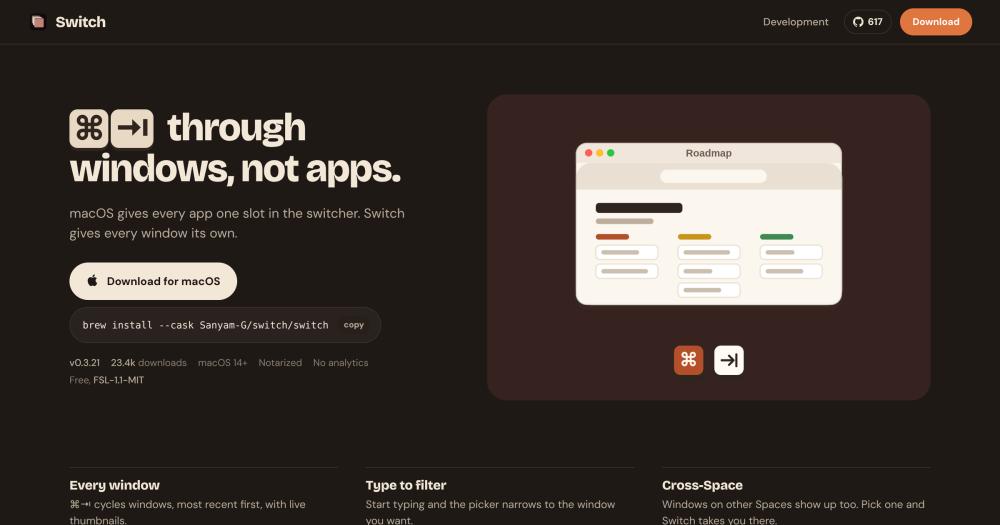
Manage macOS window focus with a keyboard-driven picker that shows every open window with thumbnails, type-to-filter search, and cross-Space navigation.

Visit websiteGitHub616 stars
image of Switch
TL;DR

Switch is a free macOS window switcher that gives every open window its own slot in a keyboard-driven picker, with live thumbnails, type-to-filter, and cross-Space navigation. It replaces paid alternatives like Witch ($14) at no cost, covering the same per-window switching workflow. The license is FSL-1.1-MIT, source-available for non-competing use, converting to MIT on May 6, 2028. Best for macOS 14+ users who manage multiple windows of the same app or navigate across Spaces by keyboard.

Read the full breakdownHide the full breakdownWho it is for, how it works, trade-offs, the quick start and the FAQ
who it's for

Who Switch is for#

Developers with many editor and terminal windows

A developer with several editor windows, terminal tabs, and a browser open can type a filename fragment in the picker to jump directly to the right window without cycling through the app twice. The per-app ⌥-` shortcut handles cycling within one app when that is faster.

Skip if:

You work from a single screen with at most three or four windows and the native ⌘-Tab already lets you find what you need in two keystrokes.

Multi-Space macOS users

Users who organize work across multiple Spaces (one for email, one for coding, one for documentation) can reach any window on any Space from a single picker without manually switching Spaces first. The cross-Space badge makes it clear where the window lives.

Skip if:

You use a single Space and do not move between Spaces during the day; the native switcher already shows everything you have open.

Stage Manager users reaching off-stage windows

Stage Manager deliberately hides apps not on stage to reduce clutter, but reaching an off-stage window requires a click. Switch surfaces those windows in the picker so you can navigate to them by keyboard, which is faster than moving through the Stage Manager sidebar.

Skip if:

You do not use Stage Manager and the standard grid of recent windows already gives you enough context to switch quickly.

macOS power users replacing a paid window switcher

Witch costs $14 and Command-Tab Plus 2 requires a purchase. Switch covers the core workflow (per-window picker, type-to-filter, cross-Space) at no cost. Users who have paid for one of those apps and want to evaluate a free alternative can install Switch via Homebrew alongside it.

Skip if:

You need specific features of a paid alternative, such as Witch's window grouping rules or Command-Tab Plus 2's appearance customization beyond what Switch provides in grid or list mode.

the problem

The problem it solves#

macOS's built-in ⌘-Tab shows one icon per application, regardless of how many windows that app has open. Switching to a specific window within an app requires cycling to the app icon and then using Mission Control or the app's own window menu, a two-step process that breaks keyboard flow. Users who keep many windows open across different apps and Spaces have no fast, filterable path to any specific window using only the keyboard.

The native switcher also hides windows on other Spaces and inside Stage Manager entirely, so reaching them means moving to the Space first and then locating the window. Power users with deep multi-window workflows end up relying on Dock clicks or Mission Control, both of which require a mouse, or they pay for a third-party app to get filterable, per-window access that the OS does not provide.

how Switch solves it

How it solves it#

Window-level ⌘-Tab picker

Replaces the default app-grouped switcher with a grid or vertical list showing every open window individually, most recently used first. Live thumbnails render the current content of each window so you can identify the right one at a glance rather than guessing by title.

Type-to-filter by app or window title

Start typing while the picker is open and the list narrows to windows whose app name or title matches. Typing a filename fragment takes you directly to that file without scrolling. Filter and keyboard navigation work together; optional Vim-style H J K L movement is available.

Cross-Space and fullscreen window support

Windows on other Spaces and fullscreen windows appear in the picker, badged with their Space. Selecting one moves you there automatically. A separate hotkey in Settings → General → Hotkeys scopes the picker to the current Space only, or to the current display only.

Per-app cycling with ⌥-`

Cycles only the windows of the frontmost app, useful when moving between three terminals or two browser windows without surfacing the rest of your open applications. The ⌥-` shortcut is configurable in Settings.

Sticky picker and close-from-picker shortcuts

Sticky mode keeps the picker open after releasing ⌘, letting you browse and pick by keyboard or click without holding a modifier. From inside the picker, ⇧⌘W closes the selected window, ⇧⌘Q quits its app, and ⇧⌘H hides it, so you can manage window state without switching to each app.

Stage Manager and pass-through app support

When Stage Manager is on, off-stage windows still appear in the picker, which the native ⌘-Tab omits. Pass-through mode lets a VM or remote desktop application receive the ⌘-Tab hotkey while it is in front, so the picker does not intercept shortcuts the guest OS needs.

strengths · trade-offs

Strengths and trade-offs#

Strengths

  • Free with no account or analyticsSwitch costs nothing and collects no data. The only network request the app makes is the update check, signed with EdDSA via Sparkle. Witch costs $14 and Command-Tab Plus 2 requires a separate purchase; Switch delivers comparable type-to-filter and cross-Space coverage without a payment.
  • Notarized, Apple silicon and IntelDistributed as a notarized macOS app, so Gatekeeper clears it without a security bypass. Supports both Apple silicon and Intel Macs on macOS 14+. The Homebrew cask and direct .dmg download are both signed by the developer.
  • Cross-Space and Stage Manager support includedSurfaces windows on other Spaces and off-stage Stage Manager windows in the picker, both omitted by the native ⌘-Tab. These features are included at no cost; comparable paid alternatives charge for window management at this level.
  • Converts to MIT license in 2028The FSL-1.1-MIT license converts to the standard MIT license on May 6, 2028, two years after the repository was created. Any developer evaluating long-term adoption knows the restrictive clause disappears on that date.

Trade-offs

  • -Source-available, not OSI open sourceSwitch ships under FSL-1.1-MIT, which permits use, copying, modification, and deployment for any purpose except building a competing commercial product or service with substantially similar functionality. Internal business use and professional services are explicitly allowed. The restriction lifts when the license converts to standard MIT on May 6, 2028. Developers who require an OSI-approved license today should note the difference.
  • -macOS 14 minimum, no cross-platform buildSwitch runs only on macOS 14 (Sonoma) or later. Earlier macOS versions, Windows, and Linux have no supported build. Users on macOS 13 or older need to look at AltTab or Witch instead.
  • -Young project with 21 open issuesThe repository had 21 open issues at the time of listing. As a project created in April 2026 at v0.3.x, rough edges compared to older paid alternatives are expected. The maintainer is active, with the repo receiving a push on November 3, 2026.
versus alternatives

Switch vs alternatives#

Switch vs Witch

Witch ($14) and Switch cover the same core problem: macOS's native ⌘-Tab shows apps, not individual windows. Both add a per-window picker with type-to-filter. The key differences are price and source availability.

FeatureSwitchWitch
PriceFree$14
LicenseFSL-1.1-MIT (source-available)Proprietary, closed
Type to filterYesYes
Cross-Space supportYesYes
macOS requirementmacOS 14+varies

Switch is the stronger fit when cost matters or when a source-available codebase is a requirement for auditing or internal tooling. Witch remains the better choice for users who need its rules-based window grouping, more granular appearance settings, or an app from an established macOS developer with a multi-year track record.

Switch vs Command-Tab Plus 2

Command-Tab Plus 2 is a paid macOS window switcher with per-window display and filtering, in the same category.

FeatureSwitchCommand-Tab Plus 2
PriceFreePaid
LicenseFSL-1.1-MIT (source-available)Proprietary, closed
Type to filterYesYes
Stage Manager supportYesvaries

Switch is the better pick for users who want the core per-window, type-to-filter experience without a purchase, and for those who need verified Stage Manager compatibility. Command-Tab Plus 2 is worth considering when its appearance and behavior customizations match a workflow Switch's current v0.3.x feature set does not cover.

Switch vs Scopo and Macscope

Scopo and Macscope are paid macOS window management tools in this category. Switch covers the same primary use case (per-window keyboard switching with filtering) at no cost. Switch is free; Scopo and Macscope carry a purchase price. Users with requirements specific to those apps should verify Switch's current changelog before switching.

install · quick start

Quick start#

bash
Install via Homebrew cask or download the notarized .dmg installer from the website.
```bash
brew install --cask Sanyam-G/switch/switch
```
tech stack · detected from GitHub

What it's built on#

Languages
Swift
frequently asked

FAQ#

Is Switch free to use?

Yes. Switch is free with no purchase, subscription, or in-app payment. The only revenue path the maintainer mentions is a voluntary PayPal donation link in the README. The FSL-1.1-MIT license permits use for any non-competing purpose at no charge, and the license converts to standard MIT on May 6, 2028.

Does Switch require Screen Recording permission?

Yes, to show live window thumbnails. The permission request explains this when you first launch Switch. If you decline Screen Recording, thumbnails are disabled and Switch falls back to app icons, but all switching and filtering still work. Switch requests only the two permissions it needs: Accessibility (to catch ⌘-Tab and focus windows) and Screen Recording (thumbnails only). No data leaves the machine.

How does Switch compare to AltTab?

Both show a per-window picker with thumbnails and type-to-filter. The README notes that AltTab has many more settings, so if you want to tune every detail of the picker's behavior, AltTab is the better pick. Switch focuses on a minimal, fast install with the core workflow: every window in a picker, type to filter, cross-Space, per-app cycling. AltTab is GPL-3.0 open source; Switch is FSL-1.1-MIT source-available.

How does Switch handle a VM or remote desktop app?

Pass-through mode keeps the ⌘-Tab hotkey inside a VM or remote desktop application while it is in front, so the guest OS receives the shortcut instead of Switch intercepting it. This is configured per app in Switch's settings.

Will the FSL-1.1-MIT license change?

Yes. The README states the license converts to standard MIT on May 6, 2028, two years after the repository was created. After that date there are no restrictions on commercial use, redistribution, or forking.

also worth a look

Similar open-source tools#

CleanYourTV

Featured

Alternative toATV Launcher Pro

Debloat any Android or Google TV over Wi-Fi and get an Apple TV-style home.

  • 48,047 GitHub stars
  • MIT LicenseLicence MIT License

OpenClaw

Featured

Alternative toMuse

Self-hosted AI assistant for WhatsApp, Telegram, and more

  • 393,635 GitHub stars
  • MITLicence MIT

Inbox Zero

Featured

Alternative toSuperhuman

AI email assistant that drafts replies and clears your inbox

  • 12,889 GitHub stars
  • AGPL-3.0Licence AGPL-3.0

rakazo

Featured

Alternative toGrok Bot

AI teammates you own: your keys, your model, your machine.

  • 6,568 GitHub stars
  • Apache-2.0Licence Apache-2.0

paperclip

Featured

Alternative toGrok Bot

Self-hosted AI agent management with org charts and budgets

  • 109,899 GitHub stars
  • MITLicence MIT

Warmbly

Alternative toInstantly

Open source cold email with warmup, campaigns, and a unified inbox

  • 851 GitHub stars
  • Apache-2.0Licence Apache-2.0
by category

Open source tools in these categories#

235

Business & Productivity

OpenClaw, Excalidraw, RustDesk

Sponsors

Inbox Zero

Alternative toSuperhuman

AI email assistant that drafts replies and clears your inbox

  • 12,889 GitHub stars
  • AGPL-3.0Licence AGPL-3.0
  • #Email

rakazo

Alternative toGrok Bot

AI teammates you own: your keys, your model, your machine.

  • 6,568 GitHub stars
  • Apache-2.0Licence Apache-2.0
  • #AI Agents

SnitchFeed

Live monitoring on LinkedIn, X, Reddit & more. Agentic social listening for startups.

Marketing & Growth

Advertise your product

New open source projects by email

The projects we add and every new guide. Free, unsubscribe any time.

Find open source alternatives to paid software

/
  • Claude Code to OpenCode
  • Jira to Windshift
  • Notion to AppFlowy
  • Slack to Mattermost
  • Linear to GitLab
  • Wispr Flow to Handy
  • Arc to Zen Browser
  • CapCut to Concat
  • Grok Bot to rakazo
  • Superhuman to Inbox Zero
  • Airtable to AITable
  • Muse to OpenClaw
  • Railway to Coolify
  • GitHub Copilot to Cline
  • Datadog to Netdata
  • Microsoft Teams to Rocket.Chat
  • Confluence to Docmost
  • Pinecone to Qdrant
  • Zapier to n8n
  • Devin AI to OpenHands
  • Firebase to Supabase
  • 1Password to KeePassXC
  • Contentful to Strapi
  • Adobe Premiere Pro to Shotcut
  • Claude Code to OpenCode
  • Jira to Windshift
  • Notion to AppFlowy
  • Slack to Mattermost
  • Linear to GitLab
  • Wispr Flow to Handy
  • Arc to Zen Browser
  • CapCut to Concat
  • Grok Bot to rakazo
  • Superhuman to Inbox Zero
  • Airtable to AITable
  • Muse to OpenClaw
  • Railway to Coolify
  • GitHub Copilot to Cline
  • Datadog to Netdata
  • Microsoft Teams to Rocket.Chat
  • Confluence to Docmost
  • Pinecone to Qdrant
  • Zapier to n8n
  • Devin AI to OpenHands
  • Firebase to Supabase
  • 1Password to KeePassXC
  • Contentful to Strapi
  • Adobe Premiere Pro to Shotcut