Black Friday at Hostinger: 15% off yearly and longer plans with BFVPS15, until 6 Dec. See plans

Black Friday: 15% off hosting with BFVPS15

Open Source Alternatives
  • Alternatives
  • Categories
    Categories by size1,340 projects
    • Developer Tools685
    • AI & Machine Learning554
    • Business & Productivity332
    • Web Development220
    • Security & Monitoring205
    • Communication & Collaboration172
    • IT Management166
    • Design & Creative151
    • DevOps & CI/CD145
    • LLMOps & AI Tooling143
    Browse all 21 categoriesCloud & Hosting, Product & Project Management and 9 more
  • Blog
  • Advertise
SearchNotion, Slack, password manager.../
Submit
Open Source Alternatives
  • Alternatives
    • Developer Tools685
    • AI & Machine Learning554
    • Business & Productivity332
    • Web Development220
    • Security & Monitoring205
    • Communication & Collaboration172
    • Browse all 21 categories
  • Blog
  • Advertise
Submit your project

New open source projects by email

The projects we add and every new guide. Free, unsubscribe any time.

Open Source Alternatives LogoOpen Source Alternatives

Handpicked Open Source Alternatives to Paid Softwares

Add Open Source Alternatives as a preferred source on Google

Product

  • Categories
  • Tag
  • Advertise

Resources

  • Blog
  • Collection
  • Submit

Company

  • Privacy Policy
  • Terms of Service
  • Refund Policy
  • Sitemap

Alternatives

  • Claude Code
  • Jira
  • Notion
  • Slack
  • Linear
  • Wispr Flow
  • All alternatives
© 2026 Open Source Alternatives. All rights reserved.
Open SourceAlternatives
Home/Categories/Security & Monitoring/Tarn
icon of Tarn Browser

Tarn

Open source alternative to Arc and Brave

  • 31 stars
  • GPL-3.0
  • Active this week
  • Last commit today

Last verified Nov 27, 2026

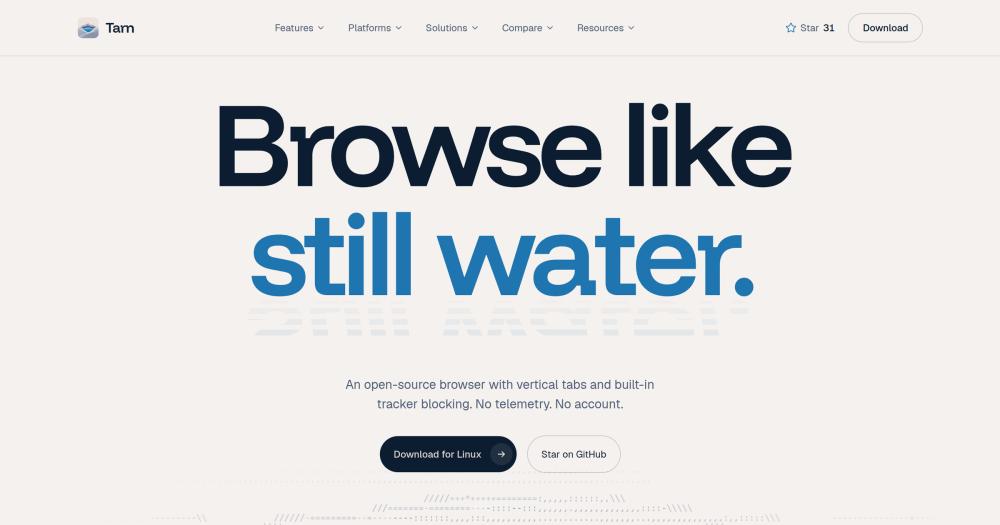
Browse the web with open source tracker blocking and no account or telemetry required.

Visit websiteGitHub31 stars
image of Tarn Browser
TL;DR

Tarn is an open source browser that blocks trackers and ads. Tabs sit in a sidebar with spaces, so different parts of your life stay apart. Each space can use a different profile, keeping cookies and history separate. One field handles addresses, search, open tabs, and commands. Your data stays on your device. There is no telemetry, no account, and no paid tier. It runs on macOS, Windows, and Linux, with iOS and Android still in testing. Tarn is at pre-1.0 status, so stored data can change between releases without a migration path.

Read the full breakdownHide the full breakdownWho it is for, how it works, trade-offs, the quick start and the FAQ
who it's for

Who Tarn is for#

Moving away from Arc

Arc closes in December 2026. If you switched to Arc for its vertical tabs and spaces, Tarn covers the same layout and also gives you full source access and no telemetry.

Skip if:

You are already on Firefox, Brave, or another open source browser and do not need a vertical-tabs layout.

Private browsing at home

You want a browser that blocks trackers and ads from the start. Tarn's Shield blocks them on every page, and all of your data stays on your computer with no account needed.

Skip if:

You are comfortable with Brave's default settings and do not need a fully open source browser.

Developers who browse a lot

If you use keyboard shortcuts for most of your work and want an AI tool that can open pages on request, Tarn's command bar and built-in AI window fit that workflow.

Skip if:

You need heavy extension support or a browser with a stable long-term release track from a large team.

the problem

The problem it solves#

Most browsers are made by companies that earn money from ads or user data. Many require an account, run telemetry in the background, or charge for their best privacy features. For people who want to browse without being tracked, the options are often closed apps they cannot inspect or browsers with paid tiers.

how Tarn solves it

How it solves it#

Shield blocking

Blocks trackers, ads, cookie banners, YouTube ads, pop-ups, malware, and phishing sites before they load. Three levels (Standard, Strict, Lockdown) can be set per site. Strict mode also removes tracking links from addresses. Lockdown mode turns off scripts and keeps no site data.

Vertical tabs and spaces

Tabs sit in a sidebar sorted into spaces. Each space has its own name, colour, and icon. Profiles keep cookies, history, and site data fully apart between spaces. Private spaces and burner tabs exist in memory only and leave no trace.

Keyboard-first address bar

One field handles addresses, search, open tabs, and app commands with inline suggestions. Type a few letters to switch to an open tab, run a command, or open a web address. Most actions have a keyboard shortcut, and most shortcuts can be changed.

Library and reader

Open tabs, history, bookmarks, downloads, and your Reading List are in one Library. Reader view strips a page to its text with controls for size, width, and read-aloud. Notes per profile stay on your device and are never synced.

AI tools when you want them

An assistant can read the page with you using Anthropic's Claude service, the device's on-device model, or Ollama running on your computer. Developer tools such as Claude Code can browse in their own window using an MCP server (a standard bridge that lets tools control a browser). Both are off until you turn them on.

strengths · trade-offs

Strengths and trade-offs#

Strengths

  • Open source under GPL-3.0Anyone can read the full source code, build from it, and change how the browser works. The GPL-3.0 licence means changes you share publicly must carry the same licence. No part of the app is closed or proprietary.
  • No telemetry and no accountNothing about your browsing goes back to the maker. There is no account to create, no sign-in, and no cloud sync. History, bookmarks, and profiles stay on the device where Tarn is installed.
  • Runs on five platformsmacOS, Windows, Linux, iOS, and Android are all supported. macOS is the most complete client. The same privacy controls and filter lists work on every platform.

Trade-offs

  • -Pre-release with no migration pathTarn is at pre-1.0 status. Features, settings, and stored data can change between releases without a way to bring old data forward. Early adopters should check the release notes before updating.
  • -Very new and small communityThe repository was created in November 2026 and has 31 stars. The community is small. Bug reports and feature requests may take longer to get a response than on an established browser.
  • -Mobile builds still in testingiOS and Android are not yet in the App Store or Google Play. Those builds are verified in simulators and emulators only, not on real phones. Physical device testing, some accessibility features, and store distribution are still planned.
versus alternatives

Tarn vs alternatives#

Tarn vs Arc

Arc is a vertical-tab browser that became popular for its design. It is free to use but closed source: you cannot see or change the code, and your use depends on the company keeping it running. Arc stops working on December 22, 2026. After that date, everyone on Arc needs a different browser.

Tarn covers the same layout: vertical tabs, spaces, split view, and a keyboard-first command bar. It adds open source code you can inspect, a GPL-3.0 licence that lets you build from it, no telemetry, and no account required.

If you are on Arc now, Tarn is a close match in layout and closer in privacy controls.

Tarn vs Brave

Brave is a free, open source Chromium browser with built-in ad and tracker blocking. Its default blocking is good, and it runs on the same Chromium engine as Chrome, so most sites work without problems. It has a paid Origin tier ($59.99) that removes the browser's own ads and monetization features.

Tarn's blocking covers similar ground but uses each platform's own web engine: WebKit on macOS, iOS, Linux, and Android, and Chromium on Windows. Tarn adds vertical tab spaces and profiles that go further than Brave's profile system. It has no paid tier at all.

Pick Brave if you need broad extension support and site compatibility on a Chromium engine. Pick Tarn if you want vertical tab spaces, keyboard-first navigation, and a fully open source codebase with no commercial tier.

install · quick start

Quick start#

bash
Install on macOS with Homebrew; for Windows and Linux, download installers from GitHub Releases.

```bash
brew install --cask quavon-dev/tarn/tarn
```
tech stack · detected from GitHub

What it's built on#

Languages
JavaPythonRust
Runtimes
Chromium
frequently asked

FAQ#

Is Tarn free?

Yes. Tarn is free to download and use, with no paid tier and no ads from the maker. It is open source under a GPL-3.0 licence.

What does the Shield block?

Shield blocks trackers, ads (using EasyList, AdGuard, and uBlock filter lists), cookie banners, YouTube ads, pop-ups, malware sites, and phishing pages. Standard mode covers the core blocks. Strict mode also removes tracking links from addresses and stops pages from knowing which site linked to them. Lockdown mode turns off scripts and keeps no site data. You can set the level per site.

Can I use Tarn on my phone?

iOS and Android builds exist but are still in testing and not yet in the App Store or Google Play. Physical device testing and some accessibility features are still planned. macOS, Windows, and Linux are the stable platforms today.

Does Tarn sync my data to any server?

No. History, bookmarks, notes, and profiles stay on the device where Tarn is installed. Tarn sends nothing back to the maker. There is no account to create and no cloud service required.

Can I build Tarn from source?

Yes. The full source is on GitHub under a GPL-3.0 licence. The macOS and Windows builds need platform tools (Apple's developer tools and Microsoft's compiler). The Linux build uses only free and open source tools. Instructions are in the repository.

Looking for more

Other ways to replace Arc and Brave#

Zen Browser

#1 in the Arc guide

Sidebar Workspaces, split view for up to 4 tabs and Boosts, the closest match to how Arc worked

46,010 GitHub stars

Floorp

#2 in the Arc guide

Workspaces that switch a Firefox container per project, with no account required

8,510 GitHub stars

Brave

#3 in the Arc guide

Chrome Web Store extensions and an Android app, with encrypted sync across devices

3,823 GitHub stars

Firefox

#4 in the Arc guide

Vertical tabs, tab groups and split view built into the browser itself, on 5 platforms

13,953 GitHub stars
All 14 Arc alternatives6 open source Arc alternatives, ranked
by category

Open source tools in these categories#

205

Security & Monitoring

REA (Reverse Engineer Anything), RustDesk, Sherlock
332

Business & Productivity

OpenClaw, Excalidraw, RustDesk

Sponsors

SnitchFeed

Live monitoring on LinkedIn, X, Reddit & more. Agentic social listening for startups.

Marketing & Growth

Windshift

Alternative toJira

Self-hosted work management for teams leaving Jira

  • 481 GitHub stars
  • AGPL-3.0Licence AGPL-3.0

Nuphos

Alternative toConductor

Agent workspace for teams running Claude Code or Codex

  • 802 GitHub stars
  • Apache-2.0Licence Apache-2.0
  • #AI Agents
Advertise your product

New open source projects by email

The projects we add and every new guide. Free, unsubscribe any time.

Find open source alternatives to paid software

/
  • Claude Code to OpenCode
  • Jira to Windshift
  • Notion to AppFlowy
  • Slack to Mattermost
  • Linear to GitLab
  • Wispr Flow to Handy
  • Microsoft To Do to Super Productivity
  • Arc to Zen Browser
  • CapCut to Concat
  • Grok Bot to Rakazo
  • Superhuman to Inbox Zero
  • Discord to Stoat
  • Airtable to AITable
  • Datadog to SigNoz
  • Muse to OpenClaw
  • Railway to Coolify
  • GitHub Copilot to Cline
  • Confluence to Wiki.js
  • Microsoft Teams to Rocket.Chat
  • 1Password to KeePassXC
  • Zapier to n8n
  • Pinecone to Qdrant
  • Contentful to Strapi
  • Firebase to Supabase