Open Source Alternatives
  • Alternatives
  • Categories
    Categories by size904 projects
    • Developer Tools471
    • AI & Machine Learning407
    • Web Development198
    • Business & Productivity195
    • Security & Monitoring131
    • Communication & Collaboration128
    • IT Management126
    • Cloud & Hosting109
    • Product & Project Management106
    • Data & Analytics105
    Browse all 21 categoriesDesign & Creative, LLMOps & AI Tooling and 9 more
  • Blog
  • Advertise
SearchNotion, Slack, password manager.../
Submit
Open Source Alternatives
  • Alternatives
    • Developer Tools471
    • AI & Machine Learning407
    • Web Development198
    • Business & Productivity195
    • Security & Monitoring131
    • Communication & Collaboration128
    • Browse all 21 categories
  • Blog
  • Advertise
Submit your project

New open source projects by email

The projects we add and every new guide. Free, unsubscribe any time.

Open Source Alternatives LogoOpen Source Alternatives

Handpicked Open Source Alternatives to Paid Softwares

Product

  • Categories
  • Tag
  • Advertise

Resources

  • Blog
  • Collection
  • Submit

Company

  • Privacy Policy
  • Terms of Service
  • Refund Policy
  • Sitemap

Alternatives

  • Claude Code
  • Jira
  • Notion
  • Slack
  • Linear
  • Wispr Flow
  • All alternatives
© 2026 Open Source Alternatives. All rights reserved.
Open SourceAlternatives
Home/Categories/Developer Tools/UTM
icon of UTM

UTM

Open source alternative to Parallels Desktop and VMware Fusion Pro

  • 36.5K stars
  • Apache-2.0
  • Active this week
  • Last commit 2 days ago

Last verified Oct 23, 2026

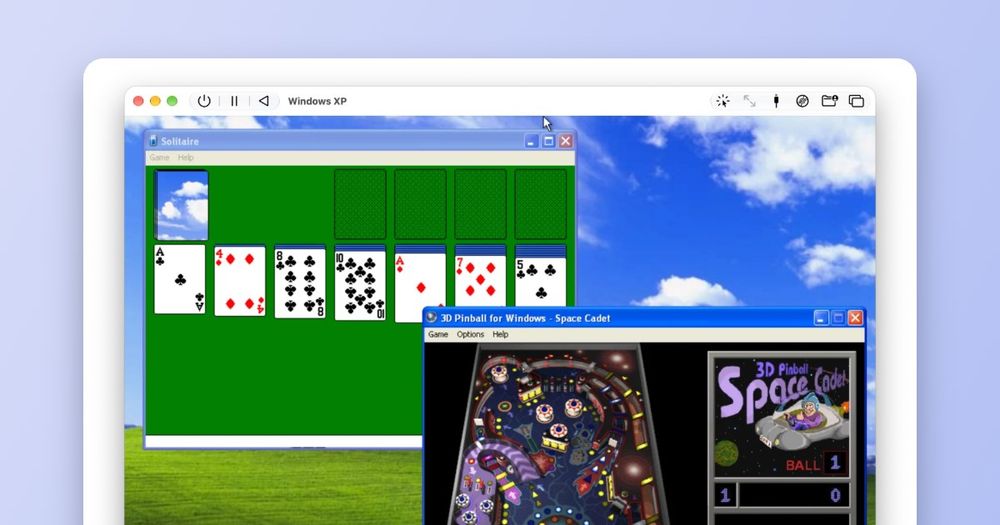
Run Windows, Linux, and macOS on Apple hardware using QEMU, with support for 30+ processor architectures and near-native speed on Apple Silicon.

Visit websiteGitHub36.5K stars
image of UTM
TL;DR

UTM is a free and open source virtual machine host and emulator for macOS, iOS, and visionOS, built on the QEMU engine. It replaces paid tools like Parallels Desktop and VMware Fusion Pro, running Windows, Linux, and other operating systems on Apple hardware with no annual subscription. On Apple Silicon, it uses Apple's Hypervisor framework for near-native ARM64 performance; on other architectures it covers 30+ processor types via JIT-accelerated QEMU emulation. Best for developers and power users on Apple devices who want OS virtualization without a recurring cost.

Read the full breakdownHide the full breakdownWho it is for, how it works, trade-offs and the FAQ
who it's for

Who UTM is for#

Mac developers who need a Windows test environment

UTM runs Windows 11 for ARM on Apple Silicon at near-native speed using Apple's Hypervisor framework, giving developers a usable Windows environment without a second machine or a Parallels subscription. The utmctl CLI and snapshot support make it practical to automate test setup and teardown.

Skip if:

You need to run x86-only Windows applications on Apple Silicon. ARM Windows cannot run x86 apps natively, and emulated x86 performance on Apple Silicon is slow. Parallels Desktop, which includes an x86 compatibility layer, is better suited for that specific case.

iOS and iPad users running retro or lightweight OS images

UTM SE brings emulation to iPhone and iPad without a jailbreak, supporting DOS, older Linux distributions, and classic ARM or x86 systems via the App Store. The full UTM is also available for sideloading on compatible iOS versions for users who want better performance.

Skip if:

You need a modern, full-featured OS on an iPhone or iPad. UTM SE uses a threaded interpreter rather than JIT, so performance is limited. Running a full desktop Linux distribution or modern Windows on UTM SE is not practical.

Retro computing users emulating PowerPC, SPARC, or MIPS systems

UTM emulates PowerPC, SPARC, MIPS, and other architectures via QEMU, letting users run classic Mac OS, vintage Linux distributions, and legacy workstation OSes on current Apple hardware. QEMU's broad architecture support means most emulation targets have upstream coverage.

Skip if:

You are not already familiar with sourcing disk images and configuring boot parameters for the target system. UTM provides the frontend; setting up emulated classic systems still requires knowledge of the guest OS and QEMU configuration.

Sysadmins running additional macOS instances on Apple Silicon

UTM can boot additional macOS instances on Apple Silicon using Apple's Virtualization.framework, useful for sandboxed testing, reproducing OS-version-specific bugs, or pre-flight checks before a system update. The feature requires macOS Monterey or later.

Skip if:

You are on an Intel Mac. Virtualization.framework support for macOS guests requires Apple Silicon hardware.

the problem

The problem it solves#

Apple Macs, iPhones, and iPads run their own operating systems, with no built-in support for other OSes. Developers who need Windows for testing, sysadmins running Linux environments, or users with legacy software requirements have limited native options on Apple hardware. The commercial tools are expensive. Parallels Desktop charges around $100 per year, and VMware Fusion Pro still requires a paid license for commercial use. Both are proprietary and macOS-only, with no support for iPhone, iPad, or visionOS.

On iOS, the constraint is stricter. Apple's App Store rules historically blocked JIT compilation, making it nearly impossible to ship a fast emulator for iPhone or iPad. Most iOS users have had no practical option for running a full Linux or Windows environment on their device.

how UTM solves it

How it solves it#

Near-native ARM64 virtualization on Apple Silicon

On Apple Silicon Macs, UTM uses Apple's Hypervisor framework to run ARM64 operating systems at near-native speed. Windows 11 for ARM and Ubuntu ARM boot and run with performance close to bare metal, without the overhead of full software emulation. This requires macOS Monterey or later on an Apple Silicon chip.

30+ emulated processor architectures via QEMU

Beyond ARM virtualization, UTM emulates over 30 CPU types via QEMU, including x86_64, ARM32, MIPS, PowerPC, SPARC, and RISC-V. Classic operating systems from the PowerPC and SPARC era run on the same machine as modern Linux and Windows instances. JIT-based acceleration via QEMU TCG keeps emulation performance reasonable for everyday workloads.

UTM SE for iPhone, iPad, and visionOS

UTM SE ships on the App Store for iPhone, iPad, and visionOS without requiring a jailbreak. It uses a threaded interpreter instead of JIT, trading speed for App Store compatibility, and supports ARM, PPC, RISC-V, and x86 in both 32-bit and 64-bit variants. Older and lighter operating systems like DOS and lightweight Linux distributions run well on UTM SE.

utmctl CLI and AppleScript automation

Virtual machines can be created, configured, started, stopped, suspended, snapshotted, and connected to USB devices from the command line using utmctl or via AppleScript. Commands include start, stop, suspend, snapshot create, snapshot restore, and USB pass-through, making UTM scriptable for CI pipelines and automated testing setups.

DirectX 11, DirectX 12, and Vulkan 1.3 in guests

Windows 11 guest VMs support DirectX 11 and DirectX 12; Linux guests support Vulkan 1.3. Game and GPU-accelerated workload compatibility is ongoing work, with the upstream QEMU project actively maintaining the guest display drivers UTM depends on. Compatibility varies by title; the UTM GitHub issues tracker documents known configurations.

strengths · trade-offs

Strengths and trade-offs#

Strengths

  • Completely free, including the App Store listingUTM is free with no subscription and no feature paywalls. The Mac App Store listing is also free; a separate paid App Store entry exists only to fund development and enable automatic updates, but buying it is optional. Parallels Desktop charges around $100 per year for comparable macOS-only virtualization.
  • Apache 2.0 license on a proven QEMU baseUTM's frontend is Apache 2.0 licensed, permitting use, modification, and redistribution without fee. It builds on QEMU, one of the most widely deployed open source emulators in use since the early 2000s, with active upstream maintenance and broad architecture coverage that UTM inherits directly.
  • Covers macOS, iOS, and visionOS from a single appParallels Desktop and VMware Fusion Pro are macOS-only tools. UTM extends to iPhone, iPad, and visionOS via UTM SE on the App Store, and the free UTM Remote app lets users control their Mac VMs from an iPhone or iPad. No other free open source virtualizer covers all four Apple platforms.
  • Actively maintained with recent Apple API supportUTM's most recent commit was in October 2026, tracking current changes to Apple's Hypervisor and Virtualization frameworks. The project has over 36,000 GitHub stars and continues to ship updates as QEMU and Apple's platforms evolve. The Swift-based frontend uses macOS 12+ and iOS 15+ APIs throughout.

Trade-offs

  • -macOS and iOS only, no Windows or Linux hostUTM is built exclusively for Apple platforms and will not run on a Windows or Linux host. Developers who work across multiple host platforms need a separate virtualization tool for non-Apple machines.
  • -x86 emulation on Apple Silicon is significantly slower than ARM64Running x86_64 Windows or Linux via QEMU software emulation on Apple Silicon is significantly slower than running ARM64 guests with hardware acceleration. The product website describes x86/x64 emulation on Apple Silicon as 'slower' compared to near-native ARM64 performance. Workloads that depend heavily on x86 Windows performance should evaluate whether QEMU emulation speed is sufficient before committing.
  • -Over 1,100 open GitHub issues across 30+ architecturesSupporting QEMU emulation across dozens of guest architectures and Apple's evolving OS APIs generates a substantial issue backlog. UTM has more than 1,100 open GitHub issues as of October 2026. Support quality varies by guest architecture and configuration; checking the issue tracker before setting up a specific OS version is recommended.
versus alternatives

UTM vs alternatives#

UTM vs Parallels Desktop

Parallels Desktop is a paid, proprietary macOS virtualizer commonly used to run Windows on Mac. UTM covers the same use case at no cost, built on QEMU and released under the Apache 2.0 license.

UTM is the better choice when you want no subscription cost, need to emulate across 30+ CPU architectures including classic systems like PowerPC and SPARC, or need virtualization on iPhone, iPad, or visionOS. On Apple Silicon, UTM runs ARM64 operating systems at near-native speed using Apple's Hypervisor framework; x86 guests run via QEMU software emulation, which carries a meaningful performance cost.

Parallels Desktop is worth considering when you want a polished, one-click Windows installation experience and are comfortable with the annual subscription. Its Windows integration features on macOS, including shared clipboard and app window blending, are more developed than UTM's.

UTM vs VMware Fusion Pro

VMware Fusion Pro is another proprietary macOS virtualizer. Its personal-use tier became free in 2024; commercial use still requires a paid license. UTM is free for all use cases.

UTM is the better choice when you need broad emulation coverage across 30+ architectures, iOS and visionOS support, or open source transparency with no commercial licensing constraints. VMware Fusion Pro is worth considering if you are in an environment that relies on VMware tooling and need compatibility with the broader VMware ecosystem, or if you want a personal-use tool with lower QEMU configuration overhead.

tech stack · detected from GitHub

What it's built on#

Languages
CObjective-CSwift
frequently asked

FAQ#

Is UTM free to use?

Yes. UTM is completely free and open source. The direct DMG download from GitHub and the Mac App Store listing are both free. A separate paid App Store entry exists to fund development and enables automatic updates, but paying is optional and the feature set is identical.

Does UTM require a jailbreak on iPhone or iPad?

No. UTM SE runs on iPhone, iPad, and visionOS from the App Store or compatible alternative marketplaces without any jailbreak. The full UTM, which uses JIT compilation for better performance, requires sideloading or a jailbroken device. For most iOS users, UTM SE from the App Store is the practical choice.

How does UTM compare to Parallels Desktop and VMware Fusion Pro?

UTM is free and open source; Parallels Desktop costs around $100 per year and VMware Fusion Pro requires a paid license for commercial use. UTM covers more CPU architectures and also works on iPhone, iPad, and visionOS. On macOS, Parallels and VMware offer more polished Windows integration features; UTM requires more manual configuration but carries no cost or vendor dependency.

What is the difference between the Mac App Store version and the direct download?

The features are identical. The Mac App Store version provides automatic updates; the direct download from GitHub requires manual updates. There is also a paid App Store listing that funds UTM development, but it provides the same features as the free listing. All three options install the same application.

Can I redistribute UTM or bundle it in my own software?

UTM's frontend code is Apache 2.0 licensed, which allows redistribution with attribution. However, UTM bundles LGPL and GPL components from QEMU, including statically linked gstreamer plugins. Redistributors need to comply with those component licenses as well. Most users running UTM locally for personal or internal use are not affected by this distinction.

also worth a look

Similar open-source tools#

Mole

Alternative toCleanMyMac X

Free CLI and native app for Mac cleanup, uninstall, and disk analysis

  • 72,205 GitHub stars
  • GPL-3.0Licence GPL-3.0

Pulse

InSecurity & Monitoring

Read-only Windows diagnostics with a local AI assistant.

  • 368 GitHub stars
  • MITLicence MIT

Superfile

Alternative toDirectory Opus

Terminal file manager with multi-panel layout and 20+ themes

  • 23,876 GitHub stars
  • MITLicence MIT

Vorssaint Utils

Alternative toiStat Menus

One menu bar icon replacing a dozen paid macOS apps

  • 28,363 GitHub stars
  • GPL-3.0Licence GPL-3.0

Xray-core

Alternative toAstrill VPN

Open source proxy core with XTLS, VLESS, and REALITY protocols

  • 42,209 GitHub stars
  • MPL-2.0Licence MPL-2.0

Steam Game Idler

Alternative toHHourBoost

Free Steam idler for trading cards, hours and achievements

  • 768 GitHub stars
  • CustomLicence Elastic License 2.0 (ELv2)
by category

Open source tools in these categories#

471

Developer Tools

REA (Reverse Engineer Anything), superpowers, Skills for Real Engineers
126

IT Management

RustDesk, Immich, Stirling PDF

Featured

rakazo

Alternative toGrok Bot

AI teammates you own: your keys, your model, your machine.

  • 4,904 GitHub stars
  • Apache-2.0Licence Apache-2.0
  • #AI Agents

Omnara

Alternative toCClaude Managed Agents

Open-source agent deployment API. Self-host or use Omnara Cloud.

  • 2,957 GitHub stars
  • Apache-2.0Licence Apache-2.0
  • #AI Agents

Inbox Zero

Alternative toSuperhuman

AI email assistant that drafts replies and clears your inbox

  • 12,712 GitHub stars
  • AGPL-3.0Licence AGPL-3.0
  • #Email
Feature your project

New open source projects by email

The projects we add and every new guide. Free, unsubscribe any time.

Find open source alternatives to paid software

/
  • Claude Code to OpenCode
  • Jira to Windshift
  • Notion to AppFlowy
  • Slack to Mattermost
  • Linear to GitLab
  • Wispr Flow to Handy
  • CapCut to Concat
  • Grok Bot to rakazo
  • Superhuman to Inbox Zero
  • Airtable to AITable
  • Muse to OpenClaw
  • GitHub Copilot to Cline
  • Datadog to Netdata
  • Microsoft Teams to Rocket.Chat
  • Confluence to Docmost
  • Pinecone to Qdrant
  • Zapier to n8n
  • Devin AI to OpenHands
  • Firebase to Supabase
  • 1Password to KeePassXC
  • Contentful to Strapi
  • Adobe Premiere Pro to Shotcut
  • ChatGPT to AnythingLLM
  • LangSmith to Langfuse
  • Claude Code to OpenCode
  • Jira to Windshift
  • Notion to AppFlowy
  • Slack to Mattermost
  • Linear to GitLab
  • Wispr Flow to Handy
  • CapCut to Concat
  • Grok Bot to rakazo
  • Superhuman to Inbox Zero
  • Airtable to AITable
  • Muse to OpenClaw
  • GitHub Copilot to Cline
  • Datadog to Netdata
  • Microsoft Teams to Rocket.Chat
  • Confluence to Docmost
  • Pinecone to Qdrant
  • Zapier to n8n
  • Devin AI to OpenHands
  • Firebase to Supabase
  • 1Password to KeePassXC
  • Contentful to Strapi
  • Adobe Premiere Pro to Shotcut
  • ChatGPT to AnythingLLM
  • LangSmith to Langfuse