Who uv is for#
Python developers replacing pip in CI/CD pipelines
uv's 10-100x speed advantage over pip most directly benefits CI builds where cold installs happen on every run. Switching `pip install -r requirements.txt` to `uv pip install -r requirements.txt` requires no other changes and can cut install times from minutes to seconds on cold runners.
Skip if:
Your CI provider already caches pip and install steps complete in under 30 seconds. The speed benefit narrows significantly with a warm pip cache already in place.
Teams migrating from poetry or pip-tools
uv supports lockfiles, workspaces, and project management commands similar to poetry, with no lock-in to a custom format. The `uv pip compile` and `uv pip sync` commands are drop-in replacements for `pip-compile` and `pip-sync`, preserving existing workflow conventions while providing faster resolution.
Skip if:
Your team relies on poetry plugins or PDM features with no equivalent in uv. Check the uv feature roadmap before committing to a full migration.
Data scientists running isolated scripts and notebooks
uv's inline script dependency metadata is especially useful for standalone scripts that need specific package versions. Running `uv run script.py` creates an isolated virtual environment automatically and executes the script, with no manual `venv` setup or activation step required.
Skip if:
Your data science stack relies on conda packages not available on PyPI. uv only resolves from PyPI and does not replace conda for that use case.
Platform engineers standardizing Python tooling across teams
uv installs on macOS, Linux, and Windows with a single command, manages Python versions directly, and enforces lockfile-based reproducibility. It provides a single binary to install and update across developer machines and CI runners, reducing per-developer environment setup from a complex multi-tool install to one command.
Skip if:
Your organization requires air-gapped package mirrors with no PyPI access and uv's private registry configuration does not cover your specific mirror setup. Verify against your registry requirements before rollout.
The problem it solves#
Python development involves too many tools. A typical setup requires pip for package installation, virtualenv or venv for environment isolation, pyenv for Python version management, poetry or pip-tools for lockfiles, and pipx for CLI tools. Each one has its own commands, its own config files, and its own failure modes. Installing packages with pip on a cold cache is slow, and even modest projects can leave CI runners waiting significantly longer than necessary.
The pain deepens at scale. Monorepos with multiple Python packages need workspace support. Projects with many interdependent packages run into slow resolution and frequent conflicts. Every time the pip resolver stalls or a pyenv shim breaks in a new shell, a developer stops solving the real problem and starts debugging tooling instead.
How it solves it#
Single tool for the full Python workflow
uv replaces pip, pip-tools, pipx, poetry, pyenv, twine, and virtualenv with one binary. Running `uv init`, `uv add`, `uv run`, and `uv python install` covers project setup, dependency management, script execution, and Python version management without switching tools or maintaining multiple installers.
10-100x faster than pip
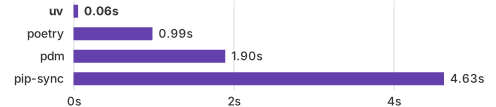
Dependency resolution and package installation run 10-100x faster than pip on benchmarks, enabled by a parallel downloader, a global cache that deduplicates packages across environments, and a Rust implementation. The project README benchmark shows installing Trio's dependencies with a warm cache completing in milliseconds.
Universal lockfile
uv generates a `uv.lock` file that is platform-independent: the same lockfile resolves correctly on macOS, Linux, and Windows. It captures exact resolved versions for every dependency, enabling reproducible environments across developer machines and CI runners without maintaining per-platform lock files.
Python version management
uv installs and manages Python versions directly, without pyenv or any other version manager. The command `uv python install 3.12 3.13 3.14` downloads multiple versions at once. Pin a version per-project with `uv python pin 3.11`, which writes a `.python-version` file that uv reads on every subsequent command.
Inline script dependencies
Scripts can declare their own dependencies directly in the file. Running `uv add --script example.py requests` annotates the script with inline dependency metadata. Then `uv run example.py` installs those dependencies into an isolated virtual environment and executes the script, with no separate requirements file or manual virtualenv setup needed.
pip-compatible interface
The `uv pip` sub-interface accepts the same flags as pip, pip-tools, and virtualenv commands. `uv pip install`, `uv pip compile`, and `uv pip sync` behave identically to their pip equivalents. Teams can migrate without changing existing tooling or CI scripts, while getting 10-100x faster installs.
Strengths and trade-offs#
Strengths
- Replaces a five-tool chain with one binaryMost Python workflows require pip, pyenv, poetry or pip-tools, virtualenv, and pipx installed and maintained separately. uv handles all five roles from a single binary with a unified configuration model. Fewer tools means fewer version conflicts between the tooling itself, simpler CI setup scripts, and one update path.
- Permissive dual license with no usage feeuv is dual-licensed under Apache-2.0 or MIT at your option. Both are permissive OSI-approved licenses. You can use it in commercial products, modify it, redistribute it, and include it in build pipelines without any licensing fee or commercial restriction. No usage tiers, no premium features behind a paywall.
- Zero install prerequisitesInstalling uv does not require Rust, Python, or any other runtime already on the machine. The standalone installer downloads a pre-built binary directly via `curl -LsSf https://astral.sh/uv/install.sh | sh` on macOS and Linux. Most Python tools require Python already installed before they can install themselves; uv does not.
- Actively maintained by Astraluv is developed by Astral, the company behind Ruff. The repository reached 89,759 GitHub stars with a last push on September 12, 2026, and maintains a regular release cadence. The project's versioning policy states that uv is stable and widely used in production.
Trade-offs
- -PyPI only: no conda package supportuv resolves packages from PyPI. It does not install conda packages, conda-forge packages, or compiled dependencies that many data science workflows obtain through Anaconda or miniforge, such as CUDA libraries or R packages. Projects that depend on conda-only packages will still need conda alongside or instead of uv.
- -Relatively new with a large open issue countuv was created in October 2023. As of the research date, the repository has 2,881 open issues. While many are enhancement requests rather than blockers, edge cases in less common setups, namespace packages, or specific editable install configurations may not yet be fully supported. Test your project's specific requirements before committing to a full migration.
uv vs alternatives#
uv vs Anaconda
Both uv and Anaconda manage Python environments, but they address the problem from opposite ends. Anaconda is a full Python distribution designed to give data scientists a complete, batteries-included environment out of the box. uv is a lightweight package manager that starts with nothing and installs only what the project explicitly declares from PyPI.
| Feature | uv | Anaconda |
|---|---|---|
| License | Apache-2.0 or MIT | Commercial distribution |
| Package source | PyPI | conda-forge, Anaconda channels |
| Python management | Yes | Yes (via conda) |
| Universal lockfile | Yes (uv.lock) | No |
| Install method | Single curl or pip command | Full distribution installer |
| Platform | macOS, Linux, Windows | macOS, Linux, Windows |
| Disk usage | Global deduplication cache | Full distribution with pre-bundled packages |
uv is the better choice when your stack is on PyPI, you want fast CI installs, and you prefer declaring dependencies explicitly. The uv add and uv sync workflow starts with an empty environment and adds only what the project needs, committing a reproducible lockfile. Install times run 10-100x faster than pip on benchmarks, making uv particularly valuable in CI pipelines where cold installs happen on every run.
Anaconda remains the right choice when your workflow depends on conda-only packages: compiled scientific libraries on conda-forge, CUDA toolkit management, or R package integration. These packages are not available through uv's PyPI resolver. Data scientists whose requirements are entirely on PyPI may find uv a faster replacement; those with conda-only dependencies will still need conda.

Quick start#
Install uv using the official standalone installer for macOS and Linux.
```bash
curl -LsSf https://astral.sh/uv/install.sh | sh
```What it's built on#
- Languages
- PythonRust
FAQ#
Does uv replace pip entirely?
Yes, for most workflows. The uv pip interface accepts the same flags as pip, pip-compile, and pip-sync, so you can switch without changing existing tooling. uv also goes beyond pip by managing Python versions, creating virtual environments automatically, and running scripts with inline dependencies. The README positions it as a single tool to replace pip, pip-tools, pipx, poetry, pyenv, twine, and virtualenv.
Is uv stable enough for production use?
Yes. The project's documentation explicitly states that uv is stable and widely used in production. The repository has a published versioning policy and reached 89,759 GitHub stars with daily commits as of September 2026. Astral, the company behind uv and Ruff, maintains a regular release cadence and backward-compatibility commitments.
What license does uv use?
uv is dual-licensed under Apache-2.0 or MIT at your option. Both are permissive OSI-approved licenses. You can use uv in commercial products, distribute it, and modify it without any fee or additional attribution requirement beyond the license notice. The GitHub repository carries both LICENSE-APACHE and LICENSE-MIT files.
Does uv work with existing requirements.txt files?
Yes. The command uv pip install -r requirements.txt is a drop-in replacement for pip install -r requirements.txt. uv also provides uv pip compile to generate platform-independent requirements files from a requirements.in source, and uv pip sync to install the pinned versions, both compatible with existing pip-tools workflows.
How does uv differ from Anaconda?
Anaconda is a full Python distribution that bundles conda, Python, and hundreds of pre-installed packages for data science. uv is a lightweight package manager that installs only what the project explicitly requires from PyPI. uv installs as a single binary via curl with no pre-bundled packages; Anaconda requires a full distribution download. Use Anaconda when you need conda-only packages; use uv for standard PyPI-based Python development.
Similar open-source tools#
FckSignups
Open-source tools that work instantly, no signup required
gitdeck
Self-hosted Git dashboard for GitHub, GitLab, and Forgejo
Sulu
Enterprise-ready open source CMS built on Symfony
TinaCMS
Open source headless CMS with inline editing and Git backend
OpenResearch
Local-first workspace for parallel research agents and experiments.
Sonarr
Smart PVR for Usenet and BitTorrent TV fans