Open Source Alternatives
  • Alternatives
  • Categories
    Categories by size993 projects
    • Developer Tools507
    • AI & Machine Learning436
    • Business & Productivity227
    • Web Development202
    • Security & Monitoring149
    • Communication & Collaboration136
    • IT Management134
    • Cloud & Hosting118
    • LLMOps & AI Tooling111
    • Product & Project Management110
    Browse all 21 categoriesData & Analytics, Design & Creative and 9 more
  • Blog
  • Advertise
SearchNotion, Slack, password manager.../
Submit
Open Source Alternatives
  • Alternatives
    • Developer Tools507
    • AI & Machine Learning436
    • Business & Productivity227
    • Web Development202
    • Security & Monitoring149
    • Communication & Collaboration136
    • Browse all 21 categories
  • Blog
  • Advertise
Submit your project

New open source projects by email

The projects we add and every new guide. Free, unsubscribe any time.

Open Source Alternatives LogoOpen Source Alternatives

Handpicked Open Source Alternatives to Paid Softwares

Product

  • Categories
  • Tag
  • Advertise

Resources

  • Blog
  • Collection
  • Submit

Company

  • Privacy Policy
  • Terms of Service
  • Refund Policy
  • Sitemap

Alternatives

  • Claude Code
  • Jira
  • Notion
  • Slack
  • Linear
  • Wispr Flow
  • All alternatives
© 2026 Open Source Alternatives. All rights reserved.
Open SourceAlternatives
Home/Categories/Business & Productivity/Alexandrie
icon of Alexandrie

Alexandrie

Open source alternative to Notion, Confluence and Obsidian

  • 3.5K stars
  • MIT
  • Active this week
  • Last commit today

Last verified Oct 31, 2026

Host a self-hosted, offline-first knowledge base with advanced Markdown editing, multi-tenant teams, OIDC/SSO, and Docker deployment.

Visit websiteGitHub3.5K starsDeploy on Hostinger
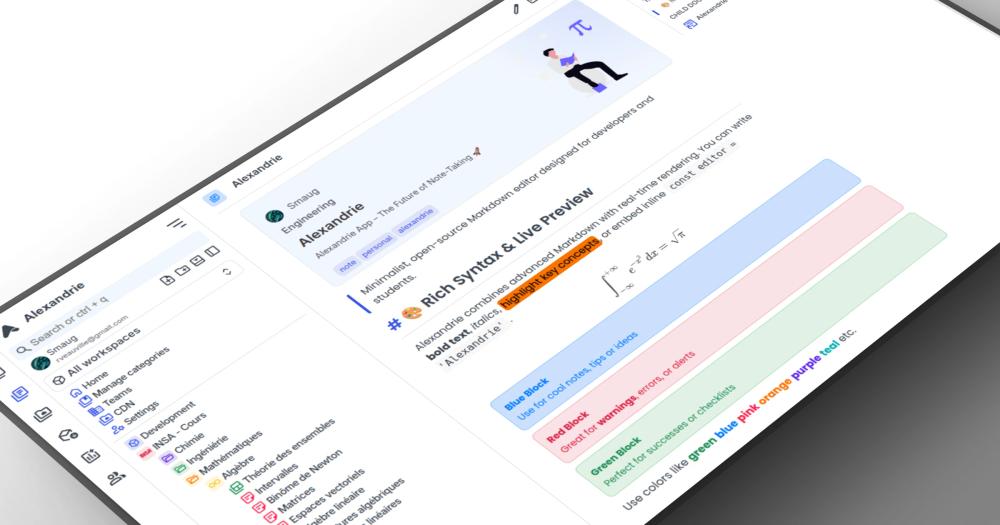
image of Alexandrie
TL;DR

Alexandrie is a self-hosted, offline-first knowledge base that replaces Notion, Confluence, and Obsidian for teams who want full data ownership. It combines a CodeMirror 6 Markdown editor with LaTeX and diagram support, multi-tenant workspaces, 5-level access control, OIDC/SSO, and automated S3 backups in a single Docker Compose stack. MIT licensed and actively maintained, it deploys in one command on any server. Best for engineering teams who need Confluence-level permissions with Notion-style editing and no per-seat costs.

Read the full breakdownHide the full breakdownWho it is for, how it works, trade-offs, the quick start and the FAQ
who it's for

Who Alexandrie is for#

Engineering teams replacing Confluence

Alexandrie supports a comparable document hierarchy (teams, workspaces, pages, nested documents) with a 5-level access model similar to Confluence's space and page restrictions. The OIDC/SSO integration connects to whatever identity provider the organization already uses. The built-in Kanban boards cover sprint documentation alongside written specs.

Skip if:

Your team relies on Confluence's Jira integration, roadmap views, or marketplace plugins that have no equivalent in Alexandrie.

Developers and researchers needing offline notes with server sync

The offline-first PWA keeps notes accessible without a connection, and server sync handles reconciliation when you reconnect. The extended Markdown engine handles LaTeX for academic writing, code snippets, and technical diagrams without third-party plugins.

Skip if:

You only need a local notes app with no team collaboration; plain file-based editors like Obsidian are lighter and have a larger plugin ecosystem for solo use.

Teams moving off Notion as headcount grows

For teams hitting Notion's per-seat costs as the organization grows, Alexandrie offers a similar nested document structure with block-style editing and full-text search. The Docker deployment runs on any entry-level VPS and serves any number of users with no additional licensing cost.

Skip if:

Your team depends heavily on Notion's third-party integrations, relational database views, or API connections to external services, none of which have direct equivalents in Alexandrie.

Organizations needing SSO-gated internal wikis

OIDC support means Alexandrie can sit behind a corporate identity provider and grant access through existing user accounts. The 5-level permission model controls document access by team or workspace, making it appropriate for multi-department internal documentation with strict access boundaries.

Skip if:

You need AD/LDAP (non-OIDC) authentication; Alexandrie documents OIDC support but not direct LDAP or Active Directory integration.

the problem

The problem it solves#

Knowledge management tools trap teams in an expensive cycle: Notion bills per seat as headcount grows, Confluence charges for cloud hosting and advanced features, and Obsidian's sync and publishing capabilities require paid plans. The more your team relies on these tools, the harder it becomes to leave. Migrating notes, pages, and documents to another format is a project, not a button click.

For teams that need OIDC-based SSO, granular workspace permissions, and a Markdown editor that handles LaTeX and technical diagrams, the only options in the paid market are enterprise plans priced for larger organizations. Small engineering teams and self-hosting organizations end up either overpaying for features they barely use or piecing together multiple tools to get the same result.

how Alexandrie solves it

How it solves it#

Extended Markdown Editor with Diagrams

Built on CodeMirror 6, the editor supports LaTeX math, custom containers, interactive checkboxes, inline diagram building, and a speech-to-text dictation mode. A snippet manager lets teams save and reuse frequently used templates or code fragments. Unlike basic Markdown editors, it handles academic and technical writing natively without plugins.

Offline-First PWA

Alexandrie installs on desktop and mobile as a Progressive Web App, keeping notes and documents accessible when offline. Changes sync back to the server when your connection returns. No separate mobile app is required; the same codebase works on every device through the browser.

Multi-Tenant Workspaces with 5-Level Access

Teams, Workspaces, Categories, and nested Documents form the organizational hierarchy in Alexandrie's multi-tenant architecture. Each user can be assigned None, Read, Write, Admin, or Owner permissions at any level. Temporary invitation codes and custom scope configuration are built in for team onboarding.

OIDC/SSO Integration

Alexandrie supports OpenID Connect (OIDC) authentication, integrating with existing identity providers such as Google Workspace, Keycloak, Okta, and others. SSO removes the need to manage a separate user store for teams that already have a central identity infrastructure. The self-hosted setup retains full control over auth configuration.

S3-Compatible Storage and Automated Backups

Media uploads and attachments connect to any S3-compatible object store: AWS S3, MinIO, Garage, RustFS, or any other compatible endpoint. Automated full-system backup and restore pipelines are built into the platform. A ZIP import/export tool covers selective node backups or full platform state migration.

strengths · trade-offs

Strengths and trade-offs#

Strengths

  • MIT License, No Per-Seat CostsAlexandrie's MIT license means there are no usage fees, block limits, or seat-based billing on the self-hosted version. Unlike Notion (which charges per member) or Confluence Cloud (which has seat tiers), running Alexandrie on your own server is a flat infrastructure cost regardless of how many people use it.
  • One-Command Docker DeployThe entire stack deploys with `docker compose up -d` after downloading two config files and filling a single `.env` file. There is no separate database setup step; the Docker Compose configuration handles the full stack. This makes initial deployment significantly faster than tools that require manual server configuration.
  • Actively Maintained with Recent CommitsWith 3,518 GitHub stars, 275 forks, and a last push on 2026-10-30, the project is actively developed. 32 open issues reflects a healthy project with active triage rather than an abandoned one. The Go backend and Vue frontend are both current-generation choices with good long-term support trajectories.
  • Kanban Boards Built into Every WorkspaceEvery workspace includes integrated Kanban boards, so teams can manage project tasks in the same context as their documentation. This removes the need for a separate task-tracking tool when the use case is developer docs or project wikis with light project tracking needs.

Trade-offs

  • -Requires Docker and Server ManagementAlexandrie is a server-side application with no cloud-hosted option. Getting started requires a machine with Docker installed and a basic understanding of environment configuration through a `.env` file. Teams without a VPS or self-hosting experience face an initial setup step before they can use it.
  • -Sparse Official DocumentationThe project's main documentation lives in the GitHub README. There is no embedded docs portal with detailed configuration references for OIDC setup, S3 tuning, or backup/restore paths. Teams that need extended configuration help may rely on the Discord community and community contributions.
  • -Vue and Nuxt Frontend Limits CustomizationThe frontend is built in Vue and Nuxt, and the backend in Go. Self-hosting through Docker Compose is straightforward, but any fork or UI customization requires Vue.js and Nuxt knowledge. Organizations with no JavaScript-familiar engineers will find contributing or extending the codebase harder than with more common stacks.
versus alternatives

Alexandrie vs alternatives#

Alexandrie vs Notion

Notion and Alexandrie share nested document workspaces with rich Markdown editing, but differ on deployment model and cost structure. Notion is a proprietary cloud service billed per seat; Alexandrie runs on your own server under the MIT license.

FeatureAlexandrieNotion
LicenseMITProprietary
Self-hostingYes, DockerNo
PricingFree (self-hosted)Per-seat subscription
Offline supportOffline-first PWALimited
OIDC/SSOYesHigher-tier plans only

Alexandrie suits teams where data ownership and per-seat cost control are the deciding factor. Notion's pricing scales with headcount; Alexandrie on a self-hosted VPS is a flat server cost regardless of team size. Notion remains the better choice if your workflow depends on its relational databases, public page publishing, or integrations with external services.

Alexandrie vs Confluence

Confluence's cloud edition is seat-priced; its data center edition requires a paid self-hosted license. Alexandrie covers the team wiki use case with a comparable document hierarchy and no license cost.

FeatureAlexandrieConfluence
LicenseMITProprietary
Self-hostingYes, freePaid license required
Jira integrationNoNative
OIDC/SSOYesHigher-tier plans only
Kanban boardsYes, built-inVia Jira

Alexandrie fits teams whose primary use is internal docs and developer wikis with no Jira dependency. If Confluence's native Jira connection is a daily workflow tool, Atlassian's product remains the stronger fit.

Alexandrie vs Obsidian

Obsidian is a local-first notes tool for individuals; multi-user sync requires either Obsidian Sync (a paid add-on) or a third-party plugin.

FeatureAlexandrieObsidian
LicenseMITProprietary (free personal use)
Self-hostingServer-basedLocal vault
Team syncBuilt-in, server-basedPaid add-on or plugin
OIDC/SSOYesNo

Alexandrie is the better fit for teams who need server-based sync and multi-user access control. Obsidian remains the stronger choice for individual note-takers who want a large plugin ecosystem and local file ownership without running a server.

install · quick start

Quick start#

bash
Self-host Alexandrie by deploying via Docker Compose with a configured .env file.

```bash
curl -O https://raw.githubusercontent.com/Smaug6739/Alexandrie/main/.env.example
curl -O https://raw.githubusercontent.com/Smaug6739/Alexandrie/main/docker-compose.yml
cp .env.example .env
docker compose up -d
```
tech stack · detected from GitHub

What it's built on#

Languages
GoTypeScript
Frameworks
NuxtVue
Infrastructure
Docker
frequently asked

FAQ#

Is Alexandrie free to use?

Yes. Alexandrie is MIT licensed, which means the self-hosted version is free to use for any purpose including commercial teams. There is no cloud-hosted offering; all usage runs on infrastructure you control. The only cost is your server.

Can I use Alexandrie as a Notion alternative for my team?

Yes. Alexandrie supports a similar nested document structure with team workspaces, block-style Markdown editing, and full-text search. Unlike Notion, it runs on your own server with no per-seat fees and no block limits. The main trade-off is that you manage the deployment.

How do I back up my Alexandrie data?

Alexandrie includes built-in backup and restore pipelines for the full platform state. You can also export selective nodes or entire workspace states as ZIP files from the interface. For media and attachments, S3-compatible storage handles retention through your object store's own policies.

Does Alexandrie support Single Sign-On (SSO)?

Yes. Alexandrie supports OpenID Connect (OIDC), which works with identity providers including Google Workspace, Keycloak, Okta, and any other OIDC-compliant provider. This makes it suitable for organizations that already centralize authentication through an identity platform.

What hardware do I need to self-host Alexandrie?

The Docker Compose stack runs on any Linux server with Docker installed. An entry-level VPS is enough for small teams. Larger teams with heavy media uploads should size the S3-compatible storage separately, as file storage is decoupled from the application server.

Looking for more

Other ways to replace Notion, Confluence and Obsidian#

AppFlowy

#1 in the Notion guide

Full Notion replacement for small teams

77,959 GitHub stars

AFFiNE

#2 in the Notion guide

Docs, whiteboards, and databases in one workspace

73,957 GitHub stars

Outline

#3 in the Notion guide

Polished team wiki and internal knowledge base

41,108 GitHub stars

Macro Docs

#4 in the Notion guide

Markdown-native docs that agents and teammates edit together

5,635 GitHub stars
All 23 Notion alternatives9 open source Notion alternatives, ranked
by category

Open source tools in these categories#

228

Business & Productivity

OpenClaw, Excalidraw, RustDesk
136

Communication & Collaboration

freeCodeCamp, iptv, Excalidraw
110

Product & Project Management

agency-agents, freeCodeCamp, Gstack
Hostinger

Self-host Alexandrie on a Hostinger VPS

Keep it running 24/7, even when your laptop is off. A Hostinger VPS gives it a server of its own.

  1. 01

    Choose a plan

    Starts from $6.49/mo

  2. 02

    Apply

    Extra 10% off yearly plans

  3. 03

    Install Alexandrie

    On a server that stays on

  4. 04

    Start building

    Focus on the app, not the server

Deploy on Hostinger

Sponsors

Inbox Zero

Alternative toSuperhuman

AI email assistant that drafts replies and clears your inbox

  • 12,855 GitHub stars
  • AGPL-3.0Licence AGPL-3.0
  • #Email

Omnara

Alternative toCClaude Managed Agents

Open-source agent deployment API. Self-host or use Omnara Cloud.

  • 3,325 GitHub stars
  • Apache-2.0Licence Apache-2.0
  • #AI Agents

rakazo

Alternative toGrok Bot

AI teammates you own: your keys, your model, your machine.

  • 6,242 GitHub stars
  • Apache-2.0Licence Apache-2.0
  • #AI Agents
Advertise your product

New open source projects by email

The projects we add and every new guide. Free, unsubscribe any time.

Find open source alternatives to paid software

/
  • Claude Code to OpenCode
  • Jira to Windshift
  • Notion to AppFlowy
  • Slack to Mattermost
  • Linear to GitLab
  • Wispr Flow to Handy
  • Arc to Zen Browser
  • CapCut to Concat
  • Grok Bot to rakazo
  • Superhuman to Inbox Zero
  • Airtable to AITable
  • Muse to OpenClaw
  • Railway to Coolify
  • GitHub Copilot to Cline
  • Datadog to Netdata
  • Microsoft Teams to Rocket.Chat
  • Confluence to Docmost
  • Pinecone to Qdrant
  • Zapier to n8n
  • Devin AI to OpenHands
  • Firebase to Supabase
  • 1Password to KeePassXC
  • Contentful to Strapi
  • Adobe Premiere Pro to Shotcut
  • Claude Code to OpenCode
  • Jira to Windshift
  • Notion to AppFlowy
  • Slack to Mattermost
  • Linear to GitLab
  • Wispr Flow to Handy
  • Arc to Zen Browser
  • CapCut to Concat
  • Grok Bot to rakazo
  • Superhuman to Inbox Zero
  • Airtable to AITable
  • Muse to OpenClaw
  • Railway to Coolify
  • GitHub Copilot to Cline
  • Datadog to Netdata
  • Microsoft Teams to Rocket.Chat
  • Confluence to Docmost
  • Pinecone to Qdrant
  • Zapier to n8n
  • Devin AI to OpenHands
  • Firebase to Supabase
  • 1Password to KeePassXC
  • Contentful to Strapi
  • Adobe Premiere Pro to Shotcut