Open Source Alternatives
  • Alternatives
  • Categories
    Categories by size1,285 projects
    • Developer Tools660
    • AI & Machine Learning544
    • Business & Productivity309
    • Web Development219
    • Security & Monitoring198
    • Communication & Collaboration168
    • IT Management164
    • Design & Creative142
    • LLMOps & AI Tooling140
    • DevOps & CI/CD137
    Browse all 21 categoriesCloud & Hosting, Product & Project Management and 9 more
  • Blog
  • Advertise
SearchNotion, Slack, password manager.../
Submit
Open Source Alternatives
  • Alternatives
    • Developer Tools660
    • AI & Machine Learning544
    • Business & Productivity309
    • Web Development219
    • Security & Monitoring198
    • Communication & Collaboration168
    • Browse all 21 categories
  • Blog
  • Advertise
Submit your project

New open source projects by email

The projects we add and every new guide. Free, unsubscribe any time.

Open Source Alternatives LogoOpen Source Alternatives

Handpicked Open Source Alternatives to Paid Softwares

Add Open Source Alternatives as a preferred source on Google

Product

  • Categories
  • Tag
  • Advertise

Resources

  • Blog
  • Collection
  • Submit

Company

  • Privacy Policy
  • Terms of Service
  • Refund Policy
  • Sitemap

Alternatives

  • Claude Code
  • Jira
  • Notion
  • Slack
  • Linear
  • Wispr Flow
  • All alternatives
© 2026 Open Source Alternatives. All rights reserved.
Open SourceAlternatives
Home/Categories/AI & Machine Learning/AnyModelBot
icon of AnyModelBot

AnyModelBot

Open source alternative to Grok Bot, OpenAI Dots, Claude Duet, Msty and Chatbox AI

  • 4.3K stars
  • MIT
  • Active this week
  • Last commit today

Last verified Nov 17, 2026

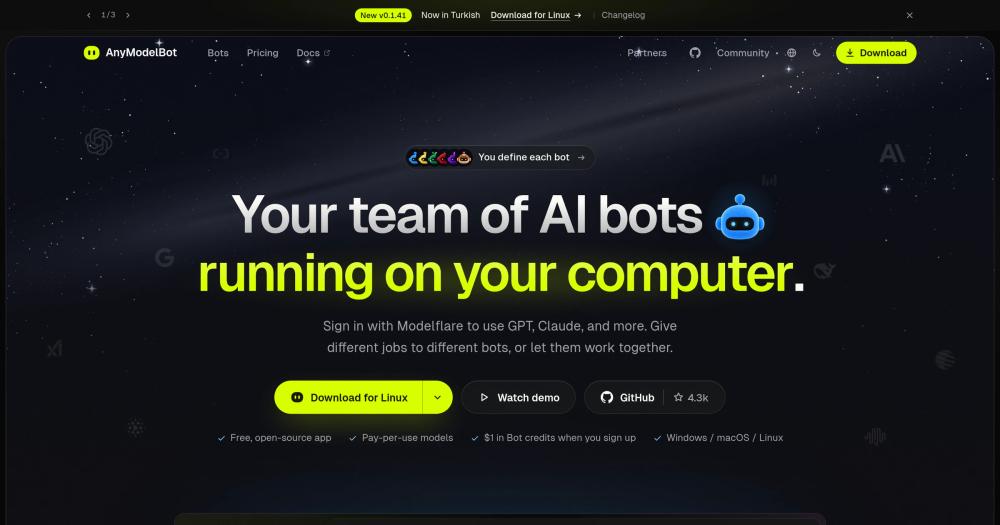
Run a local team of AI bots, each with its own model, memory, and workspace, with no subscriptions and MIT license.

Visit websiteGitHub4.3K starsDeploy on Hostinger
image of AnyModelBot
TL;DR

AnyModelBot is an MIT-licensed, local-first desktop app that runs a team of AI bots on Windows, macOS, or Linux. Each bot carries its own persona, model selection, dedicated workspace, and persistent memory stored as plain Markdown files on your device. Reach them in the app, through WeChat or Feishu, or via Docker on a home server. There are no subscriptions: pay per token through a Modelflare account or bring your own API keys from OpenAI, Anthropic, Google and others. It is an open source alternative to Grok Bot, OpenAI dots and Claude Duet, three subscription cloud agents that each run on their provider's own servers.

Read the full breakdownHide the full breakdownWho it is for, how it works, trade-offs, the quick start and the FAQ
who it's for

Who AnyModelBot is for#

Developers who want an always-on code-review and task-running bot

A bot configured as a coding assistant can review pull requests, run your test suite through the shell sandbox, file bugs, and report back via Slack or Discord. The background task system handles long-running jobs without blocking the UI. Memory lets the bot track your preferences, style rules, and recurring project context across sessions.

Skip if:

You want the bot to execute commands inside a CI pipeline or on remote servers it cannot see. AnyModelBot's computer-use and sandbox operate on the machine running the app, not on arbitrary remote hosts.

Freelancers managing repetitive admin workflows

Set up a dedicated bot for invoicing, expense filing, or client follow-up. The bot can read files from a designated workspace folder, generate summaries or spreadsheets, and send results to WeChat or Feishu. Rules let it run a daily digest at a set time and only alert you when action is needed.

Skip if:

Your admin tools are web-based and require browser login flows the bot cannot see. Computer-use can automate a visible desktop application, not an OAuth-gated web portal.

Teams or solo users who need multi-channel AI without cloud lock-in

One AnyModelBot installation covers desktop, WeChat, Feishu, Telegram, Slack, and Discord. The same bot answers across all channels using one shared memory, letting you switch between your laptop and phone without losing context. Docker deployment on a home server keeps the bot online around the clock.

Skip if:

You need a managed, always-on cloud service. AnyModelBot runs on hardware you own; if your computer is off, the bots are offline unless you deploy to a server or NAS via Docker.

the problem

The problem it solves#

Most AI chat tools give you one conversation window and one provider's subscription. When you need a code-review assistant and a separate filing bot, you are running two apps, two subscriptions, and two disconnected memory stores. Provider outages or pricing changes disrupt every workflow at once because everything runs on their cloud.

The challenge worsens with sensitive workloads. Routing confidential client files or internal code through a third-party cloud means trusting that provider's data retention policies. Teams with compliance requirements often cannot use cloud AI tools at all, while the self-hosted options available until now have required significant infrastructure setup and ongoing maintenance.

how AnyModelBot solves it

How it solves it#

Multi-bot team with distinct personas and memories

Each bot has its own persona, default model, private workspace folder, and long-term memory. Memory saves as plain Markdown files in the app's data directory; you can open and edit them in any text editor. All bots share an 'about me' section for personal preferences; group and bot-specific memories remain separate and do not mix.

68 models through one Modelflare key or your own API keys

Connect via Modelflare to access GPT, Claude, Gemini, Grok, DeepSeek, Kimi, GLM, and 60+ other models from one account. Alternatively, supply your own OpenAI, Anthropic, Google, xAI, DeepSeek, or Mistral API keys and requests route directly to the provider, bypassing Modelflare entirely. The model selector shows context length, capabilities, and reference pricing per model.

Background tasks with scheduling and approval flow

Assign a bot a background task (a research run, a file sort, a timed check) and it runs while you do other things. When it needs a decision, it shows an approval card in the sidebar. Each task and rule has a configurable token budget; the bot pauses and asks before spending more. Task files older than 30 days are deleted automatically, with the date shown in the task detail view.

Computer-use and file operations with workspace isolation

Bots can read and write files, run commands in a sandbox, and, on macOS (Beta) and Windows, control the desktop through the built-in Cua Driver. File writes outside the bot's workspace require your approval. 24 preset actions cover the common cases; executing scripts and killing processes are reserved and not delegatable to the model.

Multi-channel chat: WeChat, Feishu, Telegram, Slack, Discord

Connect a messaging account once in Settings and all bots share it. The same bot you chat with on the desktop answers messages in WeChat or Feishu on your phone, using the same memory and workspace. Telegram, Slack, and Discord support streaming replies and can send image and file attachments. WeChat allows up to 10 replies per 24-hour window per incoming message.

strengths · trade-offs

Strengths and trade-offs#

Strengths

  • MIT license with fully local data storageThe entire application is MIT licensed. Conversations, memory files, workspace files, and API keys stay on your device as standard SQLite databases and Markdown files. No conversation data goes to AnyModelBot's servers; model requests go only to the provider you choose (Modelflare or direct API). You can inspect, edit, or delete every stored item without using the app.
  • Zero app cost; pay only for tokens you useAnyModelBot itself costs nothing. You pay only for model usage, either through Modelflare at per-token rates or through your own API keys billed directly by the provider. Grok Bot, OpenAI dots and Claude Duet are each sold through a subscription plan from their vendor.
  • Background agents with scheduling and per-task token budgetsUnlike typical chat interfaces, bots run rules on a schedule: for example, 'check the price of X every morning and message me if it drops below Y'. Each rule has a per-run and monthly token budget. The bot surfaces results only when there is something worth reporting, keeping interruptions low. Grok Bot, OpenAI dots and Claude Duet are built around the same idea, but they run on the vendor's cloud computers, not on yours.

Trade-offs

  • -No offline or local model supportAnyModelBot requires an internet connection for all model requests. It does not support Ollama, LM Studio, or any locally running model. If you need fully air-gapped AI or want to run a model on your own GPU without any outgoing requests, Msty with Ollama integration is a better fit.
  • -macOS computer-use is BetaDesktop automation on macOS is marked Beta in the README and requires Accessibility and Screen Recording permissions. The feature is listed as an in-progress roadmap item for broader validation on physical hardware. Windows computer-use is available without the Beta caveat; macOS users should expect rough edges.
versus alternatives

AnyModelBot vs alternatives#

AnyModelBot vs Grok Bot, OpenAI dots and Claude Duet

AnyModelBot, Grok Bot, OpenAI dots and Claude Duet all run background AI agents that work without you and check in when they need a decision. The difference is where they run and how much control you have over the model.

AnyModelBotGrok BotOpenAI dotsClaude Duet
Licence / open sourceMIT open sourceNot open sourceNot open sourceNot open source
Where it runsYour computer or serverxAI's cloud computersOpenAI's cloud computersAnthropic's cloud
ModelsGPT, Claude, Gemini, Grok and others via Modelflare or own keysPrimarily xAI's Grok modelsOpenAI modelsClaude Opus 5.5 (not selectable)
CostApp free; models billed per token$30, $100 or $200/month subscriptionIncluded in ChatGPT Pro or Business PremiumIncluded in Claude Pro, Max or Ultra
Where you reach itDesktop (Windows, macOS, Linux), Docker, WeChat, Feishu, Telegram, Slack, DiscordmacOS desktop app, iOSChatGPT (desktop, web, mobile), Slack, TeamsiOS, Android, claude.ai
AvailabilityAvailable nowOut of betaRolling out in eligible marketsResearch preview, US, waitlist

The three vendors' cost, reach and availability cells come from their own pages, read on November 17, 2026. The Grok Bot model cell is as of October 2026, per the project, and may have changed.

AnyModelBot suits people who want agents on their own hardware, need flexibility across model providers, or value the MIT license. Grok Bot, OpenAI dots and Claude Duet are managed services built around one provider's ecosystem: dots connect to 4,000+ apps through ChatGPT's integration network, Grok Bot works in Slack and Teams and joins Meet, Zoom and Teams calls, and Claude Duet is included in Anthropic's Pro, Max and Ultra plans. AnyModelBot has no standalone iOS or Android app and does not support local models; on a phone you reach it through a chat channel such as WeChat or Feishu.

AnyModelBot vs Chatbox AI and Msty

Chatbox AI is open source under GPL-3.0 and runs on Windows, Mac, Linux, the web, iOS and Android as a multi-provider chat client with local data storage and optional hosted plans (Lite, Pro and Pro+). AnyModelBot is built around a different model: persistent bots with their own personas, Markdown memory files and scheduled background tasks on a local-first desktop and Docker foundation, reachable through WeChat and Feishu as well as the desktop app.

Msty is a desktop workspace built around local model inference through Ollama, Llama.cpp and MLX, with Agent Mode, user memories, split chats and knowledge stacks alongside cloud models. AnyModelBot routes every model request through Modelflare or official provider API keys and does not support local models. Its edge is reach through chat channels: WeChat, Feishu, Telegram, Slack and Discord.

install · quick start

Quick start#

bash
The app installs via a signed desktop package on Windows, macOS, and Linux, or deploys via Docker for server and NAS use.

```bash
docker run -d --name amb -p 3600:3600 -v amb-data:/data ghcr.io/modelflare-ai/anymodel-bot
```
tech stack · detected from GitHub

What it's built on#

Languages
JavaScriptPythonTypeScript
Frameworks
ElectronFlask
frequently asked

FAQ#

Is AnyModelBot free to use?

The application itself is free to download and MIT licensed. You pay only for model usage. Through Modelflare, new users receive $1 in credits at signup, with additional credits tied to Modelflare subscription plans. If you supply your own API keys from OpenAI, Anthropic, or another provider, you are billed directly by that provider and AnyModelBot takes no cut.

Does AnyModelBot support local models like Ollama or LM Studio?

No. AnyModelBot does not support locally running models. All model requests go to Modelflare or to an official provider API (OpenAI, Anthropic, Google, xAI, DeepSeek, and others). If running a model on your own GPU with no outgoing requests is a requirement, Msty or a tool with Ollama integration is a better fit.

What data does AnyModelBot store, and where does it go?

Conversations are stored in a local SQLite database on your device. Long-term memory saves as Markdown files in your data directory. API keys and login tokens stay in the app's config on your machine. Only model requests leave your device: they go to the provider you choose (via Modelflare or a direct API key). The memory system automatically skips passwords, API keys, and ID numbers. Per the README, telemetry in the bundled computer-use driver and auto-update in the internal gateway are both disabled.

What messaging platforms does AnyModelBot support?

AnyModelBot connects to WeChat, Feishu, Telegram, Slack, and Discord. Connect a messaging account once in Settings and all bots share it. WeChat and Feishu support image and file exchange; WeChat has a platform limit of 10 replies per 24-hour window per incoming message. Telegram, Slack, and Discord support streaming replies. There is no standalone iOS or Android app; phone access goes through the messaging platform integrations.

Looking for more

Other ways to replace Grok Bot, OpenAI Dots, Claude Duet, Msty and Chatbox AI#

OpenClaw

Featuredfor Grok Bot

Self-hosted AI assistant for WhatsApp, Telegram, and more

394,602 GitHub starsVisit

OpenMausBot

#2 in the Grok Bot guide

Local-first agent team on your existing CLI subscriptions

22,421 GitHub stars

OpenBot

#3 in the Grok Bot guide

Per-agent isolation with a policy-gated audit trail

12,398 GitHub stars

openhuman

#4 in the Grok Bot guide

Memory, reach, and workflow orchestration

42,690 GitHub stars
All 14 Grok Bot alternatives8 open source Grok Bot alternatives, ranked
by category

Open source tools in these categories#

544

AI & Machine Learning

freeCodeCamp, REA (Reverse Engineer Anything), OpenClaw
309

Business & Productivity

OpenClaw, Excalidraw, RustDesk
Hostinger

Self-host AnyModelBot on a Hostinger VPS

Keep it running 24/7, even when your laptop is off. A Hostinger VPS gives it a server of its own.

  1. 01

    Choose a plan

    Starts from $6.49/mo

  2. 02

    Apply

    Extra 10% off yearly plans

  3. 03

    Install AnyModelBot

    On a server that stays on

  4. 04

    Start building

    Focus on the app, not the server

Deploy on Hostinger

Sponsors

Inbox Zero

Alternative toSuperhuman

AI email assistant that drafts replies and clears your inbox

  • 13,025 GitHub stars
  • AGPL-3.0Licence AGPL-3.0
  • #Email

rakazo

Alternative toGrok Bot

AI teammates you own: your keys, your model, your machine.

  • 8,291 GitHub stars
  • Apache-2.0Licence Apache-2.0
  • #AI Agents

SnitchFeed

Live monitoring on LinkedIn, X, Reddit & more. Agentic social listening for startups.

Marketing & Growth

Advertise your product

New open source projects by email

The projects we add and every new guide. Free, unsubscribe any time.

Find open source alternatives to paid software

/
  • Claude Code to OpenCode
  • Jira to Windshift
  • Notion to AppFlowy
  • Slack to Mattermost
  • Linear to GitLab
  • Wispr Flow to Handy
  • Arc to Zen Browser
  • CapCut to Concat
  • Grok Bot to rakazo
  • Superhuman to Inbox Zero
  • Discord to Stoat
  • Airtable to AITable
  • Datadog to SigNoz
  • Muse to OpenClaw
  • Railway to Coolify
  • GitHub Copilot to Cline
  • Confluence to Wiki.js
  • Microsoft Teams to Rocket.Chat
  • 1Password to KeePassXC
  • Firebase to Supabase
  • Pinecone to Qdrant
  • Zapier to n8n
  • Devin AI to OpenHands
  • Asana to Leantime
  • Claude Code to OpenCode
  • Jira to Windshift
  • Notion to AppFlowy
  • Slack to Mattermost
  • Linear to GitLab
  • Wispr Flow to Handy
  • Arc to Zen Browser
  • CapCut to Concat
  • Grok Bot to rakazo
  • Superhuman to Inbox Zero
  • Discord to Stoat
  • Airtable to AITable
  • Datadog to SigNoz
  • Muse to OpenClaw
  • Railway to Coolify
  • GitHub Copilot to Cline
  • Confluence to Wiki.js
  • Microsoft Teams to Rocket.Chat
  • 1Password to KeePassXC
  • Firebase to Supabase
  • Pinecone to Qdrant
  • Zapier to n8n
  • Devin AI to OpenHands
  • Asana to Leantime