Open Source Alternatives
  • Alternatives
  • Categories
    Categories by size1,173 projects
    • Developer Tools603
    • AI & Machine Learning510
    • Business & Productivity281
    • Web Development213
    • Security & Monitoring175
    • Communication & Collaboration158
    • IT Management149
    • LLMOps & AI Tooling130
    • Cloud & Hosting129
    • Product & Project Management125
    Browse all 21 categoriesDesign & Creative, DevOps & CI/CD and 9 more
  • Blog
  • Advertise
SearchNotion, Slack, password manager.../
Submit
Open Source Alternatives
  • Alternatives
    • Developer Tools603
    • AI & Machine Learning510
    • Business & Productivity281
    • Web Development213
    • Security & Monitoring175
    • Communication & Collaboration158
    • Browse all 21 categories
  • Blog
  • Advertise
Submit your project

New open source projects by email

The projects we add and every new guide. Free, unsubscribe any time.

Open Source Alternatives LogoOpen Source Alternatives

Handpicked Open Source Alternatives to Paid Softwares

Add Open Source Alternatives as a preferred source on Google

Product

  • Categories
  • Tag
  • Advertise

Resources

  • Blog
  • Collection
  • Submit

Company

  • Privacy Policy
  • Terms of Service
  • Refund Policy
  • Sitemap

Alternatives

  • Claude Code
  • Jira
  • Notion
  • Slack
  • Linear
  • Wispr Flow
  • All alternatives
© 2026 Open Source Alternatives. All rights reserved.
Open SourceAlternatives
Home/Categories/Design & Creative/Brag
icon of Brag

Brag

  • 20.7K stars
  • MIT
  • Active this month
  • Last commit 15 days ago

Last verified Nov 8, 2026

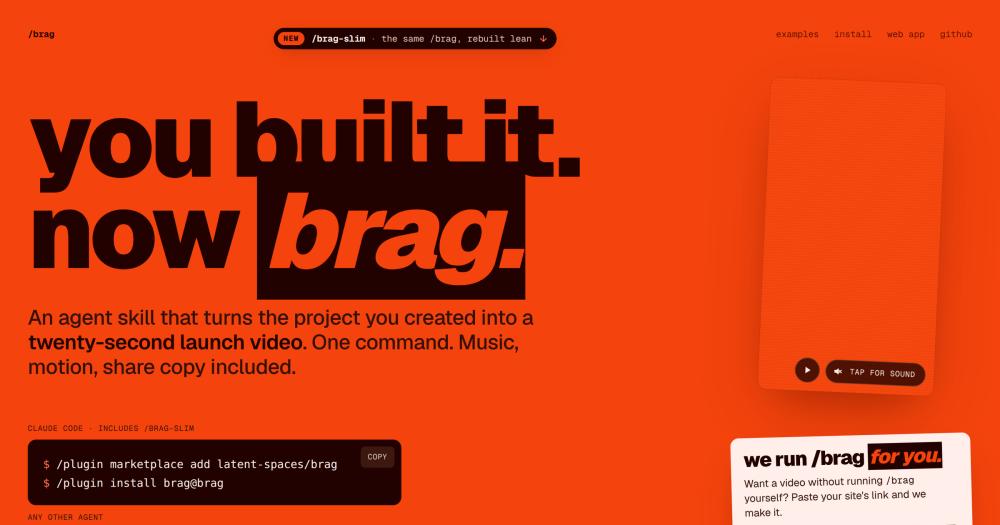
Generate a twenty-second launch video with music, motion, and share copy from any project in one command.

Visit websiteGitHub20.7K stars
image of Brag
TL;DR

Brag is an MIT-licensed agent skill that turns any software project into a twenty-second launch video with music, motion, and share copy. It runs inside Claude Code, Codex, opencode, and any agent that supports custom instructions, replacing the manual process of screen-recording, scripting, and editing a demo. With 20,681 stars on GitHub and two variants (the full Hyperframes-backed workflow and the lean `/brag-slim` for Opus 5.5), it fits indie makers and developer teams who want a postable video without a video editing workflow.

Read the full breakdownHide the full breakdownWho it is for, how it works, trade-offs, the quick start and the FAQ
who it's for

Who Brag is for#

Indie developers shipping a side project

Run `/brag` after a weekend build to get a postable video before momentum fades. The skill reads the project, writes the pitch, and renders the clip without any context-switching to a video tool.

Skip if:

If the project is not yet functional or the codebase gives no clear signal of what the product does, the agent will have little to work with. Finish the project, or add a README with enough context, first.

Open source maintainers announcing a new release

Replace the wall of text in a release note with a twenty-second video that shows what changed. The share copy comes included, ready to post to social or attach to a GitHub Release.

Skip if:

If the release is a patch or internal refactor with no user-visible change, the video will not have enough of a story. Reserve it for new features or major version milestones.

Teams demoing a new internal tool

Skip the prepared screen recording and run `/brag` on the tool's directory to get a shareable clip with context and music. The output is polished enough to share in a Slack channel or attach to a sprint review.

Skip if:

If the tool requires live data or user sessions to demonstrate its value, a prerecorded video may not capture the interactive experience well. Consider whether a live recording session is more appropriate.

the problem

The problem it solves#

Most developers have no good path from finishing a project to showing what it does. Screen recording captures the what but rarely the why; editing a compelling clip requires skills most engineers do not have or time they cannot spare. Paid AI video tools solve the editing problem, but they still require manual scripting, asset uploads, and scene composition before the renderer ever runs.

The result is that most side projects, internal tools, and open source releases ship without a usable video. The gap between finishing a project and explaining it to someone who was not in the room is a workflow problem, and writing copy or hiring a video editor is not a workflow.

how Brag solves it

How it solves it#

One-command video generation

Run `/brag` from any project directory and the agent reads the codebase, writes the product angle, composes a brief, and renders a twenty-second `brag.mp4`. No timeline editor or asset upload required. The output folder also includes share copy ready to paste into a post.

Two render modes: Hyperframes and /brag-slim

The classic `/brag` path hands a focused brief to Hyperframes for music, motion, and render. `/brag-slim` rebuilds the same workflow for Opus 5.5 with no Hyperframes dependency and no bundled assets. On Opus 5.5, the skill switches automatically; run `/brag --full` to keep the classic path.

Multi-agent support via the skills CLI

Installs across Claude Code, Codex CLI, opencode, Cursor, Copilot, and Gemini CLI through one `npx skills add` command. The repo exposes the skill at every agent's standard discovery path via symlinks, so no extra config is needed after install.

Tone steering and optional voiceover

Pass `--tone` to shape the video's personality: a fake Series A pitch, a Y Combinator demo, or any creative direction the model can interpret. Voiceover is off by default; enable it with `--voice`. When active, narration uses Kokoro through Hyperframes.

No-setup path at letsbrag.app

Paste a site's URL at letsbrag.app and get a twenty-second launch video with music, motion, and share copy. No account, no subscription, no CLI setup required. The hosted version runs the same skill and returns the finished video.

strengths · trade-offs

Strengths and trade-offs#

Strengths

  • MIT license with no per-render cost on the self-run pathThe skill is MIT licensed and free to install and run. The `/brag-slim` variant has no external render dependency and runs entirely with the tools already on the user's machine, with no subscription required for the classic path either.
  • 20,681 GitHub stars in under five monthsCreated in June 2026 and sitting at 20,681 GitHub stars with 1,601 forks, Brag attracted a large developer community in a short window. With only 5 open issues, the project is actively maintained and regularly updated.
  • Portable across the AI coding tool ecosystemThe skill manifest is compatible with Claude Code, Codex CLI, opencode, Cursor, Copilot, and Gemini CLI. The repo ships symlinks at every agent's discovery path so the skill works without manual wiring for any of those tools.

Trade-offs

  • -Classic path requires FFmpeg and HyperframesThe full `/brag` workflow depends on FFmpeg on `PATH`, Node.js 22+, and the Hyperframes CLI. On a fresh machine, these are non-trivial prereqs before the first video renders. The `/brag-slim` variant removes the Hyperframes requirement but still needs the agent runtime.
  • -Output is a fixed twenty-second formatBrag produces one format: a short twenty-second launch video. It is not a general video editor and does not support longer formats, custom aspect ratios, or multi-scene productions without modifying the skill files directly.
versus alternatives

Brag vs alternatives#

Brag vs HeyGen

Both tools create short AI-powered videos, but they serve different workflows. HeyGen is a managed video creation platform that requires an account, manual asset uploads, script writing, and scene composition before anything renders. Brag is an agent skill that reads the project and handles that work automatically, in one command.

FeatureBragHeyGen
LicenseMITProprietary
Self-hostingSkill runs locallyManaged cloud only
SetupOne npx commandAccount and manual project setup
Output20-second launch video + share copyCustom-length video
AutomationFully automated (agent reads project)Manual script and scene work

Brag is the better choice for developers who want to go from project directory to postable video without a video editing workflow. HeyGen suits teams that need longer custom videos, branded avatars, or narrated product walkthroughs with full editorial control over the script and visuals.

Brag vs Loom

Loom is a popular tool for developers sharing quick screen recordings and async demos. The comparison with Brag is about output format: Loom captures exactly what you do on screen; Brag generates a produced clip with music, motion, and share copy without a recording session.

FeatureBragLoom
LicenseMITProprietary (freemium)
InputProject codebase and READMELive screen recording
OutputRendered 20-second video with musicScreen capture video
Editing requiredNoneBasic trim tools
Agent integrationNative (Claude Code, Codex, etc.)None

Loom is the better choice for async team communication, code review walkthroughs, or anything that requires showing a live application state. Brag is the right fit when the goal is a shareable launch clip, not a recording of a session.

install · quick start

Quick start#

bash
Clone the repository and add the skill to your AI coding agent.

git clone https://github.com/latent-spaces/brag
cp -r brag/skills/brag .claude/skills/brag
tech stack · detected from GitHub

What it's built on#

Languages
JavaScriptPython
frequently asked

FAQ#

Does /brag work with any programming language or project type?

Yes. The skill reads the project context from the directory and from any README or documentation present. It has been tested on web apps, mobile apps, and developer tools; the skill itself is language-agnostic. The quality of the output depends on how clearly the project communicates what it does, not on the programming language.

What is /brag-slim, and when should I use it?

/brag-slim is a leaner version of the skill built for Claude Opus 5.5. It produces the same twenty-second video without the Hyperframes dependency or bundled assets. On Opus 5.5, the skill switches to /brag-slim automatically; run /brag --full to keep the classic Hyperframes workflow. Use /brag-slim when you want fewer dependencies or when Opus 5.5 is your active model.

What does the full /brag workflow require to install?

The full /brag path needs Node.js 22 or later, FFmpeg on PATH, and the Hyperframes CLI (install with npx hyperframes; check with npx hyperframes doctor). The skill itself installs via npx skills add https://github.com/latent-spaces/brag --skill brag for any agent, or through the Claude Code plugin marketplace with /plugin marketplace add latent-spaces/brag then /plugin install brag@brag. /brag-slim has no Hyperframes dependency.

Is there a way to use /brag without installing anything?

Yes. Paste a site's URL at letsbrag.app to get a twenty-second launch video with music, motion, and share copy. No account, no subscription, and no CLI setup required. The hosted version runs the same skill and returns the finished video.

Can I control the tone or style of the generated video?

Yes. Pass --tone with a description of the creative direction: --tone "fake Series A launch from 2016" or any other framing the model can interpret. Voiceover is off by default; enable it with --voice. When enabled, narration uses Kokoro through Hyperframes.

also worth a look

Similar open-source tools#

Awwwards-mcp

Alternative toLazyweb

MCP server for Awwwards design inspiration, no API key required.

  • 507 GitHub stars
  • MITLicence MIT

Open3D

InDeveloper Tools

C++/Python library for point clouds, meshes, and 3D visualization.

  • 14,168 GitHub stars
  • MITLicence MIT

Unity Mcp

Alternative toUnity

MCP bridge for Unity: 50 tools, any AI client, MIT licensed.

  • 15,745 GitHub stars
  • MITLicence MIT

Hallmark

InDesign & Creative

Design skill for coding agents with 48 themes, real photos and lint.

  • 48,904 GitHub stars
  • MITLicence MIT

Claude Seo

InMarketing & Growth

SEO audit plugin for Claude Code, 26 skills and 19 agents

  • 26,793 GitHub stars
  • MITLicence MIT

superCMO-skills

Alternative toAdCreative.ai

Generate video ads and product photos from inside your AI agent

  • 291 GitHub stars
  • Apache-2.0Licence Apache-2.0
by category

Open source tools in these categories#

122

Design & Creative

ComfyUI, Excalidraw, Godot Engine
73

Marketing & Growth

agency-agents, MoneyPrinterTurbo, MiroFish
510

AI & Machine Learning

freeCodeCamp, REA (Reverse Engineer Anything), OpenClaw
603

Developer Tools

REA (Reverse Engineer Anything), Skills for Real Engineers, superpowers

Sponsors

Inbox Zero

Alternative toSuperhuman

AI email assistant that drafts replies and clears your inbox

  • 12,915 GitHub stars
  • AGPL-3.0Licence AGPL-3.0
  • #Email

rakazo

Alternative toGrok Bot

AI teammates you own: your keys, your model, your machine.

  • 7,028 GitHub stars
  • Apache-2.0Licence Apache-2.0
  • #AI Agents

SnitchFeed

Live monitoring on LinkedIn, X, Reddit & more. Agentic social listening for startups.

Marketing & Growth

Advertise your product

New open source projects by email

The projects we add and every new guide. Free, unsubscribe any time.

Find open source alternatives to paid software

/
  • Claude Code to OpenCode
  • Jira to Windshift
  • Notion to AppFlowy
  • Slack to Mattermost
  • Linear to GitLab
  • Wispr Flow to Handy
  • Arc to Zen Browser
  • CapCut to Concat
  • Grok Bot to rakazo
  • Superhuman to Inbox Zero
  • Airtable to AITable
  • Muse to OpenClaw
  • Railway to Coolify
  • GitHub Copilot to Cline
  • Datadog to Netdata
  • Confluence to Wiki.js
  • Microsoft Teams to Rocket.Chat
  • Firebase to Supabase
  • Pinecone to Qdrant
  • Zapier to n8n
  • 1Password to KeePassXC
  • Devin AI to OpenHands
  • Asana to Leantime
  • Contentful to Strapi
  • Claude Code to OpenCode
  • Jira to Windshift
  • Notion to AppFlowy
  • Slack to Mattermost
  • Linear to GitLab
  • Wispr Flow to Handy
  • Arc to Zen Browser
  • CapCut to Concat
  • Grok Bot to rakazo
  • Superhuman to Inbox Zero
  • Airtable to AITable
  • Muse to OpenClaw
  • Railway to Coolify
  • GitHub Copilot to Cline
  • Datadog to Netdata
  • Confluence to Wiki.js
  • Microsoft Teams to Rocket.Chat
  • Firebase to Supabase
  • Pinecone to Qdrant
  • Zapier to n8n
  • 1Password to KeePassXC
  • Devin AI to OpenHands
  • Asana to Leantime
  • Contentful to Strapi