Open Source Alternatives
  • Alternatives
  • Categories
    Categories by size979 projects
    • Developer Tools505
    • AI & Machine Learning432
    • Business & Productivity220
    • Web Development202
    • Security & Monitoring147
    • IT Management133
    • Communication & Collaboration132
    • Cloud & Hosting116
    • LLMOps & AI Tooling111
    • Data & Analytics108
    Browse all 21 categoriesProduct & Project Management, Design & Creative and 9 more
  • Blog
  • Advertise
SearchNotion, Slack, password manager.../
Submit
Open Source Alternatives
  • Alternatives
    • Developer Tools505
    • AI & Machine Learning432
    • Business & Productivity220
    • Web Development202
    • Security & Monitoring147
    • IT Management133
    • Browse all 21 categories
  • Blog
  • Advertise
Submit your project

New open source projects by email

The projects we add and every new guide. Free, unsubscribe any time.

Open Source Alternatives LogoOpen Source Alternatives

Handpicked Open Source Alternatives to Paid Softwares

Product

  • Categories
  • Tag
  • Advertise

Resources

  • Blog
  • Collection
  • Submit

Company

  • Privacy Policy
  • Terms of Service
  • Refund Policy
  • Sitemap

Alternatives

  • Claude Code
  • Jira
  • Notion
  • Slack
  • Linear
  • Wispr Flow
  • All alternatives
© 2026 Open Source Alternatives. All rights reserved.
Open SourceAlternatives
Home/Categories/Developer Tools/Bt
icon of Bt

Bt

Open source alternative to Switchbar and Proxly

  • 519 stars
  • Apache-2.0
  • Active this week
  • Last commit 1 day ago

Last verified Oct 31, 2026

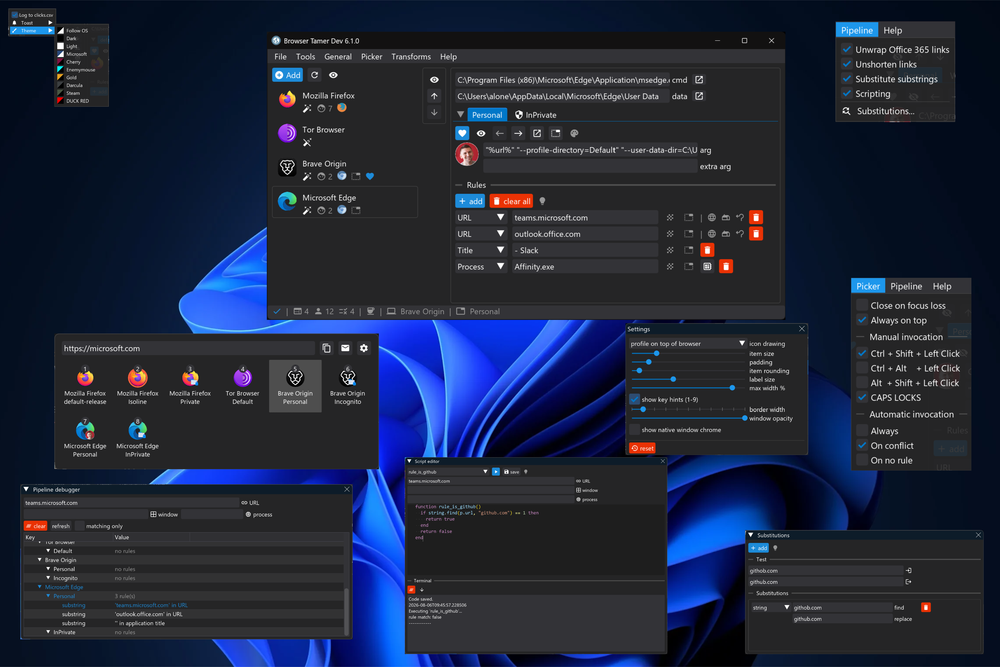
Automate link-to-browser routing on Windows and Linux with rule-based matching on URL, process name, or window title. Apache-2.0 licensed, no tracking.

Visit websiteGitHub519 stars
image of Bt
TL;DR

Bt Browser Tamer is a rule-based browser proxy for Windows and Linux that intercepts every link click and routes it to the browser, profile, container, or mode you configure. It replaces paid tools like Switchbar and Proxly with Apache-2.0 licensed, 100% local routing that requires no subscription, runs without a cloud account, and sends no telemetry. Rules match on URL domain, path, regular expression, process name, or window title, and a built-in pipeline handles Office 365 unwrapping, URL un-shortening, and ClearURLs. Best for developers and privacy-focused users managing separate browser contexts on the same machine.

Read the full breakdownHide the full breakdownWho it is for, how it works, trade-offs, the quick start and the FAQ
who it's for

Who Bt is for#

Developers separating work and personal browser contexts

Route links from work applications directly to a dedicated work Chrome or Edge profile while personal links open in Firefox. Rules can match the calling process name, so links from your company Slack client or internal ticket system fire the correct profile automatically without manual copy-paste.

Skip if:

Not useful if you only use a single browser with one profile. If all links go to the same place, Browser Tamer adds configuration overhead without benefit.

Privacy-focused users compartmentalizing by site type

Route banking and government sites into a hardened Firefox profile with no extensions, send social media to a container with no persistent history, and trigger Tor mode in Brave automatically for specific domains. Each site category gets its own isolated context without manual profile switching per click.

Skip if:

If cross-site authentication matters to your workflow, strict compartmentalization will break sessions that rely on cookies shared across categories.

Firefox Containers or Brave Containers users wanting auto-routing

Browser Tamer auto-detects Multi-Account Containers and Brave Containers as routing targets. A rule matching a work domain fires the Work container; a rule matching known social domains fires the Social container. Eliminates the per-click container selection prompt for regularly visited sites.

Skip if:

The built-in Firefox Multi-Account Containers extension handles domain-to-container rules within Firefox itself. If you only need intra-Firefox routing without cross-browser switching, that extension may be sufficient.

Users handling Office 365 links who want clean redirect chains

The URL-processing pipeline automatically unwraps Office 365 tracking redirect URLs before routing, so the browser sees and opens the real destination URL. Links shared through Microsoft 365 mail or Teams no longer pass through Microsoft's redirect chain, and the real URL appears in the address bar.

Skip if:

If your organization's IT policy prohibits changing the system default browser, you may not be able to register Browser Tamer as the system default.

the problem

The problem it solves#

Managing multiple browsers on one machine means every link click opens in the wrong context. Work links land in your personal Chrome profile, banking URLs skip the hardened Firefox you set up for them, social media invitations open inside your focus session, and video-call links ignore the minimal window you reserved for them. The only workaround is manually copying URLs and switching browsers yourself, which breaks all link-click workflows across every application on the machine.

Container isolation makes the gap clearer. Firefox Multi-Account Containers and Brave Containers isolate sites effectively, but they cannot automatically fire when another application opens a link. You end up clicking through a container-selection prompt for each link, or abandoning the isolation entirely.

how Bt solves it

How it solves it#

Rule-based URL routing by domain, path, regex, or process

Configures which browser or profile handles which link using rules that match on URL domain, path, substring, or full regular expression. Rules can also fire on the name of the calling application or its window title, so links opened from Thunderbird, Slack, or a terminal go directly to the profile you set for that source.

Browser profile and container auto-detection

Discovers installed browser profiles on startup, including Chrome and Edge profiles, Firefox profiles and Multi-Account Containers, Brave profiles and Containers, and Tor mode in Brave. Detected profiles become routing targets without manual path configuration. Running discovery again picks up newly installed browsers.

URL-processing pipeline with ClearURLs and un-shortening

Each link passes through an optional processing pipeline before routing. The pipeline unwraps Office 365 tracking URLs, resolves shortened links to their final destination, applies find/replace substitutions with optional regex, and strips tracking parameters via ClearURLs (added in v6.3.0). Pipeline steps run in sequence and each can be disabled independently.

Lua scripting for custom rules and URL transforms

Lua scripts can handle routing logic and URL pre-processing beyond what the built-in rule types cover. A script can inspect the URL, calling process, window title, or any value in the pipeline state. Useful for routing rules that require conditional logic beyond substring and regex matching.

Pipeline debugger for diagnosing routing setups

A built-in pipeline debugger shows how a URL moves through each rule and transformation step in real time, displaying the URL state after each stage. Useful when diagnosing why a link did not route to the expected browser or why a URL-transform step produced an unexpected result.

Click audit log to CSV

Optionally writes every rule hit to a CSV file with timestamp, browser id, browser name, profile name, raw URL, processed URL, matched rule description, calling process name, and calling window title. Enabled from General settings. Useful for debugging rules and auditing which applications open which domains.

strengths · trade-offs

Strengths and trade-offs#

Strengths

  • Single executable under 3 MB with no runtime dependenciesThe Windows build is a self-contained .exe under 3 MB, written in C++23 with no .NET runtime, no Visual C++ redistributable, and no Electron overhead. It registers as the system browser and handles link routing without any resident background service or tray daemon that consumes memory between clicks.
  • 100% local processing, no telemetry, no loginEvery link is processed locally. Browser Tamer requires no cloud account, sends no usage data, and has no registration step. The GitHub repo description states this explicitly: '100% local, no tracking, no registration.' Paid switchers like Switchbar and Proxly do not offer a comparable privacy guarantee in their documentation.
  • Apache-2.0 licensed, no paid tierThe Apache-2.0 license permits commercial use, modification, and redistribution without fee. There is no paid tier, subscription, or per-seat pricing. Switchbar and Proxly both carry paid pricing; Browser Tamer has none.
  • Active development with recent platform expansionCreated in November 2022, last pushed October 29, 2026. Linux support was added in v6, and recent versions added ClearURLs integration, Brave Container support, a pipeline debugger, and Lua scripting. The 520 GitHub stars and active commit history show ongoing maintenance rather than passive archival.

Trade-offs

  • -Windows and Linux only; macOS not yet availableThe project website states a macOS version is in development, but no release date or timeline is given. Mac users cannot use Browser Tamer today. The comparable paid alternatives, Switchbar and Proxly, are also Windows-only, so there is no obvious free macOS substitute in this exact category.
  • -No built-in multi-device syncRule sets and configuration live in a local file on each machine. Browser Tamer provides no built-in mechanism to sync rules across multiple computers. Users who run it on a home machine and a work laptop manage separate rule sets manually or copy the configuration file between machines.
  • -13 open issuesThe repository has 13 open issues (pull requests excluded). For a small, focused utility this is a modest backlog, but users with edge-case browser profiles, unusual Linux distributions, or complex Lua scripting needs may encounter bugs or missing features that require workarounds.
versus alternatives

Bt vs alternatives#

Browser Tamer vs Switchbar

Both tools intercept clicked links and route them to different browsers on Windows, but they target different users. Switchbar is a polished commercial tool with a simplified GUI aimed at users who want a straightforward browser-switcher. Browser Tamer is open source and targets users who need programmable depth, with URL-processing pipelines, Lua scripting, container-level routing, and process-name matching.

FeatureBrowser TamerSwitchbar
LicenseApache-2.0Proprietary (paid)
PlatformWindows and LinuxWindows
URL pre-processingYes (unwrap, un-shorten, ClearURLs)Limited
Lua scriptingYesNo
Container routingFirefox, BraveNo
Process/window matchingYesYes
Audit logYes (CSV)No

Browser Tamer is the better fit when you need Linux support, Firefox or Brave container routing, URL-processing steps before routing, or Lua scripts for complex matching logic. Switchbar may suit Windows users who prioritize a simpler setup experience and are comfortable paying for a polished commercial product.

Browser Tamer vs Proxly

Proxly is a paid Windows browser management tool focused on simplicity and quick setup. Browser Tamer and Proxly overlap in core URL routing rules, but Browser Tamer is free, cross-platform, and adds ClearURLs pipeline integration, Lua scripting, container detection, process-name matching, and a CSV audit log.

FeatureBrowser TamerProxly
LicenseApache-2.0Proprietary (paid)
PlatformWindows and LinuxWindows
URL pre-processingYes (unwrap, un-shorten, ClearURLs)Basic
Lua scriptingYesNo
Container routingFirefox, BraveNo
Audit logYes (CSV)No

Browser Tamer is the better choice for users who want a free, open source, cross-platform link router with URL-processing and container support. Proxly is worth considering for Windows users who want a simple, quick-to-set-up browser switcher with a paid support option and minimal configuration.

install · quick start

Quick start#

bash
Install on Windows via WinGet; for Linux, download the .deb package from GitHub Releases.

```bash
winget install aloneguid.bt
```

Download the Linux .deb installer: https://github.com/aloneguid/bt/releases/latest
tech stack · detected from GitHub

What it's built on#

Languages
C++
Runtimes
Chromium
frequently asked

FAQ#

Does Browser Tamer work on macOS?

Not yet. The project website states a macOS version is in development but does not give a release date. The current stable releases support Windows and Linux (Linux added in v6). Mac users have no current install path.

Is Browser Tamer free, and what does the Apache-2.0 license allow?

Browser Tamer is free with no paid tier. The Apache-2.0 license lets you use it personally, commercially, and internally without restriction. You can also modify the source and redistribute it, provided you include the license notice. There is no subscription, per-seat fee, or usage limit.

How does Browser Tamer handle Firefox Containers?

Browser Tamer automatically detects Firefox Multi-Account Containers during initial browser discovery. Detected containers appear as routing targets in the browser list. Clicking a URL that matches a container-targeted rule opens it directly in that container, bypassing the container-selection prompt.

Can I route links based on which application opened them?

Yes. Rules can match on the process name or window title of the calling application. A rule matching 'thunderbird.exe' as the process name will fire for every link clicked inside Thunderbird, regardless of the URL. Process-name matching works alongside URL matching in the same rule.

Can I add a non-browser application as a routing target?

Yes. Browser Tamer lets you define a custom application entry pointing to any executable with custom command-line arguments. The %url% placeholder passes the URL to the command. The documentation shows an example routing certain links to a PowerShell script that copies the URL to the clipboard instead of opening a browser.

also worth a look

Similar open-source tools#

CleanYourTV

Featured

Alternative toATV Launcher Pro

Debloat any Android or Google TV over Wi-Fi and get an Apple TV-style home.

  • 43,973 GitHub stars
  • MIT LicenseLicence MIT License

rakazo

Featured

Alternative toGrok Bot

AI teammates you own: your keys, your model, your machine.

  • 6,242 GitHub stars
  • Apache-2.0Licence Apache-2.0

OfficeCLI

Alternative toAspose.Total

Office automation CLI for AI agents, no Office install required

  • 32,760 GitHub stars
  • Apache-2.0Licence Apache-2.0

Nook

Alternative toArc

Open source macOS browser with vertical sidebar tabs and ad blocking.

  • 2,022 GitHub stars
  • GPL-3.0Licence GPL-3.0

Zephium

Alternative toArc

Rust browser on your system's own engine, with an AI Work canvas

  • 866 GitHub stars
  • MPL-2.0Licence MPL-2.0

Ardia

Alternative toArc

Real Chromium with Arc's sidebar, ad blocking, iCloud sync.

  • 1,026 GitHub stars
  • GPL-3.0Licence GPL-3.0
by category

Open source tools in these categories#

505

Developer Tools

REA (Reverse Engineer Anything), superpowers, Skills for Real Engineers
220

Business & Productivity

OpenClaw, Excalidraw, RustDesk

Sponsors

Inbox Zero

Alternative toSuperhuman

AI email assistant that drafts replies and clears your inbox

  • 12,855 GitHub stars
  • AGPL-3.0Licence AGPL-3.0
  • #Email

Omnara

Alternative toCClaude Managed Agents

Open-source agent deployment API. Self-host or use Omnara Cloud.

  • 3,325 GitHub stars
  • Apache-2.0Licence Apache-2.0
  • #AI Agents

rakazo

Alternative toGrok Bot

AI teammates you own: your keys, your model, your machine.

  • 6,242 GitHub stars
  • Apache-2.0Licence Apache-2.0
  • #AI Agents
Advertise your product

New open source projects by email

The projects we add and every new guide. Free, unsubscribe any time.

Find open source alternatives to paid software

/
  • Claude Code to OpenCode
  • Jira to Windshift
  • Notion to AppFlowy
  • Slack to Mattermost
  • Linear to GitLab
  • Wispr Flow to Handy
  • Arc to Zen Browser
  • CapCut to Concat
  • Grok Bot to rakazo
  • Superhuman to Inbox Zero
  • Airtable to AITable
  • Muse to OpenClaw
  • Railway to Coolify
  • GitHub Copilot to Cline
  • Datadog to Netdata
  • Microsoft Teams to Rocket.Chat
  • Confluence to Docmost
  • Pinecone to Qdrant
  • Zapier to n8n
  • Devin AI to OpenHands
  • Firebase to Supabase
  • 1Password to KeePassXC
  • Contentful to Strapi
  • Adobe Premiere Pro to Shotcut
  • Claude Code to OpenCode
  • Jira to Windshift
  • Notion to AppFlowy
  • Slack to Mattermost
  • Linear to GitLab
  • Wispr Flow to Handy
  • Arc to Zen Browser
  • CapCut to Concat
  • Grok Bot to rakazo
  • Superhuman to Inbox Zero
  • Airtable to AITable
  • Muse to OpenClaw
  • Railway to Coolify
  • GitHub Copilot to Cline
  • Datadog to Netdata
  • Microsoft Teams to Rocket.Chat
  • Confluence to Docmost
  • Pinecone to Qdrant
  • Zapier to n8n
  • Devin AI to OpenHands
  • Firebase to Supabase
  • 1Password to KeePassXC
  • Contentful to Strapi
  • Adobe Premiere Pro to Shotcut