Open Source Alternatives
  • Alternatives
  • Categories
    Categories by size1,107 projects
    • Developer Tools557
    • AI & Machine Learning472
    • Business & Productivity270
    • Web Development208
    • Security & Monitoring171
    • Communication & Collaboration153
    • IT Management145
    • Cloud & Hosting127
    • LLMOps & AI Tooling123
    • Data & Analytics118
    Browse all 21 categoriesProduct & Project Management, DevOps & CI/CD and 9 more
  • Blog
  • Advertise
SearchNotion, Slack, password manager.../
Submit
Open Source Alternatives
  • Alternatives
    • Developer Tools557
    • AI & Machine Learning472
    • Business & Productivity270
    • Web Development208
    • Security & Monitoring171
    • Communication & Collaboration153
    • Browse all 21 categories
  • Blog
  • Advertise
Submit your project

New open source projects by email

The projects we add and every new guide. Free, unsubscribe any time.

Open Source Alternatives LogoOpen Source Alternatives

Handpicked Open Source Alternatives to Paid Softwares

Product

  • Categories
  • Tag
  • Advertise

Resources

  • Blog
  • Collection
  • Submit

Company

  • Privacy Policy
  • Terms of Service
  • Refund Policy
  • Sitemap

Alternatives

  • Claude Code
  • Jira
  • Notion
  • Slack
  • Linear
  • Wispr Flow
  • All alternatives
© 2026 Open Source Alternatives. All rights reserved.
Open SourceAlternatives
Home/Categories/Security & Monitoring/cap captcha
icon of Cap Captcha

cap captcha

Open source alternative to Google reCAPTCHA Enterprise, Cloudflare Turnstile, hCaptcha, Friendly Captcha and Botpoison

  • 8.3K stars
  • Apache-2.0
  • Active this week
  • Last commit 6 days ago

Last verified Nov 5, 2026

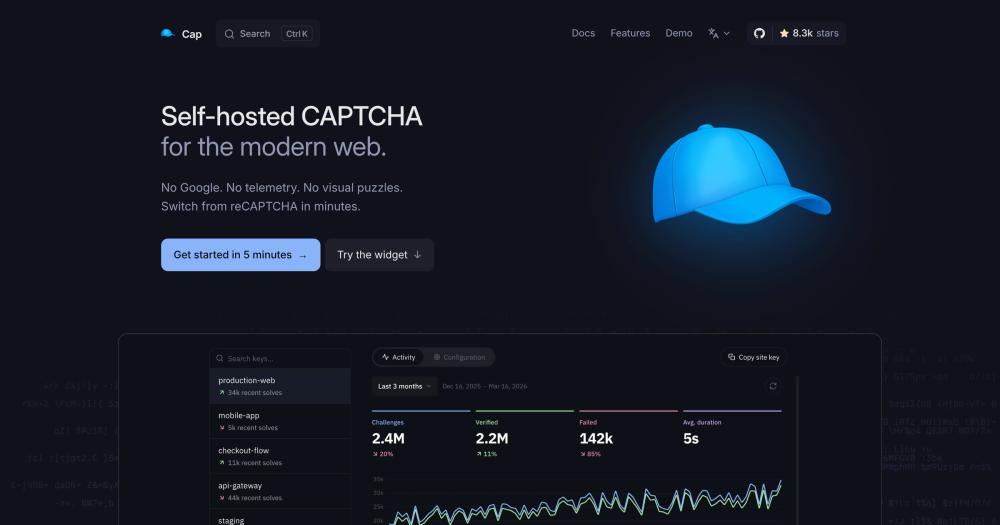
Secure websites against bots with a self-hosted CAPTCHA using proof-of-work and browser instrumentation, without visual puzzles or external tracking.

Visit websiteGitHub8.3K starsDeploy on Hostinger
image of Cap Captcha
TL;DR

cap captcha Cap is a self-hosted, privacy-first CAPTCHA alternative that replaces reCAPTCHA and hCaptcha without sending visitor data to third parties. Instead of visual puzzles, it runs GPU-resistant proof-of-work and JavaScript browser instrumentation silently in the background. The client widget is about 20 kB, requires no external scripts, and sets no cookies. The verification server runs in a Docker container on a $5 VPS. Licensed under Apache-2.0, which permits commercial deployment; redistribution requires preserving the original license notices.

Read the full breakdownHide the full breakdownWho it is for, how it works, trade-offs and the FAQ
who it's for

Who cap captcha is for#

Regulated industries protecting web forms

Teams handling medical records, financial data, or personal information under HIPAA or GDPR need bot protection that does not transfer visitor data to third-party servers. Cap runs verification on the operator's own infrastructure, satisfying data residency requirements that cloud CAPTCHAs cannot meet.

Skip if:

Your compliance requirements do not restrict third-party data processors and you need zero infrastructure to manage. Cloudflare Turnstile handles bot protection with no backend server and no visual puzzles.

Developers migrating away from Google reCAPTCHA

Cap's siteverify endpoint follows the same response format as reCAPTCHA and hCaptcha, so the backend token verification typically needs only a URL change. The main migration work is replacing the client-side widget script and updating form field references.

Skip if:

You need drop-in plugin support across a large CMS ecosystem without custom integration. hCaptcha has broader existing plugin coverage for platforms like WordPress and common e-commerce stacks.

High-traffic sites with CAPTCHA billing pressure

Sites with high form submission volumes can hit free-tier limits on reCAPTCHA Enterprise or hCaptcha. Cap's self-hosted server has no per-request fees, so protection costs do not scale with traffic volume.

Skip if:

Your traffic is low enough that managed CAPTCHA pricing is negligible, and running a server for CAPTCHA would cost more than the tier you would use on a free managed plan.

Teams wanting to block AI web agents

Cap's instrumentation layer can be configured to detect and reject headless browsers used by AI agents to interact with sites programmatically. This extends bot protection beyond traditional traffic patterns to cover AI-driven automation.

Skip if:

Your concern is traditional bot traffic rather than AI-driven automation. Standard bot detection from cloud CAPTCHAs covers most conventional abuse patterns without custom instrumentation configuration.

the problem

The problem it solves#

Managed CAPTCHA services transfer visitor behavior data to third-party servers on every verification. reCAPTCHA sends solved challenges to Google for behavioral scoring; hCaptcha sends verification events to its own cloud. For teams handling regulated data under GDPR, HIPAA, or CCPA, this transfer creates compliance exposure that is difficult to address through contractual means alone, since the fundamental product design is cloud-based.

Visual puzzles add a second problem: image grids create friction for every user, disproportionately affecting users with visual impairments and those on slow connections. Cloud CAPTCHA pricing scales with traffic too; reCAPTCHA Enterprise and hCaptcha both have free tiers with metered pricing above them, making bot protection a variable cost that grows with site volume rather than a fixed infrastructure expense.

how cap captcha solves it

How it solves it#

Dual-layer proof-of-work and browser instrumentation

Cap runs two independent challenge layers simultaneously. The first solves parallel SHA-256 hashes in WebAssembly, tuned to resist GPU acceleration. The second generates a unique JavaScript program per session that checks browser layout, canvas rendering, and event trust markers. Defeating one layer does not bypass verification; both must pass.

No visual puzzles, no user friction

All challenges run silently in the browser background. Visitors see no image grids, no crosswalk photos, and no checkbox clicks. The verification happens before form submission and completes without visible interaction for genuine users.

Zero third-party network calls

The client widget contacts only the operator's own verification server. No data is sent to Google, Cloudflare, hCaptcha, or any external service. Visitor IPs and behavioral signals stay within the operator's infrastructure throughout the entire verification flow.

20 kB client bundle with no dependencies

The widget minifies and gzips to about 20 kB with no npm dependencies. The product website reports this as roughly 250x smaller than hCaptcha. It can be loaded from a CDN, and for pages where load performance matters, the size difference is material.

Drop-in reCAPTCHA compatibility

Cap's server-side siteverify endpoint uses the same response format as the reCAPTCHA and hCaptcha verification APIs. Existing backend code that checks CAPTCHA tokens typically requires only updating the verification URL to point at Cap's server, without rewriting the token-checking logic.

strengths · trade-offs

Strengths and trade-offs#

Strengths

  • Full data locality: verification never leaves your serverUnlike reCAPTCHA Enterprise, hCaptcha, and Cloudflare Turnstile, Cap performs all verification on the operator's own infrastructure. No visitor IP, no browser fingerprint, and no behavioral signal is sent to a third party. AdGuard and Bunny.net use it in production per the README.
  • No per-request costs at any traffic volumeSelf-hosting Cap on a single VPS carries a fixed monthly cost with no API quotas or per-verification fees. Cloud CAPTCHAs charge per-request or per-month tiers above free limits. For high-traffic sites, Cap's cost stays flat while managed services scale upward.
  • Privacy compliance without additional configurationCap does not set cookies, does not fingerprint visitors, and makes no outbound calls during verification. The website lists compliance with GDPR, CCPA/CPRA, HIPAA, PIPEDA/CPPA, LGPD, PDPA, and PIPL without additional setup or data processing agreements with a third party.

Trade-offs

  • -Requires a self-managed verification serverCloud CAPTCHAs work with an API key and no backend setup; Cap needs a running server to handle challenge generation and verification. A minimal deployment fits a $5 VPS with Docker, but the server must stay available for form submissions to work. This adds operational responsibility that managed services do not impose.
  • -JavaScript required for all challenge typesBoth challenge layers run JavaScript in the browser. Users or tooling that blocks JavaScript entirely cannot pass a Cap challenge. This may affect accessibility testing workflows or automated screen-reader test environments that run with JavaScript disabled.
  • -Younger project with a smaller integration ecosystemCap was created in January 2025 and has 8 open GitHub issues. The library of community-built plugins for CMS platforms (WordPress, Drupal, Shopify) and popular frameworks is smaller than reCAPTCHA or hCaptcha, which have years of ecosystem support. Custom integration work is likely for less common stacks.
versus alternatives

cap captcha vs alternatives#

Cap vs Google reCAPTCHA Enterprise

The fundamental difference is data residency. reCAPTCHA Enterprise routes every verification event through Google's servers for behavioral analysis and scoring. Cap verifies challenges on the operator's own server, with no outbound calls to any external service.

FeatureCapreCAPTCHA Enterprise
Self-hostingYesNo (cloud-only)
LicenseApache-2.0Proprietary
Visual puzzlesNoneRisk-based (optional)
Third-party data transferNoneYes (to Google)
Client weight~20 kBProprietary (not self-hosted)
PricingFree (self-hosted)Free tier, then per-assessment

Cap is the stronger choice when data residency is a compliance requirement, when page weight matters, or when reCAPTCHA billing has become a cost item. reCAPTCHA Enterprise is worth considering when large-scale cross-site behavioral modeling provides a detection signal that a single-server deployment cannot match; Google's dataset spans billions of sites, giving it signal about bot patterns that Cap's server-side verification does not have access to.

Cap vs Cloudflare Turnstile

Turnstile is the closest cloud alternative: it avoids visual puzzles and does not use visitor data for advertising. The main practical difference is infrastructure. Turnstile requires no server and verifies through Cloudflare's edge network; Cap requires a self-hosted server. Turnstile's free plan covers most production use cases.

FeatureCapCloudflare Turnstile
Self-hostingYesNo (Cloudflare cloud)
LicenseApache-2.0Proprietary
Verification server requiredYesNo
Visitor data localityOperator's server onlyCloudflare infrastructure
Client weight~20 kBProprietary (not self-hosted)
PricingFree (self-hosted)Free plan covers most production use

Teams already on Cloudflare or those who cannot run a backend server will find Turnstile easier to operate. Cap wins on data locality: Turnstile's verification still passes through Cloudflare's infrastructure, while Cap keeps all data on the operator's own server. For teams with GDPR or HIPAA obligations that restrict third-party data processors, Cap's on-server model removes the dependency entirely.

Cap vs hCaptcha

hCaptcha is the most common reCAPTCHA replacement, but it still uses visual puzzles. Cap's proof-of-work approach is invisible to users, removing the friction image challenges create. The product website states Cap's widget is roughly 250x smaller than hCaptcha.

FeatureCaphCaptcha
Self-hostingYesNo (cloud-only)
LicenseApache-2.0Proprietary
Visual puzzlesNoneYes (image grids)
Third-party data transferNoneYes (to hCaptcha)
Client weight~20 kB (per trycap.dev, ~250x smaller than hCaptcha)Cloud-only
PricingFree (self-hosted)Free tier, then per-request

Cap is the choice when user experience and data privacy both matter. hCaptcha's value is its established integration ecosystem: broader plugin coverage for CMS platforms and a larger library of community-built adapters make it faster to deploy in stacks where Cap has no ready-made plugin.

tech stack · detected from GitHub

What it's built on#

Languages
JavaScriptRust
Frameworks
Vue
Tooling
esbuild
frequently asked

FAQ#

Is Cap GDPR-compliant without additional configuration?

Yes. Cap does not set cookies, does not fingerprint visitors, and makes no outbound network calls during verification. All verification happens on the operator's own server. The Cap website lists compliance with GDPR, CCPA/CPRA, HIPAA, PIPEDA/CPPA, LGPD, PDPA, and PIPL without additional configuration.

Can I use Cap commercially?

Yes. Cap is licensed under Apache-2.0, which permits deploying, running, modifying, and distributing it in commercial production environments. Redistribution of Cap itself requires preserving the original license notices and marking modified files. Trademark use is restricted to attribution of the original work's origin.

What does migrating from reCAPTCHA to Cap require?

The backend change is typically a URL update: Cap's siteverify endpoint uses the same response format as reCAPTCHA and hCaptcha, so existing token-checking code usually only needs the verification URL changed. The client side requires replacing the reCAPTCHA script with Cap's widget and updating form field references. The documentation at trycap.dev covers the migration steps.

What infrastructure does Cap need to run?

Cap Standalone runs in a Docker container. A $5 VPS handles most production traffic, and no external database is required for the basic configuration. Cap can also run on Cloudflare Workers or Railway for teams already using those platforms. The verification server must stay available for form submissions to pass.

How does Cap's proof-of-work hold up against determined bots?

Cap uses two independent challenge layers: GPU-resistant proof-of-work in WebAssembly and dynamically generated JavaScript instrumentation. Because each session's instrumentation code is generated fresh, bot frameworks cannot cache a static bypass for the second layer. For standard automated traffic, the combination makes large-scale abuse very difficult to automate at scale, per the product's documentation. Neither Cap nor any CAPTCHA guarantees perfect detection against a sufficiently motivated and resourced attacker.

also worth a look

Similar open-source tools#

WebCheck-OSINT

Alternative toShodan

44-check OSINT scanner for DNS, SSL, ports, CVEs, and TLS audits

  • 348 GitHub stars
  • MITLicence MIT

Markdown Preview Editor

Alternative toTypora

Browser-only Markdown editor with live preview and strict privacy.

  • 32 GitHub stars
  • MITLicence MIT

Obtainium

InIT Management

Android app updates direct from GitHub and F-Droid

  • 21,193 GitHub stars
  • GPL-3.0Licence GPL-3.0

limen

Alternative toAuth0

Composable authentication for modern Go backends

  • 561 GitHub stars
  • MITLicence MIT

Falkon

Alternative toGoogle Chrome

Speed-first browser for KDE Plasma with built-in ad blocking

  • 495 GitHub stars
  • GPL-3.0Licence GPL-3.0

Floorp

Alternative toBrave Browser

Firefox fork with advanced privacy controls and UI customization

  • 8,474 GitHub stars
  • MPL-2.0Licence MPL-2.0
by category

Open source tools in these categories#

171

Security & Monitoring

REA (Reverse Engineer Anything), RustDesk, Uptime Kuma
208

Web Development

freeCodeCamp, Skills for Real Engineers, superpowers
558

Developer Tools

Skills for Real Engineers, REA (Reverse Engineer Anything), superpowers
Hostinger

Self-host cap captcha on a Hostinger VPS

Keep it running 24/7, even when your laptop is off. A Hostinger VPS gives it a server of its own.

  1. 01

    Choose a plan

    Starts from $6.49/mo

  2. 02

    Apply

    Extra 10% off yearly plans

  3. 03

    Install cap captcha

    On a server that stays on

  4. 04

    Start building

    Focus on the app, not the server

Deploy on Hostinger

Sponsors

Inbox Zero

Alternative toSuperhuman

AI email assistant that drafts replies and clears your inbox

  • 12,889 GitHub stars
  • AGPL-3.0Licence AGPL-3.0
  • #Email

rakazo

Alternative toGrok Bot

AI teammates you own: your keys, your model, your machine.

  • 7,028 GitHub stars
  • Apache-2.0Licence Apache-2.0
  • #AI Agents

SnitchFeed

Live monitoring on LinkedIn, X, Reddit & more. Agentic social listening for startups.

Marketing & Growth

Advertise your product

New open source projects by email

The projects we add and every new guide. Free, unsubscribe any time.

Find open source alternatives to paid software

/
  • Claude Code to OpenCode
  • Jira to Windshift
  • Notion to AppFlowy
  • Slack to Mattermost
  • Linear to GitLab
  • Wispr Flow to Handy
  • Arc to Zen Browser
  • CapCut to Concat
  • Grok Bot to rakazo
  • Superhuman to Inbox Zero
  • Airtable to AITable
  • Muse to OpenClaw
  • Railway to Coolify
  • GitHub Copilot to Cline
  • Datadog to Netdata
  • Confluence to Wiki.js
  • Microsoft Teams to Rocket.Chat
  • Firebase to Supabase
  • Pinecone to Qdrant
  • Zapier to n8n
  • 1Password to KeePassXC
  • Devin AI to OpenHands
  • Asana to Leantime
  • Contentful to Strapi
  • Claude Code to OpenCode
  • Jira to Windshift
  • Notion to AppFlowy
  • Slack to Mattermost
  • Linear to GitLab
  • Wispr Flow to Handy
  • Arc to Zen Browser
  • CapCut to Concat
  • Grok Bot to rakazo
  • Superhuman to Inbox Zero
  • Airtable to AITable
  • Muse to OpenClaw
  • Railway to Coolify
  • GitHub Copilot to Cline
  • Datadog to Netdata
  • Confluence to Wiki.js
  • Microsoft Teams to Rocket.Chat
  • Firebase to Supabase
  • Pinecone to Qdrant
  • Zapier to n8n
  • 1Password to KeePassXC
  • Devin AI to OpenHands
  • Asana to Leantime
  • Contentful to Strapi