

Who FluidVoice is for#
Developers dictating code and terminal commands
FluidVoice works in any text field, including code editors and terminals. Developers can dictate function names, variable declarations, git commands, and documentation with the Fluid-1 model cleaning up filler and formatting. Real-time speed keeps dictation fast enough for thought-heavy workflows without breaking flow.
Skip if:
Your workflow requires precise control over whitespace, indentation, or special characters that voice-to-text struggles to disambiguate. Typing remains faster for low-level syntax editing where every character placement matters.
Multilingual content creators and teams
Nemotron Speech 3.5 supports roughly 40 languages, Whisper scales to 99 languages, and Parakeet TDT v3 covers 25 European languages. Multilingual users can switch models per language or use a single multilingual model. Community feedback confirms strong German and French reliability.
Skip if:
Your target language is not in the supported model lineup, or you need highly specialized vocabulary (medical, legal jargon) that general-purpose models may misrecognize.
Privacy-conscious teams avoiding cloud dictation
FluidVoice processes speech entirely on-device by default, with no voice data, transcripts, or prompts leaving your Mac unless you opt into a cloud AI provider. Teams subject to privacy regulations (GDPR, HIPAA workflows) or handling sensitive content gain dictation without exposing audio to third-party servers.
Skip if:
Your compliance framework requires formal SOC 2 or FedRAMP certification for the tooling itself. FluidVoice is a local client app with no managed service tier, so there is no vendor certification to inherit.
Writers composing long-form content at 3.7x typing speed
Speaking is roughly 3.7 times faster than typing, and FluidVoice preserves that speed advantage with real-time transcription. Writers drafting articles, documentation, or email can compose faster by voice, then edit the polished output. The Fluid-1 model reduces the cleanup burden compared to raw dictation.
Skip if:
Your writing workflow relies heavily on visual layout (tables, complex formatting, inline images) that dictation cannot efficiently specify. Voice excels at prose composition but struggles with structural design tasks.
The problem it solves#
Traditional dictation apps stream your voice to the cloud and return raw, unpolished transcripts. You speak naturally with filler words, stutters, and mid-sentence revisions, but what lands on screen requires manual cleanup before it is usable. Cloud-based dictation services charge subscription fees (often per-user) while keeping your voice data on their servers, creating both privacy risk and vendor lock-in.
The hardest part is output quality. Raw speech-to-text lacks proper capitalization, formatting, and tone matching. A casual Slack message and a formal email require different styles, but most dictation tools produce the same raw transcript regardless of context. Post-processing that transcript manually kills the speed advantage of speaking over typing.
How it solves it#
On-device speech models with 40+ language support
FluidVoice supports Nemotron Speech 3.5, Parakeet Flash, Parakeet TDT v3 and v2, Cohere Transcribe, Apple Speech, and Whisper models. Language support ranges from English-only (Parakeet TDT v2) to 99 languages (Whisper Large), with Nemotron covering roughly 40 languages. All models run locally via CoreML and Metal, so your voice never leaves your Mac.
Fluid-1 local AI post-processing model
The Fluid-1 model is a custom-trained on-device AI that rewrites raw speech into polished text. It strips filler words, fixes capitalization and formatting, adjusts tone based on the active app, and handles mid-sentence corrections. The model is fully optional (3.5 GB download), requires no API keys, and processes everything locally with zero data leaving your machine.
System-wide input via global hotkey
One hotkey triggers voice capture from anywhere on macOS. FluidVoice types directly into any text field (email, docs, chat, terminal, code editors) using accessibility APIs, so there is no app-specific configuration needed. Works across all applications that accept text input.
Real-time transcription with perceived latency under 100ms
Speech hits the screen as fast as you talk. Nemotron Speech 3.5 and Parakeet Flash deliver streaming-capable, ultra-low-latency transcription optimized for Apple Silicon. The perceived latency stays under 100 milliseconds on supported models, so dictation feels immediate rather than lagged.
Adaptive tone and per-app customization
FluidVoice detects which app is focused and applies the matching tone profile automatically. You can define custom prompts per app (Slack casual, Mail formal, GitHub structured) so your dictation fits the context without changing how you speak. The same rough speech becomes the right style for the destination.
Command Mode for voice-controlled Mac automation
Beyond dictation, FluidVoice includes Command Mode for controlling your Mac by voice. Launch apps, run Shortcuts, trigger system actions, and automate workflows without touching the keyboard. Complements Write Mode (text composition) for full voice-first operation.
Strengths and trade-offs#
Strengths
- GPL-3.0 license with full local operationFluidVoice switched to GPL-3.0 on 2026-02-23 (previous versions used Apache 2.0). The self-hosted experience is fully local with no cloud dependency by default, so you pay nothing for usage and your voice data never leaves your machine. Unlike Wispr Flow (proprietary, cloud-dependent), you control the entire pipeline.
- Multi-model flexibility across languages and hardwareEight model options (Nemotron, Parakeet variants, Cohere, Apple Speech, Whisper) let you optimize for speed, accuracy, or language support based on your workflow. Apple Silicon users get the full lineup; Intel Macs run Whisper models. Language support spans English-only to 99 languages depending on the model chosen.
- 100,000+ downloads and active developmentFluidVoice crossed 100,000 downloads with 9,577 GitHub stars and steady development (last push 2026-08-11). The community reports strong multilingual reliability (German, French tested), head-to-head speed matching Wispr Flow, and intent recovery when stumbling mid-sentence.
- Free forever with no vendor lock-inThe open source tier is free to install and run indefinitely with no feature caps, usage limits, or per-seat pricing. No subscription, no trial expiration, and no cloud account required unless you opt into a third-party AI provider for post-processing.
Trade-offs
- -macOS 15.0 Sequoia or later requirementFluidVoice requires macOS 15.0 or later, which limits compatibility to recent Macs. Older macOS versions are unsupported. This is a hard platform requirement tied to the underlying speech and accessibility APIs used.
- -Fluid-1 model is a 3.5 GB downloadThe optional Fluid-1 AI enhancement model requires a 3.5 GB download and roughly 3.5 GB of disk space when installed. The base dictation experience works without it using any supported speech model, but you lose the on-device post-processing (formatting, tone matching, filler removal) unless you configure a cloud provider instead.
- -Apple Silicon optimization; Intel support via Whisper onlyNemotron, Parakeet, and Cohere models are optimized for Apple Silicon and unavailable on Intel Macs. Intel users are limited to Whisper models and Apple Speech, which narrows model selection and may reduce speed compared to the M-series experience.
- -108 open GitHub issues as of August 2026The repository shows 108 open issues, which reflects active use but also indicates ongoing feature requests, bug reports, and edge cases. The project is under active development, so expect iteration rather than a fully polished 1.0 product.
FluidVoice vs alternatives#
FluidVoice vs Wispr Flow
Both FluidVoice and Wispr Flow deliver AI-enhanced voice-to-text dictation for macOS with post-processing to clean up raw speech. The core difference is deployment model and data ownership: FluidVoice is open source with full local operation, while Wispr Flow is proprietary and cloud-dependent.
| Feature | FluidVoice | Wispr Flow |
|---|---|---|
| License | GPL-3.0 | Proprietary |
| Local operation | Yes (default) | No (cloud API) |
| Self-hosting | Yes | No |
| Pricing | Free forever (self-hosted) | Subscription-based |
| AI post-processing | Fluid-1 (on-device) or cloud providers | Cloud API |
| Speech models | 8 options (Nemotron, Parakeet, Whisper, others) | Proprietary model |
| Language support | Up to 99 languages (model-dependent) | Unknown |
| macOS requirement | 15.0 Sequoia+ | Unknown |
FluidVoice is the better choice when you need full data ownership, zero recurring costs, or the ability to run dictation offline. The Fluid-1 model runs entirely on your Mac with no API calls, so your voice data never leaves your infrastructure. You also get multi-model flexibility (eight speech models spanning different languages, speeds, and accuracy profiles), which lets you optimize per workflow. GPL-3.0 licensing means you can modify the post-processing pipeline or contribute upstream changes.
Wispr Flow is worth considering if you prefer a managed cloud service with zero local setup and do not require self-hosting or data sovereignty. It delivers AI-enhanced dictation without the 3.5 GB Fluid-1 download or model selection decisions. However, it is proprietary with subscription pricing, and your voice data transits their servers.
Speed and Accuracy
Community feedback reports FluidVoice matches Wispr Flow head-to-head on speed and accuracy. One tester noted "just as good as Wispr Flow in my testing," and another highlighted intent recovery when stumbling mid-sentence (the transcriber caught the intended word despite the vocal mistake). FluidVoice's real-time factor peaks at effectively zero delay for Nemotron Speech 3.5 and Parakeet Flash on Apple Silicon, with perceived latency under 100ms.
When to Choose Each
Choose FluidVoice when you need self-hosting for data privacy, cost control on high-volume dictation, offline operation, or GPL-3.0 licensing for modification rights. Best for developers dictating into terminals, multilingual teams, privacy-conscious professionals, and teams avoiding vendor lock-in.
Choose Wispr Flow when you want a managed cloud service with no local model downloads, no hardware requirements, and no setup beyond installing the app. Best for users who trust cloud dictation, prefer subscription pricing over self-hosting, and do not require data sovereignty.
Quick start#
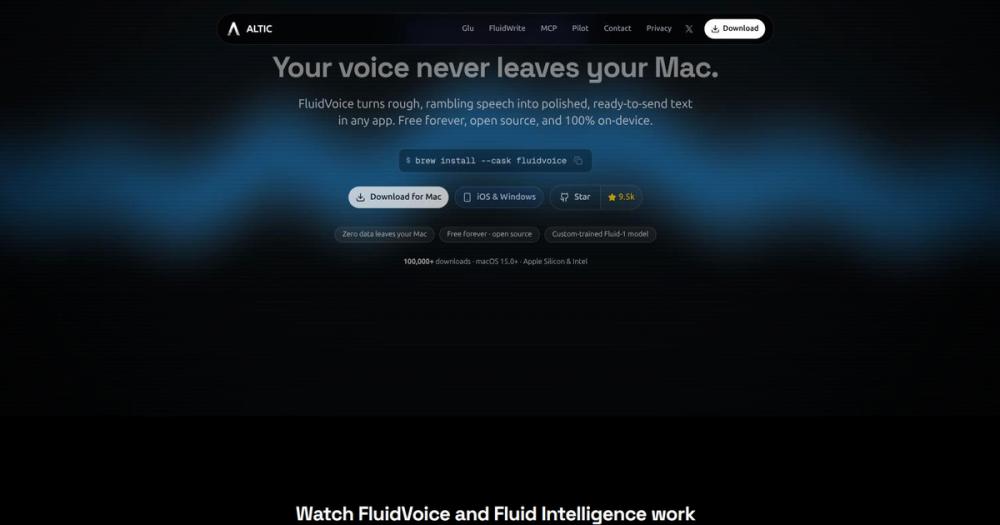
FluidVoice installs via Homebrew or direct download from GitHub releases. After installation, grant microphone access for voice capture and accessibility permissions for typing into other apps. Choose a global hotkey in settings to trigger voice capture from anywhere.

```bash
# Install via Homebrew
brew install --cask fluidvoice
```

Download the latest release directly: [GitHub Releases](https://github.com/altic-dev/FluidVoice/releases/latest)

Onboarding guides you through voice model selection based on your language and latency needs. Models range from zero-download Apple Speech to high-accuracy Nemotron and Whisper. The Fluid-1 AI model (3.5 GB) is optional and can be enabled during onboarding or skipped for a lighter install.

For cloud-based AI enhancement (optional), add an OpenAI, Groq, or custom provider API key. Keys are stored securely in macOS Keychain. Select "Always allow" for key access when prompted.What it's built on#
- Languages
- PythonSwift
FAQ#
Is FluidVoice free to use?
Yes. FluidVoice is completely free and open source under GPL-3.0 (since 2026-02-23; earlier versions used Apache 2.0). You can install it via Homebrew or direct download from GitHub releases, run it indefinitely with no subscription or usage fees, and modify the source under the GPL terms. The Fluid-1 model is optional and also free.
What macOS version does FluidVoice require?
FluidVoice requires macOS 15.0 Sequoia or later. It also needs microphone access for voice capture and accessibility permissions for typing into other apps. Apple Silicon Macs get the full model lineup; Intel Macs are supported starting from version 1.5.1 via Whisper models only.
Does FluidVoice work offline?
Yes. FluidVoice is local-first and uses on-device speech models for dictation, so it works without Wi-Fi or internet. The Fluid-1 AI enhancement model also runs entirely locally. If you opt into cloud AI providers (OpenAI, Groq, or custom endpoints) for post-processing, those features require internet, but the default experience is fully offline.
What is Fluid-1 and is it required?
Fluid-1 is a custom-trained local AI model that post-processes raw speech into polished text. It handles smart formatting, context-aware capitalization, filler word removal, and adaptive tone based on the active app. It is fully optional (3.5 GB download) and runs entirely on your Mac with no cloud calls. FluidVoice works without it using any supported speech model, but you lose the on-device enhancement layer unless you configure a cloud provider.
How many languages does FluidVoice support?
Language support is model-specific. Nemotron Speech 3.5 supports roughly 40 languages, Parakeet Flash and Parakeet TDT v2 are English-only, Parakeet TDT v3 supports 25 European languages, Cohere Transcribe supports 14 languages, Apple Speech depends on your macOS system languages, and Whisper supports up to 99 languages depending on model size. You can switch models per language or use a single multilingual model.
Similar open-source tools#

Voquill
Open source voice dictation with local AI and custom glossary

OpenWhispr
Local-first voice dictation with Whisper, offline mode, and AI cleanup

Handy
Free offline speech-to-text: runs on Windows, macOS, and Linux

VoiceInk
Private voice dictation for Mac, no subscription required.

FreeFlow
Free, open source Mac dictation with AI cleanup and voice macros

SpeakoFlow
Voice dictation and AI assistant for your desktop, fully offline