Who gitdiagram is for#
Developers onboarding to a new codebase
GitDiagram produces an architecture overview of a repository in one browser visit, no local checkout needed. Engineers starting a new job or picking up an inherited project can see how the major components connect before writing a single line of code.
Skip if:
Skip if the codebase is private and your organization restricts sharing tokens with external services. Also skip if the repository is very small (under 20 files); a directory listing is faster.
Engineering managers reviewing unfamiliar repository architecture
Before a planning session or architecture review, paste the repository URL and get a component diagram without pulling up the code. The diagram exports as PNG for use in slides or design documents.
Skip if:
Skip if you need an editable, collaborative architecture diagram with custom shapes and annotation layers. Eraser.io or Miro are better fits for that workflow.
Open source contributors exploring a new project
Click any node in the generated diagram to jump directly to the relevant file on GitHub. When evaluating a project to contribute to, this provides faster orientation than navigating the repository tree manually.
Skip if:
Skip if the project already includes a well-maintained architecture diagram in its documentation; reading the existing diagram will be faster.
Teams auditing unfamiliar dependencies or third-party repositories
Diagram any public GitHub repository to quickly assess what a dependency or third-party library actually contains. The architecture view shows how a library is internally structured before committing to using it.
Skip if:
Skip if your security or compliance workflow requires air-gapped tools. GitDiagram sends repository content to an external AI API.
The problem it solves#
Understanding an unfamiliar codebase takes hours. A large repository may span hundreds of files across nested directories, and the README typically describes the project's purpose rather than mapping how its components interact. Engineers onboarding to a new team, reviewing a pull request touching many files, or contributing to an open source project for the first time often spend their first hours reading directory trees and tracing imports.
Architecture diagrams, when they exist at all, go stale quickly. Teams document how a system works at launch, then stop updating as features are added. By the time a new contributor arrives, the diagram shows an older version of the system and the code tells a different story. There is no lightweight path to an accurate, current picture of how a repository is structured without actually reading through it.
How it solves it#
Architecture-first diagram generation
Feeds the repository tree, README, and bounded source excerpts to a language model that returns a system-level graph with groups, nodes, edges, and shapes. Generates a structural overview rather than a folder tree, so the diagram shows how components relate rather than where files live.
Clickable source links
Every node in the generated diagram links to the real file or directory on GitHub. Click a component to open its source in a new tab. Links are validated against the actual repository before the diagram renders, so every link points to something that exists.
Streaming diagram generation
The diagram generates progressively rather than waiting for the full result. A short architecture overview streams first, followed by the graph nodes and edges as they are produced. Successful diagrams are cached by repository, so repeat visits load the saved artifact without triggering another model call.
Private repository support
Provide a fine-grained GitHub personal access token in the browser header. The token is sent only with the relevant same-origin API request and is never embedded in public diagram links. Private diagrams are stored in a separate R2 namespace derived with a server-side secret.
Mermaid export and PNG download
Copy the raw Mermaid source to paste into any editor that supports Mermaid diagrams, or download the rendered diagram as a PNG image. Exporting the Mermaid source lets you version-control the diagram or edit individual nodes and edges manually.
OpenRouter for self-hosted AI provider
The default managed cloud version uses OpenAI for generation. Self-hosted deployments can configure OpenRouter as the AI provider instead, which opens access to a wider range of models without requiring a direct OpenAI account. User-supplied API keys retain standard service tier.
Strengths and trade-offs#
Strengths
- MIT license with no usage restrictionsThe codebase is MIT licensed, which means you can fork it, modify it, run it internally, or build on it commercially with no restrictions. Unlike diagramming tools with proprietary licenses that prohibit redistribution or commercial use, MIT places no constraints on how you deploy or extend the code.
- Active development and strong community adoption16,469 GitHub stars and 1,255 forks signal widespread adoption for a tool created in December 2024. The repository received a push on 2026-09-18, indicating ongoing active maintenance. 40 open issues is a manageable queue for a tool at this scale.
- Path validation prevents broken diagram linksEvery file path in the generated graph is checked against the actual GitHub repository before the diagram is finalized. Invalid paths trigger focused retries with feedback to the model. The result is that displayed nodes always correspond to files that actually exist in the repository.
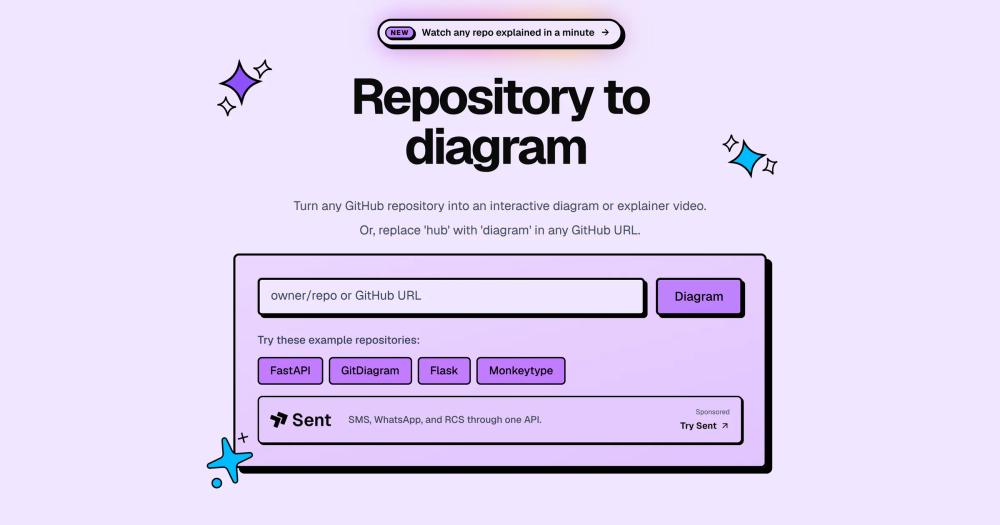
- No account required for public repositoriesAny public GitHub repository can be diagrammed immediately by entering the URL or replacing 'hub' with 'diagram' in an existing GitHub URL. No sign-up, no API key setup, and no configuration needed for the public use case.
Trade-offs
- -Self-hosting requires multiple external servicesRunning your own instance requires accounts for Cloudflare R2 (diagram storage), Upstash Redis (quota and rate limiting), and an OpenAI or OpenRouter API key. The Dockerfile is documented as a disaster recovery path rather than a zero-config install, so self-hosting demands more infrastructure work than tools with a single Docker Compose file.
- -Vercel is the only fully supported production runtimeThe primary deployment is Vercel-only; the Docker image is retained as a failover path and is not a first-class self-hosted product. Teams that need to run the full stack on private infrastructure should expect configuration work beyond what the README covers in detail.
gitdiagram vs alternatives#
GitDiagram vs Eraser.io
Both tools help engineering teams work with architecture diagrams, but they serve different workflows. GitDiagram generates diagrams automatically from a GitHub repository; Eraser.io is a collaborative diagramming editor where engineers author and maintain diagrams manually alongside technical documentation.
| Feature | GitDiagram | Eraser.io |
|---|---|---|
| License | MIT | Proprietary |
| Self-hosting | Docker (disaster recovery path) | No |
| Diagram authoring | AI-generated from repo | Manual with shapes and connectors |
| Private repo support | Yes, via GitHub token | Not applicable |
| Export formats | Mermaid source, PNG | SVG, PNG, PDF |
| Pricing | Free (public repos, hosted) | Paid plans |
| Collaboration | Not built in | Core feature |
| Source path validation | Yes, against actual repo | N/A |
GitDiagram is the better choice when the goal is a fast, disposable architecture overview of an existing repository with no setup time. It takes a URL and returns a diagram in seconds, making it useful for onboarding, quick code reviews, and exploring unfamiliar dependencies. Because the diagram is generated automatically, it reflects the current state of the repository on the next generation without any manual upkeep.
Eraser.io is the better choice when a team needs persistent, collaborative architecture documentation with custom layouts, multiple diagram types, and the ability to annotate and edit individual elements. Its diagramming canvas lets teams build canonical architecture documents that they refine over time, which is a workflow GitDiagram does not support. Teams maintaining living architecture documents with multiple contributors are better served by Eraser.io's collaborative workspace.

Quick start#
Local development setup uses Bun with Cloudflare R2, Upstash Redis, and an AI provider configured in the environment file.
```bash
git clone https://github.com/ahmedkhaleel2004/gitdiagram.git
cd gitdiagram
bun install
cp .env.example .env
bun run dev
```What it's built on#
- Languages
- JavaScriptTypeScript
- Frameworks
- Next.jsReact
- Infrastructure
- AWS
- Cache
- Redis
FAQ#
Is GitDiagram free to use?
Public repository diagrams on the hosted version at gitdiagram.com are free. The source code is MIT licensed, so running your own instance is also free, though you supply your own API keys for Cloudflare R2, Upstash Redis, and an AI provider. Heavy usage on the hosted version may be subject to rate limits.
Does GitDiagram support private repositories?
Yes. Select Private Repos in the header and provide a fine-grained GitHub personal access token with read access to the target repository. The token is sent only with the relevant same-origin API request and is never stored in the diagram URL or public diagram links.
Can I self-host GitDiagram?
Yes. The repository includes a Dockerfile and Railway configuration. Self-hosting requires a Cloudflare R2 bucket for diagram storage, Upstash Redis for rate limiting, and an OpenAI or OpenRouter API key. The README describes the Docker path as a disaster recovery recipe; expect to configure multiple services before the full stack runs.
What AI model does GitDiagram use?
The managed cloud version uses GPT-5.6 Luna at medium reasoning by default. Self-hosted deployments can configure OpenRouter to use a different model. Users can also supply their own OpenAI API key, which uses standard service tier and their configured model.
What does GitDiagram export?
Diagrams can be exported as raw Mermaid source or downloaded as a PNG image. The Mermaid source can be pasted into any tool that renders Mermaid diagrams, including GitHub markdown files, Notion, and popular diagramming editors.
Similar open-source tools#
agent-browser
Browser automation CLI with ref-based snapshots for AI agents
supervision
Python toolkit for computer vision detection, tracking, and annotation
opendisplay
Turn any iPhone, iPad, or spare Mac into a free second Mac monitor
JellyBoxPlayer
Native Jellyfin and Emby music player for every platform
browser
Headless browser for AI agents: 9x faster than Chrome, built in Zig
FckSignups
Open-source tools that work instantly, no signup required