Open Source Alternatives
  • Alternatives
  • Categories
    Categories by size1,182 projects
    • Developer Tools610
    • AI & Machine Learning515
    • Business & Productivity282
    • Web Development214
    • Security & Monitoring178
    • Communication & Collaboration158
    • IT Management149
    • LLMOps & AI Tooling130
    • Cloud & Hosting129
    • Product & Project Management126
    Browse all 21 categoriesDesign & Creative, DevOps & CI/CD and 9 more
  • Blog
  • Advertise
SearchNotion, Slack, password manager.../
Submit
Open Source Alternatives
  • Alternatives
    • Developer Tools610
    • AI & Machine Learning515
    • Business & Productivity282
    • Web Development214
    • Security & Monitoring178
    • Communication & Collaboration158
    • Browse all 21 categories
  • Blog
  • Advertise
Submit your project

New open source projects by email

The projects we add and every new guide. Free, unsubscribe any time.

Open Source Alternatives LogoOpen Source Alternatives

Handpicked Open Source Alternatives to Paid Softwares

Add Open Source Alternatives as a preferred source on Google

Product

  • Categories
  • Tag
  • Advertise

Resources

  • Blog
  • Collection
  • Submit

Company

  • Privacy Policy
  • Terms of Service
  • Refund Policy
  • Sitemap

Alternatives

  • Claude Code
  • Jira
  • Notion
  • Slack
  • Linear
  • Wispr Flow
  • All alternatives
© 2026 Open Source Alternatives. All rights reserved.
Open SourceAlternatives
Home/Categories/Security & Monitoring/Gopass
icon of Gopass

Gopass

Open source alternative to 1Password, Bitwarden, Keeper Security and HashiCorp Vault

  • 7.3K stars
  • MIT
  • Active this week
  • Last commit 4 days ago

Last verified Nov 9, 2026

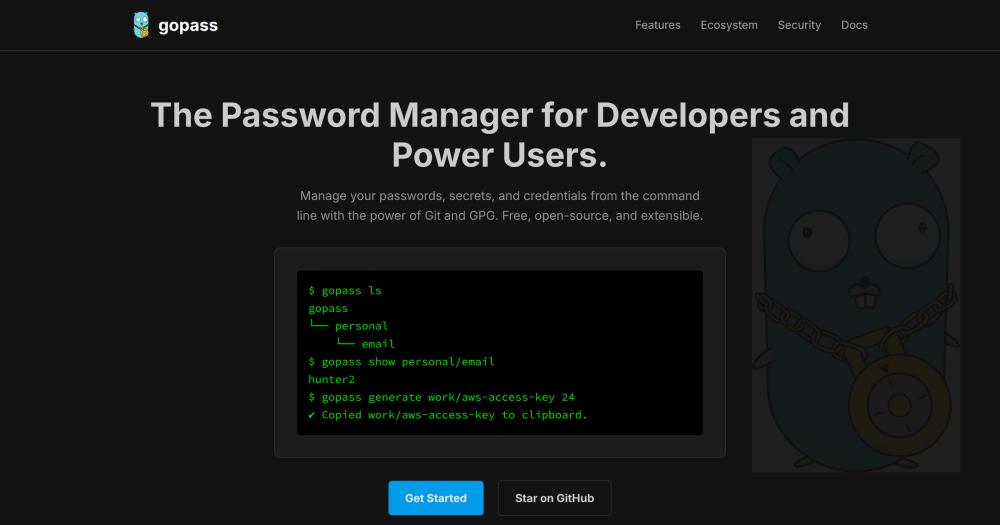
Manage passwords and secrets from the command line using GPG encryption and Git versioning, with team sharing and browser integration.

Visit websiteGitHub7.3K starsDeploy on Hostinger
Image for Gopass
TL;DR

Gopass is a command-line password manager for developers and teams that uses GPG encryption and Git versioning to store secrets locally. It is a drop-in replacement for pass, the standard UNIX password manager, and an open source alternative to paid tools like 1Password and Bitwarden for teams that want full control over their data. MIT licensed and cross-platform, gopass runs on Linux, macOS, BSD, and Windows with no dependency on a centralized server. Best for developers, sysadmins, and distributed teams who prefer terminal workflows and need to share secrets without trusting a third-party cloud.

Read the full breakdownHide the full breakdownWho it is for, how it works, trade-offs, the quick start and the FAQ
who it's for

Who Gopass is for#

Developers managing team infrastructure credentials

Teams storing AWS keys, API tokens, and database passwords can version-control all secrets alongside their code workflow. The Git backend means secrets history integrates with existing development tooling, and the terminal-native interface fits existing shell scripts and CI setups.

Skip if:

You need a GUI, mobile app, or non-technical team members to access secrets. Gopass is CLI-first; non-technical users will find the setup and daily workflow difficult.

Sysadmins on air-gapped or offline systems

Gopass operates without network access, so secrets stored locally remain accessible on disconnected machines. No account is required and no cloud service is needed. Sync happens on demand when the machine comes online and you choose to run git push.

Skip if:

Your team needs automatic background sync across devices without running git push manually. Gopass sync is explicit and does not happen automatically in the background.

Solo developers replacing 1Password or Bitwarden

For developers comfortable with GPG and Git, gopass gives full data ownership, no subscription fees, and terminal-native access from any shell session. The MIT license permits commercial use and modification without restriction.

Skip if:

You share passwords with non-technical family members or need a managed mobile experience. Bitwarden's free tier handles mixed-technical households better.

CI/CD pipelines and automation scripts

The CLI interface makes gopass scriptable. Pipelines retrieve secrets with gopass show -o and pipe them directly into environment variables or config files without storing plaintext in scripts or environment files.

Skip if:

You need dynamic secrets with automatic expiry or revocation, such as database credentials that rotate. HashiCorp Vault is purpose-built for that; gopass stores static secrets only.

the problem

The problem it solves#

Most password managers store your secrets on a third-party server. For individuals this is an acceptable tradeoff, but for teams handling infrastructure credentials, API keys, and deployment secrets, it means trusting a commercial service with the keys to your production systems. Paid managers like 1Password and Bitwarden charge per-seat fees that add up for large teams, enforce their own sync mechanisms, and create a central point of failure.

For developers and sysadmins who live in the terminal, switching to a GUI to fetch a password interrupts workflow. The standard UNIX approach of storing secrets in flat files adds no encryption or versioning. What teams need is a way to store secrets where they already store code, versioned in Git with encryption and a full audit trail of who changed what and when.

how Gopass solves it

How it solves it#

GPG and Age Encryption

Gopass encrypts each entry with one or more GPG public keys. Only recipients with the matching private key can decrypt. An age backend is available for teams that prefer age's simpler key management. Private keys never leave your machine; there is no central server that holds them.

Git-Versioned Secret Store

Every add, change, and delete creates a Git commit. You get a complete history of modifications with timestamps and authors. Syncing is a standard git push or git pull to any remote you control: a private server, GitLab, or a shared Git host.

Multi-User Team Sharing

Add a teammate's GPG public key as a recipient, and gopass re-encrypts the relevant entries for them. Shared stores let distributed teams maintain credentials without a centralized account system. Removing a recipient revokes their future access to any re-encrypted entry.

Browser Extension via gopass-bridge

The gopass-bridge extension for Firefox and Chrome connects your browser to your local gopass store for password autofill. Passwords are retrieved from your encrypted local store without being sent to a cloud service.

Cross-Platform CLI with Offline Support

Gopass runs on Linux, macOS, BSD, and Windows with the same interface and store format. It operates fully offline on an air-gapped machine, with no network access required unless you choose to sync a Git remote.

strengths · trade-offs

Strengths and trade-offs#

Strengths

  • MIT License with No Server RequiredGopass is MIT licensed. You own the store, run it on your own infrastructure, and there are no licensing fees or seats to manage. Unlike 1Password or Keeper Security, there is no central server to trust or account to maintain.
  • Full Audit Trail via GitEvery change to the secret store is a Git commit. Teams can audit exactly who changed which secret and when, using standard git log. This level of traceability is not available in most commercial password managers without an enterprise plan.
  • Offline and Air-Gap SupportGopass works without network access. You can run it on an air-gapped machine, sync only when you choose, or never connect to a remote at all. The store is files on disk, not an account in a cloud service.
  • Drop-In Replacement for passGopass is a compatible drop-in replacement for the standard UNIX pass format. Existing pass stores work directly with gopass, and teams migrating from pass gain additional features (team sharing, browser integration, improved CLI) without a full data migration.

Trade-offs

  • -GPG Key Setup RequiredGopass requires a GPG key pair before you can initialize a store. For users unfamiliar with GPG, generating keys, setting expiry dates, and distributing public keys to teammates is a non-trivial setup step. The documentation covers it, but it is a steeper on-ramp than creating an account with a managed password manager.
  • -CLI-Only Core ExperienceThe primary interface is the command line. While gopass-bridge adds browser autofill, there is no native GUI or mobile app. Teams that need polished cross-device graphical access will find gopass more demanding than managed alternatives like Bitwarden.
  • -Team Sharing Requires Key DistributionAdding a new team member requires exchanging GPG public keys and triggering re-encryption of relevant entries. This process is explicit and auditable, but it is a manual step that account-based services automate. For teams without existing GPG infrastructure, the initial setup effort is noticeable.
versus alternatives

Gopass vs alternatives#

Gopass vs 1Password

1Password is a commercial password manager with native apps on every platform, automatic cloud sync, and team vaults managed through a central account. Gopass stores secrets as GPG-encrypted files versioned in Git, with no central server.

FeatureGopass1Password
LicenseMITProprietary
Self-hostingYes (files + Git)No
PricingFree$3+/user/month
GUINo (browser extension only)Full apps on all platforms
Mobile appNoYes

Gopass is the better choice for engineering teams who prefer terminal workflows, need Git-native audit trails, and want self-hosting without per-seat licensing. 1Password is the better fit when your team includes non-technical members, needs polished mobile apps, or cannot manage GPG key distribution.

Gopass vs Bitwarden

Both Bitwarden and gopass can be self-hosted. Bitwarden runs a server with a database, web UI, and mobile apps; gopass stores secrets in a local directory synced via Git.

FeatureGopassBitwarden
LicenseMITAGPL-3.0 (server)
Self-hostingFiles + GitServer + database
Web UINoYes
Mobile appNoYes
Team sharingGPG recipientsServer-side shared vaults

Gopass suits teams already comfortable with GPG and Git who want zero server maintenance. Bitwarden (or Vaultwarden) is the better choice when your team needs web UI access, mobile apps, or members who do not use the terminal regularly.

Gopass vs HashiCorp Vault

Vault is enterprise secrets management built for dynamic credentials such as database leases, PKI certificates, cloud IAM integration, and automatic secret rotation. Gopass handles static secrets stored as encrypted files.

The two tools are complementary rather than directly competing. Vault is worth considering when you need automatic rotation, fine-grained access policies tied to service identities, or integration with cloud provider IAM systems at scale. Gopass handles developer and team credentials that are static and benefit most from Git versioning rather than automated rotation.

install · quick start

Quick start#

bash
Install gopass with Homebrew on macOS or Linux, or use your system's native package manager.
```bash
brew install gopass
```
tech stack · detected from GitHub

What it's built on#

Languages
Go
frequently asked

FAQ#

Is gopass free to use?

Yes. Gopass is MIT licensed and free for any use, including commercial team deployments. There is no paid tier, no seat count, and no account required. You can inspect the source code, fork it, and modify it without restriction.

Does gopass require a central server or cloud account?

No. Gopass stores secrets as encrypted files in a local directory. Git sync is optional; you push to any remote you choose (GitHub, GitLab, a private server, or nothing at all). The store works fully offline without network access.

How does team sharing work in gopass?

Each team member has a GPG key. You add their public key as a recipient in the shared store, and gopass re-encrypts the relevant entries for them. Changes sync via git push and pull. Adding or removing a recipient triggers re-encryption of all affected entries.

Can I use gopass without GPG?

The default encryption backend is GPG, but gopass supports an age backend as an alternative. Age uses simpler key management while still providing strong encryption. The backend is set at store initialization: run gopass setup with the --crypto=age flag to use it instead.

How does gopass compare to Bitwarden for self-hosting?

Both can be self-hosted, but they differ in architecture. Bitwarden runs a server with a database, web UI, and mobile apps; gopass stores secrets as GPG-encrypted files in a directory, with Git for sync. Gopass has no server to maintain, but also no web UI or mobile app. Bitwarden (or Vaultwarden) is the better choice when you need web or mobile access for a broader team.

also worth a look

Similar open-source tools#

Infisical

Alternative toHashiCorp Vault

Self-hosted secrets, certs, and privileged access in one platform.

  • 30,340 GitHub stars
  • MITLicence MIT

Vaultwarden

Alternative toBitwarden

Lightweight self-hosted password manager server, Bitwarden compatible

  • 70,378 GitHub stars
  • AGPL-3.0Licence AGPL-3.0

openbao

Alternative toHashiCorp Vault

Open source secret management governed by the Linux Foundation

  • 8,933 GitHub stars
  • MPL-2.0Licence MPL-2.0

Bitwarden

Alternative to1Password

Open source password manager with end-to-end encryption and self-hosting.

  • 20,595 GitHub stars
  • AGPL-3.0Licence AGPL-3.0

KeePass

Alternative to1Password

Free open source password manager with encrypted local file

  • 57 GitHub stars
  • GPL-3.0Licence GPL-3.0

KeePassXC

Alternative to1Password

Cross-platform open source password manager with browser plugin

  • 29,846 GitHub stars
by category

Open source tools in these categories#

178

Security & Monitoring

REA (Reverse Engineer Anything), RustDesk, Sherlock
610

Developer Tools

Skills for Real Engineers, REA (Reverse Engineer Anything), superpowers
Hostinger

Self-host Gopass on a Hostinger VPS

Keep it running 24/7, even when your laptop is off. A Hostinger VPS gives it a server of its own.

  1. 01

    Choose a plan

    Starts from $6.49/mo

  2. 02

    Apply

    Extra 10% off yearly plans

  3. 03

    Install Gopass

    On a server that stays on

  4. 04

    Start building

    Focus on the app, not the server

Deploy on Hostinger

Sponsors

Inbox Zero

Alternative toSuperhuman

AI email assistant that drafts replies and clears your inbox

  • 12,942 GitHub stars
  • AGPL-3.0Licence AGPL-3.0
  • #Email

rakazo

Alternative toGrok Bot

AI teammates you own: your keys, your model, your machine.

  • 7,478 GitHub stars
  • Apache-2.0Licence Apache-2.0
  • #AI Agents

SnitchFeed

Live monitoring on LinkedIn, X, Reddit & more. Agentic social listening for startups.

Marketing & Growth

Advertise your product

New open source projects by email

The projects we add and every new guide. Free, unsubscribe any time.

Find open source alternatives to paid software

/
  • Claude Code to OpenCode
  • Jira to Windshift
  • Notion to AppFlowy
  • Slack to Mattermost
  • Linear to GitLab
  • Wispr Flow to Handy
  • Arc to Zen Browser
  • CapCut to Concat
  • Grok Bot to rakazo
  • Superhuman to Inbox Zero
  • Airtable to AITable
  • Muse to OpenClaw
  • Railway to Coolify
  • GitHub Copilot to Cline
  • Datadog to Netdata
  • Confluence to Wiki.js
  • Microsoft Teams to Rocket.Chat
  • 1Password to KeePassXC
  • Firebase to Supabase
  • Pinecone to Qdrant
  • Zapier to n8n
  • Devin AI to OpenHands
  • Asana to Leantime
  • Contentful to Strapi
  • Claude Code to OpenCode
  • Jira to Windshift
  • Notion to AppFlowy
  • Slack to Mattermost
  • Linear to GitLab
  • Wispr Flow to Handy
  • Arc to Zen Browser
  • CapCut to Concat
  • Grok Bot to rakazo
  • Superhuman to Inbox Zero
  • Airtable to AITable
  • Muse to OpenClaw
  • Railway to Coolify
  • GitHub Copilot to Cline
  • Datadog to Netdata
  • Confluence to Wiki.js
  • Microsoft Teams to Rocket.Chat
  • 1Password to KeePassXC
  • Firebase to Supabase
  • Pinecone to Qdrant
  • Zapier to n8n
  • Devin AI to OpenHands
  • Asana to Leantime
  • Contentful to Strapi