Open Source Alternatives
  • Alternatives
  • Categories
    Categories by size943 projects
    • Developer Tools489
    • AI & Machine Learning421
    • Business & Productivity207
    • Web Development199
    • Security & Monitoring141
    • Communication & Collaboration129
    • IT Management129
    • Cloud & Hosting111
    • Data & Analytics108
    • LLMOps & AI Tooling107
    Browse all 21 categoriesDesign & Creative, Product & Project Management and 9 more
  • Blog
  • Advertise
SearchNotion, Slack, password manager.../
Submit
Open Source Alternatives
  • Alternatives
    • Developer Tools489
    • AI & Machine Learning421
    • Business & Productivity207
    • Web Development199
    • Security & Monitoring141
    • Communication & Collaboration129
    • Browse all 21 categories
  • Blog
  • Advertise
Submit your project

New open source projects by email

The projects we add and every new guide. Free, unsubscribe any time.

Open Source Alternatives LogoOpen Source Alternatives

Handpicked Open Source Alternatives to Paid Softwares

Product

  • Categories
  • Tag
  • Advertise

Resources

  • Blog
  • Collection
  • Submit

Company

  • Privacy Policy
  • Terms of Service
  • Refund Policy
  • Sitemap

Alternatives

  • Claude Code
  • Jira
  • Notion
  • Slack
  • Linear
  • Wispr Flow
  • All alternatives
© 2026 Open Source Alternatives. All rights reserved.
Open SourceAlternatives
Home/Categories/Developer Tools/Happy
icon of Happy

Happy

  • 24.4K stars
  • MIT
  • Active this week
  • Last commit today

Last verified Oct 29, 2026

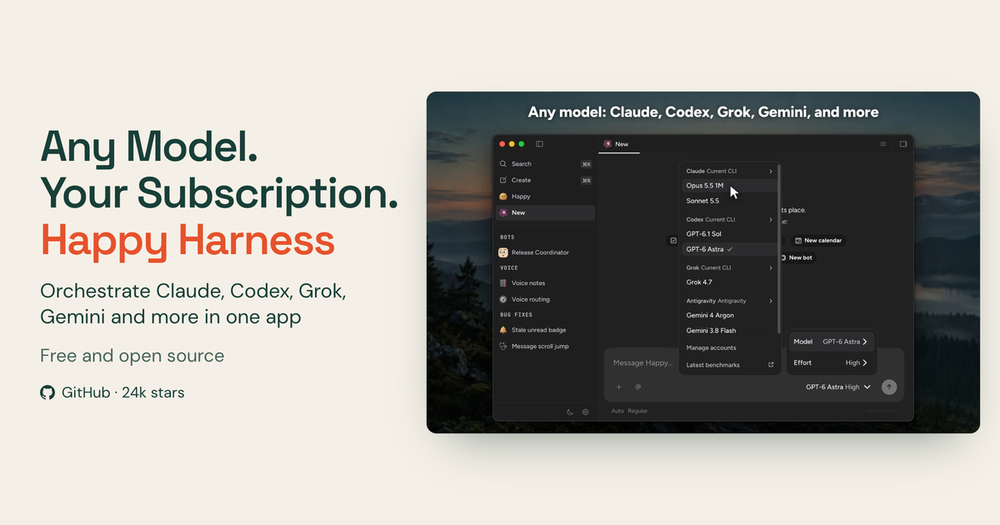
Orchestrate Claude Code, Codex, Grok, and Gemini in one app by reusing the subscriptions you already pay for, on desktop and mobile.

Visit websiteGitHub24.4K stars
image of Happy
TL;DR

Happy is an MIT-licensed open source coordination layer for AI coding sessions that runs Claude Code, Codex, Grok, and Gemini from one desktop and mobile app. It replaces the fragmented experience of switching between Cursor, Copilot, and individual model apps by unifying session management without adding a new subscription. You sign in with the model accounts you already have; Happy routes traffic through those endpoints and adds multi-model switching, encrypted mobile sync, and multiplayer team sessions. Best for developers already subscribed to Claude or Codex who want a single interface across all their AI coding tools.

Read the full breakdownHide the full breakdownWho it is for, how it works, trade-offs, the quick start and the FAQ
who it's for

Who Happy is for#

Developers already subscribed to Claude, Codex, or Grok

If you pay for Claude Pro or Codex and want to switch between them for different tasks without leaving the same interface, Happy unifies session management without adding a new subscription layer. You bring your credentials; Happy manages the sessions.

Skip if:

You use only one AI coding provider and have no need for multi-model switching. A single-provider workflow is simpler without the extra coordination layer.

Teams building with shared AI agent sessions

Deploy the team relay server and invite colleagues into the same running agent session. Each participant authenticates as themselves and can steer the agent, which makes code review and pair programming with AI agents possible in real time.

Skip if:

You work solo or your team collaboration is already covered by a shared workspace tool. The multiplayer server requires infrastructure setup that solo developers do not need.

Developers working across desktop and mobile

Start a Claude Code or Codex session at your desk and pick it up on iOS or Android without losing context. The mobile apps are end-to-end encrypted and rated 4.9 and 5.0 stars respectively, with the same session state you left on the desktop.

Skip if:

You work exclusively at a desk and do not need mobile access. The mobile sync layer adds relay server dependency with no benefit for desktop-only workflows.

Teams wanting to fork or extend an AI coding integration

With MIT licensing across all four repositories (mobile app, desktop app, agent runtime, relay server), you can fork any component and ship your own build. The agent runtime (happy-agent) is the open source runtime the desktop app uses, making it a starting point for custom agent integrations.

Skip if:

You need a stable, fully polished product and do not have engineering bandwidth to work with an actively developed codebase that has over 1,000 open issues.

the problem

The problem it solves#

AI coding tools have splintered into a subscription maze. Claude Code, Codex, Grok, and Gemini each come with their own interfaces, their own session contexts, and their own apps. Developers building seriously with AI spend time switching between these environments, losing agent context at each boundary, and still paying for the underlying model subscriptions regardless.

Existing interface layers add a third bill on top: tools like Cursor and GitHub Copilot charge a per-seat fee for their own model wrappers. If you are already subscribed to Claude Pro, Codex, and Grok, you are paying for model access that Cursor's interface reroutes through its own infrastructure anyway. The waste is the interface layer itself, duplicating subscription costs you already carry.

how Happy solves it

How it solves it#

Multi-model agent switching in one interface

Run Claude Code, Codex, Grok, and Gemini from the same app. Assign each task the model that fits best, and delegate to subagents on any of them. Gemini runs through Antigravity; OpenCode and any Agent Client Protocol agent can plug in as an additional provider.

Sign in with your existing model subscriptions

You authenticate directly with your Claude, Codex, or Grok accounts. Happy acts as the coordination layer; it does not resell model access or add a per-seat fee on top of your subscriptions. Gemini connects through your Google account via Antigravity.

End-to-end encrypted mobile sync

The iOS and Android apps connect to the same agent sessions you started on the desktop. Data moving between your devices is encrypted in transit. The iOS app has 4.9 stars from over 1,000 App Store ratings; the Android app has 5.0 stars from over 3,100 Google Play reviews.

Multiplayer sessions with a team server

Deploy a team relay server and invite colleagues into the same agent session. Each participant signs in as themselves, shares the same project context, and can steer the running agent. Built for teams that want shared AI coding sessions without screen sharing.

Terminal CLI for existing terminal workflows

Install the happy npm package to wrap Claude Code or Codex directly in your terminal. Start an agent with 'happy claude' for Claude Code or 'happy codex' for Codex, then continue the same session from your phone through the relay server. No desktop app required.

strengths · trade-offs

Strengths and trade-offs#

Strengths

  • MIT license, no per-seat fee above model costsThe coordination layer itself is MIT licensed and free. Your only cost is the model subscriptions you already hold. Unlike Cursor or GitHub Copilot, which both charge a monthly per-seat fee for their interface layer, Happy adds no seat charge on top of your model subscriptions.
  • 24,000+ GitHub stars, actively maintainedThe repo crossed 24,386 stars with 2,096 forks since its July 2025 launch, and the project remains in active development. Four open source repositories cover the mobile app, desktop app, agent runtime, and relay server.
  • Highly rated iOS and Android appsThe iOS app holds a 4.9-star rating from over 1,000 App Store reviews. The Android app holds a 5.0-star rating from over 3,100 Google Play reviews. Both apps sync the same desktop agent sessions with end-to-end encryption, which is uncommon among AI coding tools.
  • Self-hostable relay server for team syncThe relay server (happy-server) that syncs sessions between desktop and phone is open source and self-hostable. Teams with strict data requirements can run the entire stack on their own infrastructure: the app, the relay, and the agent runtime.

Trade-offs

  • -Over 1,000 open GitHub issuesThe project has accumulated 1,086 open issues since its July 2025 launch. For a tool at this stage, a high open-issue count reflects fast feature growth outpacing bug fixes. Teams running it in production should review open issues for their model integrations before relying on it for critical workflows.
  • -Mobile session sync requires a relay serverContinuing a desktop agent session on your phone requires the Happy relay server, either the hosted one or your own self-deployed instance. Self-hosting the relay introduces infrastructure overhead. Teams with strict data requirements should plan for running happy-server alongside the rest of the stack.
  • -Each model provider requires separate authenticationYou must authenticate separately with each model provider you plan to use: Claude, Codex, and Grok each require their own active subscription. Gemini runs through Antigravity, adding an extra step. Developers new to these platforms will need active subscriptions before Happy provides value over a single-provider workflow.
versus alternatives

Happy vs alternatives#

Happy vs Cursor

Both tools make AI coding agents productive on your machine, but they work differently. Cursor is a complete code editor that bundles model access and charges a per-seat monthly subscription. Happy is a coordination layer only, routing your sessions through the Claude, Codex, or Grok subscriptions you already hold, with no per-seat fee for the orchestration layer.

FeatureHappyCursor
LicenseMITProprietary
Self-hostingRelay server (open source)No
Model accessYour existing accountsBundled per-seat subscription
Mobile appiOS and Android (encrypted)No
Multiplayer sessionsYes, team serverNo
Platform feeNoneMonthly per-seat

Happy is the better choice when you already hold active Claude Pro or Codex subscriptions and do not want to pay a second interface fee on top of them. It also wins for teams needing multiplayer sessions or mobile continuity. Cursor is worth considering when you want a tightly integrated editor environment with model access included, or when you do not hold individual model subscriptions and prefer an all-in-one coding environment.

Happy vs GitHub Copilot

GitHub Copilot provides inline completions and chat inside VS Code, JetBrains, and other editors at a per-seat monthly fee. Happy manages full agent sessions where Claude Code or Codex run end-to-end coding tasks autonomously, with multi-model switching and mobile continuity.

FeatureHappyGitHub Copilot
LicenseMITProprietary
Self-hostingRelay serverNo
ModelYour Claude/Codex/Grok accountsGitHub's hosted models
Mobile accessiOS and Android appsNo dedicated app
Agent sessionsFull multi-step autonomous agentsChat completions and inline
Platform feeNoneMonthly per-seat

Happy fits developers who use AI for full autonomous coding tasks, not just completions and chat. GitHub Copilot is the simpler choice if your primary use is autocomplete and editor chat inside VS Code without managing separate model subscriptions. If you already pay for Claude Pro and want to run long autonomous sessions across desktop and phone, Happy serves a different workflow than Copilot does.

install · quick start

Quick start#

bash
Install the desktop app on macOS via Homebrew, or set up the CLI for terminal-first workflows.
```bash
brew install --cask slopus/tap/happy

npm install -g happy
```
tech stack · detected from GitHub

What it's built on#

Languages
JavaScriptKotlinPythonSwiftTypeScript
Frameworks
React
frequently asked

FAQ#

Is Happy free to use?

Yes, Happy itself is MIT licensed and free. Your costs are the model subscriptions you use (Claude, Codex, Grok, or Gemini via Antigravity); Happy adds no per-seat fee for the coordination layer. The desktop app is available for macOS, Windows, and Linux; the mobile app is on iOS and Android.

Can I self-host Happy?

Yes. The relay server (happy-server) and agent runtime (happy-agent) are open source and self-hostable. Self-hosting the relay keeps your session sync data on your own infrastructure. The desktop and mobile apps connect to a self-hosted relay by configuration. Full self-hosting requires running multiple components: the relay server and optionally the agent runtime alongside your model connections.

What AI models does Happy support?

Happy supports Claude Code (Anthropic), Codex (OpenAI), Grok (xAI), and Gemini via Antigravity. Any Agent Client Protocol (ACP) agent can also plug in as a provider. Each model requires its own active subscription from the respective provider; Happy acts as the coordination layer on top of those accounts.

How does Happy differ from Cursor or GitHub Copilot?

Cursor and GitHub Copilot bundle their own model access and charge a per-seat monthly fee for their interface layer. Happy acts as a coordination layer, routing your sessions to the model accounts you already hold without adding model charges. The tradeoff is that Happy requires individual model subscriptions for each provider you want to use.

What platforms is Happy available on?

Happy has a desktop app for macOS (Intel and Apple Silicon), Windows, and Linux, available via Homebrew on macOS or direct download. The mobile app is on iOS (App Store, 4.9 stars) and Android (Google Play, 5.0 stars). An npm CLI (npm install -g happy) is available for terminal-first workflows that wrap Claude Code and Codex directly.

also worth a look

Similar open-source tools#

Hermes Agent

Featured

Alternative toGrok Bot

Self-hosted AI agent: persistent memory, multi-channel chat, model choice.

  • 257,359 GitHub stars
  • MITLicence MIT

Oya Browser

Alternative toBrowserbase

Records portal tasks once; replays with no model and no bot detection

  • 355 GitHub stars
  • CustomLicence Sustainable Use License 1.0

Caprock

Alternative toConductor

Track coding agent sessions with cost, plan limits, and PR pipeline

  • 36 GitHub stars
  • Apache-2.0Licence Apache-2.0

Cindy

Alternative toCursor

Local-first AI agent desktop app for Claude Code, Codex, and Pi.

  • 7,497 GitHub stars
  • Apache-2.0Licence Apache-2.0

Promptfoo

Alternative toBraintrust

Automated LLM evals, red teaming, and AI vulnerability scanning.

  • 26,422 GitHub stars
  • MITLicence MIT

Vllm

Alternative toTogether AI

High-throughput LLM inference server with OpenAI-compatible API

  • 95,637 GitHub stars
  • Apache-2.0Licence Apache-2.0
by category

Open source tools in these categories#

489

Developer Tools

REA (Reverse Engineer Anything), superpowers, Skills for Real Engineers
422

AI & Machine Learning

freeCodeCamp, OpenClaw, REA (Reverse Engineer Anything)
108

LLMOps & AI Tooling

Hermes Agent, OpenCode, MarkItDown

Sponsors

Inbox Zero

Alternative toSuperhuman

AI email assistant that drafts replies and clears your inbox

  • 12,826 GitHub stars
  • AGPL-3.0Licence AGPL-3.0
  • #Email

Omnara

Alternative toCClaude Managed Agents

Open-source agent deployment API. Self-host or use Omnara Cloud.

  • 3,296 GitHub stars
  • Apache-2.0Licence Apache-2.0
  • #AI Agents

rakazo

Alternative toGrok Bot

AI teammates you own: your keys, your model, your machine.

  • 5,914 GitHub stars
  • Apache-2.0Licence Apache-2.0
  • #AI Agents
Advertise your product

New open source projects by email

The projects we add and every new guide. Free, unsubscribe any time.

Find open source alternatives to paid software

/
  • Claude Code to OpenCode
  • Jira to Windshift
  • Notion to AppFlowy
  • Slack to Mattermost
  • Linear to GitLab
  • Wispr Flow to Handy
  • Arc to Zen Browser
  • CapCut to Concat
  • Grok Bot to rakazo
  • Superhuman to Inbox Zero
  • Airtable to AITable
  • Muse to OpenClaw
  • Railway to Coolify
  • GitHub Copilot to Cline
  • Datadog to Netdata
  • Microsoft Teams to Rocket.Chat
  • Confluence to Docmost
  • Pinecone to Qdrant
  • Zapier to n8n
  • Devin AI to OpenHands
  • Firebase to Supabase
  • 1Password to KeePassXC
  • Contentful to Strapi
  • Adobe Premiere Pro to Shotcut
  • Claude Code to OpenCode
  • Jira to Windshift
  • Notion to AppFlowy
  • Slack to Mattermost
  • Linear to GitLab
  • Wispr Flow to Handy
  • Arc to Zen Browser
  • CapCut to Concat
  • Grok Bot to rakazo
  • Superhuman to Inbox Zero
  • Airtable to AITable
  • Muse to OpenClaw
  • Railway to Coolify
  • GitHub Copilot to Cline
  • Datadog to Netdata
  • Microsoft Teams to Rocket.Chat
  • Confluence to Docmost
  • Pinecone to Qdrant
  • Zapier to n8n
  • Devin AI to OpenHands
  • Firebase to Supabase
  • 1Password to KeePassXC
  • Contentful to Strapi
  • Adobe Premiere Pro to Shotcut