Open Source Alternatives
  • Alternatives
  • Categories
    Categories by size1,196 projects
    • Developer Tools617
    • AI & Machine Learning520
    • Business & Productivity290
    • Web Development215
    • Security & Monitoring180
    • Communication & Collaboration159
    • IT Management151
    • LLMOps & AI Tooling132
    • Cloud & Hosting129
    • Product & Project Management126
    Browse all 21 categoriesDesign & Creative, DevOps & CI/CD and 9 more
  • Blog
  • Advertise
SearchNotion, Slack, password manager.../
Submit
Open Source Alternatives
  • Alternatives
    • Developer Tools617
    • AI & Machine Learning520
    • Business & Productivity290
    • Web Development215
    • Security & Monitoring180
    • Communication & Collaboration159
    • Browse all 21 categories
  • Blog
  • Advertise
Submit your project

New open source projects by email

The projects we add and every new guide. Free, unsubscribe any time.

Open Source Alternatives LogoOpen Source Alternatives

Handpicked Open Source Alternatives to Paid Softwares

Add Open Source Alternatives as a preferred source on Google

Product

  • Categories
  • Tag
  • Advertise

Resources

  • Blog
  • Collection
  • Submit

Company

  • Privacy Policy
  • Terms of Service
  • Refund Policy
  • Sitemap

Alternatives

  • Claude Code
  • Jira
  • Notion
  • Slack
  • Linear
  • Wispr Flow
  • All alternatives
© 2026 Open Source Alternatives. All rights reserved.
Open SourceAlternatives
Home/Categories/Business & Productivity/Ice
icon of Ice

Ice

Open source alternative to Bartender and Vanilla

  • 30K stars
  • GPL-3.0
  • Active recently
  • Last commit 34 days ago

Last verified Nov 10, 2026

Manage macOS menu bar icons with drag-and-drop arrangement, hidden sections, appearance customization, and show-on-hover controls.

Visit websiteGitHub30K stars
image of Ice
TL;DR

Ice is a macOS menu bar manager that lets you hide, reorganize, and control the appearance of menu bar icons. It replaces paid tools like Bartender and Vanilla with a free, GPL-3.0 licensed desktop app for macOS 14 and later. Install via Homebrew cask or download from GitHub Releases: no subscription, no server required. Best for macOS power users who run many menu bar utilities and want organized, clutter-free access to them.

Read the full breakdownHide the full breakdownWho it is for, how it works, trade-offs, the quick start and the FAQ
who it's for

Who Ice is for#

macOS Power Users with Many Menu Bar Utilities

If you run a full set of tools in the menu bar, Ice lets you organize them into visible, hidden, and always-hidden sections. The drag-and-drop interface handles the initial layout, and hotkeys let you toggle sections without touching the mouse.

Skip if:

Skip if you are on macOS 13 or earlier: Ice requires macOS 14 and will not install on older versions.

MacBook Users Working Around the Notch

On MacBooks with the camera notch, icons in the center of the menu bar can disappear behind the cutout. The Ice Bar moves hidden icons to a second row below the menu bar, keeping them accessible without the notch overlap problem.

Skip if:

Skip if your Mac does not have a notch (Mac mini, Mac Pro, iMac, or non-notch MacBook): the Ice Bar still works but its primary value is for notch models where icon visibility is a problem.

Users Moving Away from Bartender

Ice covers Bartender's core feature set at no cost: hiding icons, sections, hotkeys, auto-rehide, drag-and-drop layout, and appearance controls. Users who want a free, source-available replacement with comparable day-to-day functionality will find Ice covers the main workflow.

Skip if:

Skip if you depend on Bartender's per-app automation rules or trigger-based show/hide conditions: those features are on Ice's roadmap but are not yet implemented.

the problem

The problem it solves#

macOS provides no built-in controls to hide or reorganize icons in the menu bar. As users install more utilities, monitors, cloud clients, and communication apps, the bar fills up with icons for background processes. On MacBooks with the notch, overlapping icons can disappear behind the camera cutout entirely.

The only workarounds Apple provides are quitting applications or accepting the clutter. Paid tools like Bartender and Vanilla have addressed this gap for years, but they carry a license cost. Users who want full menu bar control without paying for a third-party license have no Apple-native option.

how Ice solves it

How it solves it#

Show Hidden Items Below the Menu Bar

The Ice Bar places your hidden menu bar icons in a separate bar that appears just below the main bar. It is particularly useful on MacBooks with the notch, where the camera cutout can obscure icons in the center of the bar. The Ice Bar gives you a persistent display area for hidden items without cluttering the visible menu bar.

Drag-and-Drop Item Arrangement

Rearrange any menu bar icon by dragging it to a new position directly in the bar. The layout is applied immediately and persists across reboots. This covers the same workflow as paid alternatives while remaining free and source-available under GPL-3.0.

Show Hidden Items on Hover, Click, or Scroll

Hidden icons can be revealed by hovering over the menu bar, clicking an empty area, or scrolling in the bar. Auto-rehide kicks in after a configurable delay so icons tuck away again without manual action. All three trigger methods can be enabled or disabled independently.

Menu Bar Appearance Customization

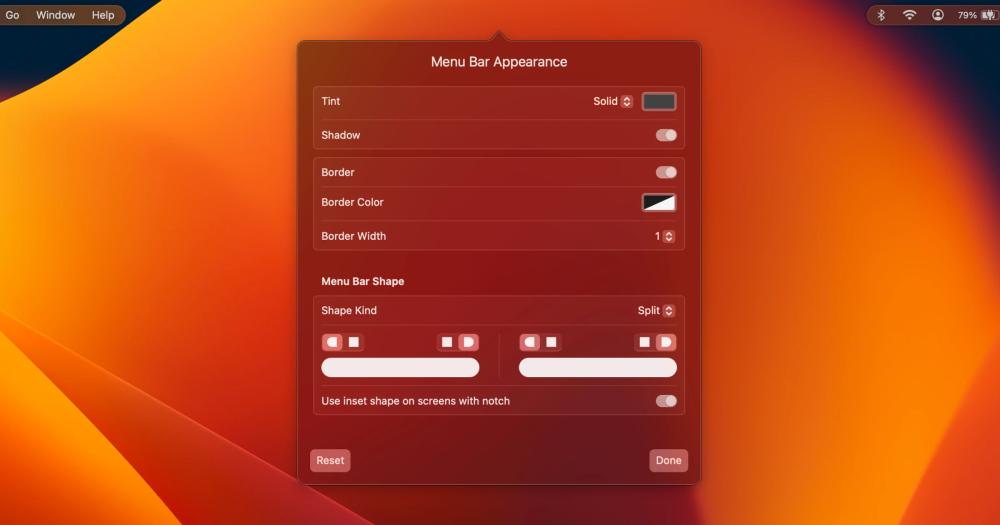
Apply a solid color or gradient tint to the menu bar, add a shadow, draw a border, or switch to a rounded or split shape. These visual controls go beyond the basic hide-and-show feature set and let you match the menu bar's look to your wallpaper or desktop setup.

Menu Bar Item Search

A built-in search panel lets you find any menu bar icon by name without scrolling through hidden sections. Trigger it with a configurable hotkey. Useful when many items are spread across visible and hidden sections and you need to reach one quickly.

Section Toggle Hotkeys

Assign keyboard shortcuts to toggle the hidden section, the always-hidden section, the Ice Bar, and section dividers. A separate hotkey can toggle application menus, which helps when menu bar items and app menus overlap on smaller screens.

strengths · trade-offs

Strengths and trade-offs#

Strengths

  • Free and GPL-3.0 LicensedIce costs nothing to download and run. The GPL-3.0 license makes the source fully available: you can read it, fork it, and self-build on any macOS 14+ machine. Bartender requires a paid license; Vanilla's permanent-hide feature is locked behind a one-time $10 Vanilla Pro purchase.
  • Nearly 30,000 GitHub Stars Since 2023Ice accumulated nearly 30,000 GitHub stars and over 1,000 forks since its initial release in August 2023, with active development continuing as of October 2026. This level of adoption for a macOS desktop utility reflects strong community uptake and consistent maintenance.
  • Appearance Controls Beyond Basic HidingIce adds visual customization not available in simple hide-and-show tools: a solid or gradient menu bar tint, a drop shadow, a border, and custom rounded or split shapes. These features are built into the app and require no additional configuration.

Trade-offs

  • -Requires macOS 14 (Sonoma) or LaterIce uses system APIs introduced in macOS 14 and there are no plans to support earlier macOS versions. Users on macOS 13 (Ventura) or earlier cannot install or run it. If you are on an older macOS version, Bartender 4 or Vanilla remain the available menu bar manager options.
  • -Several Planned Features Not Yet ShippedAs noted in the README, some features have not yet been implemented: layout profiles, individual spacer items, item groups, trigger-based show/hide rules, light/dark mode setting separation, and menu bar widgets. Users who need these features today will need to wait for them to ship or work within the current feature set.
  • -403 Open Issues on GitHubWith 403 open issues reported as of the research date (pull requests excluded), Ice carries an active backlog. The project is maintained primarily by one developer, which means issue resolution depends on a single contributor's availability. Users who run into edge cases may need to work around issues or contribute fixes.
versus alternatives

Ice vs alternatives#

Ice vs Bartender

Bartender is a paid macOS menu bar manager that hides, organizes, and automates icons through rules and triggers. Ice covers the same core functionality (sections, hotkeys, auto-rehide) and adds visual customization options (menu bar tint, shadow, border, and custom shapes) that are not part of Bartender's listed feature set.

FeatureIceBartender
LicenseGPL-3.0 (free)Proprietary (paid)
Automation rules and triggersNo (roadmap)Yes
PriceFreePaid license

Ice is the right choice when cost and source availability matter and your use case does not require per-app automation rules. Bartender is still the better fit when you need trigger-based controls: showing an icon only when a specific condition is met, for example. Those condition-based features are on Ice's roadmap but not yet shipped.

Ice vs Vanilla

Vanilla focuses on simple icon hiding. Its free tier only temporarily hides icons; permanent hiding requires Vanilla Pro, a one-time $10 purchase.

FeatureIceVanilla
LicenseGPL-3.0 (free)Proprietary
Permanent hidingYes (free)Vanilla Pro ($10 one-time)

Ice provides permanent hiding at no cost, plus an always-hidden section and appearance controls not part of Vanilla's described feature set. Vanilla Pro is worth considering when you need an older macOS version: Ice requires macOS 14, so users on macOS 13 or earlier need a different tool.

install · quick start

Quick start#

bash
Install Ice on macOS 14 or later using the Homebrew cask.

```bash
brew install --cask jordanbaird-ice
```
tech stack · detected from GitHub

What it's built on#

Languages
Swift
frequently asked

FAQ#

Is Ice free to use?

Yes. Ice is GPL-3.0 licensed and costs nothing. Download it from GitHub Releases or install it via Homebrew with brew install --cask jordanbaird-ice. There are no paid tiers, no subscription, and no license key required.

What macOS version does Ice require?

Ice requires macOS 14 (Sonoma) or later. It uses system APIs introduced in macOS 14, and the project has no plans to support earlier versions. If you are on macOS 13 (Ventura) or earlier, Bartender or Vanilla are the available alternatives.

How does Ice compare to Bartender?

Ice covers Bartender's core feature set at no cost: hiding icons, organized sections, hotkeys, and auto-rehide. It is GPL-3.0 licensed and free, while Bartender requires a paid license. Ice also includes appearance customization (menu bar tint, shadow, border, shapes) not listed in Bartender's feature description. The main gap is Bartender's automation rules and trigger-based controls; those are on Ice's roadmap but are not yet implemented.

Does Ice work on MacBooks with the notch?

Yes. Ice includes an "Ice Bar" that displays hidden menu bar icons in a separate bar just below the main menu bar. This was designed for MacBooks with the camera notch, where the cutout can obscure icons in the center of the bar.

How do I install Ice?

Install via Homebrew with brew install --cask jordanbaird-ice, or download the "Ice.zip" from the latest release at https://github.com/jordanbaird/Ice/releases/latest, unzip it, and move Ice.app to your Applications folder. Ice can be set to launch at login from its preferences.

also worth a look

Similar open-source tools#

CleanYourTV

Featured

Alternative toATV Launcher Pro

Debloat any Android or Google TV over Wi-Fi and get an Apple TV-style home.

  • 53,395 GitHub stars
  • MIT LicenseLicence MIT License

OpenClaw

Featured

Alternative toMuse

Self-hosted AI assistant for WhatsApp, Telegram, and more

  • 394,144 GitHub stars
  • MITLicence MIT

Inbox Zero

Featured

Alternative toSuperhuman

AI email assistant that drafts replies and clears your inbox

  • 12,942 GitHub stars
  • AGPL-3.0Licence AGPL-3.0

rakazo

Featured

Alternative toGrok Bot

AI teammates you own: your keys, your model, your machine.

  • 7,478 GitHub stars
  • Apache-2.0Licence Apache-2.0

paperclip

Featured

Alternative toGrok Bot

Self-hosted AI agent management with org charts and budgets

  • 112,038 GitHub stars
  • MITLicence MIT

Rustdesk Server

Alternative toTeamViewer

Self-hosted relay and rendezvous server for RustDesk remote desktop.

  • 10,720 GitHub stars
  • AGPL-3.0Licence AGPL-3.0
by category

Open source tools in these categories#

290

Business & Productivity

OpenClaw, Excalidraw, RustDesk

Sponsors

Inbox Zero

Alternative toSuperhuman

AI email assistant that drafts replies and clears your inbox

  • 12,942 GitHub stars
  • AGPL-3.0Licence AGPL-3.0
  • #Email

rakazo

Alternative toGrok Bot

AI teammates you own: your keys, your model, your machine.

  • 7,478 GitHub stars
  • Apache-2.0Licence Apache-2.0
  • #AI Agents

SnitchFeed

Live monitoring on LinkedIn, X, Reddit & more. Agentic social listening for startups.

Marketing & Growth

Advertise your product

New open source projects by email

The projects we add and every new guide. Free, unsubscribe any time.

Find open source alternatives to paid software

/
  • Claude Code to OpenCode
  • Jira to Windshift
  • Notion to AppFlowy
  • Slack to Mattermost
  • Linear to GitLab
  • Wispr Flow to Handy
  • Arc to Zen Browser
  • CapCut to Concat
  • Grok Bot to rakazo
  • Superhuman to Inbox Zero
  • Airtable to AITable
  • Muse to OpenClaw
  • Railway to Coolify
  • GitHub Copilot to Cline
  • Datadog to Netdata
  • Confluence to Wiki.js
  • Microsoft Teams to Rocket.Chat
  • 1Password to KeePassXC
  • Firebase to Supabase
  • Pinecone to Qdrant
  • Zapier to n8n
  • Devin AI to OpenHands
  • Asana to Leantime
  • Contentful to Strapi
  • Claude Code to OpenCode
  • Jira to Windshift
  • Notion to AppFlowy
  • Slack to Mattermost
  • Linear to GitLab
  • Wispr Flow to Handy
  • Arc to Zen Browser
  • CapCut to Concat
  • Grok Bot to rakazo
  • Superhuman to Inbox Zero
  • Airtable to AITable
  • Muse to OpenClaw
  • Railway to Coolify
  • GitHub Copilot to Cline
  • Datadog to Netdata
  • Confluence to Wiki.js
  • Microsoft Teams to Rocket.Chat
  • 1Password to KeePassXC
  • Firebase to Supabase
  • Pinecone to Qdrant
  • Zapier to n8n
  • Devin AI to OpenHands
  • Asana to Leantime
  • Contentful to Strapi