Who iloader is for#
iOS users setting up SideStore
iloader automates the full SideStore setup. It logs into your Apple ID, places pairing files, signs the SideStore IPA, and installs it on your device. This is the primary use case the tool was built around.
Skip if:
If you already have SideStore installed and just want to install additional apps, you do not need iloader. SideStore handles app installation on its own.
Developers testing IPA builds on hardware
Build your app locally, export the IPA, then use iloader to sign and install it on a device using your free Apple ID. No Apple Developer account subscription required for testing on your own device.
Skip if:
If you need to distribute a TestFlight build or run apps across multiple devices owned by others, you need Apple's official developer tools and a paid Developer account.
iOS users installing apps outside the App Store
Import any IPA from a trusted source and iloader signs and installs it, whether it is an archived version of an app that left the store, an open source app not submitted to Apple, or a utility Apple would not approve.
Skip if:
Verify the source and legal status of any IPA before installing. iloader does not validate the content of the apps you install.
The problem it solves#
Installing apps outside the App Store on iPhone requires either jailbreaking the device, paying for a commercial certificate signing service, or manually configuring Apple's developer tools. Free personal certificates issued through Apple expire every 7 days and must be re-signed regularly to keep apps running. Paid sideloading services charge monthly or annual fees and use shared certificates that Apple actively revokes, which can disable every app installed through that service at once.
For users wanting to run SideStore or other unsigned apps, the historical process was fragmented. Pairing files, Xcode configuration, and iTunes setup had to be coordinated manually, and a revoked certificate from a shared service left users with no recourse until a new one was issued.
How it solves it#
Automatic SideStore and LiveContainer setup
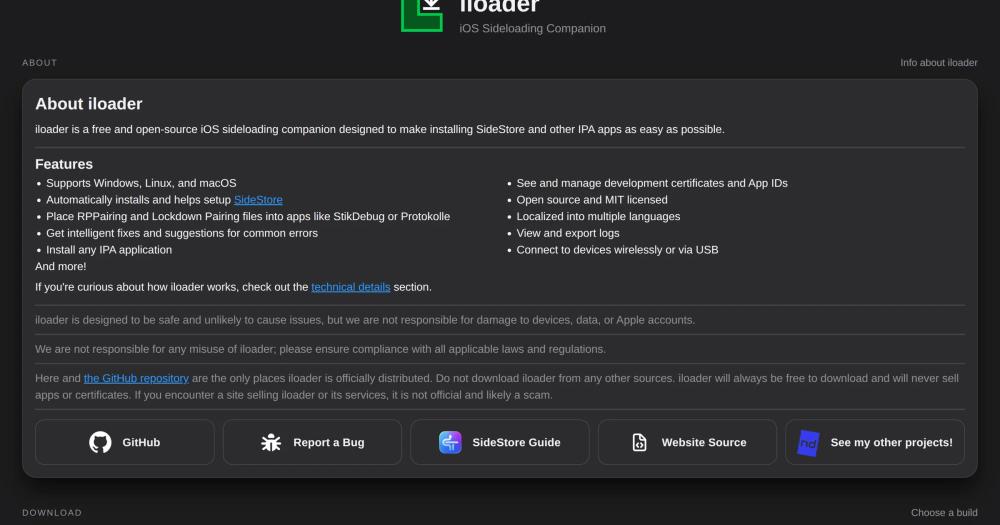
Installs SideStore or LiveContainer+SideStore in a guided, automated flow, including placing the required RPPairing and Lockdown pairing files into companion tools like StikDebug and Protokolle. No manual pairing file management required.
Import and sign any IPA file
Imports any IPA and signs it with your Apple ID developer credentials before installing it on your device. Handles provisioning profile registration, App ID creation, and certificate signing in a single operation.
Intelligent error suggestions
Detects and diagnoses common sideloading failures, then displays actionable fix suggestions. Covers authentication errors, certificate problems, and device connection issues, with full log export for harder cases.
Certificate and App ID management
Displays all development certificates and App IDs associated with your Apple account. Lets you revoke certificates directly from the app, without logging into Apple's developer portal.
Cross-platform with USB and wireless support
Runs natively on Windows, macOS, and Linux (x86_64 and ARM). Connects to iOS devices over USB or wirelessly, with Windows requiring iTunes for device communication and macOS having no prerequisites.
Strengths and trade-offs#
Strengths
- MIT licensed and completely freeThe full source code is MIT licensed, meaning you can inspect it, fork it, or modify it without restriction. iloader has no subscription tier, no certificate purchase, and no fee structure. Builds are uploaded directly from GitHub Actions, so the binary you download is verifiable against the source.
- Local signing with your own Apple IDUnlike shared-certificate services, iloader signs apps using your personal Apple developer credentials. There is no third-party certificate that Apple can revoke, and no dependency on a service's continued operation. Your signing credentials stay on your machine.
- Active development and broad communityWith nearly 3,000 GitHub stars and 203 forks, iloader has a strong sideloading community. It was created in late 2025 and received its last push in September 2026. Translations cover more than 20 languages from Arabic to Vietnamese, contributed by community members.
Trade-offs
- -High open issue countThe repository had 252 open issues at last check. The current stable version is in feature freeze while iloader-next is under development, so non-critical bug fixes may take time. Active users are directed to the Discord server for help with unresolved issues.
- -Handles Apple ID credentials directlyiloader logs into your Apple ID using Apple's authentication protocol, which means it has access to your credentials during the signing session. The maintainer recommends reviewing the source code; builds are reproducible via GitHub Actions. Risk-averse users may prefer to create a secondary Apple ID for sideloading.
- -7-day certificate limit on free accountsApple free developer accounts issue certificates that expire every 7 days, so sideloaded apps stop working unless re-signed. A paid Apple Developer account ($99/year) extends this to 12 months. iloader does not bypass this Apple-imposed limit.
iloader vs alternatives#
iloader vs Signulous and BuildStore
Signulous and BuildStore are paid iOS sideloading services. iloader solves the same problem, installing apps outside the App Store onto iPhone and iPad, but as a free, open source desktop application that signs apps locally using your own Apple ID rather than a third-party certificate service.
| Feature | iloader | Paid signing services |
|---|---|---|
| License | MIT (open source) | Proprietary |
| Cost | Free | Subscription-based |
| Signing method | Your Apple ID, local | Third-party certificates |
| Source visibility | Full source on GitHub | Closed source |
| Revocation risk | Personal account only | Shared certificate pools |
iloader is the better choice when you want no recurring cost, full transparency into the signing process, and no dependency on a third-party service's continued operation. Because apps are signed with your own Apple ID, Apple cannot revoke a third-party certificate and affect your device. iloader is also a better fit for anyone who wants to verify what the tool does with their credentials, since the full source is on GitHub and builds are reproducible from CI.
Paid services like Signulous and BuildStore may be a better fit for users who want a simpler setup without installing a desktop application, or who want access to a curated catalog of pre-signed apps without sourcing their own IPAs.

Quick start#
Install iloader by building from source after installing Node.js and Rust.
```bash
git clone https://github.com/nab138/iloader
npm install
npm run tauri build
```What it's built on#
- Languages
- RustTypeScript
- Frameworks
- React
FAQ#
Is iloader free to use?
Yes. iloader is free to download and MIT licensed. There is no subscription, no certificate purchase, and no paid tier. The maintainer states it will always be free and will never sell apps or certificates.
Does iloader require a jailbroken iPhone?
No. iloader uses Apple's own developer APIs to sideload apps, the same process Xcode uses for testing. No jailbreak or exploit is required, and iloader does not modify your device's operating system.
Which platforms does iloader run on?
iloader supports Windows (requires iTunes), macOS (no prerequisites), and Linux (x86_64 and ARM, requires usbmuxd, usually bundled with most distributions). All builds are available from the GitHub releases page and the official website.
Is it safe to enter my Apple ID in iloader?
iloader authenticates with Apple's servers directly using Apple's own GrandSlam protocol, and your credentials are used only to generate a developer session. The maintainer recommends reviewing the source code to verify this. Builds are uploaded via GitHub Actions and are reproducible from the source.
What is iloader-next?
iloader-next is the next major version of iloader, currently in beta. It is a complete rewrite featuring a web version (no download needed, available at beta.iloader.app in Chromium on macOS and Linux), a redesigned interface, and wireless pairing for iOS 27+. The current stable version only receives bug fixes while iloader-next is in development.
Similar open-source tools#
escrcpy
Graphical Android device mirroring and control with scrcpy
vphone-cli
Virtual iPhone on Apple Silicon, self-hosted and MIT licensed
hysteria
Fast and censorship-resistant proxy solution
OpenFlux
TCP tunneling via Yandex Docs or WebRTC transports
Sonarr
Smart PVR for Usenet and BitTorrent TV fans
armorpaint
Open source 3D PBR texture painting with GPU acceleration