Open Source Alternatives
  • Alternatives
  • Categories
    Categories by size894 projects
    • Developer Tools463
    • AI & Machine Learning404
    • Web Development196
    • Business & Productivity194
    • Security & Monitoring129
    • Communication & Collaboration128
    • IT Management124
    • Cloud & Hosting108
    • Product & Project Management106
    • Data & Analytics104
    Browse all 21 categoriesDesign & Creative, LLMOps & AI Tooling and 9 more
  • Blog
  • Advertise
SearchNotion, Slack, password manager.../
Submit
Open Source Alternatives
  • Alternatives
    • Developer Tools463
    • AI & Machine Learning404
    • Web Development196
    • Business & Productivity194
    • Security & Monitoring129
    • Communication & Collaboration128
    • Browse all 21 categories
  • Blog
  • Advertise
Submit your project

New open source projects by email

The projects we add and every new guide. Free, unsubscribe any time.

Open Source Alternatives LogoOpen Source Alternatives

Handpicked Open Source Alternatives to Paid Softwares

Product

  • Categories
  • Tag
  • Advertise

Resources

  • Blog
  • Collection
  • Submit

Company

  • Privacy Policy
  • Terms of Service
  • Refund Policy
  • Sitemap

Alternatives

  • Claude Code
  • Jira
  • Notion
  • Slack
  • Linear
  • Wispr Flow
  • All alternatives
© 2026 Open Source Alternatives. All rights reserved.
Open SourceAlternatives
Home/Categories/Design & Creative/Lossless Cut
icon of Lossless Cut

Lossless Cut

Open source alternative to SolveigMM Video Splitter and TMPGEnc MPEG Smart Renderer

  • 45K stars
  • GPL-2.0
  • Active this week
  • Last commit today

Last verified Oct 22, 2026

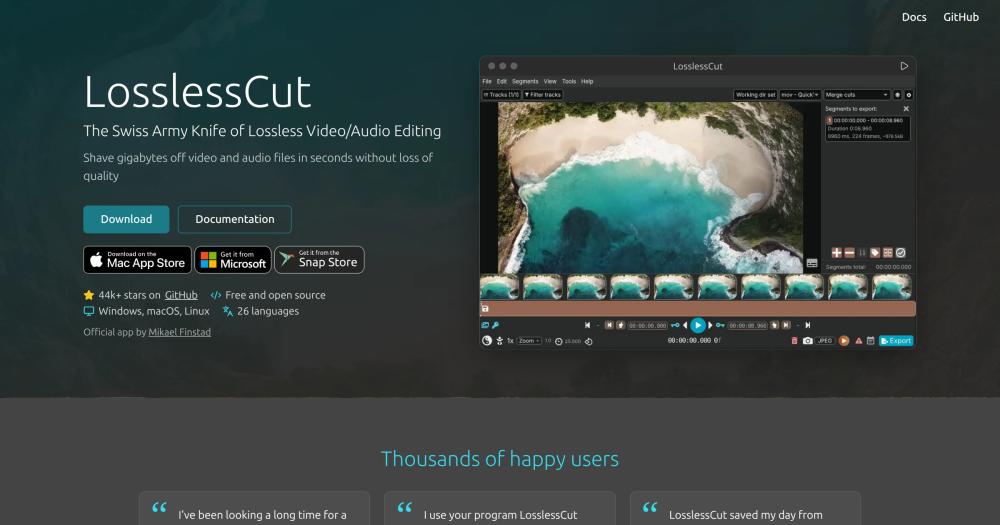
Edit video and audio files without re-encoding using LosslessCut, a cross-platform FFmpeg GUI for lossless trimming, merging, and remuxing.

Visit websiteGitHub45K stars
image of Lossless Cut
TL;DR

Lossless Cut LosslessCut is a cross-platform FFmpeg GUI that trims, cuts, merges, and remuxes video and audio files without re-encoding, finishing in seconds instead of minutes or hours. It is a free alternative to paid desktop tools like SolveigMM Video Splitter and TMPGEnc MPEG Smart Renderer, offered under the GPL-2.0 license for Windows, macOS, and Linux. Best for content creators, broadcasters, and editors who need to rough-cut large camera or drone files without quality loss, or change container formats without a re-encoding pipeline.

Read the full breakdownHide the full breakdownWho it is for, how it works, trade-offs and the FAQ
who it's for

Who Lossless Cut is for#

Creators rough-cutting large camera or drone recordings

LosslessCut trims gigabytes of raw GoPro, drone, or dashcam footage in seconds, letting you pull out the useful segments and discard the rest without waiting for a re-encode. Import chapters and markers to organize cuts before exporting.

Skip if:

Your clips need cuts at precise timestamps that do not align with keyframes, or you need color grading, transitions, or other operations that go beyond cutting and remuxing.

Broadcasters removing commercials from recorded TV

The scene and silence detection tools automatically identify commercial break points in recorded TV files. After detecting breaks, mark and cut the segments, then export a single clean file without re-encoding the original recording.

Skip if:

Your broadcast files use codecs or containers that FFmpeg cannot read, or you need fully automated post-processing at scale without running a desktop application.

Editors changing container formats without re-encoding

Remuxes MKV, TS, WebM, and other containers to MP4 or any target format without touching the video or audio streams. Used when a platform, player, or client requires a specific container but the content was recorded in a different one.

Skip if:

The source codec is incompatible with the target container and a codec conversion is needed rather than a container change.

Developers and power users running scripted workflows

The CLI and HTTP API allow LosslessCut operations to be scripted and integrated into pipelines. The project's active GitHub history (44,960 stars, last push October 2026) means API coverage keeps pace with new formats and features.

Skip if:

Your workflow requires running batch operations in a server or CI environment without a locally installed application.

the problem

The problem it solves#

Every time you trim a video in a standard editor, the software re-encodes the entire file. For a two-hour drone recording or raw camera file, that means waiting minutes or hours to see the result, and a small quality loss compounds with every round of editing.

The real cost is in workflow. A file that takes an afternoon to process does not get processed at all. Broadcasters re-cutting a recorded TV show, creators extracting a clip from a GoPro session, and anyone changing a container format from MKV to MP4 hit the same wall. The workaround is running raw FFmpeg commands by hand, but keeping track of timestamp offsets, track maps, and codec flags is tedious enough that most people just pay for dedicated software instead.

how Lossless Cut solves it

How it solves it#

Lossless cutting and trimming

Trims video and audio files by copying the data stream from the nearest keyframe, bypassing re-encoding entirely. Operations complete in seconds. The cut point aligns to the nearest preceding keyframe, which can sit a fraction of a second to several seconds before the requested mark depending on the file's encoding.

Lossless segment merging

Joins multiple cut segments or whole files with identical codecs into a single output file without re-encoding. Useful for combining clips from the same camera session or stitching chapters back together after cutting out unwanted sections.

Multi-track editing

Adds, removes, replaces, or extracts individual tracks from a file: audio tracks, subtitle files, and more. You can add music to a video, replace its audio, extract just the audio track, or strip subtitles, all without touching the video codec.

Container format remuxing

Changes the container format of a file, for example from MKV to MP4, without re-encoding any of the streams. The video, audio, and subtitle data stay bit-identical; only the wrapper changes. Useful when a player or platform requires MP4 but the source is in a different container.

Scene, silence, and black-frame detection

Analyzes files to detect scene changes, silent segments, and black frames, then splits the file at those points automatically. Useful for bulk processing of recorded TV files, sports footage, or any recording with natural break points.

CLI and HTTP API

Exposes a command-line interface and an HTTP API alongside the GUI, so batch or automated operations are available for scripting workflows. Keyboard shortcuts cover the most common editing operations for users who prefer keyboard-driven workflows.

strengths · trade-offs

Strengths and trade-offs#

Strengths

  • Near-instant operations through direct data copyBecause LosslessCut copies data streams rather than re-encoding, it completes operations in seconds. The README describes the approach as 'an almost direct data copy, fueled by the awesome FFmpeg.' User testimonials on the product website report tasks that took 45 minutes in a standard editor finishing in under a second.
  • Near-universal format support via FFmpegOpens almost any file that FFmpeg can decode, including formats that media players cannot play natively. With 44,960 GitHub stars and the most recent release (v3.70.1) on October 19, 2026, the project is actively maintained across all three desktop platforms.
  • GPL-2.0 license with no ads or trackingLosslessCut is GPL-2.0 licensed, so the source code is freely available for inspection and modification. The developer explicitly states there are no ads or tracking in the app, and the GitHub download has always been free.
  • Free GitHub download, optional paid App StoreThe executables on GitHub are free, unsigned downloads available for Windows, macOS, and Linux. The Mac App Store and Microsoft Store versions are paid but optional, offering signed binaries and automatic updates. Users who need neither feature pay nothing.

Trade-offs

  • -Cuts must start at keyframesLossless cuts can only begin at a keyframe in the source file. The actual cut point lands at the keyframe immediately before the requested timestamp, which may be a fraction of a second or up to several seconds earlier depending on the file's encoding.
  • -GitHub download triggers security warnings on first installThe free binary download from GitHub is unsigned. On Windows and macOS, unsigned executables trigger security dialogs warning that the file may be unsafe, and some anti-virus software flags it. The developer documents this in the FAQ and offers the signed App Store versions as an alternative for users who prefer a friction-free install experience.
  • -Local desktop applicationLosslessCut runs as a locally installed desktop application on Windows, macOS, or Linux. All file processing happens on the user's own machine. The application also exposes a CLI and HTTP API for automation and scripting workflows.
versus alternatives

Lossless Cut vs alternatives#

LosslessCut vs SolveigMM Video Splitter

SolveigMM Video Splitter is a paid commercial video editing tool. LosslessCut is free to download from GitHub under the GPL-2.0 license, with paid App Store versions for users who want signed binaries and automatic updates.

LosslessCutSolveigMM Video Splitter
LicenseGPL-2.0Paid/commercial
PriceFree (GitHub)Paid

LosslessCut covers a broad codec range through FFmpeg, opening nearly any format FFmpeg can decode: MP4, MKV, MOV, WebM, TS, H264, H265, AV1, FLAC, and many more. It handles multi-track operations such as adding, removing, or replacing audio and subtitle tracks, container remuxing, scene and silence detection, and metadata editing across Windows, macOS, and Linux. Lossless cuts start at the nearest preceding keyframe, which may be a fraction of a second or up to several seconds before the requested point.

LosslessCut vs TMPGEnc MPEG Smart Renderer

TMPGEnc MPEG Smart Renderer is a paid commercial video editing tool. LosslessCut provides a free alternative under the GPL-2.0 license for users who primarily need lossless cutting, merging, and remuxing.

LosslessCutTMPGEnc MPEG Smart Renderer
LicenseGPL-2.0Paid/commercial
PriceFree (GitHub)Paid

LosslessCut completes lossless cuts in seconds by performing an almost direct data copy through FFmpeg, with no quality loss. It runs on Windows, macOS, and Linux and can be extended via CLI and HTTP API for automation. The keyframe alignment constraint applies: cuts land at the keyframe immediately before the requested timestamp, which may shift the start point by a fraction of a second to several seconds depending on the source file's encoding.

tech stack · detected from GitHub

What it's built on#

Languages
TypeScript
Frameworks
ExpressReact
Tooling
FFmpeg
frequently asked

FAQ#

Is LosslessCut free to use?

The GitHub download has always been free and the developer states it will remain so. The Mac App Store and Microsoft Store versions are paid but optional; they provide signed binaries and automatic updates. There are no ads or tracking in any version.

Why do lossless cuts sometimes start slightly before the requested point?

Lossless cuts can only begin at a keyframe in the source file. Keyframes are reference frames that the video encoder places at intervals. LosslessCut places the cut at the keyframe immediately before the requested timestamp, so the actual start may be a fraction of a second or up to several seconds earlier, depending on how frequently keyframes appear in the source file's encoding.

What formats and codecs does LosslessCut support?

LosslessCut opens almost any file that FFmpeg can decode. Container formats include MP4, MOV, MKV, WebM, TS, OGG, and WAV. Video codecs include H264, H265, AV1, VP8, VP9, and Theora; audio codecs include FLAC, MP3, AAC, Opus, PCM, and Vorbis. Files with formats unsupported by the built-in HTML5 player fall back to FFmpeg-assisted playback automatically. The export always reads from the original file, so playback limitations do not affect output quality.

What is the difference between the GitHub and App Store versions?

The GitHub version is a free unsigned binary that may trigger security warnings on first run on Windows and macOS. The App Store versions are signed, install without security dialogs, and update automatically. Microsoft charges for binary signing and MS Store publishing, so the developer sells the Windows version there to cover that cost; the Mac App Store version follows the same model. Functionality is identical across all versions.

Does LosslessCut work on Linux?

Yes. Linux builds are available as free downloads from GitHub in x64 and arm64 tar.bz2 packages, an x64 AppImage, and a Raspberry Pi armv7l build. LosslessCut is also published to the Snap Store. Note that the armv7l build does not bundle FFmpeg and requires a separately installed FFmpeg binary on the system.

also worth a look

Similar open-source tools#

God's Eye View

Featured

Alternative toFFlightradar24

Real-time global intelligence on a 3D globe

  • 58,501 GitHub stars
  • CustomLicence MIT with third-party data restrictions

Openmw Web

InDesign & Creative

Morrowind in your browser, self-hosted, with mods and multiplayer

  • 134 GitHub stars
  • GPL-3.0Licence GPL-3.0

Reactive Resume

Alternative toResume.io

Resume builder with 18 templates, ATS checker, and job tracker.

  • 44,701 GitHub stars
  • MITLicence MIT

OpenTubeX

Alternative toYouTube Premium

Ad-free YouTube client with encrypted sync and SponsorBlock.

  • 122 GitHub stars
  • AGPL-3.0Licence AGPL-3.0

superCMO-skills

Alternative toAdCreative.ai

Generate video ads and product photos from inside your AI agent

  • 138 GitHub stars
  • Apache-2.0Licence Apache-2.0

Openfilm

Alternative toRemotion

AI video agent for coding agents, with a local editor and no account.

  • 1,850 GitHub stars
  • MITLicence MIT
by category

Open source tools in these categories#

101

Design & Creative

ComfyUI, Excalidraw, Godot Engine

Featured

Omnara

Alternative toCClaude Managed Agents

Open-source agent deployment API. Self-host or use Omnara Cloud.

  • 2,957 GitHub stars
  • Apache-2.0Licence Apache-2.0
  • #AI Agents

Inbox Zero

Alternative toSuperhuman

AI email assistant that drafts replies and clears your inbox

  • 12,712 GitHub stars
  • AGPL-3.0Licence AGPL-3.0
  • #Email

rakazo

Alternative toGrok Bot

AI teammates you own: your keys, your model, your machine.

  • 4,904 GitHub stars
  • Apache-2.0Licence Apache-2.0
  • #AI Agents
Feature your project

New open source projects by email

The projects we add and every new guide. Free, unsubscribe any time.

Find open source alternatives to paid software

/
  • Claude Code to OpenCode
  • Jira to Windshift
  • Notion to AppFlowy
  • Slack to Mattermost
  • Linear to GitLab
  • Wispr Flow to Handy
  • CapCut to Concat
  • Grok Bot to rakazo
  • Superhuman to Inbox Zero
  • Airtable to AITable
  • Muse to OpenClaw
  • GitHub Copilot to Cline
  • Datadog to Netdata
  • Microsoft Teams to Rocket.Chat
  • Confluence to Docmost
  • Pinecone to Qdrant
  • Zapier to n8n
  • Devin AI to OpenHands
  • Firebase to Supabase
  • 1Password to KeePassXC
  • Contentful to Strapi
  • Adobe Premiere Pro to Shotcut
  • ChatGPT to AnythingLLM
  • LangSmith to Langfuse
  • Claude Code to OpenCode
  • Jira to Windshift
  • Notion to AppFlowy
  • Slack to Mattermost
  • Linear to GitLab
  • Wispr Flow to Handy
  • CapCut to Concat
  • Grok Bot to rakazo
  • Superhuman to Inbox Zero
  • Airtable to AITable
  • Muse to OpenClaw
  • GitHub Copilot to Cline
  • Datadog to Netdata
  • Microsoft Teams to Rocket.Chat
  • Confluence to Docmost
  • Pinecone to Qdrant
  • Zapier to n8n
  • Devin AI to OpenHands
  • Firebase to Supabase
  • 1Password to KeePassXC
  • Contentful to Strapi
  • Adobe Premiere Pro to Shotcut
  • ChatGPT to AnythingLLM
  • LangSmith to Langfuse