Open Source Alternatives
  • Alternatives
  • Categories
    Categories by size1,263 projects
    • Developer Tools650
    • AI & Machine Learning535
    • Business & Productivity305
    • Web Development217
    • Security & Monitoring196
    • Communication & Collaboration168
    • IT Management160
    • Design & Creative138
    • DevOps & CI/CD135
    • LLMOps & AI Tooling135
    Browse all 21 categoriesCloud & Hosting, Product & Project Management and 9 more
  • Blog
  • Advertise
SearchNotion, Slack, password manager.../
Submit
Open Source Alternatives
  • Alternatives
    • Developer Tools650
    • AI & Machine Learning535
    • Business & Productivity305
    • Web Development217
    • Security & Monitoring196
    • Communication & Collaboration168
    • Browse all 21 categories
  • Blog
  • Advertise
Submit your project

New open source projects by email

The projects we add and every new guide. Free, unsubscribe any time.

Open Source Alternatives LogoOpen Source Alternatives

Handpicked Open Source Alternatives to Paid Softwares

Add Open Source Alternatives as a preferred source on Google

Product

  • Categories
  • Tag
  • Advertise

Resources

  • Blog
  • Collection
  • Submit

Company

  • Privacy Policy
  • Terms of Service
  • Refund Policy
  • Sitemap

Alternatives

  • Claude Code
  • Jira
  • Notion
  • Slack
  • Linear
  • Wispr Flow
  • All alternatives
© 2026 Open Source Alternatives. All rights reserved.
Open SourceAlternatives
Home/Categories/Design & Creative/Openmw Web
icon of Openmw Web

Openmw Web

  • 150 stars
  • GPL-3.0
  • Active this week
  • Last commit 3 days ago

Last verified Nov 15, 2026

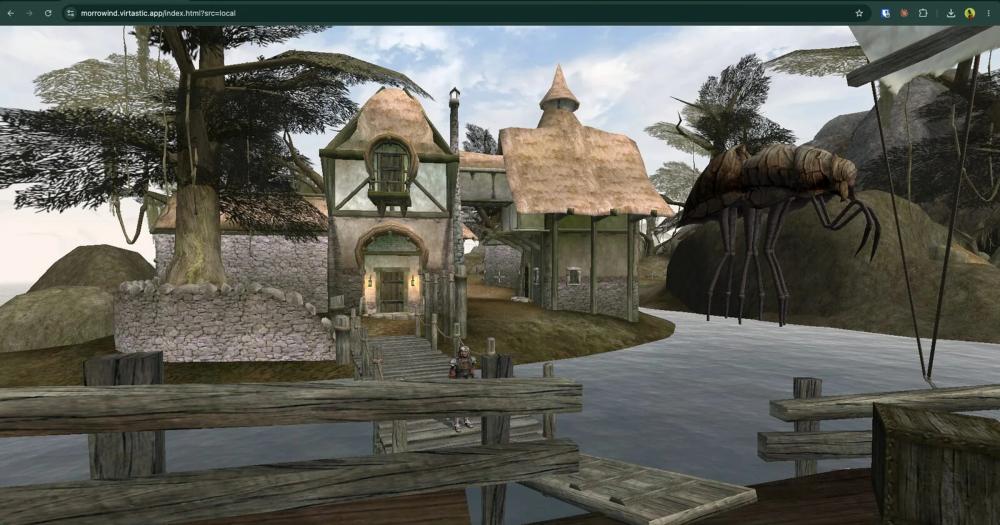
Run The Elder Scrolls III: Morrowind in a desktop Chrome tab via WebAssembly, with a self-hosted server, mod manager, and optional multiplayer.

Visit websiteGitHub150 starsDeploy on Hostinger
Morrowind running in a desktop Chrome tab at Seyda Neen
TL;DR

Openmw Web openmw-web runs The Elder Scrolls III: Morrowind in a desktop Chrome tab by compiling the open-source OpenMW engine to WebAssembly. It replaces cloud gaming subscriptions for players who already own the game on Steam or GOG, giving them browser access, mod support, and savegame control without a monthly fee. Self-hosted via Docker, GPL-3.0 licensed. Best for Morrowind fans who want to play from any Chrome-capable machine and for groups who want to host a private modded server.

Read the full breakdownHide the full breakdownWho it is for, how it works, trade-offs, the quick start and the FAQ
who it's for

Who Openmw Web is for#

Morrowind fans on non-Windows hardware

Players on Chromebooks, Linux machines, or macOS can load their Steam or GOG copy of Morrowind in a Chrome tab without installing Wine or a native game client. Game files stream from disk on demand and nothing is permanently uploaded unless the cloud locker is used.

Skip if:

Skip if you are on desktop Chrome on a Windows machine with a working native Morrowind install and no need to access your save on other devices.

Server admins hosting Morrowind for a group

The admin dashboard lets you stage a modded Morrowind installation, manage user accounts, and enable multiplayer so friends can join through their browsers. Save state is server-side, and the host controls the mod list rather than requiring each player to configure their own install.

Skip if:

Skip if your group needs stable multiplayer for a long campaign. The experimental flag and noted rough edges make it better suited for casual sessions than an ongoing run.

Developers studying WebAssembly engine ports

The repo includes the full OpenMW engine source with local WASM patches against upstream, Emscripten 6.0.1 build scripts, and WASM_ADAPTATIONS.md documenting how the desktop engine was adapted for the browser. It serves as a reference implementation for porting large multithreaded C++ codebases to WebAssembly.

Skip if:

Skip if you only want to play the game. The prebuilt release handles that entirely without requiring a build from source.

the problem

The problem it solves#

Playing The Elder Scrolls III: Morrowind on a Chromebook, a borrowed machine, or any computer without a Windows gaming setup means either wrestling with Wine, buying a second copy for a different platform, or going without. These workarounds are fragile across system updates and do not work at all on locked-down hardware.

For players who want to run a modded Morrowind installation for a group, the older options were a native dedicated server with high system requirements or a cloud gaming subscription that does not support custom mods. Neither offered browser-based access, a built-in mod manager, or savegame portability across devices without additional infrastructure.

how Openmw Web solves it

How it solves it#

WebAssembly game engine in a browser tab

The OpenMW engine compiles to WebAssembly via Emscripten 6.0.1 and runs the full Morrowind game logic entirely in the browser. WebGL2 via ANGLE handles graphics. The File System Access API streams game assets from your local disk on demand, so nothing is uploaded until you choose to use the cloud locker. Chrome or Chromium 133+ is required.

Browser-based admin dashboard

A dashboard at http://localhost/admin covers the complete server setup with a wizard, a drag-to-order mod manager (with Tamriel Rebuilt support), savegame export, backups, log viewer, and user account management. All administration happens in the browser without SSH or config file editing.

Multiple play modes with cloud locker

Choose between a free demo world (no Morrowind copy required), reading game files from your local disk on demand, streaming the server host's staged copy, or signing in to access your own Morrowind from any machine. Saves are stored locally, server-side, or in browser storage depending on the active play mode.

Experimental multiplayer up to 32 players

Party mode lets up to 32 players enter one world hosted by the owner. NPCs, combat resolution, and loot are simulated server-side by a headless engine copy, preventing modified clients from authoring world state. Players retain skills and carried inventory between visits.

One-command setup with prebuilt images

The setup script requires no compilation. It pulls a prebuilt server image from ghcr.io/virtastic/openmw-web-server and downloads the ~150 MB game engine, verified against SHA256 checksums. Update with ./setup.sh --update or the dashboard's Update button. Roll back by setting the previous tag in .env.

strengths · trade-offs

Strengths and trade-offs#

Strengths

  • Client-side engine with no streaming overheadUnlike cloud gaming platforms that encode and transmit video frames from a remote server, openmw-web runs the OpenMW engine directly in the browser tab. Gameplay performance scales with the player's local hardware, not datacenter proximity. The server only handles saves, accounts, mods, and multiplayer state.
  • GPL-3.0 with full self-hosting rightsopenmw-web is GPLv3, the same license as OpenMW. You can run a self-hosted instance on your own infrastructure, inspect the WASM adaptations, modify the source, and distribute changes under the same license. The release ships a corresponding source archive alongside every prebuilt binary.
  • Built-in mod management with load-order controlThe admin dashboard includes a drag-to-order mod manager where each mod can be toggled, reordered, and inspected for file conflicts. Tamriel Rebuilt, one of the largest Morrowind fan expansions, is supported directly through the dashboard alongside standard .esm and .esp mods.

Trade-offs

  • -Chrome and Chromium desktop onlyDesktop Chrome or Chromium 133+ is the only supported browser. The engine requires SharedArrayBuffer with threads, WebGL2 via ANGLE, EXT_clip_control, and the File System Access API. Firefox, Safari, and all mobile browsers lack one or more of these capabilities and are unsupported with no planned exception.
  • -Requires a legally-owned copy of MorrowindNo game data is included. You must supply your own Data Files from a Steam, GOG, or disc purchase. On Steam, the default install location under Program Files causes a folder access error in Chrome. Copy the Data Files folder to a user folder like Documents before playing.
  • -Multiplayer is experimentalThe multiplayer feature launched in v1.1.0 and carries an explicit experimental label. Party mode works for casual play, but the README notes rough edges to expect. Production-grade reliability has not been claimed by the project.
versus alternatives

Openmw Web vs alternatives#

openmw-web vs Cloud Gaming Services

openmw-web and commercial cloud gaming platforms like Xbox Cloud Gaming and NVIDIA GeForce Now both enable playing games in a browser, but through different architectures. Cloud gaming services stream encoded video from remote servers and charge monthly subscription fees. openmw-web compiles the OpenMW engine to WebAssembly and runs it entirely client-side, with no streaming and no subscription cost.

Featureopenmw-webCloud Gaming (Xbox Cloud / GeForce Now)
LicenseGPL-3.0Proprietary
Self-hostingYes (Docker)No
Monthly costServer costs onlySubscription required
Mod supportFull via admin dashboardNone or restricted
Latency modelLocal computeVideo stream from datacenter
Browser supportChrome/Chromium 133+Multiple browsers

openmw-web is the better choice for players who own Morrowind and want to run a modded server, keep save data on their own hardware, and access the game from any Chrome-capable machine without a monthly bill. It is the only path to self-hosting a shared Morrowind session with a custom mod list.

Xbox Cloud Gaming and GeForce Now are the better fit when you need a library of modern titles, browser support beyond Chrome, or a fully managed service with no infrastructure to maintain.

install · quick start

Quick start#

bash
Self-hosting uses Docker with a setup script that pulls a prebuilt server image and game engine.
```bash
git clone https://github.com/Virtastic/openmw-web.git
cd openmw-web
./setup.sh
```
tech stack · detected from GitHub

What it's built on#

Languages
C++JavaScriptLuaTypeScript
Runtimes
WebAssembly
Tooling
esbuild
frequently asked

FAQ#

Does openmw-web include the Morrowind game files?

No. openmw-web distributes only the OpenMW engine and server software. You must supply your own legally-purchased copy of Morrowind from Steam, GOG, or disc. On first play, you point the browser at your Data Files folder and the engine reads them on demand. No Bethesda assets are included or redistributed.

Which browsers are supported?

Only desktop Chrome or Chromium version 133 or later. The engine requires MEMORY64, SharedArrayBuffer with threads, WebGL2 via ANGLE, and the File System Access API. Firefox, Safari, and all mobile browsers do not yet provide all of these capabilities.

How do I set up my own openmw-web server?

Install Docker, then clone the repo and run ./setup.sh. The script pulls the prebuilt server image, downloads the game engine archive (verified against SHA256 checksums), and opens the admin dashboard at http://localhost/admin to walk through the rest. Full documentation is in SELF_HOSTING.md in the repo.

Is the multiplayer mode stable?

Multiplayer is playable but experimental. Up to 32 players can join one world, with NPCs and combat resolved server-side. The README flags rough edges and the feature is behind an experimental flag in the dashboard. For casual groups it works, but production-grade reliability has not been claimed by the project.

What does the GPL-3.0 license allow for self-hosters?

GPL-3.0 lets you run openmw-web on your own infrastructure for personal or internal team use without restriction. You can inspect and modify the source. If you distribute a modified copy to others, you must release the corresponding source under the same license. The license does not restrict running a private hosted instance for your own group.

also worth a look

Similar open-source tools#

God's Eye View

Featured

Alternative toFFlightradar24

Real-time global intelligence on a 3D globe

  • 64,750 GitHub stars
  • CustomLicence MIT with third-party data restrictions

Synfig

Alternative toToon Boom Harmony

Vector-tweened 2D animation without frame-by-frame drawing.

  • 2,425 GitHub stars
  • GPL-3.0Licence GPL-3.0

Phosphor Cam

InDesign & Creative

Real-time retro camera with five render engines and no data upload.

  • 137 GitHub stars
  • MITLicence MIT

Opentoonz

Alternative toToon Boom Harmony

2D animation software from Studio Ghibli's Toonz, free to use

  • 8,236 GitHub stars
  • BSD 3-ClauseLicence BSD 3-Clause

Openscreen

Alternative toScreen Studio

Free cross-platform screen recorder for polished product demos

  • 7,291 GitHub stars
  • MITLicence MIT

Oh My Ppt

Alternative toGamma

AI presentation builder, local-first, 90+ styles, PPTX export.

  • 2,527 GitHub stars
  • Apache-2.0Licence Apache-2.0
by category

Open source tools in these categories#

139

Design & Creative

ComfyUI, Excalidraw, Godot Engine
Hostinger

Self-host Openmw Web on a Hostinger VPS

Keep it running 24/7, even when your laptop is off. A Hostinger VPS gives it a server of its own.

  1. 01

    Choose a plan

    Starts from $6.49/mo

  2. 02

    Apply

    Extra 10% off yearly plans

  3. 03

    Install Openmw Web

    On a server that stays on

  4. 04

    Start building

    Focus on the app, not the server

Deploy on Hostinger

Sponsors

Inbox Zero

Alternative toSuperhuman

AI email assistant that drafts replies and clears your inbox

  • 13,025 GitHub stars
  • AGPL-3.0Licence AGPL-3.0
  • #Email

rakazo

Alternative toGrok Bot

AI teammates you own: your keys, your model, your machine.

  • 8,291 GitHub stars
  • Apache-2.0Licence Apache-2.0
  • #AI Agents

SnitchFeed

Live monitoring on LinkedIn, X, Reddit & more. Agentic social listening for startups.

Marketing & Growth

Advertise your product

New open source projects by email

The projects we add and every new guide. Free, unsubscribe any time.

Find open source alternatives to paid software

/
  • Claude Code to OpenCode
  • Jira to Windshift
  • Notion to AppFlowy
  • Slack to Mattermost
  • Linear to GitLab
  • Wispr Flow to Handy
  • Arc to Zen Browser
  • CapCut to Concat
  • Grok Bot to rakazo
  • Superhuman to Inbox Zero
  • Discord to Stoat
  • Airtable to AITable
  • Datadog to SigNoz
  • Muse to OpenClaw
  • Railway to Coolify
  • GitHub Copilot to Cline
  • Confluence to Wiki.js
  • Microsoft Teams to Rocket.Chat
  • 1Password to KeePassXC
  • Firebase to Supabase
  • Pinecone to Qdrant
  • Zapier to n8n
  • Devin AI to OpenHands
  • Asana to Leantime