Open Source Alternatives
  • Alternatives
  • Categories
    Categories by size1,061 projects
    • Developer Tools540
    • AI & Machine Learning468
    • Business & Productivity247
    • Web Development205
    • Security & Monitoring161
    • Communication & Collaboration143
    • IT Management140
    • Cloud & Hosting123
    • LLMOps & AI Tooling122
    • Data & Analytics114
    Browse all 21 categoriesProduct & Project Management, Design & Creative and 9 more
  • Blog
  • Advertise
SearchNotion, Slack, password manager.../
Submit
Open Source Alternatives
  • Alternatives
    • Developer Tools540
    • AI & Machine Learning468
    • Business & Productivity247
    • Web Development205
    • Security & Monitoring161
    • Communication & Collaboration143
    • Browse all 21 categories
  • Blog
  • Advertise
Submit your project

New open source projects by email

The projects we add and every new guide. Free, unsubscribe any time.

Open Source Alternatives LogoOpen Source Alternatives

Handpicked Open Source Alternatives to Paid Softwares

Product

  • Categories
  • Tag
  • Advertise

Resources

  • Blog
  • Collection
  • Submit

Company

  • Privacy Policy
  • Terms of Service
  • Refund Policy
  • Sitemap

Alternatives

  • Claude Code
  • Jira
  • Notion
  • Slack
  • Linear
  • Wispr Flow
  • All alternatives
© 2026 Open Source Alternatives. All rights reserved.
Open SourceAlternatives
Home/Categories/Business & Productivity/Mealie
icon of Mealie

Mealie

Open source alternative to Paprika Recipe Manager, Plan to Eat, Samsung Food, AnyList, Mela and BigOven

  • 13.8K stars
  • AGPL-3.0
  • Active this week
  • Last commit today

Last verified Nov 5, 2026

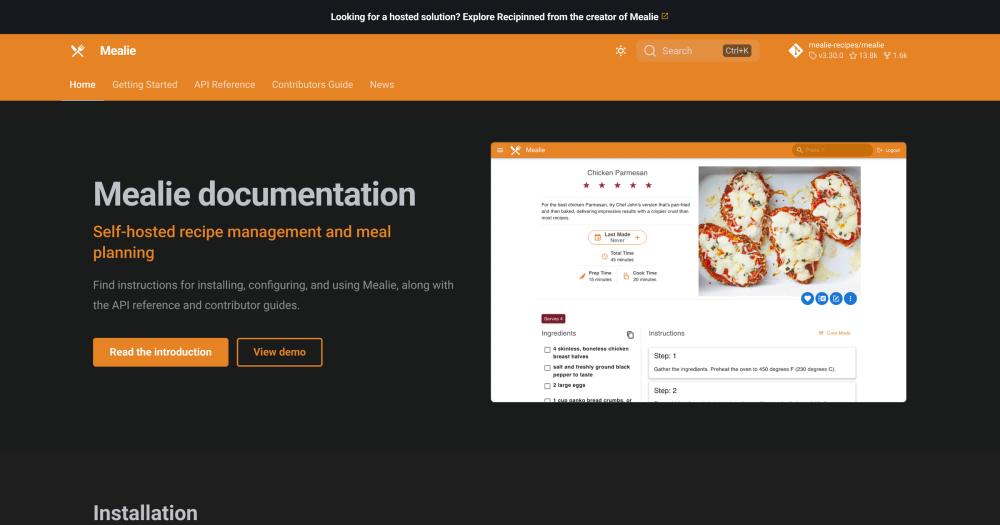
Manage recipes, meal plans, and shopping lists in a self-hosted app with URL-based recipe import and a REST API.

Visit websiteGitHub13.8K starsDeploy on Hostinger
image of Mealie
TL;DR

Mealie is a self-hosted recipe manager, meal planner, and shopping list app that runs on your own server under AGPL-3.0. It replaces paid services like Paprika Recipe Manager and Plan to Eat by importing recipes automatically from any URL, building a weekly meal plan from your library, and generating a shopping list organized by supermarket aisle. Deployment is Docker-based with no mandatory external database. Best for households and home cooks who want their recipe collection on their own infrastructure at no ongoing subscription cost.

Read the full breakdownHide the full breakdownWho it is for, how it works, trade-offs and the FAQ
who it's for

Who Mealie is for#

Households organizing a shared family recipe library

Mealie gives every household member access to the same recipe database from a phone or browser, with no per-user fees. URL import means new recipes get added in seconds rather than typed out by hand, and the shared shopping list removes the back-and-forth about what to buy.

Skip if:

If your household has no interest in managing recipes digitally or already uses a shared tool everyone is happy with, there is no payoff for running a self-hosted server.

Home server users already running Docker

If you already run a home server or Raspberry Pi with other Docker containers, adding Mealie is low overhead. It fits alongside other self-hosted services and benefits from whatever backup and reverse-proxy setup you already have.

Skip if:

If you have no existing home server and no interest in managing one, the setup cost of self-hosting outweighs the benefits for most recipe management use cases.

Home automation enthusiasts using Home Assistant

Mealie's REST API connects to Home Assistant, letting you display the week's meal plan on a dashboard, automate shopping list additions, or surface recipes through a smart home interface. The API exposes every resource the UI does, so integrations are limited only by what Home Assistant can invoke.

Skip if:

If you want a simple recipe box without automation, Mealie's API depth is unused overhead. A standalone paid app requires no server maintenance.

the problem

The problem it solves#

Most households end up with recipes spread across too many sources: cooking sites bookmarked in a browser, family notebook photos, links texted back and forth, and a few stored in a notes app. Getting from a saved recipe to a usable shopping list requires crossing multiple apps and formats manually, and finding that pasta dish from six months ago means scrolling through a camera roll.

Paid recipe managers like Paprika Recipe Manager and Plan to Eat help organize this, but they charge recurring subscriptions and store your recipe data on their servers. Samsung Food ties your recipe browsing to a Samsung account. For families who want their collection backed up locally, shareable across household members without additional seats, and accessible from home automation tools, none of the mainstream commercial options give you that control.

how Mealie solves it

How it solves it#

URL-Based Recipe Import

Paste any recipe website URL and Mealie fetches and parses the page, extracting ingredients, quantities, and instructions automatically. No manual transcription needed. The built-in editor handles recipes that cannot be imported from a URL, or family recipes with no web source.

Drag-and-Drop Meal Planner

Assign recipes from your library to any day of the week from a visual calendar. The planner sits alongside the recipe database, so you can search your collection and schedule meals in the same view without switching apps.

Aisle-Organized Shopping List

The shopping list derives from your meal plan and groups ingredients by the sections of your local supermarket, so you shop in a single pass. Items from multiple planned meals merge automatically when they share an ingredient.

Cookbooks for Custom Collections

Group any set of recipes into a named Cookbook: by cuisine, season, dietary rule, or any other criterion. Cookbooks surface subsets of a large library without changing the master recipe database.

REST API for Third-Party Integrations

Every recipe, meal plan, and shopping list is accessible through Mealie's REST API. Home Assistant automations can read the week's meal plan; external tools can add or update recipes programmatically without using the UI.

35+ Language Translations

Mealie ships with translations for over 35 languages managed through Crowdin, so the UI is usable in the household's native language. Translations are community-contributed and can be voted on or extended directly in the Crowdin project.

strengths · trade-offs

Strengths and trade-offs#

Strengths

  • No subscription and no data leaving your serverRunning Mealie on your own infrastructure means your recipe collection stays on hardware you control. No third-party account required, no monthly fee, and no recipe browsing data logged by a commercial service. That is a real difference from Paprika, Plan to Eat, and Samsung Food, all of which store your data on their platforms.
  • URL import works across recipe sitesThe URL import feature pulls ingredients and instructions directly from most recipe websites without manual copy-paste. This is the main time-saving feature relative to building a recipe database by hand or transferring records from a paid service that exports in a proprietary format.
  • API-first design integrates with home automationThe REST API backend means Mealie is not limited to its own UI. Home Assistant users can display the week's meal plan on a dashboard, trigger shopping list updates via voice, or build custom meal planning flows that the web interface does not expose.
  • Active development with a large contributor baseThe project has 13,813 GitHub stars and was last updated in November 2026, with 1,647 forks and an active Discord community. That level of activity signals that security patches, new parser support, and bug fixes reach users on a reasonable cadence.

Trade-offs

  • -Self-hosting requires server and Docker knowledgeMealie is not a one-click consumer app. Setting it up requires a machine to host it on, a working Docker install, and enough system knowledge to handle updates and backups yourself. For non-technical users, this is a real barrier that paid apps like Paprika do not have.
  • -No official managed cloud optionThere is no Mealie-hosted subscription tier. You are responsible for keeping the container updated, backing up the data volume, and recovering from server failures. This suits experienced self-hosters but rules out Mealie for users who want zero infrastructure management.
  • -AGPL-3.0 restricts redistribution as a managed serviceAGPL-3.0 is permissive for personal and internal team use, but if you modify Mealie and offer a hosted version of it to others, you must publish the modified source under AGPL-3.0. This matters to developers who want to build a commercial recipe service on top of Mealie's codebase.
versus alternatives

Mealie vs alternatives#

Mealie vs Paprika Recipe Manager

Paprika Recipe Manager and Mealie solve the same core problem: a central database for recipes with shopping list integration. Paprika is a polished native app available on iOS, macOS, Android, and Windows, with sync between devices handled through Paprika's cloud. Mealie is a self-hosted web app accessible from any browser or the API.

FeatureMealiePaprika Recipe Manager
LicenseAGPL-3.0Proprietary
Self-hostingYesNo
URL importYesYes
Shopping listYesYes
PricingFree (self-hosted)One-time purchase per platform
Data locationYour serverPaprika's cloud

Mealie is the better choice for households who want their recipe data on their own infrastructure with no ongoing fees and API access for home automation. Paprika is worth considering when you want polished native apps on iOS and macOS with no server to manage and a one-time payment model.

Mealie vs Plan to Eat

Plan to Eat is a subscription-based web service focused on meal planning and grocery lists. Its strength is a drag-and-drop meal planner with calendar-based scheduling and store aisle grouping. Mealie offers the same core features with self-hosting.

FeatureMealiePlan to Eat
LicenseAGPL-3.0Proprietary
Self-hostingYesNo
Meal plannerYesYes
Shopping listYesYes
PricingFree (self-hosted)Subscription (~$5/month)
Multi-userYesYes

Mealie is the better choice for households already running a home server who want to avoid a monthly fee. Plan to Eat is a reasonable choice for non-technical users who want the same meal planning features without server management; the subscription cost is low relative to the setup overhead of self-hosting.

Mealie vs Samsung Food

Samsung Food (formerly Whisk) is a cross-platform recipe manager and meal planner with a free tier, available on iOS, Android, and web. It integrates with Samsung smart home devices and offers a social recipe-sharing layer. The main tradeoff is that Samsung Food is operated by Samsung and your recipe and usage data stays on their platform.

FeatureMealieSamsung Food
LicenseAGPL-3.0Proprietary
Self-hostingYesNo
URL importYesYes
Meal plannerYesYes
PricingFree (self-hosted)Free
Data ownershipYour serverSamsung's platform

Mealie is the better choice when data ownership and privacy matter: your recipe collection and meal history stay on your own server with no connection to a corporate platform. Samsung Food is a reasonable choice for Samsung device users who want native integrations with smart TVs and appliances and are comfortable with the platform's data practices.

tech stack · detected from GitHub

What it's built on#

Languages
PythonTypeScript
Frameworks
FastAPINuxtVue
Databases
PostgreSQL
frequently asked

FAQ#

Does Mealie run on a Raspberry Pi?

Yes. Mealie is a Docker-based application with modest RAM requirements for a single-user or small family install. A Raspberry Pi 4 with 2GB or more RAM handles it without issue. The Docker Hub image and GitHub Container Registry image both support ARM architectures, which Raspberry Pi uses.

Can I import all my recipes from Paprika or Plan to Eat?

Mealie supports importing from various formats, though the specific export from Paprika or Plan to Eat may need an intermediate conversion step depending on the format they produce. The URL import feature can re-import any recipe that has a public URL, which covers most commercially sourced recipes. Manually entered family recipes require a compatible export format or manual entry.

Is Mealie free to use?

Yes. Mealie is open source under AGPL-3.0 and free to self-host for personal, family, or internal team use with no license fee. You are responsible for the server costs, which for a home server or small VPS are typically a few dollars per month or nothing if you already own the hardware. There is no cloud-hosted free tier from the Mealie project itself.

Does Mealie support multiple users per household?

Yes. Mealie is designed for household and family use with multi-user support. Each user can have their own account, and a shared recipe library and meal plan are accessible to the whole household. The REST API backend means user data is scoped correctly without each person needing a separate app installation.

What license governs Mealie, and can I use it for a commercial team?

Mealie is licensed under AGPL-3.0. You can run it on your own server for personal use, family use, or internal team use at a business without restriction. The AGPL restriction applies if you modify the source code and distribute it or run it as a hosted service for other users outside your organization; in that case you must publish your modifications under AGPL-3.0.

also worth a look

Similar open-source tools#

CleanYourTV

Featured

Alternative toATV Launcher Pro

Debloat any Android or Google TV over Wi-Fi and get an Apple TV-style home.

  • 51,495 GitHub stars
  • MIT LicenseLicence MIT License

OpenClaw

Featured

Alternative toMuse

Self-hosted AI assistant for WhatsApp, Telegram, and more

  • 393,917 GitHub stars
  • MITLicence MIT

Inbox Zero

Featured

Alternative toSuperhuman

AI email assistant that drafts replies and clears your inbox

  • 12,889 GitHub stars
  • AGPL-3.0Licence AGPL-3.0

rakazo

Featured

Alternative toGrok Bot

AI teammates you own: your keys, your model, your machine.

  • 6,568 GitHub stars
  • Apache-2.0Licence Apache-2.0

paperclip

Featured

Alternative toGrok Bot

Self-hosted AI agent management with org charts and budgets

  • 109,899 GitHub stars
  • MITLicence MIT

Wiki.js

Alternative toConfluence

Open source wiki with real-time collaboration and two-way Git sync.

  • 29,164 GitHub stars
  • AGPL-3.0Licence AGPL-3.0
by category

Open source tools in these categories#

248

Business & Productivity

OpenClaw, Excalidraw, RustDesk
Hostinger

Self-host Mealie on a Hostinger VPS

Keep it running 24/7, even when your laptop is off. A Hostinger VPS gives it a server of its own.

  1. 01

    Choose a plan

    Starts from $6.49/mo

  2. 02

    Apply

    Extra 10% off yearly plans

  3. 03

    Install Mealie

    On a server that stays on

  4. 04

    Start building

    Focus on the app, not the server

Deploy on Hostinger

Sponsors

Inbox Zero

Alternative toSuperhuman

AI email assistant that drafts replies and clears your inbox

  • 12,889 GitHub stars
  • AGPL-3.0Licence AGPL-3.0
  • #Email

rakazo

Alternative toGrok Bot

AI teammates you own: your keys, your model, your machine.

  • 6,568 GitHub stars
  • Apache-2.0Licence Apache-2.0
  • #AI Agents

SnitchFeed

Live monitoring on LinkedIn, X, Reddit & more. Agentic social listening for startups.

Marketing & Growth

Advertise your product

New open source projects by email

The projects we add and every new guide. Free, unsubscribe any time.

Find open source alternatives to paid software

/
  • Claude Code to OpenCode
  • Jira to Windshift
  • Notion to AppFlowy
  • Slack to Mattermost
  • Linear to GitLab
  • Wispr Flow to Handy
  • Arc to Zen Browser
  • CapCut to Concat
  • Grok Bot to rakazo
  • Superhuman to Inbox Zero
  • Airtable to AITable
  • Muse to OpenClaw
  • Railway to Coolify
  • GitHub Copilot to Cline
  • Datadog to Netdata
  • Confluence to Wiki.js
  • Microsoft Teams to Rocket.Chat
  • Pinecone to Qdrant
  • Zapier to n8n
  • 1Password to KeePassXC
  • Devin AI to OpenHands
  • Firebase to Supabase
  • Contentful to Strapi
  • Adobe Premiere Pro to Shotcut
  • Claude Code to OpenCode
  • Jira to Windshift
  • Notion to AppFlowy
  • Slack to Mattermost
  • Linear to GitLab
  • Wispr Flow to Handy
  • Arc to Zen Browser
  • CapCut to Concat
  • Grok Bot to rakazo
  • Superhuman to Inbox Zero
  • Airtable to AITable
  • Muse to OpenClaw
  • Railway to Coolify
  • GitHub Copilot to Cline
  • Datadog to Netdata
  • Confluence to Wiki.js
  • Microsoft Teams to Rocket.Chat
  • Pinecone to Qdrant
  • Zapier to n8n
  • 1Password to KeePassXC
  • Devin AI to OpenHands
  • Firebase to Supabase
  • Contentful to Strapi
  • Adobe Premiere Pro to Shotcut