Open Source Alternatives
  • Alternatives
  • Categories
    Categories by size1,314 projects
    • Developer Tools679
    • AI & Machine Learning550
    • Business & Productivity315
    • Web Development219
    • Security & Monitoring199
    • Communication & Collaboration170
    • IT Management165
    • Design & Creative148
    • DevOps & CI/CD142
    • LLMOps & AI Tooling142
    Browse all 21 categoriesCloud & Hosting, Product & Project Management and 9 more
  • Blog
  • Advertise
SearchNotion, Slack, password manager.../
Submit
Open Source Alternatives
  • Alternatives
    • Developer Tools679
    • AI & Machine Learning550
    • Business & Productivity315
    • Web Development219
    • Security & Monitoring199
    • Communication & Collaboration170
    • Browse all 21 categories
  • Blog
  • Advertise
Submit your project

New open source projects by email

The projects we add and every new guide. Free, unsubscribe any time.

Open Source Alternatives LogoOpen Source Alternatives

Handpicked Open Source Alternatives to Paid Softwares

Add Open Source Alternatives as a preferred source on Google

Product

  • Categories
  • Tag
  • Advertise

Resources

  • Blog
  • Collection
  • Submit

Company

  • Privacy Policy
  • Terms of Service
  • Refund Policy
  • Sitemap

Alternatives

  • Claude Code
  • Jira
  • Notion
  • Slack
  • Linear
  • Wispr Flow
  • All alternatives
© 2026 Open Source Alternatives. All rights reserved.
Open SourceAlternatives
Home/Categories/Developer Tools/Meridian Browser
icon of Meridian Browser

Meridian Browser

Open source alternative to Arc and Dia Browser

  • 16 stars
  • MIT
  • Active this week
  • Last commit today

Last verified Nov 20, 2026

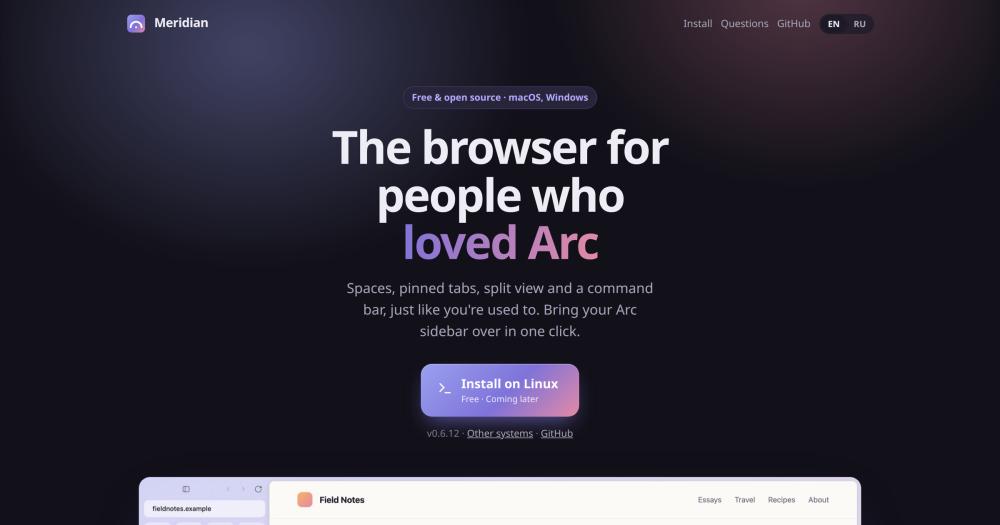
Browse the web in an open-source Chromium browser with Arc-style spaces, split view, and a built-in MCP server for AI coding agents.

Visit websiteGitHub16 stars
image of Meridian Browser
TL;DR

Meridian Browser Meridian is a free, MIT-licensed Chromium browser that ships the full Arc workspace: spaces with per-space color and logins, split view, the ⌘T command bar, pinned tabs and folders, and a one-click importer that brings your Arc setup across on first launch. It adds a 28-tool MCP server for Claude Code, Codex, and other AI coding agents, plus a Workbench with Monaco editor and real terminals. Arc stops working on December 22, 2026; Meridian is the natural continuation for developers on macOS (Apple silicon) or Windows who run AI coding agents.

Read the full breakdownHide the full breakdownWho it is for, how it works, trade-offs, the quick start and the FAQ
who it's for

Who Meridian Browser is for#

Developers migrating from Arc before December 2026

Arc's December 22, 2026 end of life creates a forced migration. Meridian is the most direct path: one-click import, the same workspace model, and no account required. The macOS import includes logins (cookies), passwords, Boosts, and the full tab history.

Skip if:

You are not currently on Arc and do not need the specific Arc workspace model. A mainstream Chromium browser or Dia Browser may be a better fit if you have no existing Arc setup to preserve.

AI developers running Claude Code or Codex alongside a browser

Meridian's 28-tool MCP server lets Claude Code, Codex, and other MCP clients navigate tabs, read pages, take screenshots, and type, all with configurable permission levels. The Workbench and Mission Control give you terminals, an editor, and a live session monitor without leaving the browser window.

Skip if:

Your coding agent workflow does not need browser access, or you are on a team policy that forbids third-party browsers.

Privacy-conscious developers who want workspace isolation

No account signup, no telemetry, and no data sent to any server except the AI provider you explicitly connect. Spaces with separate cookie profiles keep work and personal browsing isolated without needing two browser installs.

Skip if:

You need cross-device sync for tabs and settings, or a team-managed browser policy with central administration.

the problem

The problem it solves#

Arc's shutdown on December 22, 2026, leaves its users searching for a browser that keeps the spaces-and-sidebar workflow they depend on. The main commercial option, Dia Browser from the same Arc team, moves that workflow behind a freemium paywall with a $20-per-month Pro tier. Beyond the migration problem, most browsers treat AI coding agents as an afterthought. Claude Code, Codex, and similar tools run in a terminal beside the browser with no structured way to read or navigate what is on screen. Developers coordinate sessions manually, copy-paste URLs, and lose context when the browser and the agent are in separate windows. There is no way to monitor multiple agent sessions, track context usage, or give an agent scoped, permission-gated access to exactly the tabs it needs.

how Meridian Browser solves it

How it solves it#

Spaces and Per-Space Profiles

Separate browser spaces, each with its own color, icon, and login profile (separate cookies and sessions for work and personal browsing). Switch between spaces with ⌃1-9 or swipe. Sites where you are signed in on one space stay signed out on others, without needing two browser installs.

28-Tool MCP Server

Exposes 28 browser tools to any MCP client: tab and space management, page reading, navigation, clicks, typing, screenshots, split view, Boosts, and translation. Access is permission-gated at four levels, from fully off to full control. The server connects over a local named pipe with a random token so websites cannot reach it.

Workbench with Monaco Editor

A browser tab with a file tree, the Monaco editor, and real terminals, designed for running Claude Code, Codex, Gemini CLI, Copilot, OpenCode, and similar tools next to the pages they affect. After a restart, the Workbench reopens previous sessions in order with their names and permission modes preserved.

One-Click Arc Import

Brings spaces, colors, icons, pinned tabs, folders, favorites, Today list, logins (via Arc's cookies into matching profiles, macOS only), saved passwords, history, and Boosts across on first launch. Chrome import (File › Import from Chrome) is also available and brings bookmarks, open tabs, sign-ins, passwords, and history.

Mission Control for Agent Sessions

A single panel (⇧⌘M on macOS) showing every Claude Code and Codex session across all spaces: subagent activity, context fill level, and pending user confirmations. One click navigates to any session's terminal.

No Account, No Telemetry

No server receives your browsing data. AI features send nothing to a provider unless you have connected one and triggered a query explicitly. API keys are encrypted with the system keychain and are never accessible to web pages. Built-in ad and tracker blocking requires no extension.

strengths · trade-offs

Strengths and trade-offs#

Strengths

  • MIT License with No Ongoing CostsMIT-licensed with no account, no subscription, and no telemetry. Run it on as many machines as you want, use it commercially, and fork it without restriction. Unlike Arc, which stops working on December 22, 2026, or Dia Browser's $20-per-month Pro tier, there are no ongoing costs and no end-of-life deadline.
  • Direct Arc Migration PathThe importer brings spaces, colors, icons, pinned tabs, folders, favorites, Today, saved passwords, logins (cookies into matching profiles on macOS), history, and Boosts in one operation on first launch. Nothing leaves your computer and Arc is not modified. Arc stops working on December 22, 2026, making this import the full migration path.
  • Explicit MCP Permission ModelAgents act inside your logged-in browser, so the security model matters. MCP access is controlled at four explicit levels: off, read-only, ask before acting, and full control. JavaScript execution in pages is a separate opt-in that is off by default. Page text given to models is marked untrusted so models are instructed not to follow instructions embedded in pages.
  • Full Chromium CompatibilityBuilt on Chromium, so Google sign-in, passkeys, Chrome extensions (in experimental mode), and all standard web APIs work as expected. Sites that require Chromium-specific features work in Meridian. The Chromium base also means the browsing engine receives upstream security patches.

Trade-offs

  • -Early-Stage SoftwareFirst released in October 2026, Meridian has 24 open issues as of its November 2026 snapshot. The macOS build is not yet Apple-signed, so the first launch requires opening System Settings › Privacy & Security and clicking Open Anyway. The Windows build has had less hands-on testing than macOS, per the README's own note.
  • -No Built-In Password Manager or SyncMeridian has no password manager of its own and no cross-device sync for settings or tabs. Saved passwords imported from Arc or Chrome are readable but Meridian does not manage them separately.
  • -Chrome Extensions Work in Experimental Mode OnlyChrome extensions are supported as an experiment, not a stable feature. Meridian handles ad blocking itself, and password managers work via their companion apps, but other extensions may behave unpredictably.
  • -Windows Import LimitationsOn Windows, quit Arc before importing its logins because Arc locks its cookie files while it is open. Chrome's App-Bound Encryption means Chrome logins do not transfer to Meridian; you sign in to each site once after importing. Arc extensions do not come over on Windows.
versus alternatives

Meridian Browser vs alternatives#

Meridian vs Arc

Arc and Meridian share the same sidebar model: spaces, pinned tabs, split view, Boosts, the command bar, and Today auto-archiving. Arc stops working on December 22, 2026. For anyone still on Arc, Meridian offers a direct migration: a one-click importer brings spaces, colors, pinned tabs, folders, favorites, saved passwords, logins (via cookies on macOS), and Boosts on first launch.

FeatureMeridianArc
LicenseMIT (open source)Proprietary
StatusActiveEnds December 22, 2026
Spaces and sidebarYesYes
Split viewYesYes
Arc importOne-clickn/a
MCP server for AI agents28 toolsNot documented

Because Arc is shutting down, it is not a viable long-term choice. Meridian is the natural continuation for users who built their workflow around Arc's spaces model.

Meridian vs Dia Browser

Dia Browser is the commercial successor from the Arc team, offering spaces, sidebar AI, and Skills on a freemium model ($20 per month for the Pro tier). Meridian and Dia Browser overlap on the core workspace UX but diverge on two dimensions: license and AI agent integration.

FeatureMeridianDia Browser
LicenseMIT (open source)Proprietary
PriceFreeFreemium, $20/mo Pro
Arc importOne-clickNot documented
AI chatBuilt in (bring your own key)Built in (sidebar AI)

Meridian is the stronger fit for developers who run Claude Code, Codex, or other MCP-compatible coding agents: the MCP integration, Workbench, and Mission Control are built for that workflow. Dia Browser is worth considering when you want a commercially supported product with the Arc team's design sensibility and a polished AI sidebar, without the complexity of connecting coding agents to your browser.

install · quick start

Quick start#

bash
Install Meridian on macOS using the verified one-line setup script; Windows users download the exe installer from GitHub Releases.

```bash
curl -fsSL https://undermove.github.io/meridian-browser/install.sh | bash
```
tech stack · detected from GitHub

What it's built on#

Languages
JavaScript
Frameworks
Electron
Runtimes
Chromium
Tooling
esbuild
frequently asked

FAQ#

Is Meridian free to use and open source?

Yes. Meridian is MIT-licensed and free to download, install, and use with no account, no subscription, and no ads. The source code and build steps are on the chromium-port branch of the GitHub repository. The installer is not yet Apple-signed, so the first macOS launch requires a one-time System Settings override to open it.

Does Meridian work with Chrome extensions?

Partially, as an experiment. Meridian handles ad and tracker blocking itself, and password manager apps work via their companion applications. Other extensions may work but are not guaranteed to behave correctly. The team flags extension support as an in-progress area.

How do I connect Claude Code to Meridian's MCP server?

Open Settings › AI, pick an access level for agents, then click Connect next to Claude Code. Meridian shows the exact command to run and executes it after you confirm. Agents started in the Workbench get browser tools for that session only; your global MCP configs are not modified.

Does Meridian run on Intel Macs or Linux?

Not yet. The current release (version 0.6) supports macOS on Apple silicon (M1 and later) and Windows x64. Intel Mac and Linux builds are planned but not released as of the November 2026 snapshot. The README notes that the Linux build comes later.

Looking for more

Other ways to replace Arc and Dia Browser#

Zen Browser

#1 in the Arc guide

Sidebar Workspaces, split view for up to 4 tabs and Boosts, the closest match to how Arc worked

45,913 GitHub stars

Floorp

#2 in the Arc guide

Workspaces that switch a Firefox container per project, with no account required

8,496 GitHub stars

Brave

#3 in the Arc guide

Chrome Web Store extensions and an Android app, with encrypted sync across devices

3,802 GitHub stars

Firefox

#4 in the Arc guide

Vertical tabs, tab groups and split view built into the browser itself, on 5 platforms

13,878 GitHub stars
All 13 Arc alternatives6 open source Arc alternatives, ranked
by category

Open source tools in these categories#

679

Developer Tools

REA (Reverse Engineer Anything), Skills for Real Engineers, superpowers
315

Business & Productivity

OpenClaw, Excalidraw, RustDesk

Sponsors

SnitchFeed

Live monitoring on LinkedIn, X, Reddit & more. Agentic social listening for startups.

Marketing & Growth

Windshift

Alternative toJira

Self-hosted work management for teams leaving Jira

  • 449 GitHub stars
  • AGPL-3.0Licence AGPL-3.0

Nuphos

Alternative toConductor

Agent workspace for teams running Claude Code or Codex

  • 707 GitHub stars
  • Apache-2.0Licence Apache-2.0
  • #AI Agents
Advertise your product

New open source projects by email

The projects we add and every new guide. Free, unsubscribe any time.

Find open source alternatives to paid software

/
  • Claude Code to OpenCode
  • Jira to Windshift
  • Notion to AppFlowy
  • Slack to Mattermost
  • Linear to GitLab
  • Wispr Flow to Handy
  • Arc to Zen Browser
  • CapCut to Concat
  • Grok Bot to rakazo
  • Superhuman to Inbox Zero
  • Discord to Stoat
  • Airtable to AITable
  • Datadog to SigNoz
  • Muse to OpenClaw
  • Railway to Coolify
  • GitHub Copilot to Cline
  • Confluence to Wiki.js
  • Microsoft Teams to Rocket.Chat
  • 1Password to KeePassXC
  • Firebase to Supabase
  • Pinecone to Qdrant
  • Zapier to n8n
  • Devin AI to OpenHands
  • Adobe Premiere Pro to Shotcut
  • Claude Code to OpenCode
  • Jira to Windshift
  • Notion to AppFlowy
  • Slack to Mattermost
  • Linear to GitLab
  • Wispr Flow to Handy
  • Arc to Zen Browser
  • CapCut to Concat
  • Grok Bot to rakazo
  • Superhuman to Inbox Zero
  • Discord to Stoat
  • Airtable to AITable
  • Datadog to SigNoz
  • Muse to OpenClaw
  • Railway to Coolify
  • GitHub Copilot to Cline
  • Confluence to Wiki.js
  • Microsoft Teams to Rocket.Chat
  • 1Password to KeePassXC
  • Firebase to Supabase
  • Pinecone to Qdrant
  • Zapier to n8n
  • Devin AI to OpenHands
  • Adobe Premiere Pro to Shotcut