Open Source Alternatives
  • Alternatives
  • Categories
    Categories by size1,162 projects
    • Developer Tools597
    • AI & Machine Learning503
    • Business & Productivity281
    • Web Development211
    • Security & Monitoring174
    • Communication & Collaboration155
    • IT Management147
    • LLMOps & AI Tooling129
    • Cloud & Hosting128
    • Product & Project Management124
    Browse all 21 categoriesDesign & Creative, DevOps & CI/CD and 9 more
  • Blog
  • Advertise
SearchNotion, Slack, password manager.../
Submit
Open Source Alternatives
  • Alternatives
    • Developer Tools597
    • AI & Machine Learning503
    • Business & Productivity281
    • Web Development211
    • Security & Monitoring174
    • Communication & Collaboration155
    • Browse all 21 categories
  • Blog
  • Advertise
Submit your project

New open source projects by email

The projects we add and every new guide. Free, unsubscribe any time.

Open Source Alternatives LogoOpen Source Alternatives

Handpicked Open Source Alternatives to Paid Softwares

Add Open Source Alternatives as a preferred source on Google

Product

  • Categories
  • Tag
  • Advertise

Resources

  • Blog
  • Collection
  • Submit

Company

  • Privacy Policy
  • Terms of Service
  • Refund Policy
  • Sitemap

Alternatives

  • Claude Code
  • Jira
  • Notion
  • Slack
  • Linear
  • Wispr Flow
  • All alternatives
© 2026 Open Source Alternatives. All rights reserved.
Open SourceAlternatives
Home/Categories/Developer Tools/Nushell
icon of Nushell

Nushell

  • 41K stars
  • MIT
  • Active this week
  • Last commit today

Last verified Nov 7, 2026

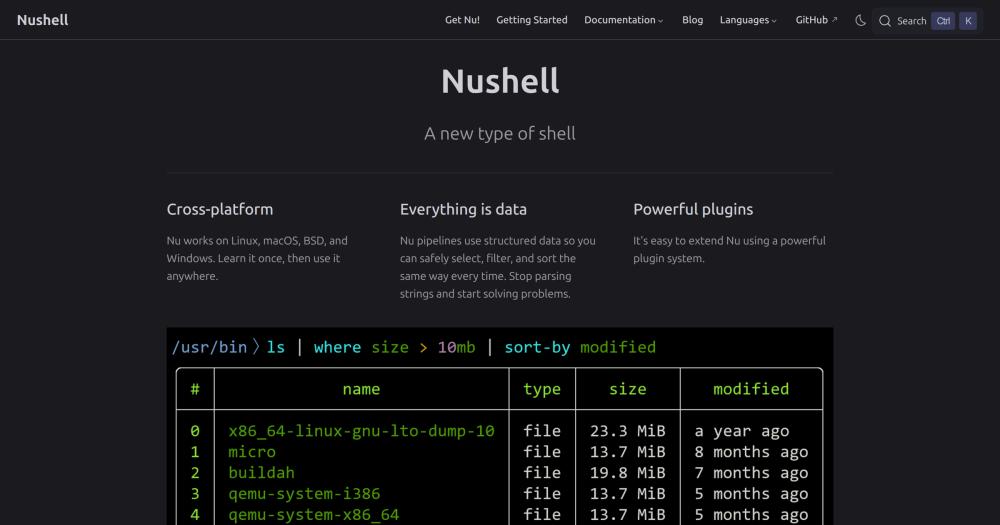
Run structured data pipelines in a cross-platform shell that treats every command output as typed data, eliminating text parsing with awk and sed.

Visit websiteGitHub41K stars
Image for Nushell
TL;DR

Nushell is a cross-platform shell written in Rust that replaces Bash and zsh string-parsing pipelines with a typed data model. Where traditional shells output raw text that needs `awk`, `sed`, or `jq` to extract structure, Nushell returns tables you filter, sort, and select from directly. It reads JSON, YAML, TOML, CSV, SQLite, and Excel files natively and uses the same commands on all of them. MIT licensed, it installs through Homebrew on macOS and Linux or winget on Windows. Best for developers who process structured data daily and want a single consistent shell that works identically across platforms.

Read the full breakdownHide the full breakdownWho it is for, how it works, trade-offs, the quick start and the FAQ
who it's for

Who Nushell is for#

Developers processing structured data daily

Engineers who regularly extract fields from JSON API responses, filter log files, or query CSV exports gain the most from Nushell. The same `where`, `select`, and `get` commands replace a different tool for each format, and the typed pipeline catches malformed data before it flows downstream.

Skip if:

Your workflow is primarily running single commands rather than building multi-step pipelines. Nushell's value concentrates in pipeline composition; for running individual programs, Bash or zsh are simpler to stay with.

Platform engineers writing scripts that run on Linux and macOS

Nushell's built-in commands behave identically across Linux, macOS, BSD, and Windows from the same source. Teams that need a single script to work on all four platforms without conditional OS-detection blocks get a consistent model out of the box.

Skip if:

Your scripts must also run on machines where only Bash or sh is available, such as minimal server images or CI runners without Nushell installed. Nu requires installation and is not a drop-in POSIX replacement.

Developers exploring interactive shell alternatives

Nushell's autocomplete, table rendering, and clear error messages make it a productive interactive shell for day-to-day terminal use. The book, cookbook, and Discord community provide substantial learning resources for new users transitioning from Bash or zsh.

Skip if:

You need to run existing Bash scripts without modification. Nushell does not execute POSIX shell syntax, so migrating a large scripts library represents a significant up-front investment.

the problem

The problem it solves#

Bash and zsh treat every command output as a stream of raw text. Extracting a single field from ls output requires awk, a column offset, and an assumption that the format never changes. When a filename contains a space, that assumption breaks. When the same script needs to query a JSON file, a CSV export, and a REST API response, you add jq, a CSV parser, and a custom loop. Each tool has its own syntax, its own edge cases, and no shared data model.

The deeper problem is that these parsing pipelines fail silently. A wrong column offset in awk produces garbage output rather than an error. A grep on a log file that changes format returns nothing but no warning. For developers who rely on shell scripts in CI pipelines or daily workflows, the cost is time spent debugging string manipulation instead of solving the underlying task.

how Nushell solves it

How it solves it#

Structured data pipeline model

Every Nushell command produces a table of typed values rather than text. `ls` returns a table with `name`, `type`, `size`, and `modified` columns. Pipe it through `where type == "dir"` and you get the same table filtered by value, with no field offset or string parsing required.

Native multi-format I/O

Nushell reads JSON, YAML, TOML, CSV, SQLite databases, and Excel files directly into its table model using `open`. The same `select`, `get`, and `where` commands work on all of them, so a script that processes a configuration file needs no format-specific parser.

Typed error messages

Because Nu operates on typed data, it catches type mismatches before they produce silent wrong output. When a pipeline fails, the error message names the exact command and position where the type mismatch occurred, rather than producing garbled output with no indication of where things went wrong.

Cross-platform commands

Nushell's built-in commands work identically on Linux, macOS, BSD, and Windows. A `ps | where cpu > 0` pipeline runs the same way on all four platforms, unlike Bash scripts that require different tools and quoting rules on Windows versus Linux.

Plugin system with structured data

Plugins extend Nu using a JSON-RPC protocol and follow the same structured data model as built-in commands. Filter plugins receive data one element at a time and stream structured values back; sink plugins get the full data vector. Plugins live in your PATH under a `nu_plugin_*` naming convention.

strengths · trade-offs

Strengths and trade-offs#

Strengths

  • MIT license with no usage restrictionsNushell is MIT licensed. You can use it in personal projects, commercial software, and enterprise environments without restrictions, with no per-seat fees, no paid team tier, and no CLA required. The license is confirmed in the GitHub repository's LICENSE file.
  • Broad package manager supportNushell is packaged in Homebrew, Nix, winget, Cargo, and over a dozen other package managers across Linux, macOS, and Windows. This means it installs with a single command on most developer machines without custom setup or manual builds.
  • Typed pipeline catches silent failuresTraditional shell pipelines fail silently: a wrong `awk` column offset returns a wrong field without an error. Nushell's typed values mean that accessing a non-existent column or mismatching types produces an error at the point of failure with a clear message, so bugs surface at development time rather than in production.
  • Broad ecosystem integrationTools including zoxide, starship, oh-my-posh, virtualenv, atuin, and clap all officially support Nushell. Developers who already use these tools can keep their existing workflow and add Nu incrementally, rather than starting from scratch.

Trade-offs

  • -Command stability varies at this MVP stageThe README states: "This project has reached a minimum-viable-product level of quality. Many people use it as their daily driver, but it may be unstable for some commands. Nu's design is subject to change as it matures." Scripts written today may need minor updates as the design evolves.
  • -Active issue backlog with 1,377 open issuesThe repository carries 1,377 open issues, reflecting active use and community engagement but also indicating known rough edges. Users who rely on Nu in production environments should test their workflows before switching and monitor the changelog between releases.
  • -Existing Bash scripts do not run in Nu without modificationNushell does not aim for POSIX or Bash compatibility. Shell scripts written for Bash or sh will not run in Nu without modification. Teams that share scripts with users on systems where only Bash is available need to maintain both versions. Migrating a large scripts library is a substantial up-front cost.
versus alternatives

Nushell vs alternatives#

Nushell vs PowerShell

Nushell and PowerShell share the same core idea: pipelines carry structured objects, not text streams. PowerShell built this concept on Windows as a Microsoft product; Nushell extends it to Linux, macOS, BSD, and Windows under the MIT license.

FeatureNushellPowerShell
LicenseMITMIT (core), proprietary (Windows built-in)
PlatformsLinux, macOS, BSD, WindowsWindows (built-in), Linux/macOS (opt-in install)
Data modelTyped tables with native format I/O.NET objects
InstallHomebrew, winget, Nix, CargoIncluded on Windows; downloadable on others
Scripting languageNuPowerShell

Nushell is the better choice for developers on Linux or macOS who want a structured data shell without depending on the .NET runtime. Its native I/O for JSON, YAML, TOML, and CSV is built into the shell with no additional modules. PowerShell is worth considering when you work primarily in Windows enterprise environments, need deep integration with the Windows management API, or already maintain a large library of PowerShell scripts.

Nushell vs Bash with jq and awk

The more direct comparison is against the standard Bash workflow augmented with jq, awk, sed, and format-specific tools.

FeatureNushellBash + jq/awk
Data modelTyped tables across all formatsText streams
Cross-platformIdentical commands on all platformsDifferent quoting rules per platform
Error feedbackType errors caught at pipelineSilent wrong output
Learning curveNew syntax to learnExisting knowledge carries over

Nushell is a better fit for developers who work with multiple data formats in the same workflow and find that maintaining jq queries alongside awk scripts adds more overhead than the structured model costs in learning time. Bash remains the right choice when scripts must run on minimal server images without additional installs, need POSIX shell conventions, or the team already maintains a large Bash scripts library.

install · quick start

Quick start#

bash
Install Nushell with your package manager, then launch it by typing `nu`.

```bash
# macOS and Linux
brew install nushell
# Windows
winget install nushell
# Nix
nix profile install nixpkgs#nushell
```
tech stack · detected from GitHub

What it's built on#

Languages
Rust
frequently asked

FAQ#

Is Nushell compatible with Bash scripts?

No. Nushell uses its own syntax and does not execute POSIX shell scripts. Commands that exist in Bash (such as ls, ps, or open) have Nushell equivalents that return structured tables rather than text. Migrating Bash scripts requires rewriting them in Nu's syntax. Nushell can still call external programs and pipe their output through Nu commands, so you can mix external tools with Nu pipelines.

How do I install Nushell?

On macOS and Linux, brew install nushell installs Nu through Homebrew. On Windows, winget install nushell works via the Windows Package Manager. Nushell is also available through Nix (nix profile install nixpkgs#nushell), Cargo, and over a dozen other package managers. After installing, type nu to start the shell. Detailed installation instructions are in the Nushell book at nushell.sh/book/installation.html.

Can I use Nushell as my default login shell?

Yes. Many users run Nushell as their daily driver, as the README notes. Because it is not a POSIX shell, some programs that expect /bin/sh behavior need to be pointed at Bash explicitly, but interactive terminal use works well. The Nushell book covers configuration, including setting Nu as the default shell.

What data formats does Nushell read natively?

Nushell reads JSON, YAML, TOML, CSV, TSV, SQLite, and Excel (.xlsx) files directly into its table model using the open command. URL contents can also be loaded. The structured output from open feeds into the same pipeline commands as file system output, so no format-specific parsing scripts are needed.

Can Nushell run external programs and existing command-line tools?

Yes. Nushell can call any program in your PATH. The output of external commands flows into Nu pipelines, where you can use lines, split column, or parse to bring text output into Nu's typed model. External programs that expect standard arguments work normally. The main incompatibility is with POSIX shell scripts, not with the programs themselves.

also worth a look

Similar open-source tools#

CleanYourTV

Featured

Alternative toATV Launcher Pro

Debloat any Android or Google TV over Wi-Fi and get an Apple TV-style home.

  • 51,495 GitHub stars
  • MIT LicenseLicence MIT License

REA (Reverse Engineer Anything)

Featured

Alternative toRevEng.AI

AI-powered reverse engineering for binaries, apps, and assemblies.

  • 431,018 GitHub stars
  • MITLicence MIT

rakazo

Featured

Alternative toGrok Bot

AI teammates you own: your keys, your model, your machine.

  • 7,028 GitHub stars
  • Apache-2.0Licence Apache-2.0

Agent Reach

Featured

Alternative toFirecrawl

Give any AI agent internet access, free and local

  • 108,787 GitHub stars
  • MITLicence MIT

Hermes Agent

Featured

Alternative toGrok Bot

Self-hosted AI agent: persistent memory, multi-channel chat, model choice.

  • 260,560 GitHub stars
  • MITLicence MIT

Rataflow

InDeveloper Tools

Node-based flow graph library for the terminal, in Rust.

  • 195 GitHub stars
  • MITLicence MIT
by category

Open source tools in these categories#

597

Developer Tools

REA (Reverse Engineer Anything), Skills for Real Engineers, superpowers

Sponsors

Inbox Zero

Alternative toSuperhuman

AI email assistant that drafts replies and clears your inbox

  • 12,915 GitHub stars
  • AGPL-3.0Licence AGPL-3.0
  • #Email

rakazo

Alternative toGrok Bot

AI teammates you own: your keys, your model, your machine.

  • 7,028 GitHub stars
  • Apache-2.0Licence Apache-2.0
  • #AI Agents

SnitchFeed

Live monitoring on LinkedIn, X, Reddit & more. Agentic social listening for startups.

Marketing & Growth

Advertise your product

New open source projects by email

The projects we add and every new guide. Free, unsubscribe any time.

Find open source alternatives to paid software

/
  • Claude Code to OpenCode
  • Jira to Windshift
  • Notion to AppFlowy
  • Slack to Mattermost
  • Linear to GitLab
  • Wispr Flow to Handy
  • Arc to Zen Browser
  • CapCut to Concat
  • Grok Bot to rakazo
  • Superhuman to Inbox Zero
  • Airtable to AITable
  • Muse to OpenClaw
  • Railway to Coolify
  • GitHub Copilot to Cline
  • Datadog to Netdata
  • Confluence to Wiki.js
  • Microsoft Teams to Rocket.Chat
  • Firebase to Supabase
  • Pinecone to Qdrant
  • Zapier to n8n
  • 1Password to KeePassXC
  • Devin AI to OpenHands
  • Asana to Leantime
  • Contentful to Strapi
  • Claude Code to OpenCode
  • Jira to Windshift
  • Notion to AppFlowy
  • Slack to Mattermost
  • Linear to GitLab
  • Wispr Flow to Handy
  • Arc to Zen Browser
  • CapCut to Concat
  • Grok Bot to rakazo
  • Superhuman to Inbox Zero
  • Airtable to AITable
  • Muse to OpenClaw
  • Railway to Coolify
  • GitHub Copilot to Cline
  • Datadog to Netdata
  • Confluence to Wiki.js
  • Microsoft Teams to Rocket.Chat
  • Firebase to Supabase
  • Pinecone to Qdrant
  • Zapier to n8n
  • 1Password to KeePassXC
  • Devin AI to OpenHands
  • Asana to Leantime
  • Contentful to Strapi