Open Source Alternatives
  • Alternatives
  • Categories
    Categories by size1,162 projects
    • Developer Tools597
    • AI & Machine Learning503
    • Business & Productivity281
    • Web Development211
    • Security & Monitoring174
    • Communication & Collaboration155
    • IT Management147
    • LLMOps & AI Tooling129
    • Cloud & Hosting128
    • Product & Project Management124
    Browse all 21 categoriesDesign & Creative, DevOps & CI/CD and 9 more
  • Blog
  • Advertise
SearchNotion, Slack, password manager.../
Submit
Open Source Alternatives
  • Alternatives
    • Developer Tools597
    • AI & Machine Learning503
    • Business & Productivity281
    • Web Development211
    • Security & Monitoring174
    • Communication & Collaboration155
    • Browse all 21 categories
  • Blog
  • Advertise
Submit your project

New open source projects by email

The projects we add and every new guide. Free, unsubscribe any time.

Open Source Alternatives LogoOpen Source Alternatives

Handpicked Open Source Alternatives to Paid Softwares

Add Open Source Alternatives as a preferred source on Google

Product

  • Categories
  • Tag
  • Advertise

Resources

  • Blog
  • Collection
  • Submit

Company

  • Privacy Policy
  • Terms of Service
  • Refund Policy
  • Sitemap

Alternatives

  • Claude Code
  • Jira
  • Notion
  • Slack
  • Linear
  • Wispr Flow
  • All alternatives
© 2026 Open Source Alternatives. All rights reserved.
Open SourceAlternatives
Home/Categories/Developer Tools/Rataflow
icon of Rataflow

Rataflow

  • 195 stars
  • MIT
  • Active this month
  • Last commit 10 days ago

Last verified Nov 7, 2026

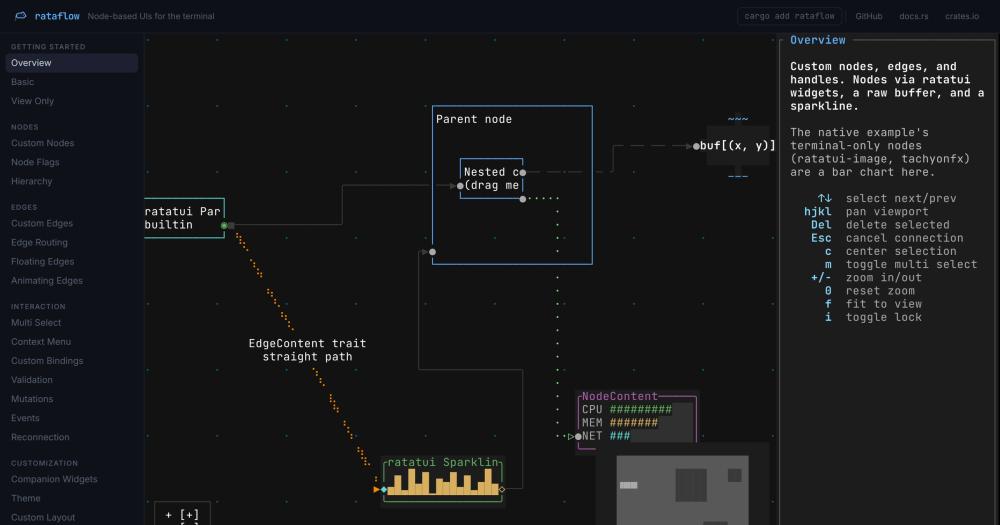
Build node-based flow graph UIs in the terminal with a Rust library that handles pan, zoom, drag, and custom node rendering on ratatui.

Visit websiteGitHub195 stars
image of Rataflow
TL;DR

Rataflow is a Rust library for building interactive node-based UIs in the terminal, from a static diagram to a fully interactive flow editor. Built on ratatui, it handles panning, zooming, dragging, multi-selection, edge routing with braille strokes for smooth diagonals, and serde-serializable graph snapshots for undo and restore. MIT licensed, it ships as a Cargo crate with no runtime dependencies beyond ratatui and a crossterm, termion, or termwiz backend. Best for Rust developers who need a visual graph interface in a TUI application without adopting a web frontend.

Read the full breakdownHide the full breakdownWho it is for, how it works, trade-offs, the quick start and the FAQ
who it's for

Who Rataflow is for#

Rust developers adding a graph view to a TUI tool

Teams building terminal applications sometimes need a visual graph layer: a dependency graph, a pipeline view, a network topology display. Rataflow provides that layer as a Cargo dependency, keeping the binary self-contained without requiring a web frontend.

Skip if:

If the graph is static and read-only with no user interaction, a simpler ASCII diagram library or an SVG-to-text renderer avoids the interaction overhead rataflow adds.

Developers building interactive terminal graph editors

Full interaction coverage is included: multi-select, drag, connection validation with custom validators, context-menu events on nodes and edges, and node resizing. These are the features a terminal-based visual editor needs beyond basic display.

Skip if:

If the graph has 40,000 or more nodes that all need to be rendered simultaneously, check the README performance benchmarks first. At that scale, drag frames average ~18ms in release builds.

Rust teams familiar with xyflow migrating to a terminal context

Rataflow directly mirrors the xyflow API: nodes, edges, FlowEvents, handles, and companion widgets map across with the same conceptual model. Teams that have built web apps with xyflow can apply the same graph design patterns in a terminal application.

Skip if:

If the target users access the application from a browser, xyflow in a React app is the appropriate tool. Rataflow targets native terminal processes, not web pages.

the problem

The problem it solves#

Terminal UI frameworks give developers a fixed grid of character cells and nothing more. Building a node graph on top of that grid requires solving a chain of problems: tracking world-space float positions that exceed the terminal's u16 coordinate range, rendering nodes that scroll partially off screen, drawing edges that cross each other without overwriting glyphs, and processing mouse events at 125-1000Hz before they queue up and lag the display.

The practical result is that adding a flow graph to a TUI application without a library means writing the layout engine, coordinate transforms, z-ordering, edge routing, and input coalescing from scratch before anything visible exists. Teams typically avoid it and reach for a web frontend instead, adding a browser dependency to what would otherwise be a lightweight terminal tool.

how Rataflow solves it

How it solves it#

Generic node and edge content types

Node and edge content is defined by the NodeContent and EdgeContent traits, so each node can render any Rust type: a text block, a sparkline chart, a live image via ratatui-image, or a custom shader effect via tachyonfx. The graph model stores the content; rataflow handles positioning, z-ordering, and interaction.

Pan, zoom, drag, and multi-select built in

Panning, zooming, dragging, and multi-selection work from the first frame with no configuration. Box selection runs on right-drag, node resizing uses a bottom-right grip, and keyboard navigation supports both spatial arrow-key and sequential Tab movement. All keybindings are rebindable via an actions API. Auto-pan activates when dragging near the canvas edge.

Automatic Sugiyama graph layout

Pass a list of edges and rataflow assigns node positions using a layered Sugiyama algorithm, with configurable direction (top-to-bottom, left-to-right) and spacing. For custom positioning, compile out the sugiyama feature flag and set positions via set_node_positions with any external algorithm.

Edge routing with junction glyphs and braille strokes

Step, straight, and floating edge types are built in. Crossing edges resolve to proper junction glyphs instead of overwriting each other. Braille edges merge by combining dot patterns within a cell, producing smooth diagonal lines in the terminal without ASCII artifacts.

serde serialization for save and restore

The serde feature flag enables serialization and deserialization of graph snapshots covering both topology and content. The examples directory includes save_restore and undo_redo demonstrations using this API.

WASM portability via ratzilla

The ratzilla feature flag targets WebAssembly, allowing rataflow graphs to run in a browser using a WebGL2 canvas. The overview demo at rataflow.furkankly.dev runs the native example compiled to WASM, with the same graph topology and portable node types.

strengths · trade-offs

Strengths and trade-offs#

Strengths

  • MIT license with no commercial restrictionsMIT licensed, so commercial products built on rataflow require no paid tier, no per-seat fee, and no licensing agreement beyond attribution. Source modifications and redistribution are permitted without restriction.
  • Measured performance at large graph sizesBenchmarks against 625 nodes at a 200x60 terminal buffer average ~1.0ms per drag frame in native release builds (roughly 1,000 FPS). At 10,000 nodes the average stays at ~6.6ms. The WASM build handles 10,000 nodes at ~8ms, the same frame time xyflow needs for 625 nodes according to the README benchmarks.
  • Backend-agnostic input layerWorks with crossterm (default), termion, termwiz, and WASM via ratzilla. Switching terminal backends does not change graph model code, only the event conversion shim. All four backends share the same rendering pipeline.
  • Off-screen node renderingNodes render into per-node scratch buffers, so a node at a negative world-space position draws the visible portion correctly. ratatui's u16 buffer cannot address negative coordinates; rataflow handles that at a signed-integer clipping stage before the final cast.

Trade-offs

  • -Rust-only, no cross-language bindingsRataflow is a Cargo crate with no bindings to Python, Node.js, Go, or other languages. Teams not writing Rust cannot use it. There is no higher-level scripting interface.
  • -Mouse event drain loop requiredTerminal backends deliver raw mouse events at 125-1000Hz. During a drag, unprocessed events queue up and the UI lags visibly unless the application drains all pending events before each render frame. The README documents the drain loop pattern, but it is an integration requirement on the caller, not an automatic behavior.
  • -Pre-1.0 API stabilityThe repository was created in August 2026 and has not reached a stable 1.0 release. The API may change in minor versions. Teams building long-lived tools should pin the exact version in Cargo.toml and review the changelog before upgrading.
versus alternatives

Rataflow vs alternatives#

rataflow vs commercial diagramming SDKs

Developer libraries for building interactive node graphs divide by target runtime: browser-based toolkits in JavaScript versus terminal-based libraries in Rust. rataflow occupies the terminal side, with no browser dependency and no paid tier.

JointJS+ (Rappid) is a widely deployed commercial graph library for the browser. It ships with a React component API, pre-built shapes, and an SVG renderer, and requires a commercial license for production use with per-seat or per-project pricing.

FeaturerataflowJointJS+
LicenseMITCommercial (paid license required)
Target environmentTerminal / WASMBrowser (JavaScript/React)
LayoutSugiyama (built-in)Dagre, manual, or custom
Serializationserde (opt-in)JSON (built-in)
RendererTerminal cell buffer + WASM WebGL2SVG/DOM
PricingFree (self-hosted)Paid, per seat or project

rataflow is the better choice when the target environment is the terminal: a Rust CLI, a server-side monitoring dashboard, or any application where users interact through a terminal emulator. The MIT license means no licensing friction for commercial products built on it.

JointJS+ is worth considering when the application is already browser-based, the shape library and SVG rendering quality are required, and the commercial license cost is acceptable. It has a mature API with years of production use; rataflow is newer and not yet at a stable 1.0.

rataflow vs xyflow (React Flow)

xyflow is the open source browser-based flow library that rataflow was directly inspired by. The comparison is useful for teams choosing their application architecture.

Featurerataflowxyflow
LicenseMITMIT
Target environmentTerminal / WASMBrowser (React/Svelte)
Drag frame at 625 nodes~1.0ms native, ~8ms WASM~11ms
At 10,000 nodes (WASM)~8msnot comparable (requires ~11ms at 625)
DistributionRust binaryNode.js web app

xyflow is the right choice for a web application: React integration, a large ecosystem of plugins, and a mature API with many real-world production apps behind it. rataflow is the right choice when the application lives in the terminal, the team is writing Rust, and adding a web frontend is not the preferred path.

install · quick start

Quick start#

bash
Install rataflow into your Rust project with Cargo.
```bash
cargo add rataflow
```
tech stack · detected from GitHub

What it's built on#

Languages
JavaScriptRustTypeScript
frequently asked

FAQ#

Does rataflow work with async Rust runtimes like tokio?

Yes. The examples directory includes basic_async.rs, which shows the tokio event loop pattern. The library itself is not async, but it integrates with an async runtime by processing events forwarded from the runtime's input loop. The async and sync examples differ only in how events are polled, not in how the graph is used.

What terminal backends does rataflow support?

crossterm is the default and ships with the library. termion and termwiz are opt-in feature flags. WASM builds use ratzilla. All four share the same graph model and rendering code; only the input event conversion differs by backend.

Can I save and restore the graph state?

Yes, with the serde feature flag. It enables serialization and deserialization of graph snapshots covering both topology and content types. The examples directory includes save_restore and undo_redo demonstrations using this feature.

How does rataflow handle nodes that scroll off screen?

Nodes render into per-node scratch buffers, so a node at a negative world-space position draws the visible portion correctly. ratatui's u16 buffer cannot address negative coordinates; rataflow handles that at a signed-integer clipping stage before the final u16 cast.

Is the crate stable for production use?

The crate is MIT licensed and functional, with published examples covering every major feature. The repository was created in August 2026 and has not yet reached a 1.0 release, so the API may change in minor versions. For production use, pin the exact crate version in Cargo.toml and review the changelog before upgrading.

also worth a look

Similar open-source tools#

BUI

InDeveloper Tools

Blender's widget system for Python, Rust, JavaScript and C apps

  • 1,385 GitHub stars
  • GPL-3.0Licence GPL-3.0

Pyxel

Alternative toPICO-8

Python retro game engine with built-in editors and browser export.

  • 18,522 GitHub stars
  • MITLicence MIT

DiscImageStudio

Alternative toLightScribe Toolbox

Burn visible images into standard CD, DVD, or Blu-ray discs.

  • 6,620 GitHub stars
  • GPL-3.0Licence GPL-3.0

Awwwards-mcp

Alternative toLazyweb

MCP server for Awwwards design inspiration, no API key required.

  • 424 GitHub stars
  • MITLicence MIT

Opensource UI

Alternative toTailwind UI

200+ copy-paste React and Next.js components, MIT licensed, no package

  • 818 GitHub stars
  • MITLicence MIT

Stayput

InBusiness & Productivity

136 file tools for images, PDFs and video, no uploads or accounts.

  • 1 GitHub stars
  • MITLicence MIT
by category

Open source tools in these categories#

597

Developer Tools

REA (Reverse Engineer Anything), Skills for Real Engineers, superpowers
120

Design & Creative

ComfyUI, Excalidraw, Godot Engine

Sponsors

Inbox Zero

Alternative toSuperhuman

AI email assistant that drafts replies and clears your inbox

  • 12,915 GitHub stars
  • AGPL-3.0Licence AGPL-3.0
  • #Email

rakazo

Alternative toGrok Bot

AI teammates you own: your keys, your model, your machine.

  • 7,028 GitHub stars
  • Apache-2.0Licence Apache-2.0
  • #AI Agents

SnitchFeed

Live monitoring on LinkedIn, X, Reddit & more. Agentic social listening for startups.

Marketing & Growth

Advertise your product

New open source projects by email

The projects we add and every new guide. Free, unsubscribe any time.

Find open source alternatives to paid software

/
  • Claude Code to OpenCode
  • Jira to Windshift
  • Notion to AppFlowy
  • Slack to Mattermost
  • Linear to GitLab
  • Wispr Flow to Handy
  • Arc to Zen Browser
  • CapCut to Concat
  • Grok Bot to rakazo
  • Superhuman to Inbox Zero
  • Airtable to AITable
  • Muse to OpenClaw
  • Railway to Coolify
  • GitHub Copilot to Cline
  • Datadog to Netdata
  • Confluence to Wiki.js
  • Microsoft Teams to Rocket.Chat
  • Firebase to Supabase
  • Pinecone to Qdrant
  • Zapier to n8n
  • 1Password to KeePassXC
  • Devin AI to OpenHands
  • Asana to Leantime
  • Contentful to Strapi
  • Claude Code to OpenCode
  • Jira to Windshift
  • Notion to AppFlowy
  • Slack to Mattermost
  • Linear to GitLab
  • Wispr Flow to Handy
  • Arc to Zen Browser
  • CapCut to Concat
  • Grok Bot to rakazo
  • Superhuman to Inbox Zero
  • Airtable to AITable
  • Muse to OpenClaw
  • Railway to Coolify
  • GitHub Copilot to Cline
  • Datadog to Netdata
  • Confluence to Wiki.js
  • Microsoft Teams to Rocket.Chat
  • Firebase to Supabase
  • Pinecone to Qdrant
  • Zapier to n8n
  • 1Password to KeePassXC
  • Devin AI to OpenHands
  • Asana to Leantime
  • Contentful to Strapi