Open Source Alternatives
  • Alternatives
  • Categories
    Categories by size924 projects
    • Developer Tools478
    • AI & Machine Learning415
    • Business & Productivity199
    • Web Development199
    • Security & Monitoring135
    • Communication & Collaboration129
    • IT Management128
    • Cloud & Hosting110
    • Data & Analytics107
    • Design & Creative106
    Browse all 21 categoriesProduct & Project Management, LLMOps & AI Tooling and 9 more
  • Blog
  • Advertise
SearchNotion, Slack, password manager.../
Submit
Open Source Alternatives
  • Alternatives
    • Developer Tools478
    • AI & Machine Learning415
    • Business & Productivity199
    • Web Development199
    • Security & Monitoring135
    • Communication & Collaboration129
    • Browse all 21 categories
  • Blog
  • Advertise
Submit your project

New open source projects by email

The projects we add and every new guide. Free, unsubscribe any time.

Open Source Alternatives LogoOpen Source Alternatives

Handpicked Open Source Alternatives to Paid Softwares

Product

  • Categories
  • Tag
  • Advertise

Resources

  • Blog
  • Collection
  • Submit

Company

  • Privacy Policy
  • Terms of Service
  • Refund Policy
  • Sitemap

Alternatives

  • Claude Code
  • Jira
  • Notion
  • Slack
  • Linear
  • Wispr Flow
  • All alternatives
© 2026 Open Source Alternatives. All rights reserved.
Open SourceAlternatives
Home/Categories/Business & Productivity/Paperless-ngx
icon of Paperless-ngx

Paperless-ngx

Open source alternative to DocuWare, Laserfiche, M-Files, ecoDMS and FileCenter

  • 47.1K stars
  • GPL-3.0
  • Active this week
  • Last commit today

Last verified Oct 25, 2026

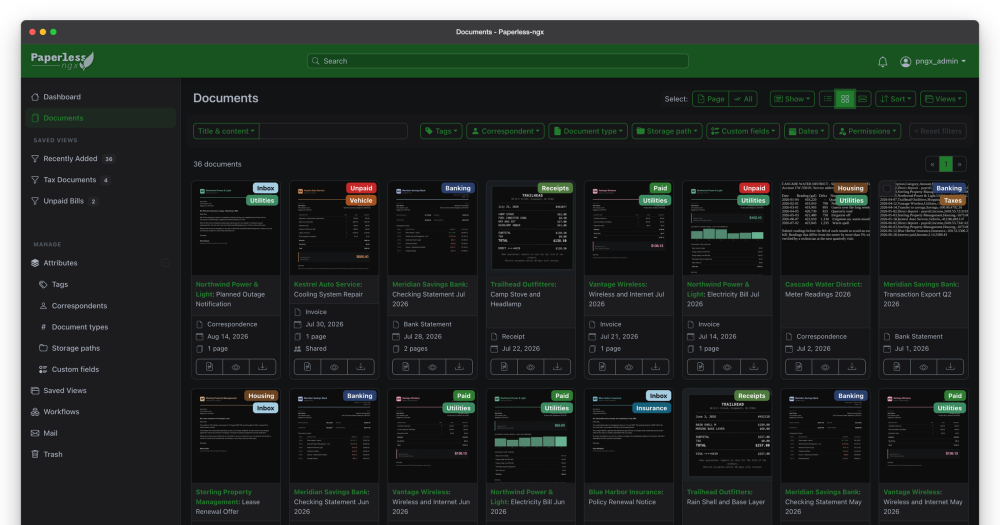
Manage and archive physical documents by scanning, OCR-indexing, and retrieving them through a self-hosted, GPL-licensed digital archive.

Visit websiteGitHub47.1K starsDeploy on Hostinger
image of Paperless Ngx
TL;DR

Paperless-ngx is a self-hosted document management system that scans physical documents, runs OCR to index their text, and stores them in a searchable archive. It replaces paid DMS tools like DocuWare and M-Files for home users and small teams who want full control over their document archive. Licensed under GPL-3.0, it deploys via Docker Compose with an install script. Best for households and small businesses that scan recurring paperwork and need fast retrieval without a cloud subscription.

Read the full breakdownHide the full breakdownWho it is for, how it works, trade-offs, the quick start and the FAQ
who it's for

Who Paperless-ngx is for#

Households going paperless with recurring mail

Individuals who receive regular paper mail (utility bills, tax forms, bank statements, medical letters) can scan and auto-index everything into a searchable archive. Search retrieves any document by content within a second; no filing system to maintain.

Skip if:

Your household document volume is very low (under 50 documents per year) or you prefer a managed cloud service. Paperless-ngx requires a server to run, so a simple cloud folder may be more practical at minimal scale.

Small business owners managing invoices and contracts

Small businesses that receive paper invoices, contracts, and correspondence can route all incoming documents through Paperless-ngx for automatic tagging by correspondent and document type. Full-text search surfaces any specific invoice or clause without maintaining manual folders.

Skip if:

Your business has compliance or audit requirements (HIPAA, SOC 2, etc.). Paperless-ngx does not provide the audit trails, encrypted storage, or access controls that regulated workflows require.

Home lab users building a self-hosted stack

Paperless-ngx integrates naturally into home lab environments running other self-hosted services. Docker Compose deployment slots into existing setups, and the API allows integration with automation tools for document routing.

Skip if:

You do not already run any self-hosted services and are not comfortable managing Docker containers.

Teams migrating from Paperless or Paperless-ng

The project is the official successor to both Paperless and Paperless-ng. Existing users can migrate by swapping the Docker image without losing their indexed archive, document types, correspondents, or tags.

Skip if:

You are a new user with no prior Paperless installation. New users start with the standard Docker Compose setup; the migration path is specifically for existing Paperless-ng users.

the problem

The problem it solves#

Paper documents pile up over time: tax returns, utility bills, invoices, contracts, medical records. Finding a specific document means physically sorting through folders and cabinets, with no way to search across them. Digitizing everything manually is slow, and generic file storage offers no OCR, no automatic tagging, and no cross-document search.

For households and small offices, commercial document management systems are overbuilt and expensive. DocuWare and M-Files target enterprise compliance workflows with per-seat pricing that makes no sense for a home archive or small team. The gap leaves individuals paying cloud storage fees for unindexed scans they still cannot search, or maintaining paper filing systems that grow more unwieldy every year.

how Paperless-ngx solves it

How it solves it#

OCR document indexing

Runs optical character recognition on every scanned document, extracting text that becomes searchable across the full archive. PDFs, images, and multi-page documents are all processed server-side. Once indexed, any word from any document surfaces in search results immediately.

Automatic tagging and classification

Documents can be auto-assigned to correspondents, document types, and tags using rules based on OCR content. The LLM integration extends rule-based classification to handle documents that do not match static patterns. This reduces the manual work of organizing a large archive.

Full-text search across the archive

Every indexed document is searchable by content, correspondent, date, tag, or type. The search interface runs in the browser via an Angular frontend, returning results across hundreds or thousands of documents in under a second for most deployments.

Docker Compose deployment with install script

The project ships Docker Compose files targeting the GitHub container registry image, with an install script that sets up the full stack. A running instance requires only Docker and Docker Compose; no separate database setup is needed beyond what the compose file provides.

Multi-format document consumption

Accepts PDFs, images (JPEG, PNG, TIFF), and other document formats through watched folders, the web upload interface, or a mobile companion app. The consumption pipeline normalizes all inputs through the OCR engine before indexing.

Community-maintained with active development

Paperless-ngx is the official successor to the original Paperless and Paperless-ng projects, designed to distribute maintenance responsibility across a team. The repo has over 47,000 GitHub stars, and translation support runs through Crowdin in many languages.

strengths · trade-offs

Strengths and trade-offs#

Strengths

  • GPL-3.0 license with full self-hostingLicensed under GPL-3.0, Paperless-ngx can be deployed on your own hardware with no software costs. Unlike DocuWare or M-Files, which require vendor licensing agreements, the GPL means you can run, modify, and redistribute the code. Self-hosting gives you complete control over where documents are stored and who can access them.
  • 47,000+ stars and a very low open issue countWith over 47,000 GitHub stars and only 4 open issues, Paperless-ngx has one of the healthiest community signals in self-hosted document management. The project is actively maintained, and the multi-team structure (frontend, CI/CD, etc.) distributes maintenance so no single contributor's workload stalls the project.
  • Official successor to an established project lineagePaperless-ngx is the officially recognized successor to the original Paperless and Paperless-ng projects, inheriting years of production use and community feedback. Users migrating from Paperless-ng can drop in the new Docker image without data loss, and the history means the feature set reflects real user needs over a long period.
  • Runs on low-cost home hardwareA basic deployment runs on a local server or NAS device; the project explicitly recommends a home server for the best security posture. This makes it accessible to individuals using hardware like a Raspberry Pi or a repurposed desktop, without the cloud infrastructure costs of managed DMS services.

Trade-offs

  • -No encryption at restDocuments are stored in clear text without encryption. The README explicitly warns that Paperless-ngx should never be run on an untrusted host, and recommends running it only on a local server with backups. Users handling highly sensitive documents (financial, legal, medical) should implement filesystem-level encryption themselves before deploying.
  • -Not built for enterprise compliance workflowsThe project targets households and small offices, not enterprise deployments. It lacks the compliance workflow automation, audit trails, and role-based access controls that regulated industries require from commercial DMS platforms like DocuWare. Large organizations with document compliance requirements will find the feature set limited.
  • -Requires Docker and server administration knowledgeDeploying Paperless-ngx requires familiarity with Docker Compose and basic server administration. The install script simplifies setup, but troubleshooting storage, networking, or OCR performance issues requires comfort with containers and Linux. Non-technical users are better served by managed alternatives.
versus alternatives

Paperless-ngx vs alternatives#

Paperless-ngx vs DocuWare

DocuWare and Paperless-ngx both capture, index, and retrieve documents, but they target different scales. DocuWare is an enterprise DMS with workflow automation, compliance features, and vendor-managed hosting; Paperless-ngx is a self-hosted archive built for personal and small-team use.

FeaturePaperless-ngxDocuWare
LicenseGPL-3.0Proprietary
Self-hostingYes (Docker Compose)Vendor-licensed on-premise or cloud
PricingFree (server costs only)Per-user subscription
OCRYesYes
Workflow automationLimitedYes (enterprise-grade)
Compliance featuresNoneYes

Paperless-ngx is the better choice when you need a self-hosted personal or small-office archive with no software licensing costs. DocuWare is the better choice for organizations that need document workflows, audit trails, or compliance with regulations like HIPAA or ISO standards.

Paperless-ngx vs FileCenter

FileCenter is a Windows desktop document management application for small offices. Paperless-ngx is a server-based, web-accessible archive that works on any device with a browser.

FeaturePaperless-ngxFileCenter
LicenseGPL-3.0Proprietary
PlatformSelf-hosted web (any device)Windows desktop
PricingFree (server costs only)Paid
OCRYesYes
AccessWeb browser, APIWindows desktop

Paperless-ngx is the better choice when you want browser-based access from any device, a Linux or NAS-based server, or an open source codebase you can modify. FileCenter is a better fit for Windows-centric offices that prefer a desktop application and do not want to manage a server.

install · quick start

Quick start#

bash
The install script sets up a docker compose environment on your server.
```bash
curl -L https://raw.githubusercontent.com/paperless-ngx/paperless-ngx/main/install-paperless-ngx.sh | bash
```
tech stack · detected from GitHub

What it's built on#

Languages
PythonTypeScript
Frameworks
AngularDjango
Cache
Redis
frequently asked

FAQ#

Is Paperless-ngx free to use?

Yes. Paperless-ngx is GPL-3.0 licensed and entirely self-hosted, so the software costs nothing. You pay only for the hardware or server you run it on. There is no cloud subscription tier or managed hosted version.

How do I install Paperless-ngx?

The easiest path is Docker Compose using the official install script from the GitHub repository. The script configures and launches the full stack in one command. Detailed step-by-step guides for alternative installation methods are in the official documentation at docs.paperless-ngx.com.

Is Paperless-ngx safe for sensitive documents?

It depends on your deployment. The project stores documents in clear text without encryption and explicitly warns against running it on untrusted hosts. The recommended deployment is a local server on your home network with backups. For sensitive legal, financial, or medical records, add filesystem-level encryption to your storage volume before storing documents.

How does Paperless-ngx compare to DocuWare?

Paperless-ngx covers core document capture, OCR indexing, and search for personal and small team use at no software cost. DocuWare is an enterprise DMS with workflow automation, compliance modules, and vendor-managed hosting, which is a better fit for larger organizations with regulatory requirements. Paperless-ngx is the better choice when you want self-hosted control without enterprise pricing.

Can I migrate from Paperless-ng to Paperless-ngx?

Yes. Paperless-ngx is the official successor to Paperless-ng and is designed as a drop-in upgrade. Replace the Docker image with the Paperless-ngx image; your existing database, indexed documents, correspondents, and tags carry over without data loss.

also worth a look

Similar open-source tools#

OpenClaw

Featured

Alternative toMuse

Self-hosted AI assistant for WhatsApp, Telegram, and more

  • 392,852 GitHub stars
  • MITLicence MIT

Inbox Zero

Featured

Alternative toSuperhuman

AI email assistant that drafts replies and clears your inbox

  • 12,787 GitHub stars
  • AGPL-3.0Licence AGPL-3.0

rakazo

Featured

Alternative toGrok Bot

AI teammates you own: your keys, your model, your machine.

  • 5,406 GitHub stars
  • Apache-2.0Licence Apache-2.0

paperclip

Featured

Alternative toGrok Bot

Self-hosted AI agent management with org charts and budgets

  • 106,516 GitHub stars
  • MITLicence MIT

VoiceWink

Alternative toWispr Flow

Hotkey voice-to-text for Windows 11, offline AI, one-time purchase.

  • 3 GitHub stars
  • GPL-3.0Licence GPL-3.0

Cherry Studio

Alternative toTypingMind

Local-first AI workstation with agents and multi-model chat.

  • 52,883 GitHub stars
  • AGPL-3.0Licence AGPL-3.0
by category

Open source tools in these categories#

199

Business & Productivity

OpenClaw, Excalidraw, RustDesk
415

AI & Machine Learning

freeCodeCamp, OpenClaw, REA (Reverse Engineer Anything)
Hostinger

Run Paperless-ngx on your own server

Self-host Paperless-ngx on a Hostinger VPS.

Deploy on Hostinger

Featured

Omnara

Alternative toCClaude Managed Agents

Open-source agent deployment API. Self-host or use Omnara Cloud.

  • 3,235 GitHub stars
  • Apache-2.0Licence Apache-2.0
  • #AI Agents

Inbox Zero

Alternative toSuperhuman

AI email assistant that drafts replies and clears your inbox

  • 12,787 GitHub stars
  • AGPL-3.0Licence AGPL-3.0
  • #Email

rakazo

Alternative toGrok Bot

AI teammates you own: your keys, your model, your machine.

  • 5,406 GitHub stars
  • Apache-2.0Licence Apache-2.0
  • #AI Agents
Feature your project

New open source projects by email

The projects we add and every new guide. Free, unsubscribe any time.

Find open source alternatives to paid software

/
  • Claude Code to OpenCode
  • Jira to Windshift
  • Notion to AppFlowy
  • Slack to Mattermost
  • Linear to GitLab
  • Wispr Flow to Handy
  • CapCut to Concat
  • Grok Bot to rakazo
  • Superhuman to Inbox Zero
  • Airtable to AITable
  • Muse to OpenClaw
  • Railway to Coolify
  • GitHub Copilot to Cline
  • Datadog to Netdata
  • Microsoft Teams to Rocket.Chat
  • Confluence to Docmost
  • Pinecone to Qdrant
  • Zapier to n8n
  • Devin AI to OpenHands
  • Firebase to Supabase
  • 1Password to KeePassXC
  • Contentful to Strapi
  • Adobe Premiere Pro to Shotcut
  • ChatGPT to AnythingLLM
  • Claude Code to OpenCode
  • Jira to Windshift
  • Notion to AppFlowy
  • Slack to Mattermost
  • Linear to GitLab
  • Wispr Flow to Handy
  • CapCut to Concat
  • Grok Bot to rakazo
  • Superhuman to Inbox Zero
  • Airtable to AITable
  • Muse to OpenClaw
  • Railway to Coolify
  • GitHub Copilot to Cline
  • Datadog to Netdata
  • Microsoft Teams to Rocket.Chat
  • Confluence to Docmost
  • Pinecone to Qdrant
  • Zapier to n8n
  • Devin AI to OpenHands
  • Firebase to Supabase
  • 1Password to KeePassXC
  • Contentful to Strapi
  • Adobe Premiere Pro to Shotcut
  • ChatGPT to AnythingLLM