Open Source Alternatives
  • Alternatives
  • Categories
    Categories by size950 projects
    • Developer Tools492
    • AI & Machine Learning423
    • Business & Productivity208
    • Web Development200
    • Security & Monitoring143
    • IT Management130
    • Communication & Collaboration129
    • Cloud & Hosting112
    • LLMOps & AI Tooling109
    • Data & Analytics108
    Browse all 21 categoriesDesign & Creative, Product & Project Management and 9 more
  • Blog
  • Advertise
SearchNotion, Slack, password manager.../
Submit
Open Source Alternatives
  • Alternatives
    • Developer Tools492
    • AI & Machine Learning423
    • Business & Productivity208
    • Web Development200
    • Security & Monitoring143
    • IT Management130
    • Browse all 21 categories
  • Blog
  • Advertise
Submit your project

New open source projects by email

The projects we add and every new guide. Free, unsubscribe any time.

Open Source Alternatives LogoOpen Source Alternatives

Handpicked Open Source Alternatives to Paid Softwares

Product

  • Categories
  • Tag
  • Advertise

Resources

  • Blog
  • Collection
  • Submit

Company

  • Privacy Policy
  • Terms of Service
  • Refund Policy
  • Sitemap

Alternatives

  • Claude Code
  • Jira
  • Notion
  • Slack
  • Linear
  • Wispr Flow
  • All alternatives
© 2026 Open Source Alternatives. All rights reserved.
Open SourceAlternatives
Home/Categories/Developer Tools/Parrotflow
icon of Parrotflow

Parrotflow

Open source alternative to Wispr Flow and Superwhisper

  • 22 stars
  • GPL-3.0
  • Active this week
  • Last commit today

Last verified Oct 29, 2026

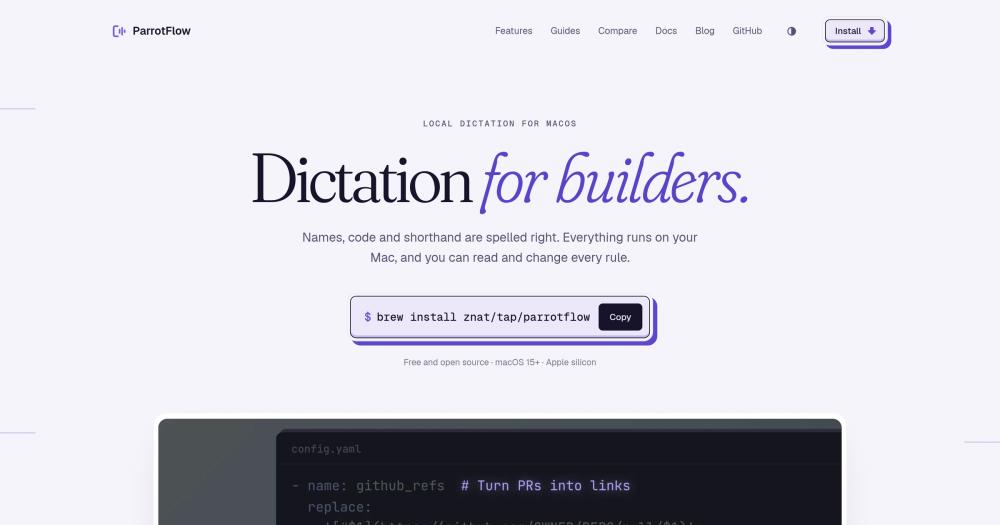
Transform spoken words into correctly formatted text on macOS using programmable rules, scripts, and on-device models, with no audio sent to the cloud.

Visit websiteGitHub22 stars
image of Parrotflow
TL;DR

Parrotflow is a programmable local dictation app for macOS that turns raw speech into correctly formatted text using a YAML config of rules, scripts, and pipelines. It replaces cloud-based paid tools like Wispr Flow by running everything on your Mac, using small on-device models for corrections without a network call. Licensed under GPL-3.0 and installed via Homebrew on Apple silicon. Best for developers who dictate code, commands, and messages and need domain-specific formatting that generic dictation cannot provide.

Read the full breakdownHide the full breakdownWho it is for, how it works, trade-offs, the quick start and the FAQ
who it's for

Who Parrotflow is for#

Developers dictating code and commands

Parrotflow corrects domain-specific terms, variable names, and CLI flags that generic speech recognition mishears. A rule that rewrites 'PR 478' as a GitHub link and another that formats spoken numbers as digits give you formatted output without post-editing.

Skip if:

Your dictation vocabulary is general language with no domain-specific names, numbers, or shorthand. Plain prose dictation does not need a rule layer.

Teams writing messages with Slack handles

The built-in slack_mentions transform ships ready to fill with a roster. Parrotflow rewrites spoken first names as @handles in message context, leaving the word unchanged when it appears elsewhere in the same sentence.

Skip if:

Your team uses a different chat tool without a similar @mention syntax. The script is simple to adapt, but you need to write it yourself.

Developers extending a coding agent

Adding the ParrotFlow skill to a coding agent means you can describe a new dictation rule in natural language and have the agent write and validate the YAML. You stay in the dictation flow instead of switching to a config editor.

Skip if:

You do not already use a coding agent or prefer to write config by hand. The skill adds value only when the agent is already in your workflow.

Privacy-focused workflows

Audio stays on-device with no cloud key required for built-in steps. For anyone dictating sensitive content, the absence of a network path to a third-party API is the deciding factor over Wispr Flow.

Skip if:

Your threat model does not include third-party audio processing. Cloud dictation tools may be more convenient if privacy is not a constraint.

the problem

The problem it solves#

Generic dictation on macOS hears what you said phonetically, not what you meant technically. A class named CaretAnchor becomes 'carrot anchor'. A Vue component becomes 'view component'. A PR number becomes a sequence of English words. Correcting these by hand after every dictation breaks the flow that dictation was supposed to create.

Cloud-based tools like Wispr Flow add a post-processing step, but the step rewrites your words with a language model. The result is grammatically polished but no longer yours: your specific variable names, your team's Slack handles, and your project's shorthand get normalized away. Developers who dictate into code editors and terminals need a correction layer they control, not one that second-guesses what they meant to say.

how Parrotflow solves it

How it solves it#

YAML rules and scripts

Transforms are regex patterns, Python or shell scripts, or prompt steps defined in a YAML config file. A rule that turns 'PR 478' into a GitHub link, or 'Siobhan' into a Slack mention, is four lines of config. Scripts read from stdin and write to stdout, so any language works.

Screen context correction

Before applying rules, Parrotflow reads the text in the active window. If 'CaretAnchor' appears on screen and you say 'carrot anchor', Parrotflow writes the version on screen. This works in every app except password managers, Keychain Access, System Settings, and password fields, using the macOS Accessibility API.

Contextual vocabulary learning

When Parrotflow corrects a word, it shows a pill with a confirm button. Confirm once, and 'upgrade view' becomes 'upgrade Vue' in future dictations. In 'the whole view', the word stays unchanged. The vocabulary system applies corrections only where the surrounding context matches.

Transform pipelines

Transforms chain in the order you list them. Numbers-to-digits runs before a PR-link rule so the rule finds digits, not spelled-out words. A transform can run automatically in the pipeline, on demand via a key, or when you say its name while holding the dictation key.

Coding agent skill

Install the ParrotFlow skill in a coding agent and describe a rule in plain language. The agent writes it into config.yaml and checks it with ParrotFlow's built-in config validator. Claude Code and any agent that supports the skills protocol can use it.

strengths · trade-offs

Strengths and trade-offs#

Strengths

  • No audio leaves your MacSpeech recognition, screen reading, rule evaluation, and vocabulary correction all run on-device. There is no API key for built-in steps and no network call in the transcription path. Cloud-based paid tools like Wispr Flow send audio to their servers; Parrotflow does not.
  • GPL-3.0 and fully inspectableEvery rule, transform, and built-in script ships in the repo. The config format is plain YAML. GPL-3.0 means you can run it for any personal or internal team use, modify the source, and see exactly what runs on your audio.
  • LLM is opt-inBuilt-in transforms use mmBERT, Qwen3 0.6B, and spaCy for small, targeted corrections without a language model. A prompt step that rewrites your dictation with Ollama or a cloud model is something you add when you need it, not a default that changes your words.

Trade-offs

  • -macOS 15+ and Apple silicon onlyParrotflow requires macOS 15 and Apple silicon. Intel Macs and all non-Apple platforms are not supported. Developers on Linux or Windows, or on older Macs, cannot use it.
  • -2 GB disk and 1 GB memoryThe on-device models take about 2 GB of disk and 1 GB of memory. On a Mac with limited RAM shared with other processes, this can create pressure. These figures come from the project README.
  • -New project with a small communityParrotflow was created in July 2026 and has 22 stars and 7 open issues at the time of listing. The rule format and pipeline API are functional but may change as the project matures.
versus alternatives

Parrotflow vs alternatives#

Parrotflow vs Wispr Flow

Both tools target dictation on macOS, but they differ on where audio goes and whether output can be programmed. Wispr Flow sends audio to cloud servers for transcription and post-processing; Parrotflow runs everything on your Mac.

FeatureParrotflowWispr Flow
LicenseGPL-3.0Proprietary
Audio processingOn-deviceCloud
Programmable rulesYes (YAML, Python, shell)No
Screen contextYesNo
SubscriptionNoYes

Parrotflow is the better choice when privacy matters, when you need custom formatting rules (PR links, Slack mentions, number formats), or when you want to inspect and modify the transcription pipeline. Wispr Flow is worth considering if you need dictation on Intel Macs or older macOS versions, or if you want a polished experience without any config file.

Parrotflow vs Superwhisper

Superwhisper is a local Whisper-based dictation app for macOS. Both tools run on-device, but Superwhisper does not have a programmable rule layer.

FeatureParrotflowSuperwhisper
LicenseGPL-3.0Proprietary
Audio processingOn-deviceOn-device
Programmable rulesYesNo
Screen contextYesNo
Vocabulary learningYesNo

Parrotflow is the better choice for developers who need domain-specific corrections and custom transforms. Superwhisper suits users who want simple local dictation with a cleaner UI and no configuration.

install · quick start

Quick start#

bash
Install Parrotflow via Homebrew on Apple silicon with macOS 15+.
```bash
brew install znat/tap/parrotflow
```
tech stack · detected from GitHub

What it's built on#

Languages
PythonSwift
frequently asked

FAQ#

Is Parrotflow free to use?

Yes. Parrotflow is free and open source under the GPL-3.0 license. Install it via Homebrew with no account, API key, or subscription. GPL-3.0 allows personal and internal team use; it prohibits reselling Parrotflow itself as a managed hosted service.

Does Parrotflow require an internet connection?

No. Transcription, screen context reading, rule evaluation, and vocabulary correction run on-device. The only network activity is in optional prompt steps you configure yourself, pointing at Ollama or a cloud model of your choice.

What Macs does Parrotflow run on?

Parrotflow requires Apple silicon and macOS 15 or later. Intel Macs are not supported. The on-device speech recognition and model steps that power screen context and vocabulary correction run on Apple silicon hardware.

Can I use Parrotflow without knowing YAML or Python?

For basic use, yes. Parrotflow ships with built-in transforms for numbers, dates, disfluency, and grammar that work without any config. Writing custom rules requires YAML, and scripts require Python or shell. The ParrotFlow coding-agent skill can write config for you if you describe what you need.

How does Parrotflow differ from Superwhisper?

Superwhisper offers local Whisper-based transcription for macOS. Parrotflow adds a programmable rule layer on top of transcription: screen context, vocabulary correction, YAML transforms, and scripts. If you need dictation that understands your codebase's naming conventions, Parrotflow adds that; Superwhisper does not.

Looking for more

Other ways to replace Wispr Flow and Superwhisper#

Handy

#1 in the Wispr Flow guide

Cross-platform offline dictation on Windows, macOS, and Linux, with the largest community of the eight

34,783 GitHub stars

VoiceInk

#2 in the Wispr Flow guide

Apple Silicon Mac dictation with local AI enhancement and no subscription

6,932 GitHub stars

FluidVoice

#3 in the Wispr Flow guide

macOS 15+ dictation with live transcription preview and optional on-device AI cleanup

12,489 GitHub stars

OpenWhispr

#4 in the Wispr Flow guide

Cross-platform dictation with documented meeting transcription, live diarization, and optional cloud processing

10,045 GitHub stars
All 13 Wispr Flow alternatives8 open source Wispr Flow alternatives, ranked
by category

Open source tools in these categories#

493

Developer Tools

REA (Reverse Engineer Anything), superpowers, Skills for Real Engineers
209

Business & Productivity

OpenClaw, Excalidraw, RustDesk
424

AI & Machine Learning

freeCodeCamp, OpenClaw, REA (Reverse Engineer Anything)

Sponsors

Inbox Zero

Alternative toSuperhuman

AI email assistant that drafts replies and clears your inbox

  • 12,826 GitHub stars
  • AGPL-3.0Licence AGPL-3.0
  • #Email

Omnara

Alternative toCClaude Managed Agents

Open-source agent deployment API. Self-host or use Omnara Cloud.

  • 3,296 GitHub stars
  • Apache-2.0Licence Apache-2.0
  • #AI Agents

rakazo

Alternative toGrok Bot

AI teammates you own: your keys, your model, your machine.

  • 5,914 GitHub stars
  • Apache-2.0Licence Apache-2.0
  • #AI Agents
Advertise your product

New open source projects by email

The projects we add and every new guide. Free, unsubscribe any time.

Find open source alternatives to paid software

/
  • Claude Code to OpenCode
  • Jira to Windshift
  • Notion to AppFlowy
  • Slack to Mattermost
  • Linear to GitLab
  • Wispr Flow to Handy
  • Arc to Zen Browser
  • CapCut to Concat
  • Grok Bot to rakazo
  • Superhuman to Inbox Zero
  • Airtable to AITable
  • Muse to OpenClaw
  • Railway to Coolify
  • GitHub Copilot to Cline
  • Datadog to Netdata
  • Microsoft Teams to Rocket.Chat
  • Confluence to Docmost
  • Pinecone to Qdrant
  • Zapier to n8n
  • Devin AI to OpenHands
  • Firebase to Supabase
  • 1Password to KeePassXC
  • Contentful to Strapi
  • Adobe Premiere Pro to Shotcut
  • Claude Code to OpenCode
  • Jira to Windshift
  • Notion to AppFlowy
  • Slack to Mattermost
  • Linear to GitLab
  • Wispr Flow to Handy
  • Arc to Zen Browser
  • CapCut to Concat
  • Grok Bot to rakazo
  • Superhuman to Inbox Zero
  • Airtable to AITable
  • Muse to OpenClaw
  • Railway to Coolify
  • GitHub Copilot to Cline
  • Datadog to Netdata
  • Microsoft Teams to Rocket.Chat
  • Confluence to Docmost
  • Pinecone to Qdrant
  • Zapier to n8n
  • Devin AI to OpenHands
  • Firebase to Supabase
  • 1Password to KeePassXC
  • Contentful to Strapi
  • Adobe Premiere Pro to Shotcut