Open Source Alternatives
  • Alternatives
  • Categories
    Categories by size979 projects
    • Developer Tools505
    • AI & Machine Learning432
    • Business & Productivity220
    • Web Development202
    • Security & Monitoring147
    • IT Management133
    • Communication & Collaboration132
    • Cloud & Hosting116
    • LLMOps & AI Tooling111
    • Data & Analytics108
    Browse all 21 categoriesProduct & Project Management, Design & Creative and 9 more
  • Blog
  • Advertise
SearchNotion, Slack, password manager.../
Submit
Open Source Alternatives
  • Alternatives
    • Developer Tools505
    • AI & Machine Learning432
    • Business & Productivity220
    • Web Development202
    • Security & Monitoring147
    • IT Management133
    • Browse all 21 categories
  • Blog
  • Advertise
Submit your project

New open source projects by email

The projects we add and every new guide. Free, unsubscribe any time.

Open Source Alternatives LogoOpen Source Alternatives

Handpicked Open Source Alternatives to Paid Softwares

Product

  • Categories
  • Tag
  • Advertise

Resources

  • Blog
  • Collection
  • Submit

Company

  • Privacy Policy
  • Terms of Service
  • Refund Policy
  • Sitemap

Alternatives

  • Claude Code
  • Jira
  • Notion
  • Slack
  • Linear
  • Wispr Flow
  • All alternatives
© 2026 Open Source Alternatives. All rights reserved.
Open SourceAlternatives
Home/Categories/Business & Productivity/PureMac
icon of PureMac

PureMac

Open source alternative to CleanMyMac and Sensei

  • 7.5K stars
  • MIT
  • Active this week
  • Last commit today

Last verified Oct 31, 2026

Manage disk space on macOS with app uninstalling, cache cleanup, duplicate detection, and storage analysis. MIT licensed, zero telemetry, no subscription.

Visit websiteGitHub7.5K stars
image of PureMac
TL;DR

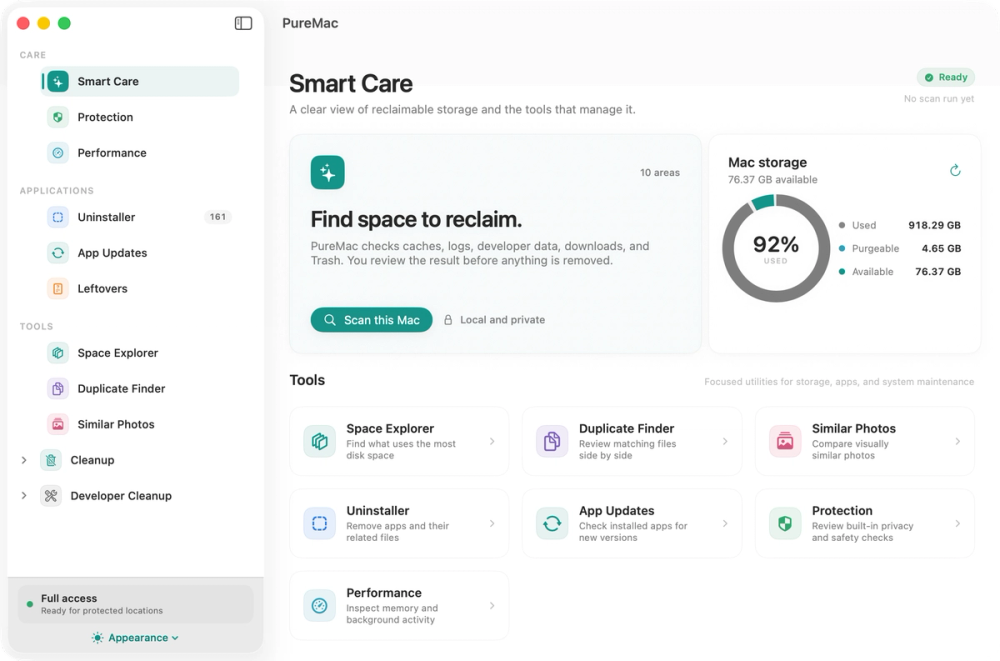
PureMac is a free, native macOS cleaner that handles app uninstalling, cache cleanup, duplicate detection, storage exploration, and security checks in one signed, notarized app. It replaces subscription tools like CleanMyMac and Sensei with an MIT-licensed, telemetry-free alternative that moves files to Trash before permanent removal and shows you every selection before it acts. Best for Mac users on limited storage who want a no-subscription cleanup tool, and for developers who regularly accumulate Xcode artifacts, Docker images, and Homebrew caches.

Read the full breakdownHide the full breakdownWho it is for, how it works, trade-offs, the quick start and the FAQ
who it's for

Who PureMac is for#

Developers managing build artifact sprawl

PureMac's developer cleanup section covers Xcode DerivedData and Archives, simulator caches, Homebrew download caches, npm/yarn/pnpm content-addressable stores, Docker images and build cache, and local AI-app caches for Ollama and LM Studio. Each category is listed separately so you select only what you know is safe to clear before confirming.

Skip if:

Your Mac has ample storage and you never accumulate Xcode or Docker build artifacts. The general system cleaner handles common caches without the developer-specific category detail.

Privacy-conscious users avoiding telemetry-shipping cleanup tools

PureMac makes no analytics calls and sends no crash reports. Local scanning and cleanup run entirely offline; the only network calls are optional GitHub release checks and Homebrew update fetches, initiated by the user. The MIT source is publicly auditable so you can verify what the app does and does not send.

Skip if:

Telemetry is not a concern for you and you prefer a more automated cleanup experience with less manual review per category.

Mac users replacing a CleanMyMac subscription

If you pay $40 or more per year for CleanMyMac, PureMac covers the same core categories: system caches, user caches, mail attachments, app uninstalling with orphan discovery, storage exploration, and security checks. It adds a duplicate finder and a CLI tool, and it does not count purgeable space as recoverable junk.

Skip if:

You rely on CleanMyMac's malware removal or its cloud-based privacy monitor. PureMac is a configuration audit and file-management tool, not a security scanner.

Home users on 256 GB MacBooks managing storage pressure

Entry-level MacBooks ship with 256 GB SSDs that fill up faster than expected through photo libraries, app bundles, and background downloads. PureMac's Space Explorer and duplicate finder help identify what is consuming storage without guessing, and the app uninstaller removes apps with their full residue rather than leaving stray containers and preference files behind.

Skip if:

Your Mac has 512 GB or more and storage pressure is not a recurring issue. Reviewing detailed cleanup selections adds time without much benefit if you rarely hit the storage ceiling.

the problem

The problem it solves#

Mac storage fills quietly. Xcode build artifacts, Homebrew download caches, Docker layers, npm stores, and app leftovers accumulate in directories most users never see. Entry-level Macs ship with 256 GB SSDs that cannot be upgraded; recovering even 10 GB often means hunting through the Library folder by hand or paying for a subscription cleaner to do it for you.

The subscription model adds another layer of friction. CleanMyMac costs $40 or more per year, ships telemetry by default, and uses inflated scan scores to keep users renewing. Many of these tools also claim to reclaim purgeable space, which macOS manages itself and no third-party app can reliably free. You pay for urgency theater on top of the actual cleanup work.

how PureMac solves it

How it solves it#

App Uninstaller with 10-Level Matching

Locates every preference file, cache folder, container, launch agent, and log left by an app using a 10-level heuristic engine (bundle ID, team identifier, entitlements, Spotlight metadata, container discovery, company-name heuristics). Three sensitivity tiers (Strict, Enhanced, Deep) let you dial the match aggressiveness. Matched files go to Trash at user level; Apple system apps are excluded automatically.

Smart Care System Cleaner

Scans system caches, user caches, mail attachments, Trash across all volumes, and developer data including Xcode DerivedData, Homebrew download caches, Node/npm/yarn/pnpm stores, Docker images and build cache, and local AI-app caches for Ollama and LM Studio. Each category is scanned independently; you can stop a scan early and keep completed results. Items can be filtered by name, size, or age before confirming removal.

SHA-256 Duplicate Finder

Groups files by size then verifies duplicates by SHA-256 content hash, so only byte-for-byte identical files are flagged. Hard links are not counted as separate recoverable copies. Every group keeps one protected copy; selected extras move to Trash after confirmation and a fresh identity check. Handles any file type, not just photos.

Space Explorer for Storage Analysis

Measures the allocated space inside any folder and lets you drill into subdirectories to compare sizes. Packages are measured without exposing their internals as navigable folders. Skipped and inaccessible items are reported rather than silently excluded. You can reveal any item in Finder directly from the explorer view.

Protection and Performance Checks

Protection audits Gatekeeper, FileVault, the application firewall, System Integrity Protection, and installed XProtect metadata, reporting each as a configuration state rather than a threat score. Performance shows a live CPU and memory view by process, startup and background items, and local Time Machine snapshots with per-snapshot deletion. No antivirus claims; no exaggerated health scores.

Scheduled Cleaning with Auto-Clean Threshold

Optional background cleaning on a configurable interval from hourly to monthly. An auto-clean threshold prevents background runs from firing when there is nothing meaningful to remove. Scheduled runs permanently delete selected categories without Trash recovery, so the documentation recommends reviewing which categories you enable and keeping backups of files you cannot afford to lose.

strengths · trade-offs

Strengths and trade-offs#

Strengths

  • Zero telemetry, verified in the public sourcePureMac makes no analytics calls and sends no crash reports or usage statistics. The only network activity is optional GitHub release checks and Homebrew update fetches, both initiated by the user. Unlike CleanMyMac, which ships telemetry by default, PureMac's network behavior is documented in the README and verifiable in the MIT-licensed source.
  • MIT license with no subscription or trial periodThe app and CLI are MIT licensed and free to run, inspect, and fork. No trial period, no subscription tier, and no paywall on core features. CleanMyMac costs $40 or more per year; Sensei requires a paid license. PureMac's one-time install means the tool does not degrade if you stop paying, because there is no payment.
  • Honest reporting on purgeable APFS spaceMost Mac cleaners count purgeable APFS space as junk and claim to recover it, which no third-party app can reliably do (macOS manages purgeable space itself). PureMac shows purgeable space in the storage breakdown separately from cleanable data, with a note that it is not counted as removable junk. The README explicitly calls this a design choice against overpromising.
  • Explicit and documented deletion behaviorPureMac documents which cleanup actions use Trash at the user level (app uninstalls, orphan removal, duplicate removal) and which permanently delete data (dashboard cleanup, scheduled auto-clean, Trash emptying, Docker and Xcode runtime cleanup, and CLI runs). The README names each category explicitly. Confirmation is required for manual selections; scheduled runs are unattended once enabled.

Trade-offs

  • -macOS 13 Ventura or later requiredPureMac requires macOS 13 Ventura as the minimum supported version. Users on Monterey (12) or earlier cannot run it. This rules out anyone who cannot or prefers not to upgrade, which is a common situation on older hardware no longer eligible for recent macOS releases.
  • -App Updates covers Homebrew-managed casks onlyThe App Updates feature checks and upgrades Homebrew-managed cask apps only. Apps installed from the App Store, downloaded directly from vendors, or managed through other package managers are not covered. A shortcut to the App Store is provided for Apple-managed apps, but PureMac does not update those itself.
  • -Scheduled auto-clean permanently deletes without Trash recoveryWhen scheduled cleaning runs in the background, selected categories are permanently deleted without Trash recovery. Dashboard cleanup and developer-cache removal also bypass the Trash. The documentation identifies which tools use Trash and which do not, and recommends reviewing enabled categories and keeping backups before turning on scheduled runs.
versus alternatives

PureMac vs alternatives#

PureMac vs CleanMyMac

CleanMyMac is the dominant paid Mac cleaner, with a subscription starting at $40 per year that covers malware scanning, privacy monitoring, and automated maintenance. PureMac overlaps with CleanMyMac on the core disk-management work: cache cleanup, app uninstalling with orphan detection, storage exploration, and system health checks.

FeaturePureMacCleanMyMac
LicenseMIT (open source)Proprietary
PriceFree$40+ per year
TelemetryNoneYes, shipped by default
App uninstallerYes, with Trash recoveryYes
Purgeable spaceShown separately, not as junkCounted as recoverable
Malware scannerNoYes

PureMac is the better choice when you want a free, auditable tool with no subscription and no telemetry. It also includes a SHA-256 duplicate finder and a CLI companion for scripted cleanup. The MIT license means you can inspect the code that decides what gets deleted.

CleanMyMac remains the better fit when you want integrated malware scanning, a cloud-based privacy monitor, or polished one-click maintenance with minimal manual review. PureMac requires deliberate interaction. You review selections before acting, which adds steps compared to CleanMyMac's more automated workflows.

PureMac vs Sensei

Sensei is a paid proprietary tool in the Mac maintenance category, sharing territory with PureMac on disk cleanup and app management. PureMac is MIT licensed and free; Sensei requires a paid license.

On disk management, PureMac covers cache cleanup, app uninstalling with orphan detection, storage exploration, and a SHA-256 duplicate finder. It also ships a CLI companion for scripted cleanup workflows. PureMac's performance section shows live CPU and memory usage and startup items but does not include hardware diagnostics or real-time performance controls.

PureMac is the better fit for users who want free, MIT-licensed disk cleanup with zero telemetry and no subscription. Users who depend on Sensei for capabilities beyond disk management should compare against Sensei's current documentation before switching.

install · quick start

Quick start#

bash
Install PureMac via Homebrew cask; a signed DMG is also available at GitHub Releases.
```bash
brew install --cask puremac
```

Install the optional CLI companion via Homebrew tap.
```bash
brew install momenbasel/tap/puremac-cli
```
tech stack · detected from GitHub

What it's built on#

Languages
JavaScriptSwift
frequently asked

FAQ#

Is PureMac completely free?

Yes. PureMac and its CLI companion are MIT licensed and free with no trial period, no subscription, and no paid feature tier. Download the signed installer from GitHub Releases or install via Homebrew with brew install --cask puremac. The source code is publicly available on GitHub.

Does PureMac send any data to external servers?

No. Local scanning and cleanup run entirely offline. The only network activity is optional GitHub release checks (to notify you of a new version) and Homebrew update fetches for cask apps, and both are initiated by you rather than running automatically in the background. No analytics, crash reports, or scanned file paths are transmitted.

Why does PureMac need Full Disk Access?

macOS restricts access to certain folders by default, including Mail downloads, Safari data, the TCC database, and protected app containers. Without Full Disk Access, scans of those locations are incomplete. The onboarding walkthrough guides you through granting it; you can manage it later in System Settings under Privacy and Security. PureMac functions without it, but some cleanup categories will show fewer results.

Can I undo a cleanup?

It depends on which tool performed the removal. App uninstalling, orphan removal, and exact-duplicate removal move files to Trash at the user level, so recovery is possible until you empty the Trash. Dashboard cleanup, scheduled auto-clean, Trash emptying, Docker and simulator cleanup, administrator-authorized removal, and CLI cleanup permanently delete data and cannot be recovered. Review the confirmation dialog and keep backups of files you cannot afford to lose.

Does PureMac run on Intel Macs?

Yes. PureMac runs on both Apple Silicon and Intel Macs running macOS 13 Ventura or later. The signed, notarized app runs natively on both architectures.

also worth a look

Similar open-source tools#

Mole

Alternative toCleanMyMac X

Free CLI and native app for Mac cleanup, uninstall, and disk analysis

  • 73,394 GitHub stars
  • GPL-3.0Licence GPL-3.0

Blitzclean

Alternative toCleanMyMac

macOS menu-bar monitor and storage cleaner for developers

  • 260 GitHub stars
  • MITLicence MIT

Cleaner

Alternative toCleanMyMac

Mac disk cleaner that shows every item before it removes anything.

  • 4 GitHub stars
  • MITLicence MIT

chippytea

Alternative toCleanMyMac

Free up Mac disk space with no account and no telemetry.

  • 236 GitHub stars
  • MITLicence MIT

CleanYourTV

Featured

Alternative toATV Launcher Pro

Debloat any Android or Google TV over Wi-Fi and get an Apple TV-style home.

  • 43,973 GitHub stars
  • MIT LicenseLicence MIT License

OpenClaw

Featured

Alternative toMuse

Self-hosted AI assistant for WhatsApp, Telegram, and more

  • 393,358 GitHub stars
  • MITLicence MIT
by category

Open source tools in these categories#

220

Business & Productivity

OpenClaw, Excalidraw, RustDesk

Sponsors

Inbox Zero

Alternative toSuperhuman

AI email assistant that drafts replies and clears your inbox

  • 12,855 GitHub stars
  • AGPL-3.0Licence AGPL-3.0
  • #Email

Omnara

Alternative toCClaude Managed Agents

Open-source agent deployment API. Self-host or use Omnara Cloud.

  • 3,325 GitHub stars
  • Apache-2.0Licence Apache-2.0
  • #AI Agents

rakazo

Alternative toGrok Bot

AI teammates you own: your keys, your model, your machine.

  • 6,242 GitHub stars
  • Apache-2.0Licence Apache-2.0
  • #AI Agents
Advertise your product

New open source projects by email

The projects we add and every new guide. Free, unsubscribe any time.

Find open source alternatives to paid software

/
  • Claude Code to OpenCode
  • Jira to Windshift
  • Notion to AppFlowy
  • Slack to Mattermost
  • Linear to GitLab
  • Wispr Flow to Handy
  • Arc to Zen Browser
  • CapCut to Concat
  • Grok Bot to rakazo
  • Superhuman to Inbox Zero
  • Airtable to AITable
  • Muse to OpenClaw
  • Railway to Coolify
  • GitHub Copilot to Cline
  • Datadog to Netdata
  • Microsoft Teams to Rocket.Chat
  • Confluence to Docmost
  • Pinecone to Qdrant
  • Zapier to n8n
  • Devin AI to OpenHands
  • Firebase to Supabase
  • 1Password to KeePassXC
  • Contentful to Strapi
  • Adobe Premiere Pro to Shotcut
  • Claude Code to OpenCode
  • Jira to Windshift
  • Notion to AppFlowy
  • Slack to Mattermost
  • Linear to GitLab
  • Wispr Flow to Handy
  • Arc to Zen Browser
  • CapCut to Concat
  • Grok Bot to rakazo
  • Superhuman to Inbox Zero
  • Airtable to AITable
  • Muse to OpenClaw
  • Railway to Coolify
  • GitHub Copilot to Cline
  • Datadog to Netdata
  • Microsoft Teams to Rocket.Chat
  • Confluence to Docmost
  • Pinecone to Qdrant
  • Zapier to n8n
  • Devin AI to OpenHands
  • Firebase to Supabase
  • 1Password to KeePassXC
  • Contentful to Strapi
  • Adobe Premiere Pro to Shotcut