Open Source Alternatives
  • Alternatives
  • Categories
    Categories by size1,182 projects
    • Developer Tools610
    • AI & Machine Learning515
    • Business & Productivity282
    • Web Development214
    • Security & Monitoring178
    • Communication & Collaboration158
    • IT Management149
    • LLMOps & AI Tooling130
    • Cloud & Hosting129
    • Product & Project Management126
    Browse all 21 categoriesDesign & Creative, DevOps & CI/CD and 9 more
  • Blog
  • Advertise
SearchNotion, Slack, password manager.../
Submit
Open Source Alternatives
  • Alternatives
    • Developer Tools610
    • AI & Machine Learning515
    • Business & Productivity282
    • Web Development214
    • Security & Monitoring178
    • Communication & Collaboration158
    • Browse all 21 categories
  • Blog
  • Advertise
Submit your project

New open source projects by email

The projects we add and every new guide. Free, unsubscribe any time.

Open Source Alternatives LogoOpen Source Alternatives

Handpicked Open Source Alternatives to Paid Softwares

Add Open Source Alternatives as a preferred source on Google

Product

  • Categories
  • Tag
  • Advertise

Resources

  • Blog
  • Collection
  • Submit

Company

  • Privacy Policy
  • Terms of Service
  • Refund Policy
  • Sitemap

Alternatives

  • Claude Code
  • Jira
  • Notion
  • Slack
  • Linear
  • Wispr Flow
  • All alternatives
© 2026 Open Source Alternatives. All rights reserved.
Open SourceAlternatives
Home/Categories/Developer Tools/Stacklit
icon of Stacklit

Stacklit

  • 116 stars
  • MIT
  • Active this week
  • Last commit today

Last verified Nov 9, 2026

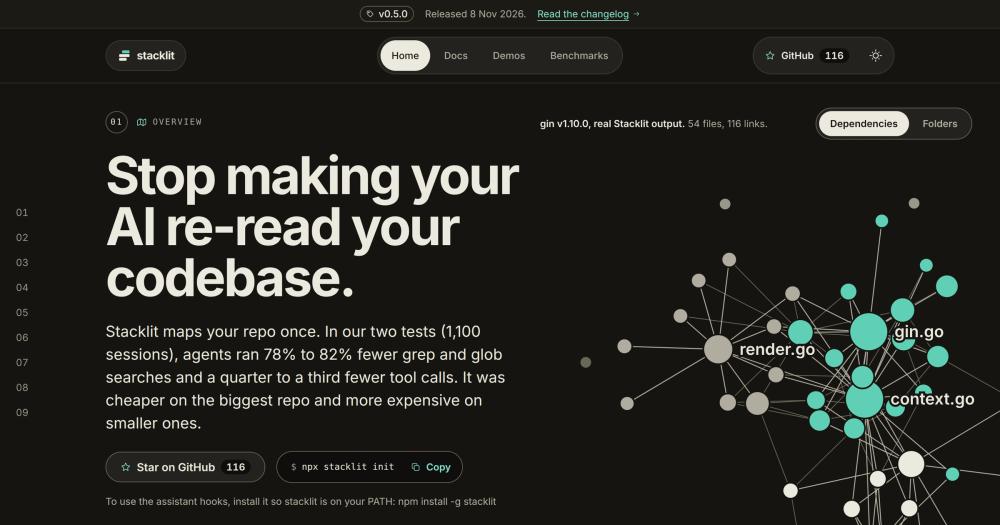
Index your repository once with tree-sitter and give AI coding agents a committed map so they run 78-82% fewer grep and glob searches.

Visit websiteGitHub116 stars
image of Stacklit
TL;DR

Stacklit maps your repository once with tree-sitter and writes a committed stacklit.json file your AI agents read instead of crawling files. In 1,100 test sessions it produced 78-82% fewer grep and glob calls. One Go binary, MIT-licensed, no telemetry, no network calls, no paid tier. Run `npx stacklit init` to scan and write the map; then `stacklit setup` to wire up Claude Code, Cursor, Codex and 23 more AI tools with git hooks that keep the map fresh. The biggest benefit is on large repos (16,000+ files), where sessions ran 22% cheaper. On small repos under 1,300 files the map overhead can cost more.

Read the full breakdownHide the full breakdownWho it is for, how it works, trade-offs, the quick start and the FAQ
who it's for

Who Stacklit is for#

Large monorepos and multi-service backends

Teams working on repos with 10,000 or more files get a measurable cost and speed improvement. AI agents on large codebases spend a large fraction of each session on file discovery; the map replaces most of that with a single ranked query.

Skip if:

Repo has fewer than 5,000 files; on small repos the map overhead increases session costs rather than reducing them.

Codebase archaeology and feature additions

The benchmark found 12-22% cheaper sessions for 'where is it' and 'where does a new thing go' question types. Developers onboarding to an unfamiliar codebase or adding a feature in a large system benefit most from the ranked file list and the dependency graph.

Teams running Claude Code, Cursor, or Codex

`stacklit setup` writes Claude Code's CLAUDE.md, Cursor's config and .mcp.json, and Codex's AGENTS.md in one pass. Teams already using these tools get a low-friction path to a shared codebase map with no per-tool manual configuration.

Skip if:

Team uses a single AI tool that already ships built-in codebase indexing meeting their needs.

the problem

The problem it solves#

Every new AI coding session opens blind. The agent has no memory of your codebase structure, so it lists folders, reads directory trees, runs grep, and opens individual files to find its way before writing a single line of code. On a large codebase that orientation loop repeats in full every session and can consume a quarter or more of the total token budget on file-discovery calls that return the same results each time. This is not a limitation of any particular AI tool; it is a property of stateless sessions with no persistent context. Some commercial platforms include their own codebase indexing, but it runs in the cloud, adds to your seat costs, and requires trusting the provider with your source code. Local indexing options generally require manual configuration per tool, leave the index stale when code changes, and do not support multiple AI assistants from one config. Stacklit targets this gap with a local, deterministic codebase map that multiple AI tools read, that updates on every commit, and that an agent can query with a plain question to get a ranked, token-budgeted file list.

how Stacklit solves it

How it solves it#

Tree-sitter symbol graph across 48 languages

Stacklit parses your repo with tree-sitter and builds a dependency graph covering 48 languages, with full call edges and symbol lookup for 20 of them including Go, Python, TypeScript, Rust, Java, C#, Kotlin, Swift, PHP, and Ruby. The result is a `stacklit.json` file you commit alongside your code.

Token-budgeted query commands

Ask a plain question and get a ranked file list that fits an explicit token budget. The `query` command takes a natural language question and a `--budget` parameter (in tokens) and returns ranked function signatures and call sites. Additional commands include `slice` (one symbol's source), `impact` (what depends on it), `explain`, `path`, and `hubs`.

One-command wiring for 25+ AI tools

Run `stacklit setup` and it finds the AI assistants installed on your machine and writes the config each one reads: CLAUDE.md for Claude Code, AGENTS.md for Codex, opencode.json for OpenCode, and so on. It supports 25 targets including Cursor, Copilot, Windsurf, Zed, and Amp, plus a generic AGENTS.md for anything else.

Git hooks keep the map fresh

Setup installs post-commit, post-checkout and post-merge git hooks that run `stacklit init` automatically when you commit, switch branches, or merge. The updated `stacklit.json` can be committed alongside code so every AI tool always reads the current state of the codebase.

MCP server with 15 tools

Run `stacklit serve` to start an MCP-compatible server exposing 15 tools, or use `--profile minimal` for 4 core tools at about 230 tokens of schema. MCP-compatible agents can query the index, run impact analysis, and slice symbol definitions without touching the filesystem directly.

strengths · trade-offs

Strengths and trade-offs#

Strengths

  • Fully local, no telemetryThe Go binary makes no network calls during analysis. The only optional outbound request is loading language icons for the interactive HTML map from thesvg.org; set `STACKLIT_MAP_ICONS=off` to disable that too. No account, no cloud dependency, no telemetry of any kind.
  • Deterministic output you can commit and diffThe same repository at the same commit always produces the same `stacklit.json` bytes. You can commit the index and diff it in pull requests, so changes to the dependency graph are visible and reviewable as code alongside the changes that caused them.
  • Cost benefit scales with repo sizeOn a 16,000-file repository, Stacklit reduced agent session costs by 22% (cost ratio 0.78 [0.70, 0.86] in a 50-session paired test). The map overhead is proportionally cheaper on the codebases where file discovery already burns the most tokens per session.

Trade-offs

  • -Increases cost on small reposOn repos with fewer than about 1,300 files, the map adds more overhead than it saves. The benchmark found 10% more expensive sessions at around 1,300 files, 23-37% more expensive at around 400 files, and up to 61% more expensive at around 2,900 files in one test round. The cost break-even is roughly 10,000 files or more.
  • -New project with 9 open issuesThe repo launched in April 2026 and had 9 open issues at time of indexing. As a relatively new project it may have rough edges in parsing edge cases or handling unusual monorepo layouts. The benchmark also notes its 81% first-file accuracy was measured on its own tuned test set, which is an upper bound.
versus alternatives

Stacklit vs alternatives#

Stacklit vs Sourcegraph

Sourcegraph is a paid code intelligence platform for large engineering teams. Its search, navigation and AI features run as a hosted service or as an on-premises deployment, with per-seat pricing on cloud plans. It indexes your full git history across multiple repositories and provides a web code search interface alongside IDE integrations and its Cody AI assistant.

Stacklit is narrower in scope. It is a local CLI that maps one repository at a time for the purpose of reducing AI agent file-search calls, with no git history search, no cross-repo indexing, and no web UI beyond the generated HTML visual map. Teams that need org-wide code search, compliance controls, or a team-shared search experience should evaluate Sourcegraph. Developers who want to cut AI tool costs on a large local codebase can use Stacklit without an account, cloud access, or per-seat fees.

Stacklit vs Cursor

Cursor is a paid AI code editor that includes its own codebase indexing to give its AI context about the open project. That indexing is built into Cursor, runs in Cursor's cloud, and is not available to other AI tools.

Stacklit's index is tool-agnostic. The same stacklit.json that informs Claude Code's CLAUDE.md also configures Codex, Gemini CLI, Windsurf, and 21 more assistants. Developers who run multiple AI tools or who run agents in CI or terminal sessions outside an IDE get a consistent, local index any tool can read. Cursor users who also run Claude Code or Codex can use Stacklit alongside Cursor's own indexing.

install · quick start

Quick start#

bash
Install Stacklit from npm or Homebrew, then run the two setup commands to map your repository and configure your AI tools.
```bash
npm install -g stacklit
stacklit init
stacklit setup
```
tech stack · detected from GitHub

What it's built on#

Languages
GoJavaScriptTypeScript
frequently asked

FAQ#

Does Stacklit send my code to any server?

No. The CLI binary makes no network calls during analysis. The only optional outbound request is loading language icons for the interactive HTML map from thesvg.org; set the environment variable STACKLIT_MAP_ICONS=off to disable that. No code, metadata, or usage data leaves your machine.

Which AI coding tools does Stacklit support?

stacklit setup supports 25 targets at v0.5.0, including Claude Code, Cursor, Codex, Gemini CLI, GitHub Copilot, Windsurf, Zed, Amp, Aider, Cline, Continue, OpenCode, Roo Code, and Kiro, plus a generic AGENTS.md. Run stacklit setup --list to see all 26 targets. Any tool not listed can read stacklit.json directly without setup.

Does Stacklit make AI coding cheaper on every repository?

No. Cost savings depend heavily on repo size. On a 16,000-file project sessions ran 22% cheaper (cost ratio 0.78). On repos with 400-2,900 files the sessions cost 10-61% more because the map overhead is larger than the grep reduction. The recommended threshold for a net cost benefit is roughly 10,000 files or more.

How does the index stay up to date when code changes?

stacklit setup installs git post-commit, post-checkout, post-merge, and post-rewrite hooks that run stacklit init automatically whenever you commit, switch branches, or merge. The updated stacklit.json can then be committed alongside code so the AI tools always read the current map.

What languages does Stacklit index?

Stacklit indexes 48 languages and formats. Full symbol graph and call edges (the query, slice, and impact commands) are available for 20: Go, Python, TypeScript/JavaScript, Rust, Java, C#, Kotlin, Swift, PHP, Ruby, C, C++, Scala, Dart, Elixir, Lua, Zig, Haskell, OCaml, and Solidity. All other supported languages get file-level module and import data without call edges.

also worth a look

Similar open-source tools#

Nuphos

Featured

Alternative toConductor

Agent workspace for teams running Claude Code or Codex

  • 372 GitHub stars
  • Apache-2.0Licence Apache-2.0

REA (Reverse Engineer Anything)

Featured

Alternative toRevEng.AI

AI-powered reverse engineering for binaries, apps, and assemblies.

  • 441,247 GitHub stars
  • MITLicence MIT

rakazo

Featured

Alternative toGrok Bot

AI teammates you own: your keys, your model, your machine.

  • 7,478 GitHub stars
  • Apache-2.0Licence Apache-2.0

Agent Reach

Featured

Alternative toFirecrawl

Give any AI agent internet access, free and local

  • 109,989 GitHub stars
  • MITLicence MIT

Hermes Agent

Featured

Alternative toGrok Bot

Self-hosted AI agent: persistent memory, multi-channel chat, model choice.

  • 261,524 GitHub stars
  • MITLicence MIT

Serena

InDeveloper Tools

MCP server giving AI coding agents IDE-level code tools

  • 31,215 GitHub stars
  • CustomLicence GPL-3.0-or-later (with MIT-licensed SolidLSP component)
by category

Open source tools in these categories#

610

Developer Tools

REA (Reverse Engineer Anything), Skills for Real Engineers, superpowers
515

AI & Machine Learning

freeCodeCamp, REA (Reverse Engineer Anything), OpenClaw

Sponsors

Inbox Zero

Alternative toSuperhuman

AI email assistant that drafts replies and clears your inbox

  • 12,942 GitHub stars
  • AGPL-3.0Licence AGPL-3.0
  • #Email

rakazo

Alternative toGrok Bot

AI teammates you own: your keys, your model, your machine.

  • 7,478 GitHub stars
  • Apache-2.0Licence Apache-2.0
  • #AI Agents

SnitchFeed

Live monitoring on LinkedIn, X, Reddit & more. Agentic social listening for startups.

Marketing & Growth

Advertise your product

New open source projects by email

The projects we add and every new guide. Free, unsubscribe any time.

Find open source alternatives to paid software

/
  • Claude Code to OpenCode
  • Jira to Windshift
  • Notion to AppFlowy
  • Slack to Mattermost
  • Linear to GitLab
  • Wispr Flow to Handy
  • Arc to Zen Browser
  • CapCut to Concat
  • Grok Bot to rakazo
  • Superhuman to Inbox Zero
  • Airtable to AITable
  • Muse to OpenClaw
  • Railway to Coolify
  • GitHub Copilot to Cline
  • Datadog to Netdata
  • Confluence to Wiki.js
  • Microsoft Teams to Rocket.Chat
  • 1Password to KeePassXC
  • Firebase to Supabase
  • Pinecone to Qdrant
  • Zapier to n8n
  • Devin AI to OpenHands
  • Asana to Leantime
  • Contentful to Strapi
  • Claude Code to OpenCode
  • Jira to Windshift
  • Notion to AppFlowy
  • Slack to Mattermost
  • Linear to GitLab
  • Wispr Flow to Handy
  • Arc to Zen Browser
  • CapCut to Concat
  • Grok Bot to rakazo
  • Superhuman to Inbox Zero
  • Airtable to AITable
  • Muse to OpenClaw
  • Railway to Coolify
  • GitHub Copilot to Cline
  • Datadog to Netdata
  • Confluence to Wiki.js
  • Microsoft Teams to Rocket.Chat
  • 1Password to KeePassXC
  • Firebase to Supabase
  • Pinecone to Qdrant
  • Zapier to n8n
  • Devin AI to OpenHands
  • Asana to Leantime
  • Contentful to Strapi